



Table of Contents Show
Samesame… but different
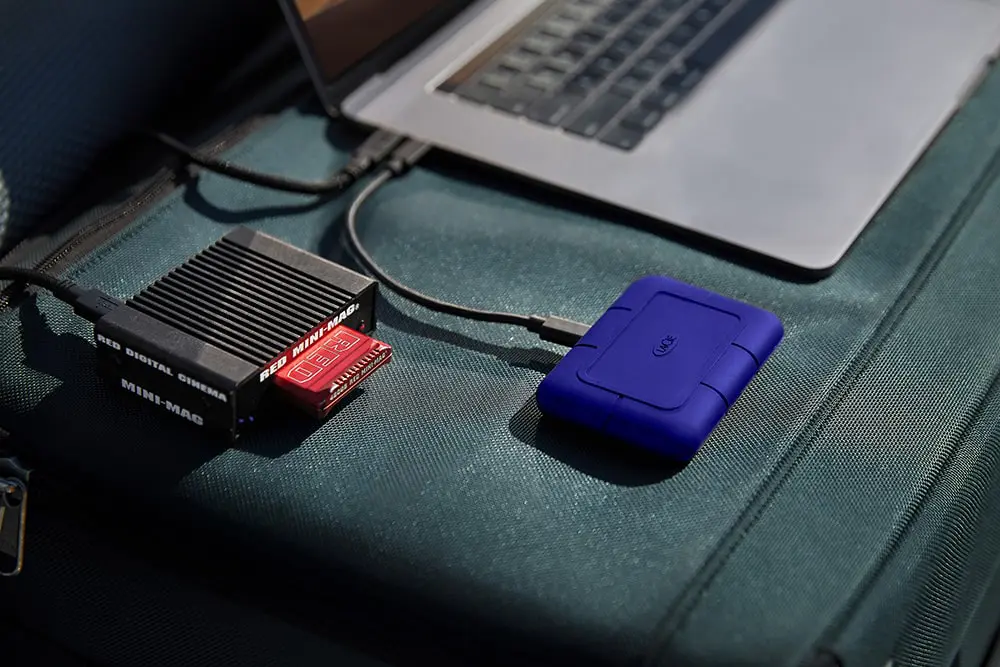
At first glance, the Rugged SSD Pro 5 can’t deny its lineage. The form factor is the classic Neil Poulton design that Lacie has used over the last twenty years. Beveled edges and a rubbery surface not only give the device a distinct look, but also added surface adhesion – more on that later. However, if you are used to the larger 2,5” form factor, the drive is now turned 90°, with the Thunderbolt 5/USB-C Port added on the broad side.
Also, like the previous model, LaCie has sadly ditched the lifeboat-like orange color. But instead of the last generations full black, this model comes with a dark blue enclosure. But not only the color has changed – the Rugged SSD Pro 5 comes with a IP68-certification for water resistance. LaCie claims that this will protect the drive not only from your everyday splash of coffee, but it is supposed to last up to thirty minutes in a depth of up to 1,5 meters – and no, we didn’t verify that ourselves.
Neither did we actually check if it would actually survive being driven over by a car with up to two tons in weight – we are confident that some courageous Youtuber will pick up the mantle on these tests.
The numbers
Rather, we focused in on the speed. The Rugged SSD Pro 5 comes in 2 TB and 4 TB. In ideal conditions, LaCie claims this drive achieves speeds of 6.700 MBit/s for reading and 5.300 MBit/s for writing. As both models come with 50 GBs of cache, it can maintain this write speed for quite some time before dropping to a still very acceptable 1.800 MBit/s on the 4 TB version and 1.400 MBit/s on the 2 TB version. And with the cache being this big, this should really only come into play when working with very large RAW- or ProRES-files.
So we did our own test on a MacBook Pro with the M4 Pro, one of the few computers on the market with Thunderbolt 5 currently built in. There is the Razer Blade 18 and the Schenker Key 17 Pro out there in the Windows Worlds, but at the time of testing we didn’t have access to either of these machines. So for this this test, Mac it is.
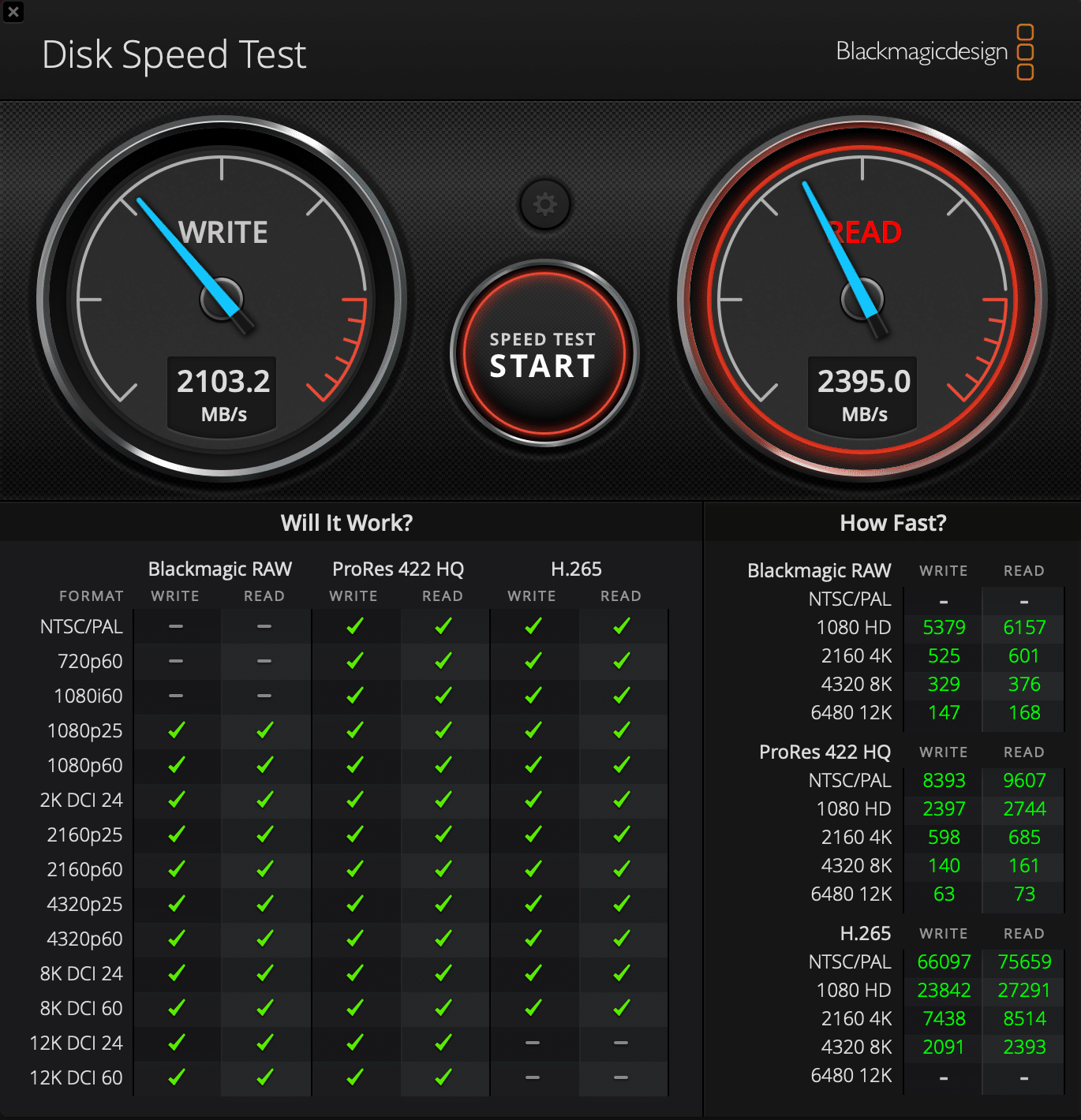
As the Rugged is designed for outdoor use, we thought it made sense to test it on a mobile computer and not the Mac Mini, the only non-mobile computer out there with Thunderbolt 5. And as we are talking VFX and video here, we resorted to the Blackmagic Disk Speed Test. Achieving a solid 3.800 MBit/s on Read and a whopping 5.030 MBit/s on Write. Also noticeable: There was no noticeable difference between running the MacBook Pro connected to a power outlet or on battery.
Power Issues
So much speed comes at a price: While the SSD is small, it is definitely hungry. As it has no external power supply – as it is meant for mobile use – it draws all of its power from the Thunderbolt 5 connection. So you always want to use the supplied Thunderbolt 5 cable. And with a length of just 0.3 meters that might force you into some compromises.
For example, when we connected the drive to a iMac Pro, we had to build a rather weird contraption just to not have the drive dangling in mid-air. But even if you use the cable, there are some caveats in regards to backwards compatibility: On a M1 Mac Studio with Thunderbolt 4 the drive was recognized, but the OS asked us to disconnect other peripherals so it would be able to supply sufficient power to the drive. On the previously mentioned iMac Pro, we needed to upgrade to MacOS Sequoia for the drive to be even recognized. After that, it worked like a charm.
And when quickly connecting to the USB-C Port of a small windows PC, the SSD did not even show up. And while current generation iDevices come with a USB-C port, don’t expect the Rugged to show up on an iPhone – not enough power. On a iPad with USB-C however, it SHOULD show up, though we did not test that ourselves. Also, it should be noted that there is only one Thunderbolt 5 port on the device – so if you plan on daisy-chaining, consider the Rugged to be at the end of that chain.
However, once you overcome these little inconveniences, you still have got a really fast drive, only limited by the bandwidth of your Thunderbolt Port.
The rugged takes a trip
But let’s keep in mind what the Rugged series has been designed for from the beginning: Mobililty. So we took that literal, got that MacBook Pro and our Rugged SSD Pro 5 on the next train and started editing in Resolve, as you do. It should be clear from the test data above that editing feels snappy, no matter what format or resolution you throw at that thing. So let’s talk about ergonomics. The choice to put the port on the broad side of the device actually makes a lot of sense. That way, we were able to put it on the left side of the MacBook Pro, in front of the Keyboard. So it is really not in the way when working on the touch pad and suddenly that 30 centimeters of cable are more than enough to connect to your mobile workstation without trapping your own feet in the process.

During that commute, the device became warm, but never hot. With the whole device being encapsulated to provide IP68 water resistance, there is no effective way to dissipate heat, so we will have to see if other devices like the announced OWC Envoy with Thunderbolt 5 can perform better due to a metal enclosure.
However, be careful with what you wish for… The biggest advantage of the Rugged series for mobile users has always been that it is, well, Rugged. The rubber enclosure gives you unparalleled surface adhesion. If you angle your knees, if the train goes into a curve, if somebody bumps into you – a rugged hard drive will likely stay in place rather than follow Newtons laws.
Prices
The Rugged SSD Pro 5 retails at US $ 399.-/€ 429.- for the 2 TB version and US $ 599.-/€ 689.- for the 4 TB version. This comes with a limited five year warranty and a free month of Adobe Creative Cloud thrown in for good measure. In addition to that, LaCie is so confident in its durability claims that it gives you a free Rescue Date Recovery Service should you suffer data loss inside your warranty. Is that expensive? Yes and no.
Thunderbolt devices are always at a premium, when the latest standard launches, but compare it to upgrading your shiny new MacBook Pros internal SSD to let’s say 4 TB instead of the base configurations 1 TB. That’s going to set you back US $ 1.000.- / € 1.150.- for just 3 TB more instead of the 4 TB the large version of the Rugged SSD Pro 5 offers. And yes, that internal SSD will still be faster due to being connected by PCIE 4.0, but in fairness, Thunderbolt 5 is pretty close.
External Scratchings
Also, we would make the argument that having a external scratch disk has a lot of advantages over using your internal storage for that kind of throughput. Because , you can extend whatever workstation you are working on, and that drive will only be used for Scratch Activies, not for anything else, any software might be looking for. So you get all the Scratching speed.
An, let’s be honest, those files in media production quickly add up, and since the technical term of a 99% filled internal drive with the OS is “unusable”, having all of that data on n external drive makes a lot of sense in day-to-day productions.

Conclusions
So should you buy it? If you want to utilize Thunderbolt 5 right now (February 2025), the Rugged SSD Pro 5 is a great choice. If we take a look at the competition out there, the announced OWC Envoy and the Sabrent Thunderbolt 5 SSD are roughly the same price, all with breathtaking speed. What sets the Rugged SSD Pro 5 apart is the water resistance and the overall durability. This is what really sets it apart and if those factors are important to you, then this should be a no-brainer.
If you are working with a fixed or semi-portable setup and want a fast external scratch disk? In that case we still can highly recommend the Rugged SSD Pro 5. But if you are looking for a solution that has more redundancy for storing project data for longer periods, then it might be worth holding out a little bit more. The OWC Thunderblade X12 has been announced for March, giving you RAID redundancy and a external power supply and the option for far bigger storage.
Other solutions will surely follow very soon if that is what you are looking for. Meanwhile the Rugged SSD Pro 5 holds up to what it promises. A very fast, mobile and durable external scratch disk. If you currently don’t own a Thunderbolt 5-compatibile computer, it might still make sense to invest in the Rugged SSD Pro 5 to future-proof your investment – but be sure to double check that it really works with your current hardware and OS-version. Also be aware that the previous generation with Thunderbolt 3 is still available if you don’t plan to use Thunderbolt 5.
Pro & Contra
Pro: Extremely durable and water resistant
Pro: Big 50 GB Cache
Pro: Very fast read and write speeds
Pro: Proven design with great surface adhesion
Contra: Expensive
Contra: Limited Backwards Compatibility

1 comment
Comments are closed.