


![A group of people in various poses, with a focus on a woman in white attire, overlayed with the text 'SWITCHX' and the tagline 'SWITCH [ANYTHING]. KEEP WHAT MATTERS.' The scene is set against a beach background at dusk.](https://i0.wp.com/digitalproduction.com/wp-content/uploads/2026/02/beeble-switchx-hero.png?resize=110%2C110&quality=72&ssl=1 "a group of people in various poses with a focus on a woman in white attire overlayed with the text switchx and the tagline switch anything keep what matters the scene is set against a beach background at dusk digital production")


Reallusion has released Character Creator 4.54 and iClone 8.54 for Windows, and this update finally answers the age-old production question: “Why do I have to leave my software just to try out assets?” Now you don’t. CC4.54 and iClone 8.54 drop a streamlined, trial-and-buy asset workflow right inside the viewport. No more browser detours, no more context-switching, and no more asset regret before you hit version one.
Smart Search Means Fewer Interruptions, Faster Versions
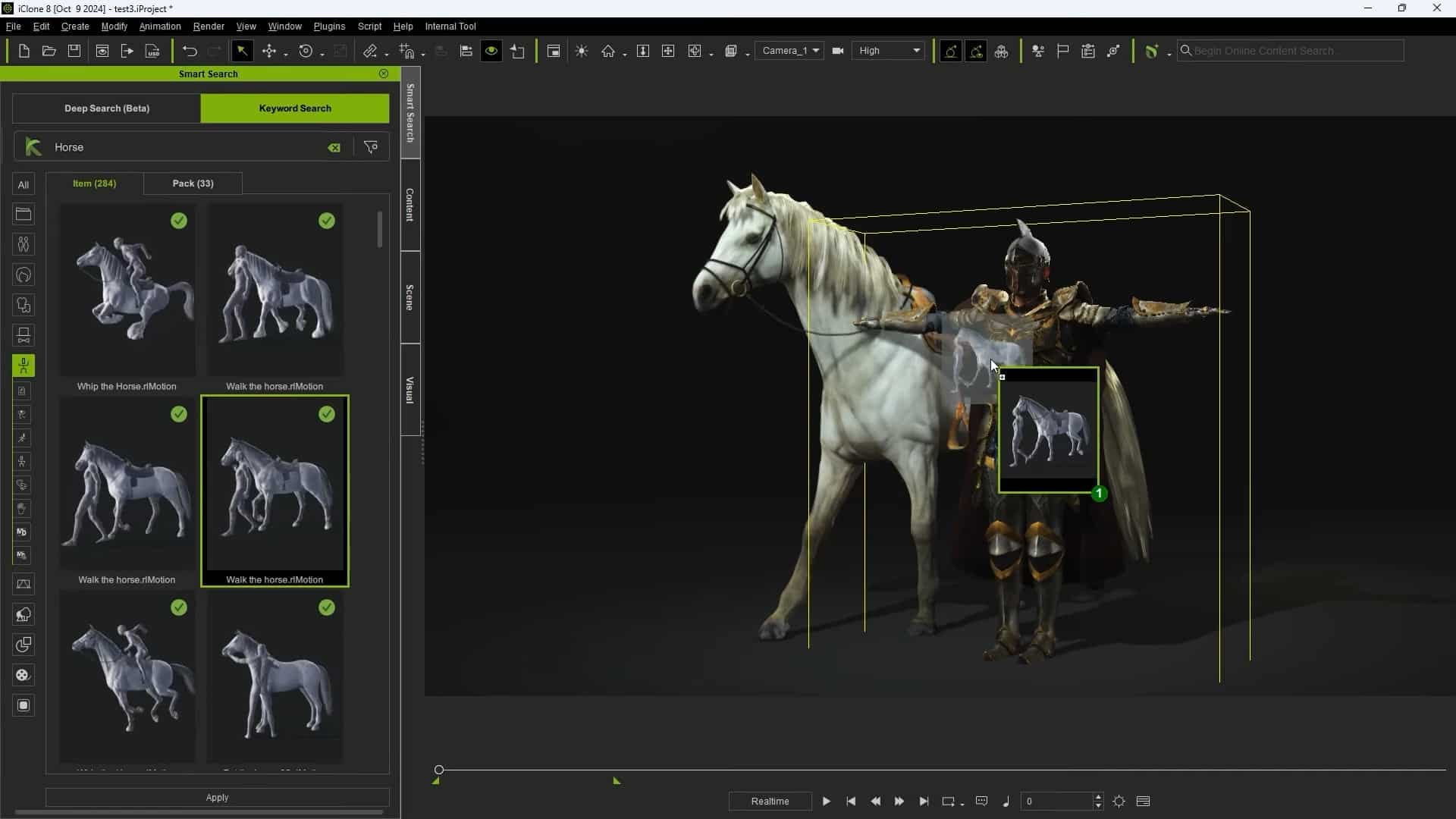
The big news is AI Smart Search, which delivers over 130,000 premium 3D assets directly inside both Character Creator and iClone. It’s a search box and asset browser built right into the UI—type a keyword, paste a reference image, or even use natural language, and see the results live in your project, complete with watermarks for trial use. You can try on outfits, test facial hair, add props or environments, and animate with full-quality motion data, all without ever leaving your timeline or breaking focus.

You can trial a mix of 30,000+ clothing items, 5,500+ shoes, 3,000+ hairstyles, and 23,000+ motion clips. And, thanks to the watermark, you can pitch, iterate, and block out scenes before opening your wallet. The only catch? There’s a limit to how many watermarked items you can trial at once (currently set to 10), but this can be managed by removing unused assets as you go.

DA Points: In-App Checkout, No Card Required
Reallusion’s DA Points system makes in-app purchasing almost painless. Your DA Point balance is always visible in the UI. When you’re happy with a test asset, you just right-click and purchase instantly—no cart, no website detour, and no external payment popup. DA Points can be loaded in advance and used without extra transaction fees, which speeds up asset approval in team settings and helps avoid procurement slowdowns.

The iContent Licence: Cheaper, But With Render-Only Limitations
Not every artist needs to export assets for game engines or offline rendering. That’s why Reallusion has launched the iContent licence, which lets you render with an asset in Character Creator or iClone at about 30% of the price of a standard licence. The limitation: iContent assets are watermarked and can’t be exported or used outside the Reallusion ecosystem, or in external renderers, games, or for 3D printing.
It’s a solid option for concept, previz, or when you need to whip up a client proof-of-concept without overcommitting the budget. If you want to export later, you can upgrade to a standard licence by paying the difference—your content and settings remain intact, and of course you now own the asset, for when you are going through with your show or game.

Within the scene management is an option to show purchased and unpurchased assets, so you always can check what is available to you, what has to be bought, or which background character is running away with a test-asset.
Under the Hood: Technical Details
The asset search draws from Reallusion Content Store, Marketplace, and ActorCore and can be accessed from the main UI or the Smart Content Manager. Deep Search uses AI to return results based on keywords or even visual similarity when you drag in an image. Purchases and trials work with project- or user-level asset libraries, so teams can centralise approvals and control costs.
Both Character Creator 4.54 (build 4.54.4225.1) and iClone 8.54 run on Windows 7 or newer. Perpetual licences are $299 for Character Creator and $599 for iClone, with the update available as of June 26, 2025.
Pipeline Impact: Less Friction, Faster Approval
For artists, TDs, and supervisors working in post, VFX, realtime, or any content creation pipeline, the new workflow means less downtime and less wasted budget on assets you might not even use. You get fast block-outs, quicker look-dev, and easier asset review—all in your working context. If you like an asset, just right-click, pay, and keep moving.
Of course, for those needing external export, keep an eye on licence restrictions and test asset compatibility before locking your pipeline around any new tool.
Test Before You Trust
As always, new features should be vetted on non-critical projects or in a staging environment before rolling into a live show or client delivery.
// Character Creator 4.54 – Now Available (Reallusion Forum)
// iClone 8.54 Has Arrived: Reallusion Unlocks Creative Potential … (Reallusion Forum)
