



Esri has released CityEngine 2025.0 and added a long-requested feature for technical artists, urbanists, and VFX supervisors: the Street Designer. Finally, precise lane-by-lane city sculpting, directly in the viewport, no extra plugins, no custom code required (unless you want it).
The new Street Designer enables per-lane editing—vehicle, parking, bike, sidewalk, buffer, vegetation, and public transport—each with procedural markings, furnishings, and foliage. Street cross-sections can be built or tweaked interactively, with custom configurations saved and reused. The default Esri.lib now ships with a “Generic_Street_Configurations.cej” demo scene plus preset lane templates, so no more wild west sidewalk hacks or guessing how a European avenue should look in CG.
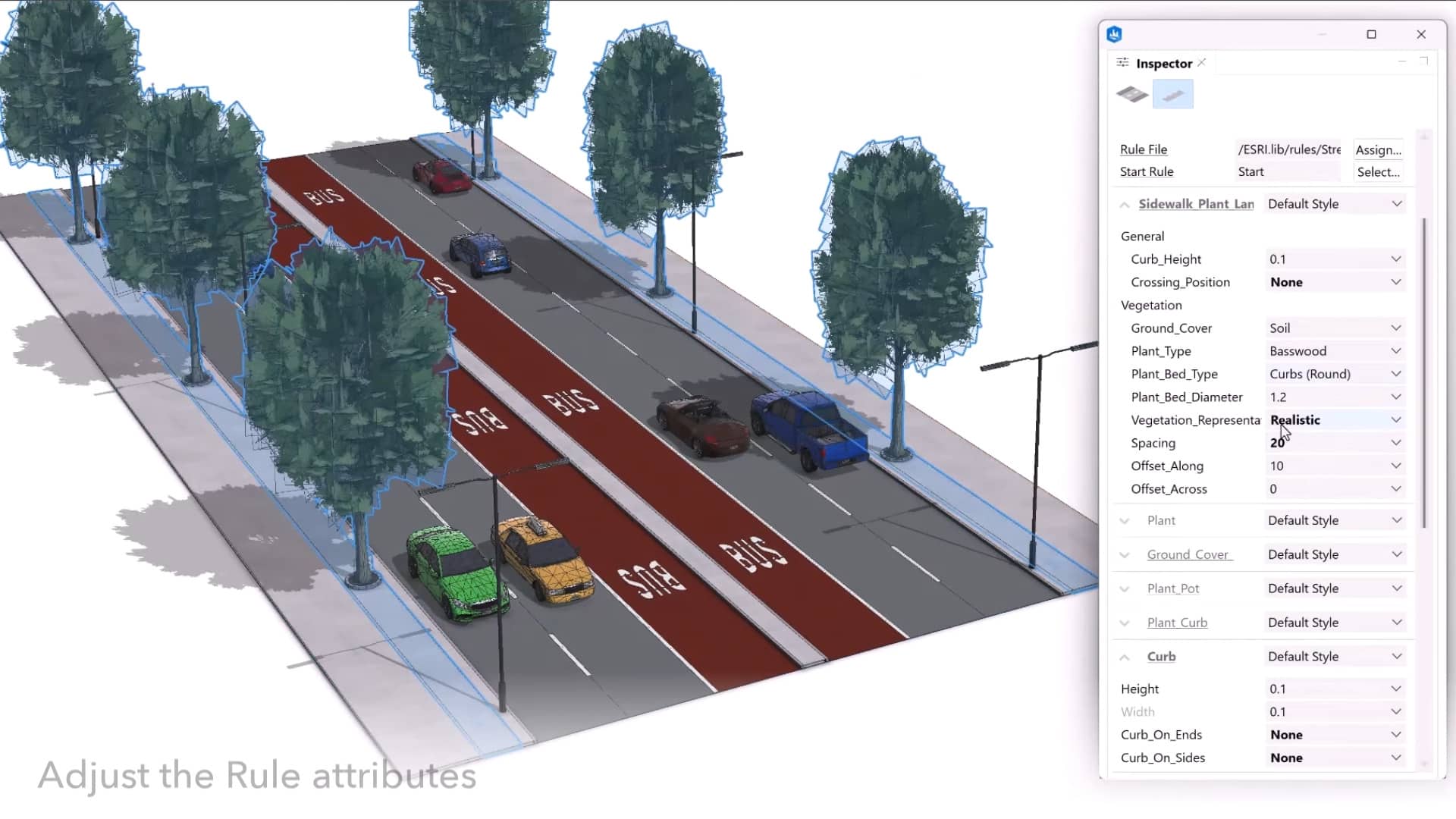
For developers and TDs, a Python API exposes lane and segment functions (CE.addLane, CE.moveLane, CE.createStreetConfiguration, among others) for procedural street control, batch setup, and automated asset prep. CGA rule support gets expanded for referencing and managing these new lane types.
Visual CGA Editor: Node Clarity at Last
The Visual CGA Editor, CityEngine’s node-based, non-linear rule editing environment, receives overdue ergonomic upgrades. There’s a new “Find Node” dialog, cleaned-up slot visuals, clear annotation widgets, and actual lock indicators for read-only files. Node connections are visually decluttered. Compilation speed in heavy graphs gets a measurable boost. The editor now supports right-mouse panning—a small tweak that will save cumulative hours and wrists across projects.

Procedural Scripting and Geometry: More Boolean, Less Crash
The CGA language itself gains streamlined 3D Boolean syntax, automatic tagging of intersections, and better sequential programming with improved inline rules and comp splits. Numeric stability gets a tune-up: cleaner handling of non-planar geometry, reduced split errors, and a fix for convexify crashers. These improvements matter in heavy production pipelines where edge-case geometry was, until now, a daily headache.

Viewport and UI: Shadows, Snapshots, and Usability Polish
Default anti-aliasing and anisotropic filtering are now switched on, cleaning up texture edges and lines out of the box. Shadow rendering for snapshots improves—useful for dailies and quick looks. Snapshot resolution is capped at 10,000 × 10,000 pixels, which should keep both marketing and pipeline artists happy. Material assignment is now instant with a double-click in the Material Browser, and numeric input is more strictly validated across tools. Copy-on-move via Ctrl-drag and new toolbar icons also feature, but won’t disrupt muscle memory. Dark mode dashboard alignment and usability tweaks round out the UI changes—nothing flashy, but a collection of workflow splinters removed.
File I/O and SDK: Industry Standard, Now With TGA
CityEngine 2025.0 brings fixes and updates for USD, FBX, and Collada import/export, finally squashing some persistent opacity bugs. TGA file support is added. Under the hood, third-party libraries (ArcGIS Maps SDK, Chromium, FileGDB, OpenUSD, OpenDesign SDK for IFC/DWG, libpng, libtiff) have been updated, ensuring compliance and futureproofing.
DCC integration is unchanged: export supports OBJ, DXF, FBX, Alembic, and USD, keeping CityEngine interoperable with Houdini, Maya, Max, C4D, Blender, Unreal Engine 5, and similar tools.
Platform Support and System Requirements
The software now supports 64-bit Windows 10+, Windows Server 2016+, RHEL/AlmaLinux/Rocky Linux 8+, and adds official support for Windows Server 2025. No word on major macOS support changes—see the documentation for current OS specifics.
Licensing: Perpetual is Dead, Long Live Rental
With this release, Esri ends perpetual licensing for CityEngine. From June 2025 onward, only subscription access via ArcGIS Professional ($2,200/year) or Professional Plus ($4,200/year) is available. Existing annual license users must migrate; no grandfathering or extensions for perpetuals. This is now rental software—plan your budgets accordingly.
Test First, Deploy Later
As with all major tool updates, users should test new workflows and features on staging assets before pushing CityEngine 2025.0 into live production pipelines. The Street Designer is powerful, but trust—never rely—on the demo scene alone.
CityEngine 2025.0 Release Notes
CityEngine company homepage // Esri CityEngine
