



Table of Contents Show
With version Edius 11.40.18961, Grass Valley delivers one of the most substantial free updates since the launch of EDIUS 11. The focus is clear: speed and stability in project handling. The centrepiece is a completely reworked Bin window. The HTML5-based Bin introduced in EDIUS 11 had long-term architectural advantages but showed performance bottlenecks when handling hundreds or thousands of clips. Large projects became sluggish. According to release notes and IBC demonstrations, the Bin now uses a new, faster core engine. Clip loading, scrolling, and search are markedly quicker, with improved keyboard navigation and drag-and-drop operations.
For editors managing feature-length timelines, broadcast projects, or multi-camera documentary work, these changes translate into shorter waiting times and fewer workarounds. Project startup is faster, background jobs are more visible, and sequence creation in large projects benefits from optimised database handling. The Bin now also includes batch clip renaming, more intuitive context menus, and visual progress indicators tied directly to clips. These may sound minor, but for productions that rely on consistent metadata—think sports highlights, news agencies, or fast-turnaround event coverage—they address long-standing pain points.
Configurable projects, fewer surprises
EDIUS 11.40 introduces a default project name setting, configurable under User Settings > Application > Project. Previously, default names were handled inconsistently, leading to confusion when multiple projects were saved under generic labels. This setting now centralises control. The Restore and Transfer Clips feature has also been refined. For productions with proxy workflows or remote storage, more reliable restoration means less downtime when reconnecting assets.
AI: from speech to text, and text to voice
The update integrates native speech-to-text (STT) directly into EDIUS, reducing reliance on external BAT Server workflows. Editors can download AI models in different sizes (Tiny, Small, Medium, Large) depending on required accuracy and hardware capacity. Larger models deliver more precise results but demand more compute power. Crucially, GPU acceleration is supported, which significantly shortens transcription times for users with capable NVIDIA cards.
Output is generated as subtitle files directly compatible with VisTitle, meaning captions can be styled, edited, and timed without leaving EDIUS. This makes subtitling for accessibility or localisation less dependent on third-party tools.
The BAT Server add-on, however, is not being sidelined. On the contrary, it gains new functions: multilingual translation of subtitles, beat detection for marker-aligned editing, and an experimental voice synthesis tool. The latter allows automatic voiceovers from existing subtitles or audio recordings, with selectable voices and gender options. Early demonstrations at IBC 2025 showed real-time translation workflows. For instance, German audio automatically translated into English speech. “Foa eweryboti to bettar underzstand ze germaans” ;) At the time of writing, this feature is in preview and not independently verified for production use.
Edit as you capture
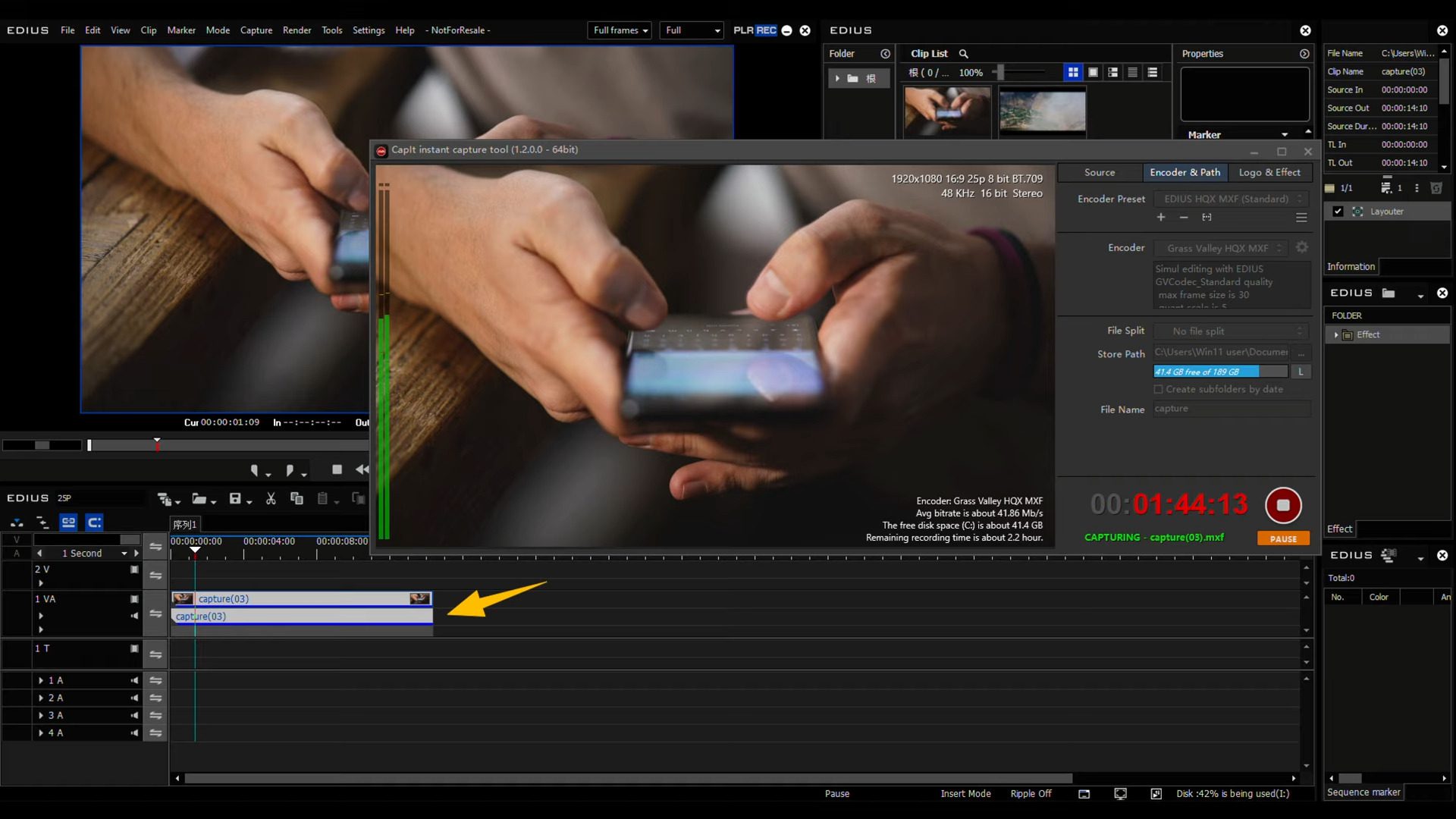
The new capture environment in EDIUS 11.40 revolves around CapIt, a tool designed not only for ingest from traditional I/O cards but also from less conventional sources such as NDI streams, webcams, livestreams, and even secondary EDIUS systems. CapIt allows overlays, blurs, and mosaics to be applied during recording, effectively enabling real-time compliance and branding. In the Workgroup edition, the headline feature is Edit-while-Capture: as soon as a recording starts, the growing file can be pulled into the timeline and cut while the ingest continues. For live productions, this means highlight reels, instant replays, or end-of-show edits can be assembled before recording even finishes. Files are written in the Grass Valley HQX codec, ensuring editability during ingest without intermediate transcoding. Together, these functions make capture in EDIUS more than just a pre-edit step; it becomes an active part of production.
Intel NPU and noise reduction
One of the smaller but technically interesting updates is support for Intel NPU hardware. Noise reduction now runs on Intel’s Neural Processing Units, found in newer CPUs, instead of occupying CPU cores. This frees system resources for playback and editing tasks. For users on Intel’s latest platforms, this may reduce the need for heavy GPU-based denoising plugins in certain cases.
Plugins and filter visibility
EDIUS finally moves beyond VST2 audio plugins, adding VST3 support. This resolves a compatibility gap, as most current audio tools are now developed exclusively for VST3. Users relying on third-party EQs, compressors, or restoration plugins should see broader compatibility going forward.
Plugin handling in general is improved. If a project contains a missing plugin, EDIUS now displays the plugin name rather than simply flagging an unknown effect. For productions re-opened years later, or in facilities where licensing lapses, this provides clarity on what needs to be reinstalled. Filter handling also sees refinements. The Information Palette now shows the preset name rather than only the base effect, and timeline filters display preset metadata for quicker identification. This helps when multiple colour correction or grading presets are applied across sequences.
The Auto Color Correction filter has gained two notable upgrades: improved accuracy when working with clips that include alpha channels, and an automatic saturation adjustment toggle. These improvements require re-analysis to take effect, but they close gaps where older builds delivered incorrect corrections, especially in compositing workflows.
Hardware acceleration: more tasks offloaded
EDIUS 11.40 extends hardware acceleration to more processes. Timeline clips with time effects, frame rate conversions, and alpha blending can now be hardware processed, provided interpolation is not set to optical flow and clip sizes match project settings. For users on modern GPUs, this reduces CPU strain and increases timeline responsiveness. For facilities, it also allows more predictable hardware provisioning, knowing that common operations like speed changes or alpha blending will not block CPU pipelines.
Stabilisation with Mercalli 6
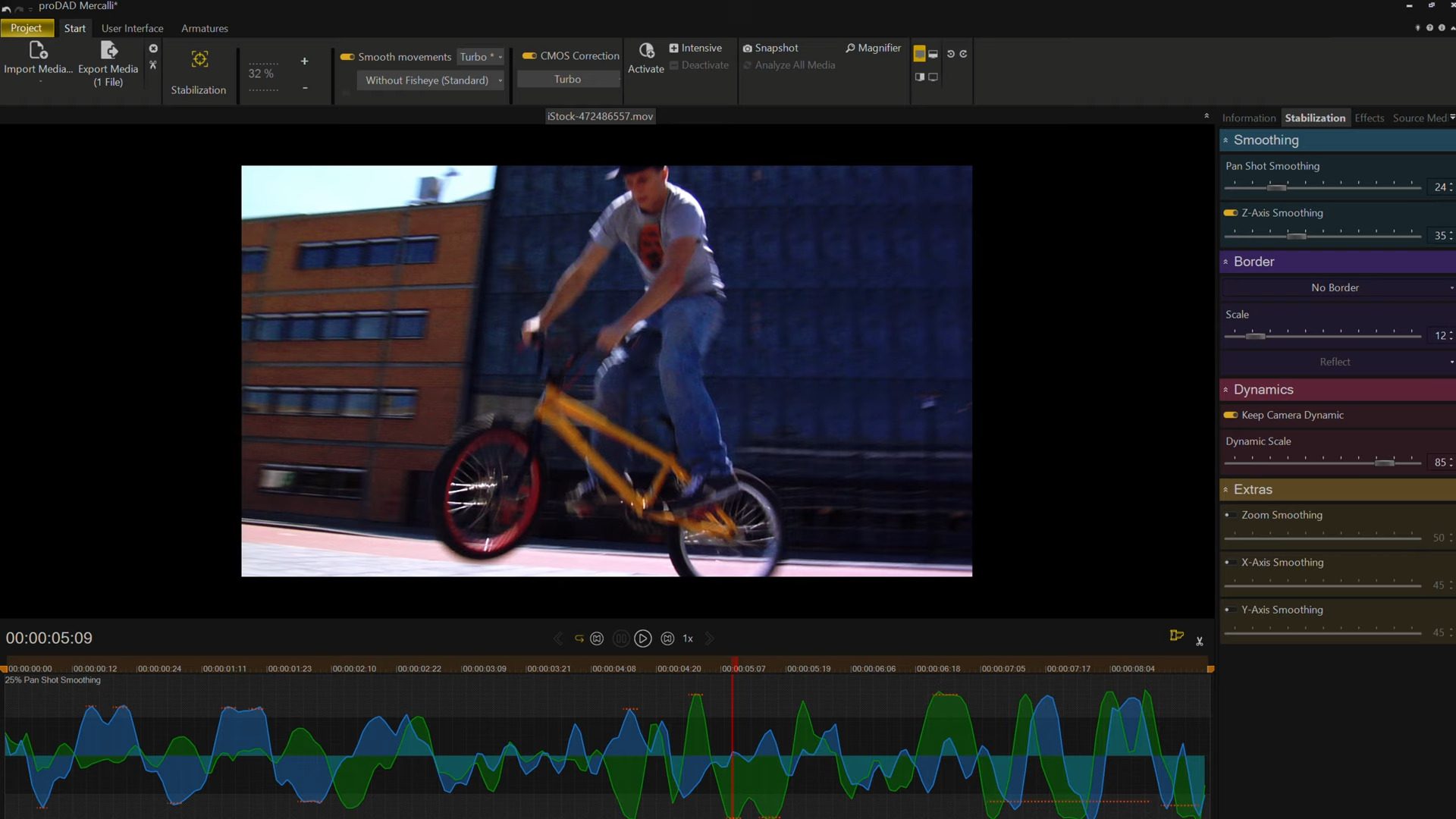
Grass Valley has partnered with ProDAD to integrate Mercalli 6 stabilisation. Long considered one of the most reliable stabilisers in postproduction, Mercalli’s sixth generation is now faster and available as both standalone software and BAT Server integration. This allows automated batch stabilisation via presets, which can be useful in drone footage workflows, action sports, or ENG (electronic news gathering) where stabilisation is needed at scale. Existing Mercalli users are offered upgrade pricing.

Scene detection and media management
EDIUS 11.40 will also include a Scene Detection tool, released separately but free of charge. It automatically splits long recordings into shot-level clips, with options for fine-grained control. For documentary and reality TV editors, this can replace manual logging steps. Changes in Mync, the companion media manager, mirror EDIUS updates: added Canon EOS C50 support, acquisition metadata for Canon XF-AVC and XF-HEVC formats, and improved H.264 export compatibility for older Smart TVs.
T3 Pro Player/Recorder
Alongside the software, Grass Valley introduced the T3 Pro Player/Recorder, positioned as a mid-tier option beneath the T3 Elite. The Pro version offers dual-channel 4K 60p recording and playback, but omits redundant power supplies and card reader panels. While not upgradable to the Elite, it provides a lower-cost path for facilities needing robust 4K playback or ingest.
Stability fixes
EDIUS 11.40 addresses a long list of bugs. Notable fixes include:
- Crashes when opening large projects after another project is already loaded.
- Timeline export failures when colour bar clips were present.
- Black frames in certain H.264 playback cases.
- Incorrect proxy handling in XDCAM workflows.
- Undo-related crashes.
- Errors in waveform cache generation.
For studios that rely on EDIUS for long-form projects, these fixes reduce the likelihood of corrupt project states and unexpected interruptions.
Compatibility and future-proofing
EDIUS Cloud now supports Windows Server 2025, extending compatibility for cloud-deployed editing environments. This positions the software for longer-term use in facility deployments without requiring near-term OS migration.
Conclusion
EDIUS 11.40 is not just an incremental patch. It combines under-the-hood speed boosts with headline features like speech-to-text, VST3 plugin support, Edit-while-Capture, and Mercalli 6. For editors working in live event, news, or fast-turnaround environments, these updates bring measurable workflow gains.
Grass Valley calls it “the fastest EDIUS ever”. While the claim is marketing, the bin and sequence performance improvements are noticeable. As always, production facilities should test all new features, particularly AI-driven tools and Edit-while-Capture, before introducing them into mission-critical pipelines.
Get Edius HERE
