



Cavalry, developed by Scene Group (Mainframe), has released version 2.5. The update focuses on collaborative workflows, compositing capabilities, and layout flexibility. According to the announcement, the key additions include Referencing, a Tracking Tool, and 11 new Filters, supported by layout, export, and API enhancements.
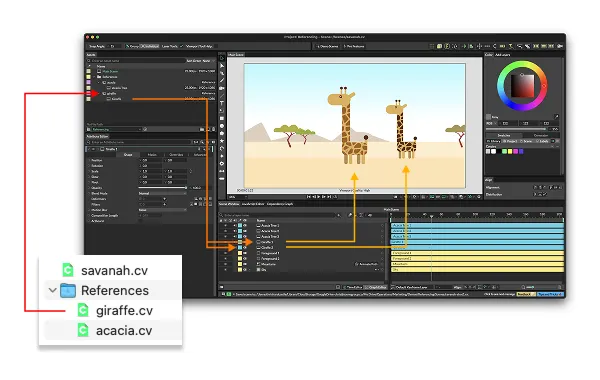
Referencing: reuse scenes as assets across projects
The new Referencing feature allows a .cv (Cavalry scene) file to be imported as an “Asset” in another scene. This works similarly to pre-compositions and is designed to support parallel workflows. Multiple artists can work on different parts of a project while maintaining a consistent master scene. Shared source assets remain centralised, meaning that edits in the original file can propagate to any referencing scenes. This approach reduces duplication and improves version management, which is especially relevant for studios handling multi-scene productions.

Tracking tool: planar tracking via corner pin
Cavalry 2.5 introduces a tracking tool that lets users track flat surfaces in video footage and attach animation or graphics using a Corner Pin Shape. The tool is aimed at planar tracking tasks such as screen replacements or compositing motion graphics into video plates. The feature description refers specifically to tracking “flat surfaces,” which suggests a planar solve rather than a full 3D camera track. It remains to be confirmed how the tracker handles perspective shifts, occlusion, or motion blur, as these details were not specified in the release documentation. This aspect has not been independently verified at press time.

New filters including luminance blur and spherise
Version 2.5 adds 11 new filters, broadening Cavalry’s compositing and creative toolkit. Among them, the Luminance Blur filter allows the user to blur an image according to the brightness values of another layer, using luminance to drive blur intensity. This can be used to create selective softening or depth-style effects directly within the tool. Another notable addition is Spherise, which maps a shape onto a sphere that can be rotated, revealing internal surfaces while allowing lighting, bump, and shadow controls. The release also mentions new chroma-keying options and several other image filters, further reducing the need for external compositing passes.
Layout Group wrapping & responsive spacing
The Layout Group component now supports wrapping and expanded spacing controls, improving how elements reflow within animated layouts. Designers can now build templates that adapt automatically to changing content or screen ratios. This upgrade is particularly relevant for motion-driven UI graphics and dynamic data visualisations, where elements must reposition or wrap without manual adjustment. Previously, Layout Groups were limited to fixed rows or columns, making responsive design more cumbersome.
Export to Project, drag/drop reorder, bit depth updates, API & shortcut tweaks
Cavalry 2.5 also adds practical quality-of-life updates. The new Export to Project command lets users collect a scene and its connected assets into a single project folder for archiving or collaboration. Arrays and other list-based elements can now be reordered via drag-and-drop, streamlining data organisation within complex scenes. On macOS, the renderer supports additional bit-depth options for ProRes and PNG exports, allowing higher precision in delivery formats.
Improvements to Pre-Comp Overrides and Components make it easier to adjust nested compositions. The JavaScript API has been expanded, improving script-based automation and integration potential for pipelines that use Cavalry in procedural setups. There are also enhancements to the Shortcut Manager, allowing more customisation of keyboard commands. The developers mention “many more enhancements and fixes,” though without detailed enumeration.
What to test / limitations to check
While the Medium post outlines the main features, several technical aspects remain open for verification. The robustness of the new planar tracking tool needs testing on shots with strong perspective or motion blur. Referencing introduces dependencies between scene files, which could affect version control or asset path management. Performance tests are advisable, particularly with compute-heavy filters such as Luminance Blur on large image sequences. Teams relying on the scripting interface should confirm compatibility of existing scripts with the revised JavaScript API. Finally, the expanded bit-depth support appears to apply only to macOS; parity on Windows was not explicitly stated.
As always, these new features should be tested within real-world projects before integration into production pipelines.
