



Substance Painter 11.1, released on 18 November 2025, marks a technical milestone: the long-expected switch from OpenGL to Vulkan on Windows and Linux. The change brings the viewport renderer, texture computations, and baking to Vulkan, aligning all platforms with the Metal backend introduced earlier on macOS.
According to Adobe, Vulkan should improve viewport performance and shorten baking times. GPU raytracing now uses Vulkan-based compute, replacing both OptiX and DXR. This unifies GPU-based baking across AMD, NVIDIA, and Linux systems. However, users should verify GPU compatibility, as the new API may change hardware support requirements.

New Ribbon path tool
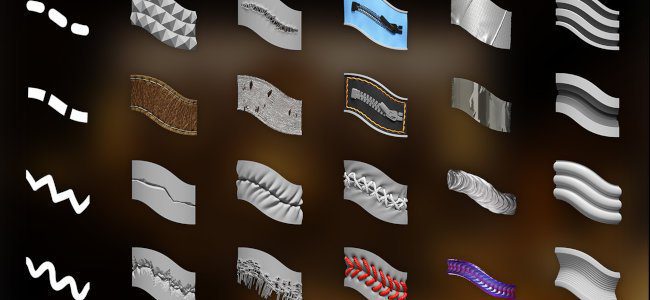
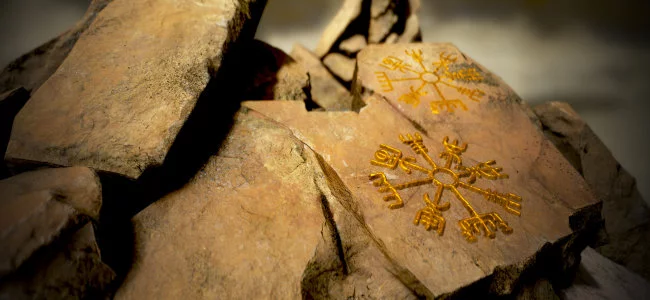
The central addition in Substance Painter 11.1 is the Ribbon tool, a new member of the path tool family. It repeats or stretches a texture seamlessly along any 3D surface, with precise control over start and end segments and options for sharp or curved corners. The Ribbon can lay down clean gradients, trim details, or even deform text along a path, useful for stitching, labeling, or placing ornaments around complex geometry. Adobe describes it as a “cleaner tool for more precise drawing with paths.”
Ribbon paths are compatible with symmetry, dynamic strokes, and come with blending modes for overlapping alpha, height, and normal channels. Artists can adjust size and opacity per vertex, decoupled from stylus pressure, giving finer control over variation along a stroke. Two new presets, Custom Ribbon Grayscale and Custom Ribbon Material, are provided to demonstrate advanced uses, such as multi-channel path strokes with dynamic ends and corners.
75 new presets and categories
Painter 11.1 adds 75 new Ribbon presets, grouped into new categories accessible from shortcut buttons in the Properties window. These include:
- Apparel: stitches, zippers, and fabric tears
- Basic: lines, gradients, and dynamic custom ribbons
- Grunge: surface cracks
- Hard Surface: panels, grips, welds, and mechanical seams
- Organic: bandages and wrappings
- Paint: brush-based gradients
- Text: text-along-path templates
Typing “ribbon”, “paint”, or “path” in the Assets window filters the relevant content. Switching presets no longer deselects the active path, streamlining iteration.

Symmetry for fill layers and effects
Symmetry now applies to fill layers and fill effects using 3D projection. Both mirror and radial symmetry are supported, activated via the contextual toolbar or the Properties window. Fill layers gain a new flip input resource option to mirror text or logos while keeping them legible on both sides. The symmetry UI has been reworked with dedicated sliders for each axis and a smaller radial display.
Physical displacement size
Displacement in Painter can now be defined using real-world units. Users can choose between Normalised, Scene-based, or Physical size (cm) units. This makes it easier to align displaced geometry across DCCs or game engines that expect physically accurate height values.
Vulkan raytracing and performance updates
Beyond rendering, the Vulkan backend modernises Substance Painter 11.1’s baking system. Raytracing via Vulkan replaces previous DXR/OptiX-based implementations, bringing GPU baking to AMD GPUs and Linux systems for the first time. Adobe notes faster render times, particularly at high resolutions. Performance has also improved when working with very large or elongated triangles, resolving earlier issues with low-poly meshes used for tiling texture creation. Shader compilation is faster, and the default brush shape has been updated for better roundness and hardness behaviour.

Smaller but useful updates
Substance resources in tools and fills now include a Resolution Override group. This allows changing the generation resolution (Auto, Texture Set, or Custom) with an optional scaling factor—useful for optimising quality or performance. The Substance Engine has been updated to version 9.2.5, and export presets now correctly handle grayscale mesh maps.
Fixes and known issues
Crashes during project loading and path snapping have been addressed, along with several interface glitches in the Path panel and tool properties. However, Adobe lists known issues with the new Ribbon system, including UV tile performance drops, tangent loops at corners, and instability with very long text paths. HDR colour conversion under ACES on Linux still clamps values, and the right-click menu remains undersized on HD displays.
Practical note
As always, production artists should test the Vulkan backend and new path workflows in controlled environments before using them in active projects. Hardware behaviour, especially for GPU-based raytracing, may vary depending on drivers and GPU vendor support.
Summary
Painter 11.1 is less a feature flourish than a structural overhaul. Vulkan unifies the graphics layer across all platforms, the Ribbon tool introduces precision path workflows, and displacement gains measurable units.
Together, these mark a shift toward more predictable, platform-agnostic performance in Adobe’s texturing flagship.
