



Previs Pro 3 already transformed static storyboards into moving animatics with camera motion, props, lighting and timing. Now the developers have extended the toolset further. The new Video Style Grade lets users stylise those animatics with generative AI while retaining the original blocking, timing and camera work.
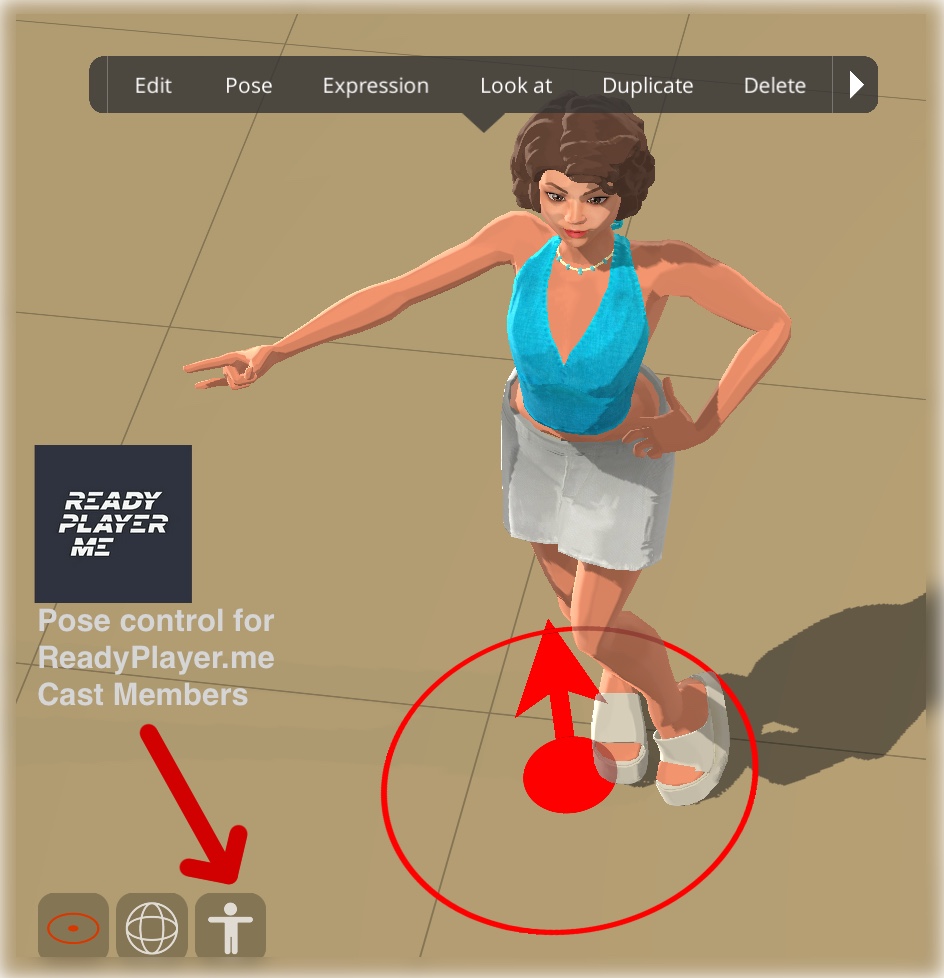
At the same time, the app’s new Pose Mode adds fine-grained control over character articulation, including shoulder, wrist, thigh and ankle positioning, along with a library of preset Hand Poses. The vertical movement range for props, lights and characters has also been doubled, now reaching up to 20 metres. These additions make Previs Pro more than a rough storyboard tool. The combination of pose control, lighting, camera motion and visual styling pushes it toward a real “pre-look” / previs / animatic hybrid.
Don’t Forget It Calls Home
Video Style Grade works via external AI services. For now, the backend is reported to run through Stability AI, though the vendor warns this may change as the technology evolves. When you hit “generate,” Previs Pro flattens each shot, sends that plus your style prompt to the external service, then receives back a stylised video clip.
That dependency comes with a caveat: your stylised look depends partly on whatever Stability AI is doing tomorrow (As if they knew that already….). If the provider updates its model, your output tomorrow may not match your output yesterday, even with identical settings. Previs Pro labels the feature “beta” for good reason.
The app transmits only flattened frames and text prompts, not full project data, but it is still cloud-connected. Consistency and data privacy should therefore be treated with care. Previs Pro insists it respects user data, and we believe them, although “respect” and “external AI providers” are not two words that usually share a sentence without irony.
Controls, Limits and Why It’s Still Convincing
Video Style Grade offers built-in looks such as “Comic,” “Photo,” and “Clay,” or access to generic diffusion models. A Strength slider controls how forcefully the AI applies its style. Higher values often create striking transformations but may also distort original composition, move props or re-frame characters in unpredictable ways. Each generation incurs a small API cost, so the system limits users to a set number of regenerations. Consistency between characters across shots remains imperfect, making the feature best suited for visual tone tests and key frames rather than entire sequences.
Still, when combined with Pose Mode, extended vertical range, lighting, and camera animation, Video Style Grade becomes a strong option for “pre-look” experimentation. Directors, art directors and previs artists gain a flexible sandbox to convey tone before full rendering begins, provided they understand that part of their workflow now lives somewhere in the cloud.
Platform Scope and Practical Use
Previs Pro runs exclusively on macOS, iPadOS, and iOS. That means Apple-centric teams get the full benefit; cross-platform productions will need to adapt or rely on exported assets. With the combination of Animatics, Light Grade, Pose Mode, Video Style Grade and expanded movement ranges, Previs Pro is evolving into a capable all-in-one previs and visual-look testing environment. For smaller teams and independent productions, this could simplify preproduction, assuming they accept the external AI dependency.
TL;DR: Great, But Don’t Kid Yourself
Previs Pro now lets you pose characters precisely, animate cameras, move lights higher, and then send the whole thing to an AI service to “paint the vibe.” It is both clever and risky. Like all cloud-dependent tools, it is as reliable as the provider’s latest update and privacy mood. Before introducing Video Style Grade into a live production pipeline, test output consistency across shots, scenes, and days. The creative direction you approve today might look slightly “reinterpreted” after the next model update.

