



For those who don’t know the tool: BlendShape Monitor is a lightweight diagnostic plugin for Autodesk Maya that sits squarely in character rigging and facial setup, focusing only on inspection rather than deformation authoring, and does not overlap with Autodesk’s own rigging tools or third-party rig builders.
Why blendshapes still go wrong
Blendshapes remain one of the most common deformation methods for facial animation in Maya, particularly for FACS-based rigs and corrective shapes layered on top of joint systems. Despite their ubiquity, debugging blendshapes once a rig grows beyond a few dozen targets remains largely manual and error-prone. Maya’s native interface presents blendshape nodes as long, alphabetical lists of target names with numeric weights. That abstraction works when rigs are small and well documented. It breaks down quickly when shapes overlap, are reused across multiple regions, or are indirectly driven by other systems, such as RBF solvers.
This problem is compounded in production environments where rigs are inherited, shared, or modified over time. In many cases, artists are asked to fix deformation issues without knowing which blendshape is responsible, or whether multiple shapes are contributing simultaneously. The result is a familiar cycle of muting targets, scrubbing weights, and guessing.
What BlendShape Monitor actually does
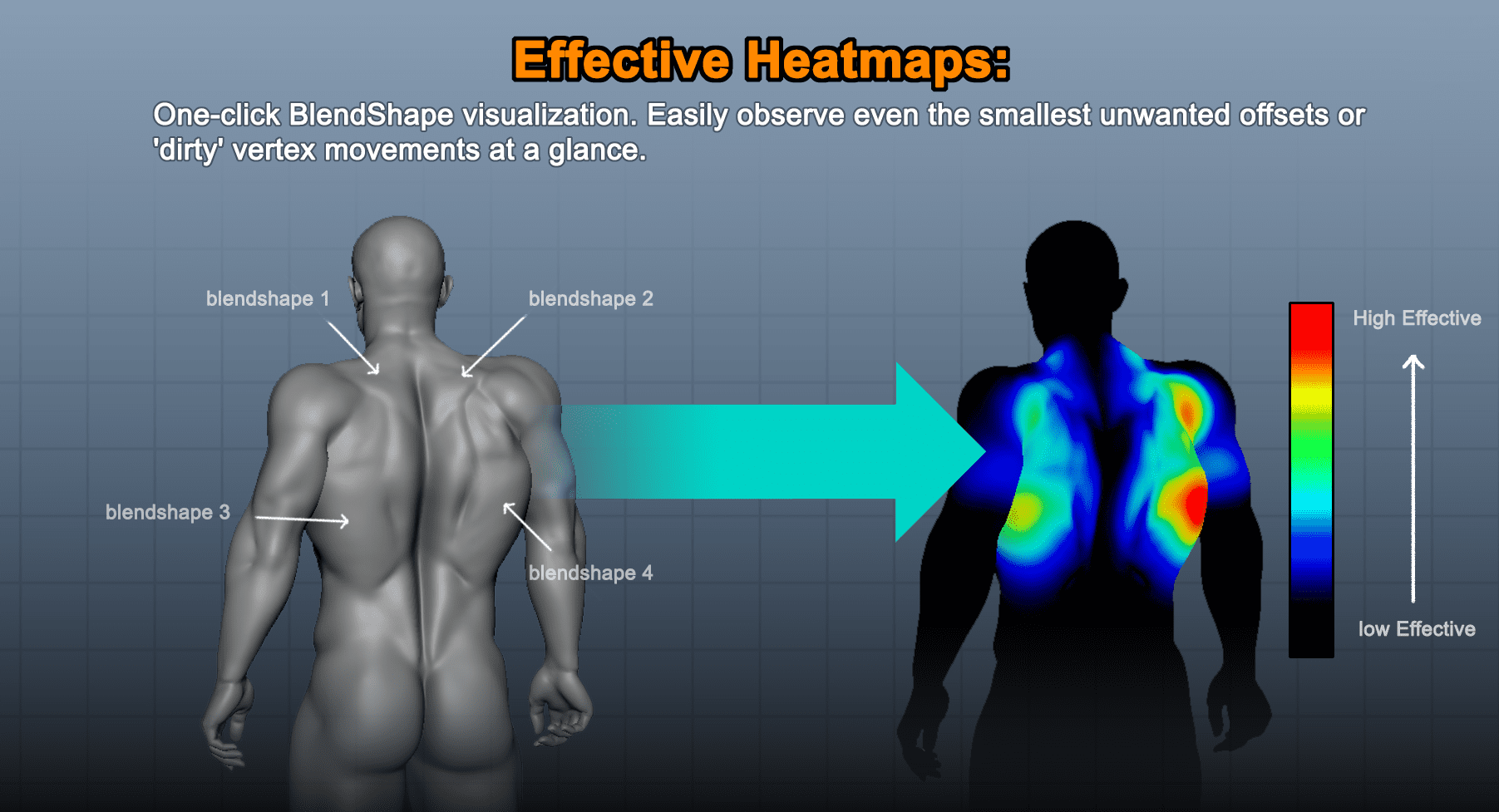
BlendShape Monitor is a diagnostic plugin for Autodesk Maya that attempts to replace that guesswork with direct visual feedback. Instead of relying on target names and numerical weights, the tool visualises the influence of individual blendshapes directly on the mesh using colour-coded vertex heatmaps. These heatmaps update in real time, including during animation playback, reflecting the current evaluated weight of each shape.
The plugin reads the deformation data from existing blendShape nodes. It does not modify the rig, create new targets, or alter evaluation order. According to the developer, its sole purpose is inspection. This distinction matters, as the tool is intended to be safe to use on production rigs without changing scene data.
The visualisation highlights which vertices are affected by a given blendshape and to what extent. Areas with stronger deformation are shown in higher-intensity colours, making it immediately obvious whether a shape is localised, overlaps with others, or extends into unintended regions of the mesh.
Managing clutter in dense rigs
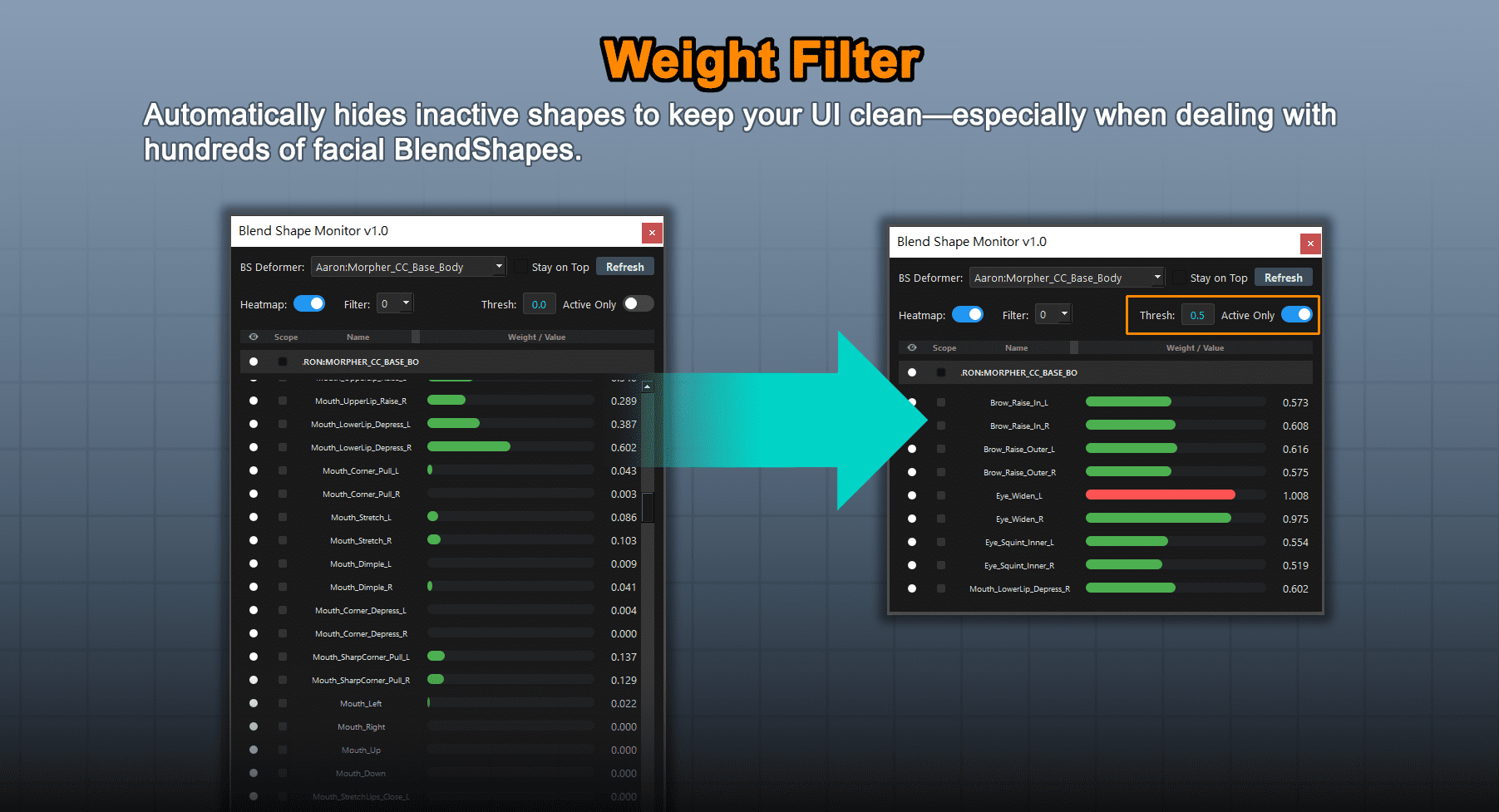
One of the stated goals of BlendShape Monitor is to make large blendshape sets manageable. The plugin includes filtering options that hide inactive targets, allowing artists to focus only on shapes that currently contribute to the deformation. This is particularly relevant when blendshapes are driven indirectly by other systems, where weights may be non-zero even if no animator is directly adjusting them.
The tool also allows individual targets to be solo-ed. When a shape is soloed, other blendshapes are temporarily hidden from the visualisation, making it easier to inspect its isolated effect. Global visibility toggles let you enable or disable the heatmap overlay without removing the plugin from the scene.
Weight values are synced live with Maya’s evaluation during playback. This means the visualisation reflects the rig’s actual state at each frame, rather than a static snapshot. For troubleshooting animation issues that only appear in motion, this real-time aspect is central to the tool’s design.
Origin in production reality
BlendShape Monitor was developed by Johnson Lee, an artist and tools developer whose work as Art Director at Reallusion directly informed the tool’s focus on large-scale facial rigs. According to the developer, the plugin emerged from internal production needs rather than as a speculative product idea.
At Reallusion, facial rigs for characters such as those used in Character Creator workflows can exceed one hundred blendshapes. These include expression shapes based on FACS conventions, as well as numerous corrective shapes used to address secondary deformation. In such setups, identifying which shape is responsible for an artefact using Maya’s default UI is time-consuming and unreliable. The plugin reflects that context. It is narrowly scoped, avoids adding new rigging concepts, and addresses a specific bottleneck encountered when maintaining and debugging existing rigs rather than building new ones.
Compatibility and scope
BlendShape Monitor is compatible with Autodesk Maya 2022 and later. No support is claimed for earlier versions. The plugin runs inside Maya and does not require external dependencies according to the product listing. Installation and licensing are handled via Gumroad.
The tool does not claim to support other DCC applications, nor does it attempt to abstract blendshape concepts across platforms. It is explicitly Maya-specific, relying on Maya’s native blendShape node behaviour. It is also not positioned as a teaching tool. Users are expected to understand blendshape workflows, vertex-level deformation, and Maya’s rig evaluation. The plugin provides visibility, not validation.
Pricing and licensing
BlendShape Monitor is sold via Gumroad. At the time of writing, pricing is listed at approximately USD 20 for a freelance licence and USD 70 for a studio seat. The exact terms of these licences are defined on the Gumroad page and should be reviewed before purchase. No subscription model is indicated.
What it does not solve
While the plugin makes deformation issues easier to see, it does not resolve them automatically. Poor topology, conflicting targets, and incorrectly authored shapes still need to be fixed at the source, by you. BlendShape Monitor does not rank shapes by quality, detect errors, or suggest corrections.
It also does not address performance issues caused by excessive blendshape counts or inefficient evaluation. Its visual overlays are for inspection, not optimisation. Artists should be cautious when using any viewport overlay in heavy scenes and test performance impact in their own environments.
Production considerations
As with any new tool, BlendShape Monitor should be evaluated under controlled conditions before being deployed to production. Its read-only approach reduces risk, but pipeline teams should still test compatibility with existing rigs, scripts, and viewport configurations.
In teh final analysis, BlendShape Monitor addresses a narrow but persistent pain point in Maya character rigging, offering visibility where the host application still relies heavily on lists and numbers. Whether it becomes a standard part of rig debugging workflows will depend on how well it holds up wiht the messier rigs found in long-running productions.
// BlendShape Monitor Gumroad product page
// https://johnsonlee529.gumroad.com/l/bs-monitor-maya/
