



Table of Contents Show
We don’t want to comment in detail on any bugs, as that would be unfair for public beta software. On the other hand, the audio area in particular is still quite unstable on the basis of Fairlight, so we have planned a later, thorough test here. So here is just some general information. The Fairlight company also comes from Down Under, namely from Sydney, and has been developing a processor-based editing station for music recording and editing since the late seventies. The first record to be mixed exclusively on a computer was produced as early as 1981. Prominent artists such as Peter Gabriel, Kate Bush and Jean Michel Jarre created their productions with the Fairlight CMI sampler. Later, the company also experimented with innovative video editing.

In September 2016, the company was acquired by Blackmagic Design (BMD for short). Fairlight was always characterised by the fact that even the latest version of its own software remained compatible with components purchased long before. This earned it a loyal following. Avid, on the other hand, alienated many a professional from Pro Tools version 10 onwards due to incompatibility with older hardware and forced them to buy the new S3 or S6 control surfaces. A 15-year-old DaVinci panel, on the other hand, still runs with the latest software (under Linux), and control panels for Fairlight that are several decades old still work.
It is not yet clear how BMD will deal with the professional hardware for Fairlight and at what prices it will be offered. However, the software-only version is already fully integrated into Resolve 14 under a new page and already offers two long-requested features with direct sound recording in film editing tracks and sub-frame editing (down to the individual sample if required). If you temporarily disconnect from the video, you can precisely eliminate clicks, breathing or an “er”. In the case of constant tempo changes, pitch correction is offered directly in the editing area. Now editors might groan in agony because the entire sound mix has to be added to the colour grading. We can give the all-clear: you can work alone, but you don’t have to – you can co-operate perfectly in Resolve.
Working together
Previously, only colour grading was possible in collaboration, whereas elsewhere you could only view an edited version. BMD has completely changed this, as intensive collaboration is now possible for all work processes in server-based projects. This does not even require a dedicated machine running as a PostgreSQL server, it can also be a workstation (which should, however, remain switched on if possible). For smooth video editing, the server and all other users must of course be in a shared, fast network. The previous multi-user mode is no longer necessary with the new concept.


Collaborative editing is done via bin locking, i.e. a user blocks one or more bins for their work and starts working with the clips and timelines in them. Others can watch, but cannot change or add anything. However, they can copy material or timelines into their own bins and create a modified version there. Mutual coordination takes place via the integrated chat function. The owner of a bin is visible to everyone else and can even be colour-coded. If several versions of a timeline are available, they can be compared in a graphically intuitive form and changes can be made in a targeted manner. This process also applies to sound editing.
When grading, on the other hand, only the clip that is currently being edited is blocked. When the user moves on to the next clip, the changes are visible to all others and can also be edited. Technically, this works well, the only criticism would be that it is all a little too open. Not everyone involved always has the knowledge and discipline to avoid making unwanted changes to others – a few protective mechanisms would be a good idea. To ensure that all of this works, “Live Save” is now the order of the day, meaning that every single step is regularly saved and an undo history is provided. The editing window and Fairlight share this, while Colour has its own undo list. Especially when working with the beta, however, it is advisable to save an intermediate version from time to time, as the saved file could be corrupted in the event of a crash in the middle.
Speed
BMD has had to put up with a lot of criticism in this area. Of course, the programme originally comes from the high-end sector and a powerful workstation is a must. But distributing software free of charge also awakens the desires of the little people. The rude awakening came when you wanted to edit natively in the H.264 codec on an inexpensive mid-range device and work in the timeline largely came to a standstill. Previously, the only solution was to convert to a less demanding codec, which took up a lot of time and space. Even with this, the reaction to mouse movements during trimming or to the J, K and L control buttons in the timeline was not immediate. Final Cut Pro X with H.264 editing like butter on a medium-sized iMac proved that there is another way, and even Premiere could do better.

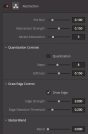
In the new version, however, Resolve easily outperforms Premiere on a current iMac and is even slightly faster than FCP-X in some processes. On PCs, the current beta is still much less stable, but the range of hardware configurations is also much wider – certainly one of the main reasons for a long and intensive public beta phase. There is also a clear difference between the free version and the studio version under Windows with Nvidia cards when processing the computationally intensive H.264 codec. The studio version is just as fast as on the Mac and now allows really smooth UHD editing with fast response even with native H.264 clips on a good mid-range device. It should be clear that you can’t edit 4K with four times the performance requirements of HD on a cheap computer – it’s no better with other software. If someone does need optimised media, this conversion is now twice as fast. It should also be possible to reconnect the media if they are (once again) not found. We were unable to verify this “Rediscover Optimised Media” in our test, as the error did not occur here.

At the moment, however, there is still a problem that it is better to clarify before making a purchase if your own camera could be affected: If an H.264 clip comes with several PCM audio tracks, the tempo inexplicably collapses completely. This applies, for example, to material from Sony’s PXW-Z150. If you strip the sound with external software, everything is fine again. Let’s hope that this is just one of the quirks of a beta version and can still be fixed. It should be clear that “… up to ten times faster…” is a typical marketing phrase. In any case, you can’t suddenly work on a computer that is ten times weaker. You shouldn’t expect miracles when it comes to grading, because the demands on the graphics card are not insignificant with version 14 if the resolution is high. The material has to fit into the VRAM, and grading and many effects make heavy demands on the GPU performance. At least we got the impression that problems with a weak graphics card are better handled by the programme than with older versions. But the race between video formats and computer performance continues.
New formats
Resolve now supports frame rates of up to 120 fps and resolutions of up to 16,000 x 16,000 pixels (i.e. a future ultra-8K format?), but there is still a lot for the hardware manufacturers to do. After all, you can pack and grade photos with 42 megapixels from a Sony A7R II into an HD timeline without a computer with 4 GB of VRAM protesting or even crashing. Under “Clip Attributes”, the frame rate can be freely assigned between 1 and 120, albeit only with whole numbers. New codecs include native Canon C200 clips, Nikon RAW, DNxHR, Arri RAW in Open Gate resolution and MP3 audio on Windows. H.264 with High 10 profiles is now also read on Windows, but only in the studio version. Stereo 3D recordings can also be converted to optimised files. We were particularly impressed that UHD clips in H.265 (aka HEVC) from a Samsung NX1 can also be played back by Resolve in the same mid-range iMac and edited in the timeline almost as quickly as H.264 (Studio only). In addition to .cube, version 14 now understands CLF-LUTs, which offer themselves as a universal format, and a day-for-night look and a Kodak 2383 emulation are included to try out. ACES and the in-house colour management support new cameras, colour spaces and gamma curves such as Rec. 2100 or the new Color Science from RED.

A number of output formats have been added that are particularly suitable as an alternative to ProRes on the PC. These include DNxHR HQX in 10- and 12-bit versions as well as the entire list of VP9 codecs. Google’s VP9 offers itself as a licence-free alternative to HEVC, and it also supports formats beyond UHD and the most important HDR variants. VP9 is by no means just an Internet codec, as there is also a lossless version and variants up to YUV 422 in 12-bit. Netflix already uses VP9 as an alternative to H.264 for mobile use, VLC and other open players show it and in browsers only Safari and Explorer are still on the sidelines. The encoding of H.264 now also allows multiple passes, a tick in “Network Optimisation” allows viewing even before the clip has been fully calculated. The export to Pro Tools has been improved despite Fairlight and now also transfers the names of audio tracks to colleagues.
New effects
The range of in-house effects in the OFX standard has become quite extensive and now extends from stylisation and skin embellishment to serious compositing. They are not only accessible in the “Colour” area, but can also be dragged directly from the library onto a clip in the editing window. The previously long lists are now more accessible and clearer as bins and sub-bins. Some are only available in the Studio version, but at 299 US dollars it has become so inexpensive that there is hardly any good reason not to upgrade. You will no longer need a dongle when the final version comes onto the market.

Styling: “Abstraction” offers cartoon effects with fill and edge and allows precise fine-tuning, only the edge colour cannot be influenced. “Watercolour” complements this with a softer version with fewer adjustment parameters. The effect for shrinking and expanding masks can also be used as a min/max filter for stylistic effects with finer details. The effect of all these filters can of course also be strongly influenced by an upstream grading node. Another useful feature is “Color Palette”, which analyses the predominant colours in a clip and displays them in small fields – simply export as a still image and the graphics department will be delighted.

Repairs: There is a “Dead Pixel Fixer”, which can also be helpful for dust on the sensor or drops on the lens, depending on the subject. “Timelapse Deflicker” and “Colour Stabilizer” eliminate fluctuations caused by changes in light, but must be carefully adjusted to the subject to avoid artefacts. “Dehaze” increases the contrasts in haze or smog, as could also be achieved by grading, but it is easier with this. “Deband” can mitigate problems caused by a lack of colour depth or compression by dithering.
Distortions: “Lens Distortion” can not only simulate distortions in the lens, but also correct them, as long as they are not the wave-shaped errors of some wide-angle lenses (figuratively also known as moustache). As the filter allows fine-tuning in relation to colour channels, it can also be used to correct chromatic aberrations (CA), even with adaptation to decentered lenses. And while we’re at it: Resolve 14 also has a warper on board, which can also be attached to moving image areas via FX tracking. It can’t quite keep up with specialised plug-ins such as RE:Flex, but that alone costs more than Resolve and only works with After Effects.

Compositing
The compositing capabilities of Resolve have been significantly expanded. This starts with the fact that you can now define an additional image source directly in “Colour”, which is still referred to as a mask (Add Matte). This is now also less cumbersome than before in the Media Pool with “Add as Matte for Colour Page Clip”. In addition, you can not only pass through alpha channels of the source, but also combine all clipping by nodes and forward them to the alpha output. With suitable image formats such as ProRes 4444, they are passed through to Fusion or included in the film (unfortunately only via image sequence on a PC). Functions such as “Alpha Matte Shrink and Grow” and the new “Match Move” are also available.
This is a tracker that can track small regions and allows the correct perspective insertion of a layer from as few as three tracked areas. The function goes far beyond a conventional point tracker: Match Move usually recognises occlusions automatically and deactivates the respective area. When the region reappears, it can be found again with programme support and the path to it is interpolated. You can easily combine several tracks in one image if the regions in question are obscured or leave the image. As you can (as usual) track forwards or backwards, the less ambiguous but almost philosophical terms “Clear Past” and “Clear Future” are used to delete parts of the tracks.
Together with the rotoscoping capabilities of the windows with the previous planar tracker, some tasks that were previously handed over to Fusion or similar programmes can certainly be solved. The already good planar tracker has been reworked for image stabilisation and can now largely keep up with the “Warp Stabilizer” from Premiere or After Effects. Even in the basic setting, it manages this just as well as the stabilisation from Adobe and is significantly faster. In addition, with the “FX” setting it can now control the position of numerous effects, e.g. by tracking the light source in a lens flare. Unfortunately, unlike Adobe, there is still no analysis and compensation of a rolling shutter, such as with the highly problematic shots from an unsteady smartphone or filming photo devices. If you need it, you can also find an anti-tripod correction under “Camera Shake”.
Face refinement and other enhancements
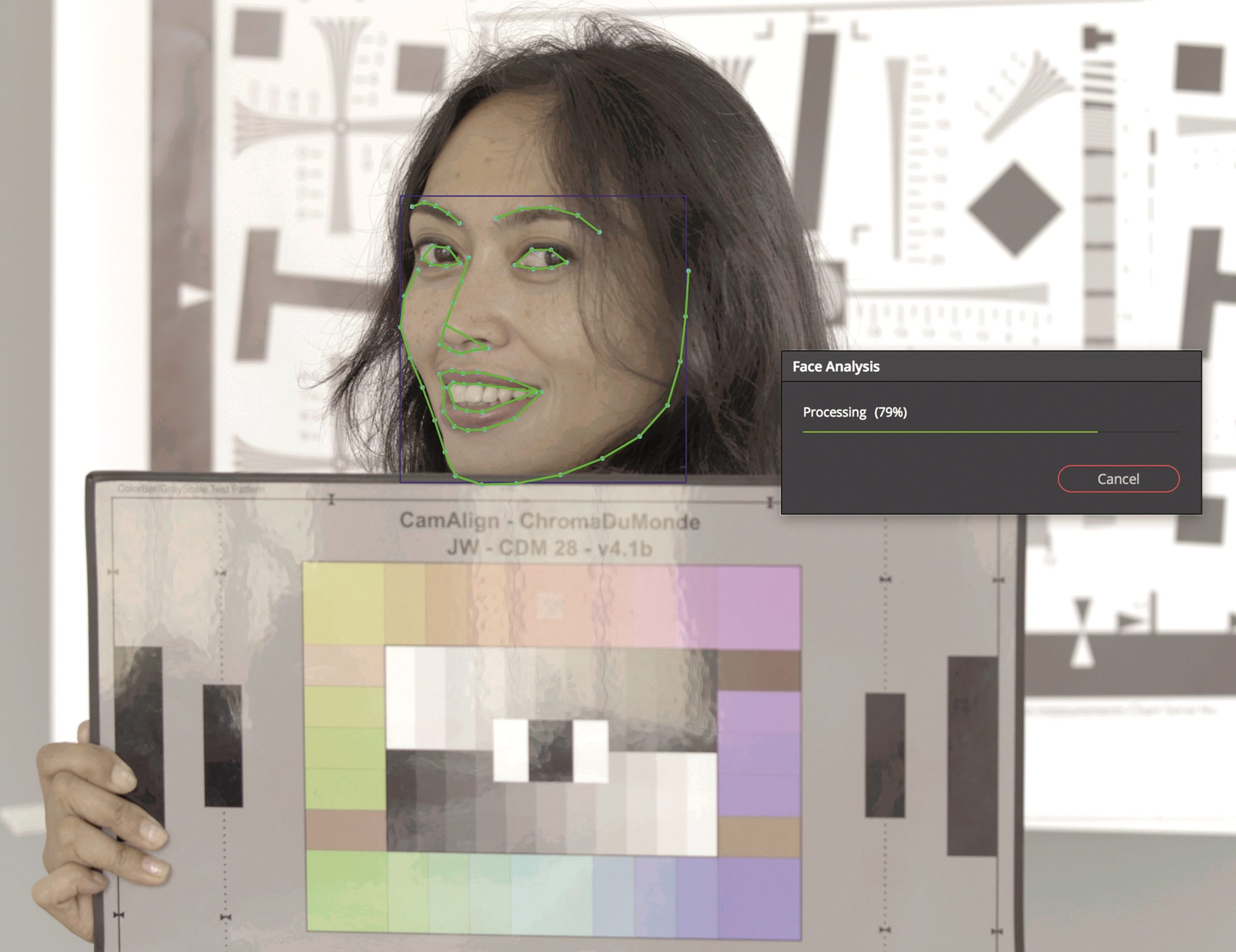
What you can’t achieve with make-up, electronics have to do nowadays. Everyone knows the digitally smoothed plastic beauties from adverts and soaps, because almost every camera already offers internal skin smoothing. BMD could not be left behind and now supplies a corresponding filter. However, this is considerably more sophisticated than an automatic function in the camera. Using “Analyze” – starting from the best possible position – faces are recognised, tracked and a mask is created for the approximate face shape. In Beta 5, which we tested, this also worked quite well with a slightly lateral view. This is quite important, because although the overlay appears to show support points, these cannot be edited – you have to make do with the result as it is. However, the mask as a whole can still be blurred, made more precise or changed in size. The function thus generates a key for the skin tones, but limits it to the facial features. Incidentally, this mask can also be used in the node tree as input for pixelating a face.
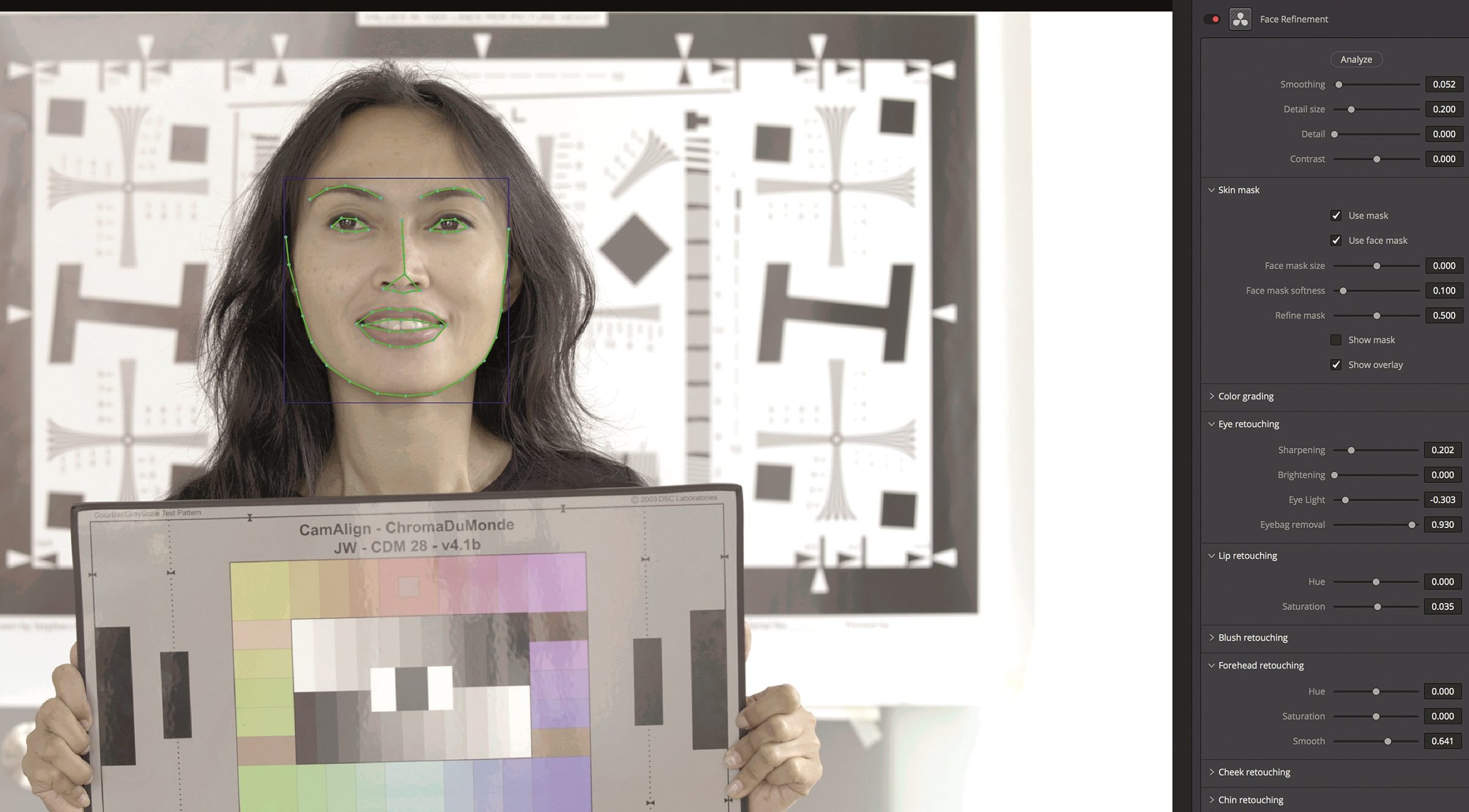
The degree and size at which unwanted details are smoothed out can be finely adjusted, as can targeted grading for the mask area. Further processing is separated for different zones, even a gentle blushing or make-up of the lips is offered, plus separate settings for forehead, cheeks or chin. A lot of attention is paid to the eyes with sharpening, brightening, highlighting or reducing bags under the eyes. All in all, it can be said that with restrained use, you can achieve much better results with this filter than with the usual functions of a camera. You should therefore keep your hands off them if you have Resolve and some time available in post-production. A skilful balance between smoothing and detail is particularly important.
BMD has also added differentiated fine adjustments to the other blur and sharpening tools, in particular the sharpening can be set separately for different frequency ranges and thus fine and coarser structures. As with skin enhancement, a powerful GPU can do this much better than a standard function in the camera, which should generally be switched off. And again, a delicate hand is required if you want it to look natural. If you are enthusiastic about the model railway effect of tilt/shift lenses, you no longer have to buy a new lens, but can use a suitable filter.

Easier work
Describing the multitude of smaller, very practical improvements here would go beyond the scope of this booklet – it is not without reason that Alexis van Hurkman’s excellent .pdf manual has grown to almost 1,300 pages. If you don’t want to read so much, you can buy the video tutorials on version 14 from the same author at Rippletraining. Worth mentioning are the extended capabilities of the markers including area marking as an alternative to subclips, scrubbing and shortening in the preview images similar to Premiere and the pipettes for quick correction of white and black point or colour balance (as a starting point for grading, not for an automatically beautiful image). Also worth mentioning is the more intuitive and flexible editing of keyframes or the numerous and easily customisable keyboard shortcuts.

Media management has become more flexible: drag-and-drop is now also possible with entire folders and you can open several bin windows at the same time. The clone tool has finally come of age with a selection of professional checksum methods and the option to eject media. The quick renaming of the displayed clip names (Display Name) for hundreds of recordings based on extracts of the metadata makes work much easier. The search function and Smart Bins now take marker names and notes into account. As in other programmes, several clips can be narrowed down in the media pool using a selection rectangle with modifiers, and “Create Bin with Selected Clips” fits in with this. Duplicates are also possible, of course without taking up as much space as an alias. Audio and video can be separated as subclips using drag-and-drop.

The Mediapool has virtually become a watch folder for missing clips: When you add new files, Resolve checks whether they match missing clips in the timeline. A clear distinction is now made between clips that are missing from the media pool and clips that are no longer connected in the timeline. The “Reconform” function has been significantly improved and can now be performed on the basis of bins or directly from media with very detailed specifications. You can even specify several formats or codecs as a comma list with priorities, but don’t forget to activate “Search Subfolders”.

Comment
If Resolve 14 works as intended after the beta phase, it should at least cause thoughtfulness, if not panic, among the competition. From the comprehensive, professional audio editing and intuitive functions for collaborative post-production even without dedicated hardware to the performance with demanding formats on affordable hardware, the programme is now extremely competitive. And the price?
You get the usual suspects:
- For the same price, a good but somewhat peculiar programme for lone wolves from Apple (aka Final Cut Pro X)
with more modest grading and sound capabilities, but intuitive compositing with Motion. - Adobe’s rental software with hostage-taking (aka Premiere), which even in some releases behaves like a beta and can’t keep up at all, at least in the audio area (Audition). Only in the text functions
it is ahead. - At Avid, after years of announcements, suddenly at NAB 2017 the free Media Composer | First, which doesn’t even offer UHD, plus 8 audio tracks, 4 video tracks and 5 bins, and whose projects are not compatible with the full version. Or, for considerably more money, the real Media Composer plus Pro Tools, which are nowhere near as elegantly integrated as the editing and sound design of the black magicians.
And the conspiracy theorist in me whispers: they are probably striving for world domination on behalf of evil and have only omitted the 13 as a cover (aka fake news).
Fusion 9
The next version of Fusion is coming: Freshly announced at Siggraph, Fusion number 9 is now available for download. We only got wind of it shortly before the editorial deadline, so here is just a brief summary – a test will follow in one of the next issues. Fusion, the former Windows-only compositing flagship, has been available for Windows, Linux and MacOS since the last version. This is relevant because Blackmagic Design has managed to obtain ProRes certification from Apple. In terms of transcoding, Fusion would therefore be one of the most cost-effective solutions for ProRes on Windows and Linux systems. There is also a Connect plug-in for Avid Media Composer.

Three areas have received special attention in the update: The new planar tracker has been adapted to track flat objects for replacements or for the Roto. A brand new feature is the camera tracker, which analyses the movement of the camera in the footage – and the tracker also handles lens metadata for framing, focal length and so on – all already built in and included. The new Delta Keyer comes with a complete set of matte finesse controls and a new clean plate tool that can even handle live footage. This live capability benefits the next major innovation: the VR toolbox. It contains all the important functions from real-time stereo correction to an in-built 3D viewport, support for practically all headsets and export to .fbx, 3ds, Alembic, Collada and many other data formats, as well as possible live VR productions (we are working on a story). Rendering in Fusion utilises both Nvidia and AMD GPUs. The 2D image processing is also OpenCL-ready.
“Generation”, the network component for Fusion, is now discontinued – and reappears as “Studioplayer” within the software, with all its features.

And for those who are now thinking: “Fusion was always a bit expensive” – the price for the Fusion 9 Studio version, which has everything built in, will be around 3OO euros – comparable to Resolve Studio. There is also a free version, but this can only export ProRes on the Mac and is somewhat limited in terms of keyers and trackers.
