



Table of Contents Show
For a long time, the official homepage of the French developer was quiet about the future of Guerilla. The forum also kept a low profile and the latest video on the YouTube channel was at least a year old. Since the first presentation of Guerilla Station at FMX 2017, when Mercenaries Engineering revealed Arsenal at booth 1.4, expectations were high, but no firm date was promised for the official release.
Shortly before Christmas 2017, however, Mercenaries Engineering made a big splash. As promised at FMX, Guerilla Station was symbolically renovated and equipped with new features that make the application a state-of-the-art problem solver for professional media productions.
From the heart of Paris
Paris-based software developer Mercenaries Engineering was founded in 2005 by two Frenchmen, Benjamin Legros and Cyril Corvazier. Both are experienced 3D developers who have been working on the further development and distribution of Guerilla Station since 2005. Release 2.0 was published shortly before Christmas 2017, on 22 December 2017 to be precise. The first major change was the splitting of the software into the core application called Guerilla Station, a standalone software for lighting, look development and scene assembly.

The second application is the so-called Guerilla Render. You could say that this is a command line application that is purely concerned with rendering the underlying scene in conjunction with a render farm. Guerilla Station has also implemented the Guerilla Render for rendering. The render nodes, the guerrilla render component, can be used to set up rendering via a render farm – a step that is familiar from established production renderers in order to maintain the financial development of the software.
If you take a closer look at Guerilla Station, the user is already overcome by a slight guerrilla feeling, which is based on the purist user interface and its colour scheme. You can really feel the team tent of a guerrilla squad covered with a camouflage net. It contains a highly explosive mixture, a well-considered and large repertoire of digital helpers for lighting and look development in the prime area.
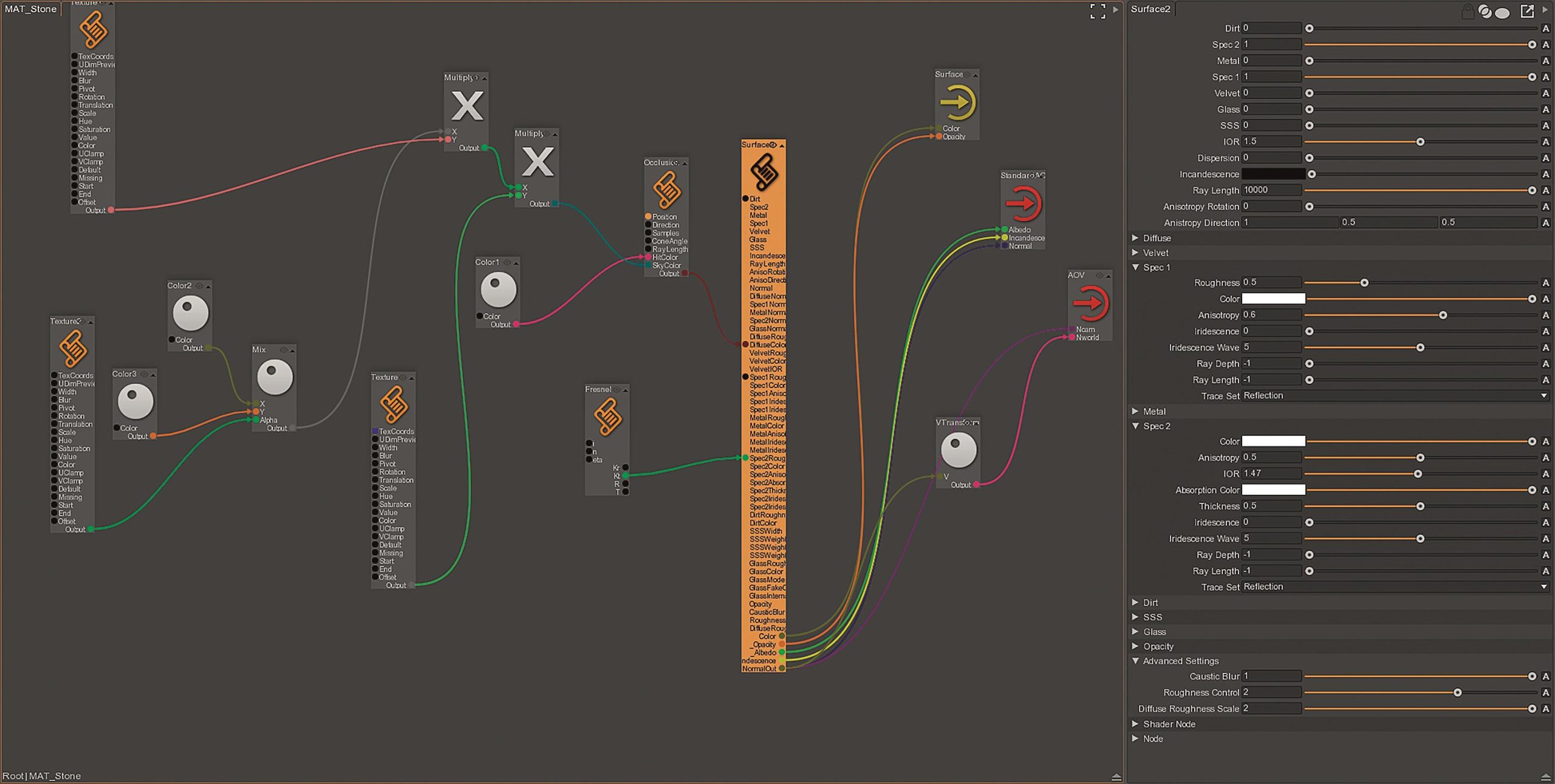
By default, Guerilla Station presents itself to the user in a user interface that is divided into four areas, also known as widgets. The largest contains the perspective view of the scene. Directly below this is the Graph Editor, the heart of Guerilla Station. This is where the main work takes place. All functions and objects can be displayed via nodes in the Graph Editor via a menu and logically linked to each other. To the right is the so-called Node List, a widget that displays a hierarchical list of all objects in the Node Graph.
Directly above the node list is the widget that displays the respective parameters of the selected node and allows the user to make changes. Regardless of how the widgets are arranged, the user can divide the structure as desired at any time – horizontally or vertically – and assign different display options to the content. To do this, simply press the V key or click the right mouse button, both in the active widget, to open a menu whose structure is familiar from Autodesk’s Maya. The navigation in the perspective viewport is based on common software such as Autodesk’s Maya or 3ds Max and therefore appears friendly right from the start – which is particularly helpful for new users.
Once you have familiarised yourself with the navigation and changing the widgets, you as a user can get to grips with the basic principle of Guerilla Station. It is a Node-based workflow, so it is easy to get started if you are familiar with Node-based software solutions such as Houdini, Fusion or Nuke.
Workflow
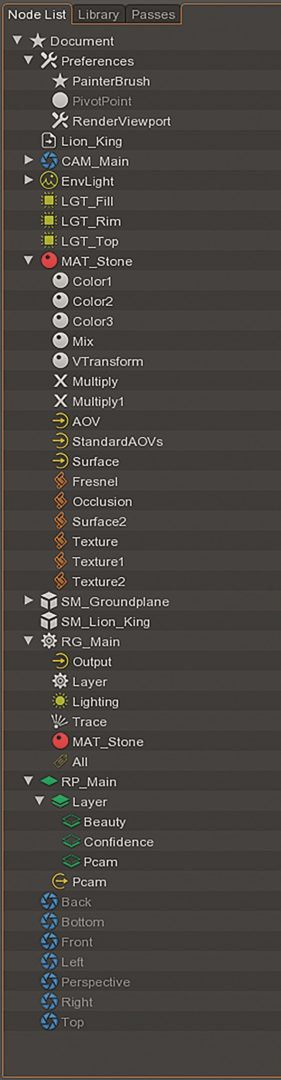
The entry point for working with Guerilla Station is within a document. A document can be seen as a kind of workspace in which either a single object is used for look development or entire shots are assembled – in the best case via file referencing. The entire overview of a document, or rather what is in an active document, is obtained via the node list, the window that is located at the bottom right by default. When Guerilla Station is started for the first time, a standard project with preset nodes is provided. In most cases, global settings for the respective document can be found at the top, followed by Render Passes and the important Render Graph, which will be analysed in more detail a little later.
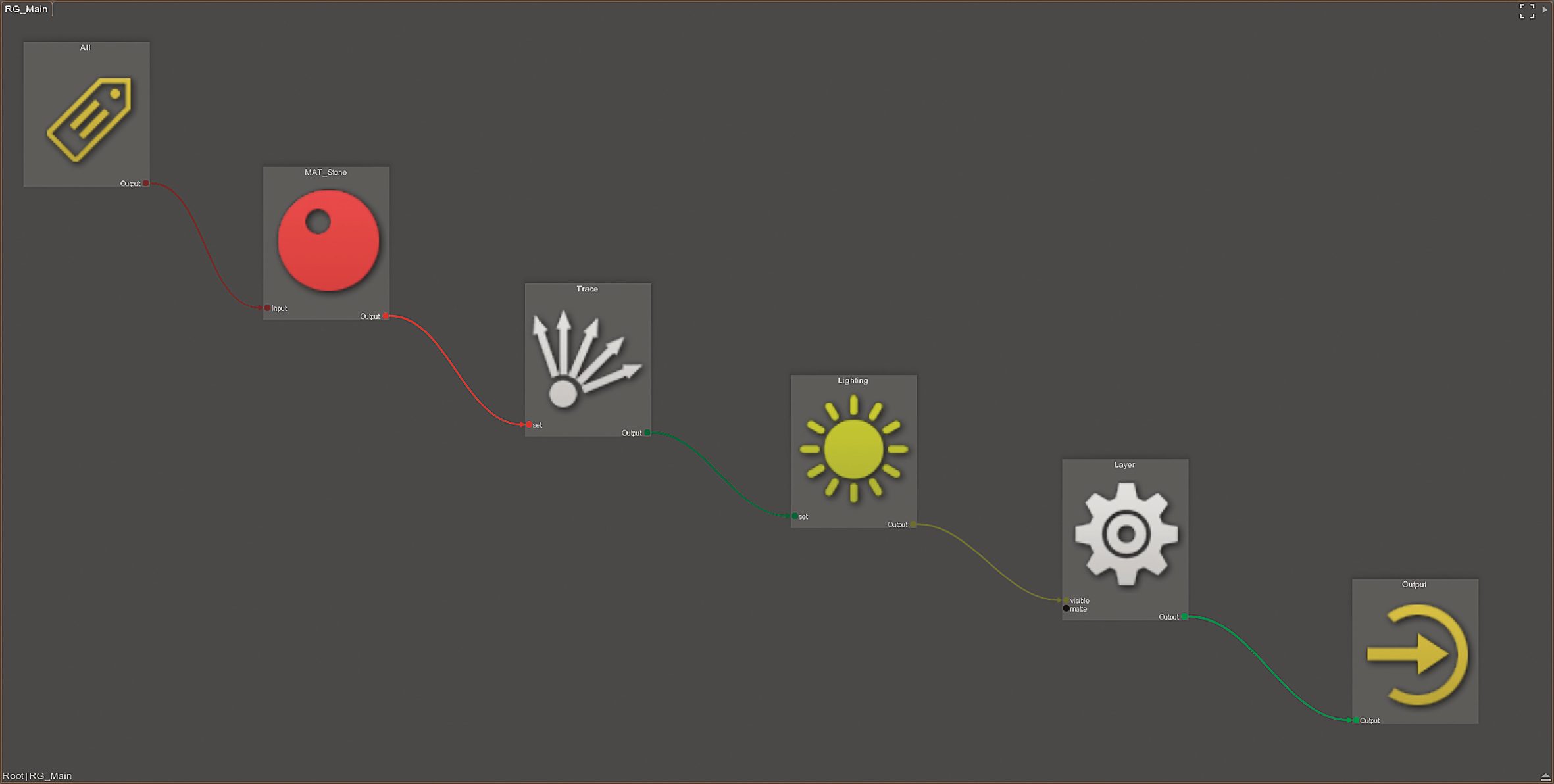
The structure and arrangement of the nodes in the node graph can initially appear abstract to new users. There are different types of nodes that are assigned to different areas. There are also nodes that act more or less like folders in a file system and provide structure. Double-click with the left mouse button to dive into the node. Once you are one level deeper in the higher-level node, logical circuits can be set up using a number of other nodes. The data flow in a node can always be seen from left to right. The node picker menu is opened via the key combination Ctrl-Space. It is comparable to the tool menu of Clarisse or Houdini. It contains all the nodes available in the respective context, which can be found and used using the search function.
When working in the Node Graph, the main focus is on the previously mentioned Render Graph. A render graph can stand alone or there can be countless render graphs in a document. However, the function of a render graph remains the same. Firstly, it is advisable to explain the standard structure using a first project. Within a render graph, there is usually a chain of four nodes. Two nodes have not been included here, namely input and output. Between the input and output nodes, there are nodes that are used to overwrite object parameters and nodes that build a scene around the objects along with light setups, initiation of ray tracing and other attribute overrides.
Working intelligently
If you are familiar with the dynamic file referencing of Clarisse or Katana, you will find parallels with Guerilla Station. When objects are referenced into the Guerilla document from outside, ideally Alembic data records, this data is stored at the top level in the render graphs and settings. Each render graph serves as an independent strand that receives one or more objects at the top level and generates overwrites in the respective render graph, which is used to prepare the objects for rendering.
A render graph is therefore a version of an object or several objects in a customised scene. Basically, an input node sucks in all objects from the top level, but objects can also be provided with special tags and specifically addressed via tags – including via an input node per inserted tag. The special feature of the workflow is that a render graph only generates overrides or local overrides and the referenced data is not changed by the settings. Based on this, it can be said that the guerrilla station is what the user makes of it.
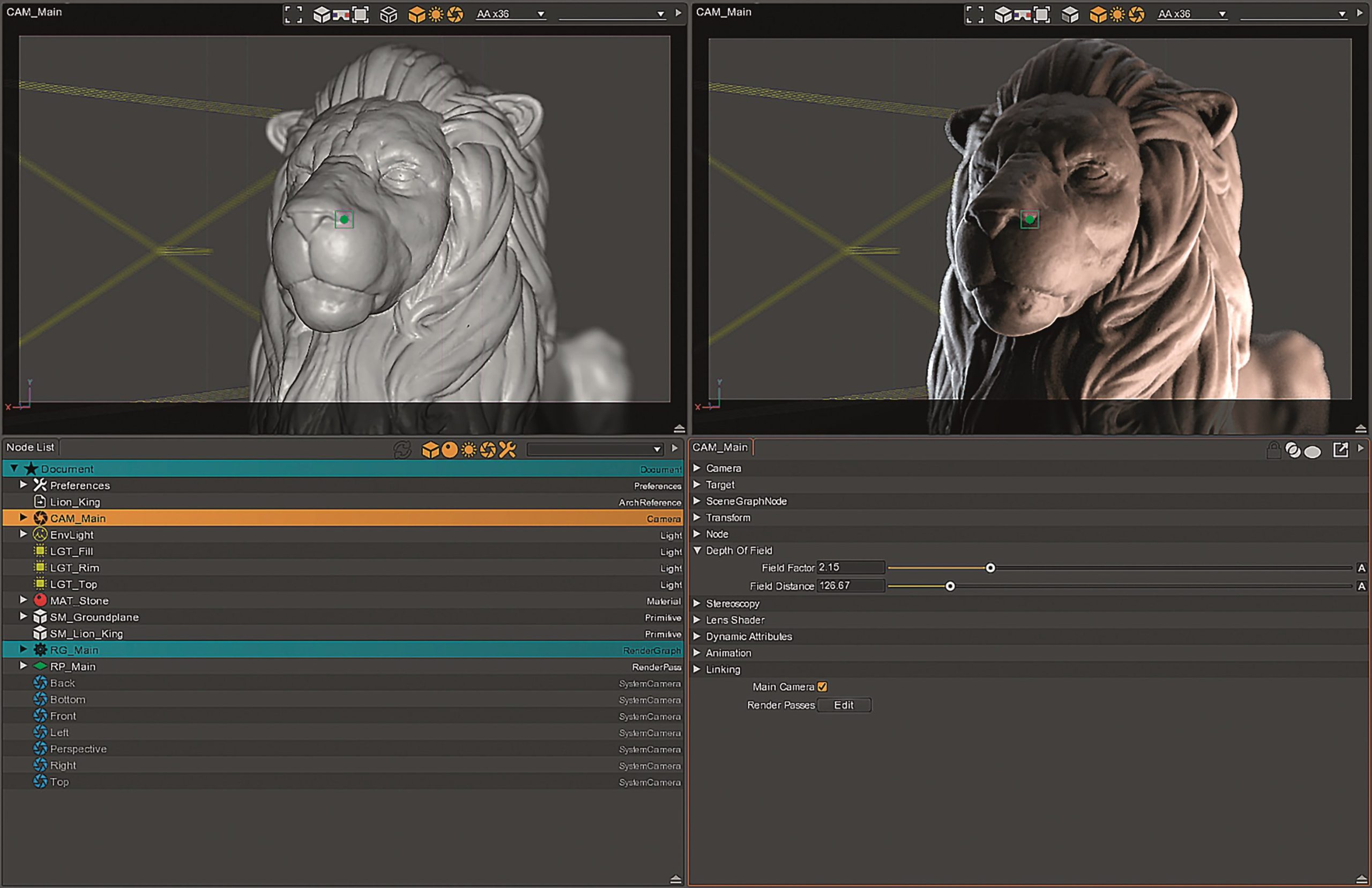
For example, a render graph can be just a single object with a customised material that is currently undergoing lighting and look development. This approach allows a guerrilla project to be used as an asset database. Or an entire shot can be housed in one document with a wealth of complex objects and materials with a large number of light sources. You could also create a database of shots, for which the Guerilla Station is predestined.
Whether individual objects or entire shots, it is not enough to process entire shots on one workstation for a decentralised production. Parallel work is commonplace in professional media productions. A render graph can therefore also be exported in its entirety and sent to a digital artist to work on within the in-house workflow. The digital artist in turn expands the render graph with their own nodes and tells the nodes which should be visible or available when referenced in another project and which should not. This keeps the graph clean for the digital artists at the feed point of the render graphs, primarily the lighting and look development department. However, the advantage extends further.
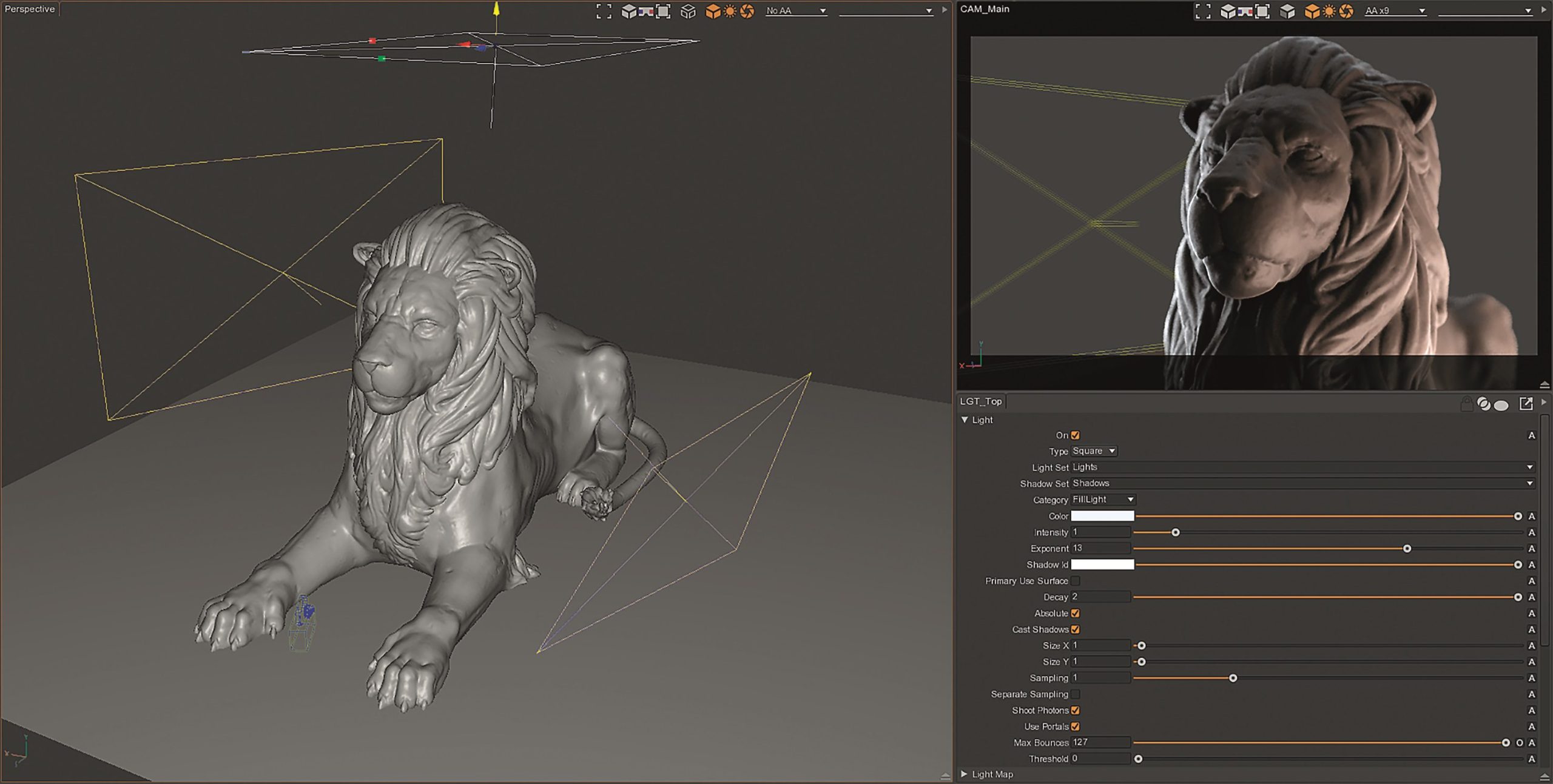
Not only a render graph can be exported as such to a file. It is also possible to export individual nodes such as lights, materials, compositing nodes and render passes as well as individual shader nodes and locators. These in turn can be picked up, used and re-circulated by other digital artists.
Guerilla Station also allows a series of selected nodes to be exported as an independent guerrilla project. In this way, entire projects from a look development project can be exported within a pipeline for each department, and more specifically for the respective digital artists involved in the shot, and re-imported as a reference, except that entire scenes are now included instead of objects. Project structures can be set up and distributed to the respective departments in no time at all. In most cases, the global feed point for the referenced sub-scenes is the lighting and look development project. Once you have internalised this principle, there is hardly anything standing in the way of flexible media production, in which work can largely be carried out in parallel and changes can be made dynamically.
Things to know to get started
Getting started with your first look development project is relatively simple. No classic import is required to transfer data records to Guerilla Station. The function responsible for importing objects and scenes as instances is hidden behind the Create menu, which is opened using the Alt C key combination. This contains the “Create Reference” function, which can be used to reference all supported file formats. In addition to classic .obj formats, Alembic caches and Open VDB datasets can also be referenced. In addition, .bin data from Realflow as well as FumeFX and
Maya caches are also supported. The create reference function is also the linchpin for referencing guerrilla projects.
Once the reference has been created, two objects are available in the Graph Editor: an object for the reference itself, i.e. the path to the source file, and a locator object with a primitive contained in it, which displays the reference as geometry in the scene. The reference objects can be hidden using the corresponding view icon. The icons for the view settings are located at the top right of the Graph Editor.
The scene can already be filled with lights and cameras at this point. Objects can be created using the aforementioned Create menu, which can also be accessed via the menu bar at the top left. Depending on what purpose the nodes fulfil in the document, the number of available attributes is sometimes less large and sometimes excessively large, which may seem confusing, especially when objects such as geometry with a wealth of attributes are used.
The attributes of the geometry can also be easily adjusted in the render graph. All you need to do is add an attribute node to the respective strand. Attributes can be adjusted directly by the displacement or the subdivision level using local overrides. The materials can be integrated at the same level in the render graph. Here, Surface 2 and Volume 2 nodes can be used, which are similar to modern PBR materials. In addition to the two materials mentioned, a specific material can also be selected from a small selection of presets.

Back to the attributes of the objects: An important place to start is the “Scene Graph Node” field, as it contains the line called “Tags”. The tags can be used to specifically address individual assets within a render graph or to select entire sets of assets via a tag. Within a render graph, the input node, which sucks in all objects by default, can therefore be specifically influenced by a tag. This means that not only can additional render graphs be used for a suitable project structure, but a network of different strands can also be created within a render graph. So that the individual strands within a render graph are connected into one, there are so-called binop nodes with different conditions, such as a union.
Trace sets can also be built into the render graph. The trace sets of the trace node allow the user to decide which objects should be connected to which trace sets. Should object X be rendered completely or only a certain component such as the diffuse rays or rather with light rays in combination with shadow rays or only the reflection? For a standard rendering, it is sufficient to enter lights and shadows. The same applies to the Light Node, which provides the user with a kind of light linking. The light sources that are to be taken into account in the render graph for the calculation can be entered in the top line of the attributes. The same applies to the render layers. The standard render graph contains a render layer node that allows the selection of render layers in the first attribute line. The render layers are defined on the top level of the node graph. Within the widget called “Passes”, countless layers can be created for rendering and the required AOVs or LPEs can be applied.
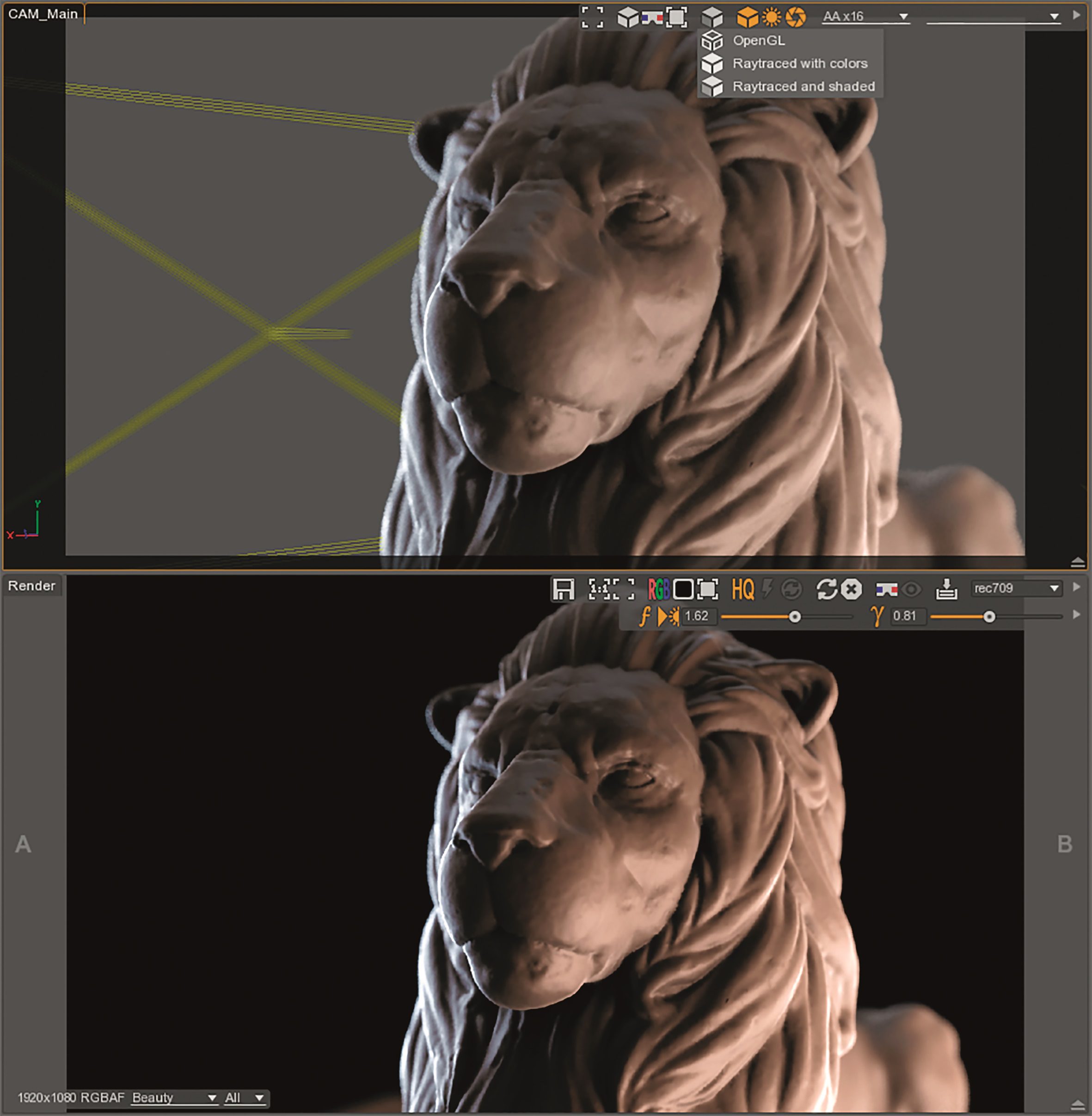
In order to see the aforementioned functions in action or to perceive your own work, interactive rendering must be activated in the perspective viewport. The cube icon at the top sidebar of the viewport is the place of use. This contains various modes, including the mode for interactive rendering. You can now benefit from the new features.
The big news of version 2.0
In version 2.0, the render engine has been completely overhauled, tidied up and equipped with the latest functions. Probably the most important is now the option to use interactive rendering while working. Interactive rendering can be used as usual in the Render View and also when rendering in the respective viewports. The Guerilla Station is in no way inferior to its competitors, quite the opposite. Just like Clarisse, you can activate the perspective viewport with the OpenGL display using ray tracing with the shaders and lighting – a new feature that is nowadays a must.

Based on this, adaptive sampling was implemented, which ensures an equal distribution of noise in the rendered frames. This means that the samples are adjusted variably. Areas that require more sampling are provided with more, and sampling is suspended for areas that have already reached a certain quality in terms of the threshold, which results in an enormous performance boost. In conjunction with interactive rendering, the user receives direct feedback on changes when using a good workstation.
In addition to the actual path tracing, bidirectional path tracing has also been implemented, which is particularly advantageous when rendering interior scenes. There is no tick or direct line for the option, but the Light Max Depth must be increased for use. Russian Roulette has been implemented to give the rendering a further boost, although turbo is not always the right word here. If Russian Roulette is set too aggressively, it can also be a trigger for noise. However, with careful use, the render time can allow a time bonus by cancelling out rays before they have reached their maximum ray depths.
In the area of shading, the familiar surface and volume material has been rebuilt and stored as Surface 2 and Volume 2. These are PBR materials that now include the GGX-BRDF model and are based on energy conservation. Furthermore, OSL support has been implemented for Light Path Expressions, so that a much larger number of AOVs are available to users. What is really interesting in version 2.0 is the expansion of the Render Graph and the functions it contains. It is now possible for the user to create instances within a render graph, which is particularly helpful for procedural instances of modern scattering. Be it for landscape design or fur solutions. Based on this, lights can now also be generated procedurally. For the sake of completeness, it should be mentioned that the Guerilla Station supports Golem, Yeti and Xgen Procedurals natively.
No PLE version, but free use
Guerilla Station not only impresses with a broad repertoire of functions and possibilities familiar from professional feature film productions and animated films, but Mercenaries Engineering also has an extremely lucrative offer for those interested. Instead of equipping the software with sophisticated and sometimes user-gagging protection mechanisms in conjunction with not exactly affordable licence models, Guerilla Station is available free of charge.
There is no catch to the offer, just one restriction: Mercenaries Engineering offers each digital artist one free licence per project for a single workstation. You only have to pay for two licences or more, or for the production of an additional intellectual property. And then within a very reasonable financial range. If you compare Guerilla Station with Clarisse and Katana, you can confidently say that the products from the Paris-based developer are the most affordable.
Looking at the competition, freelancers have to pay 899 euros net for a single user licence at Isotropix, including one year’s maintenance. Katana costs 7,148 euros, although it should be noted at this point that Clarisse is the standard tool at Double Negative Visual Effects and is used by leading production houses such as Industrial Light and Magic. Katana is software that was created at Sony Pictures Imageworks and is predestined for professional media productions. The Guerilla Station has been used by studios such as Prime Focus World and is in no way inferior to its competitors. On the contrary, with version 2.0, the software is a serious contender in the very manageable field of professional lighting and look development solutions.
With the bonus that every digital artist can use one version free of charge for commercial projects. This makes it a perfect introduction to the topic, especially if you want to take a look behind the scenes of professional productions. However, there is one downside to the Guerilla Station. For digital artists who have already worked extensively with Node-based programmes and for whom working with asset-based workflows is part of their daily routine, Guerilla Station is certainly a benefit. However, the learning phase in particular is somewhat cumbersome, as new training material has been promised by Mercenaries Engineering but is not yet available. Although the existing documentation has been brought up to date and older features have been removed, the training videos in particular are scarce. Until the new training material is available, the written documentation and the associated forum will remain as learning platforms. Whether both sources make the learning process easy is something every digital artist has to find out for themselves.
On the other hand, the countless setting options of the attributes are welcome at large studios, as they are optimised down to the smallest detail and in feature film or animated film productions on a large scale, the employees have such a wealth of experience that hardly any learning material is needed. Rather, the software is customised to suit individual needs. Nevertheless, Guerilla Station is a solid application and can be recommended.
Away from PLE – A licence model without equal
If users would like to test Guerilla Station themselves and integrate it directly into a production if they like it, this is certainly possible. Mercenaries Engineering offers one licence per IP address or per project free of charge on the official homepage. All you have to do is enter a valid e-mail address in the download area. The download link will then be sent to you. If you want to use Guerilla Station on several workstations, you will be asked to pay.
The basic price for Guerilla Station is 2,000 euros net per single workstation including one year’s maintenance. From 4 up to 7 single workstations there is a discount of 1O% on each single workstation licence. A discount of 2O% is even granted for purchases of 8 to 17 licences.
Licences for Guerilla Render start with a single user licence of 7OO euros net per node. A discount of 1O% is granted from the 1st node to the 19th. With a purchase of 2O to 49 nodes you get a discount of 2O%. That’s not exactly a penny, but in contrast to competing products such as Clarisse (single user licence for 2,599 euros including one year’s maintenance) and Katana (single user licence 7,148 euros including one year’s maintenance) it can certainly be considered more affordable.
The big surprise comes for education and teaching: according to the official homepage, students, lecturers and educational institutions receive licences free of charge.
More information at: www.guerillarender.com
