



In nuce: Autodesk releases 3ds Max 2023.1 – the latest version of the powerful 3D modelling and rendering software. What feature delights await users? A taster: extended spline segments, more powerful modifiers, Smart Extrude with an improved algorithm – and many more such functional treats.
Squeaky clean features: We have summarised some of what we consider to be the most noteworthy new features below. To get your own overview of the new functions, click on Autodesk’s corresponding help page or the release note .

- Extrude and expand spline segments & open vertices: Works via the input combo “transform tool” and “keyboard shortcut”. To put it more clearly: You hold down the Shift key (alternatively, hold down Ctrl and Shift at the same time) while using the Move, Rotate and Scale tools in parallel. The input works directly via the viewport.

The angular model (right) was transformed into a smooth model using TurboSmooth - More powerful modifiers: Affects the modifiers Turbosmooth, Morpher and Skin. Specifically, movement sequences created using the modifiers should be significantly more performant. According to a comment from the developers, viewing, evaluating and further iterating your work should be much easier with the now more powerful modifiers.
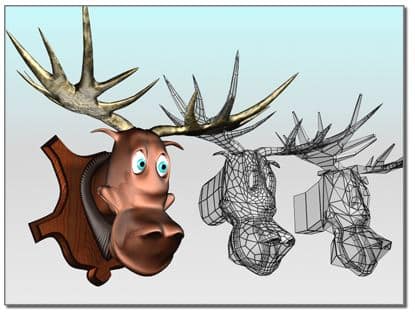
- Backwards compatibility: Save material libraries in previous versions of 3ds Max – saving in the current version is of course also possible. To decide in which 3ds Max version you want to save your material libraries, select the new “Save as type” option in the Material Editor.

Cutting, slicing and sabering with Smart Extrude
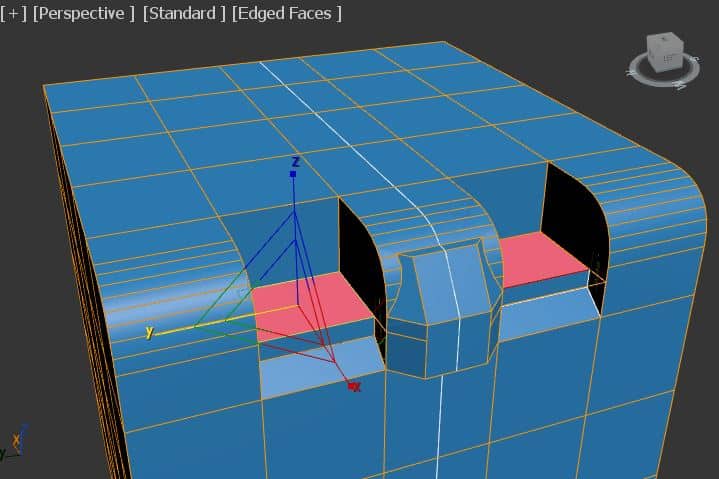
- Smart Extrude with improved algorithm: Now recognises overlaps or cuts between pairs of surfaces. Further improvements relate to surface generation, surface triangulation of colinear and concave corners – and the visibility of hidden edges.
- New selection option in the vertex paint modifier: You can use this to capture existing vertex information, which you can then edit and manipulate. In other words, you can use the corresponding button to capture colour information from modifiers that are located in the modifier stack below.
- Other features: Support for Alembic 1.8, improved performance when merging files (file merging), and much more.
Click further: All further information about 3ds Max 2023.1.
