



Adobe’s latest beta release of After Effects lets users preview HDR compositions directly within the software. Designed for professionals working with HDR content, the feature enables real-time HDR playback on HDR-compatible monitors. According to Adobe, this ensures better accuracy in visualizing brightness and color when working with HDR projects, especially compared to earlier workflows requiring third-party tools or cumbersome conversions.
Adobe After Effects Beta: HDR Preview and Enhanced Caching
The new After Effects beta introduces a groundbreaking feature: HDR preview. For motion designers and VFX professionals, the ability to view HDR compositions on HDR-compatible monitors eliminates the need for guesswork. This feature ensures that every highlight, shadow, and color appears exactly as intended, simplifying workflows for HDR projects.
The update also brings support for widely used HDR color spaces, including Rec.2100 PQ (Perceptual Quantizer) and Rec.2100 HLG (Hybrid Log-Gamma). These industry-standard spaces are crucial for delivering content compatible with platforms such as Netflix and other HDR streaming services. Artists now have the flexibility to work confidently, knowing that their output aligns with current media standards.
Beyond HDR, Adobe has also enhanced the caching system in After Effects. By optimizing RAM and disk usage, the beta delivers faster playback and smoother previews, even for large compositions. This improvement is especially valuable for professionals working on intricate VFX or motion graphics, as it reduces interruptions and enhances overall efficiency.
While the HDR preview in After Effects beta is promising, it’s essential to approach the feature with caution in live production environments. Like most beta features, its stability should be thoroughly tested in smaller projects before incorporating it into high-stakes workflows. The After Effects beta, including the HDR preview feature, is available to Creative Cloud subscribers. For more information or to download the beta, visit Adobe’s official site here.
Adobe Premiere
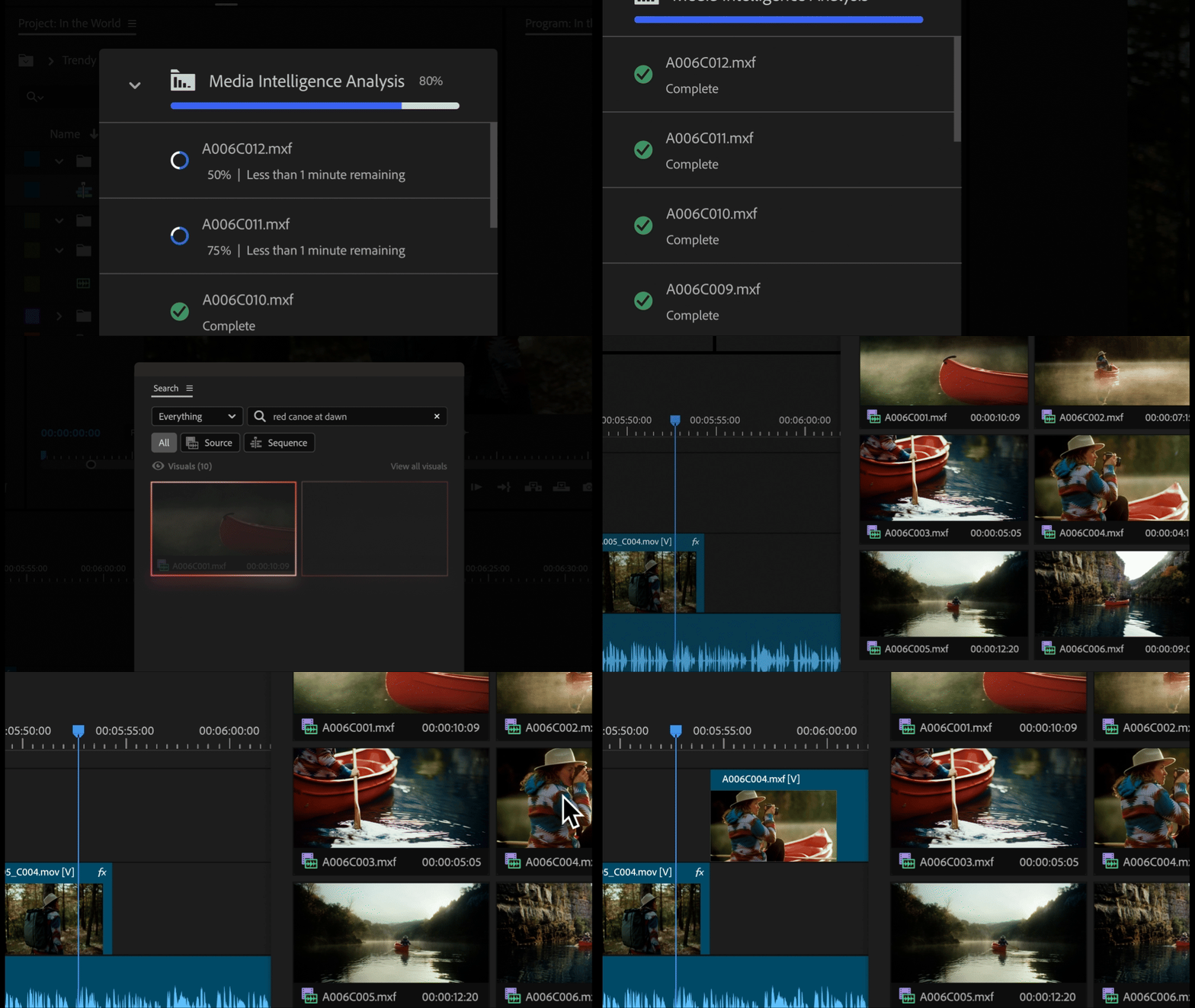
The Premiere Pro beta adds AI-powered Media Intelligence, simplifying the search for specific clips in extensive projects. This feature automatically analyzes footage, recognizing objects, locations, camera angles, and metadata like recording dates or camera types. Editors can now type in descriptions, such as “sunset drone shot,” into a search bar, and the system will locate the matching clips instantly. Importantly, the analysis runs entirely on local systems, ensuring data privacy. Hopefully! But, if it works, it might be one of the most usefull AI-Features we have seen in a while!
Another feature in the Premiere Pro beta is Subtitle Translation, a addition for filmmakers expanding their content’s global reach. The feature supports native translation of subtitles into 17 languages, making it easier to create localized versions of projects. This significantly reduces the reliance on manual translations, which often slow workflows and add to production costs. For more details on the Premiere Pro beta and its features, visit Adobe’s official page here.
