



We had the pleasure of talking to Simon Hall from Blackmagic Design about Fusion, AI and the community. Simon Hall knows post-production from both sides of the suite. Before stepping into his current role in business development at Blackmagic Design—where he focuses on post-production and supports the Resolve ecosystem across EMEA—he spent over a decade getting his hands dirty in the edit bay.
Starting as an offline editor and later working as a Smoke operator in a northern UK studio, Simon eventually moved to London to take up a training role—merging his technical know-how with a knack for sharing knowledge. His past as a freelance editor kept him close to the tools, even as his focus shifted to product strategy. Over the past ten years, he’s been a key figure in shaping DaVinci Resolve’s growth from a specialist grading tool to a full-fledged post-production platform with a massive user base.
DP: Fusion 20 marks a huge step forward, and the community has been very enthusiastic. What was the motivation behind this release, and what can users look forward to in future updates?
Simon Hall: We are a company that really does value user feedback. What the devs always want to do is to take user ideas and integrate into the software. As you can imagine, those lists tend to be very long. SO we have to pick and choose what we do. Our motivation as a company is to give people the features and workflows they want. We will continue to try to get the best out of our software. Because we like making people happy at the end of the day.
DP: The Integration in Resolve was a great idea – as it was to keep the Standalone Edition alive which is favoured by many professionals for performance reasons. Can we expect full feature parity (i.e. all Resolve OFX plugins available in the standalone Fusion)?
Simon Hall: Some of the open effects are obviously designed for colour. So that’s why you may not find them in fusion studio. But the devs try and get parity as much as they can. Over time, what will happen is hopefully we’ll start to get parity between the two applications. The open effects that are available in resolve are then also available in fusion.
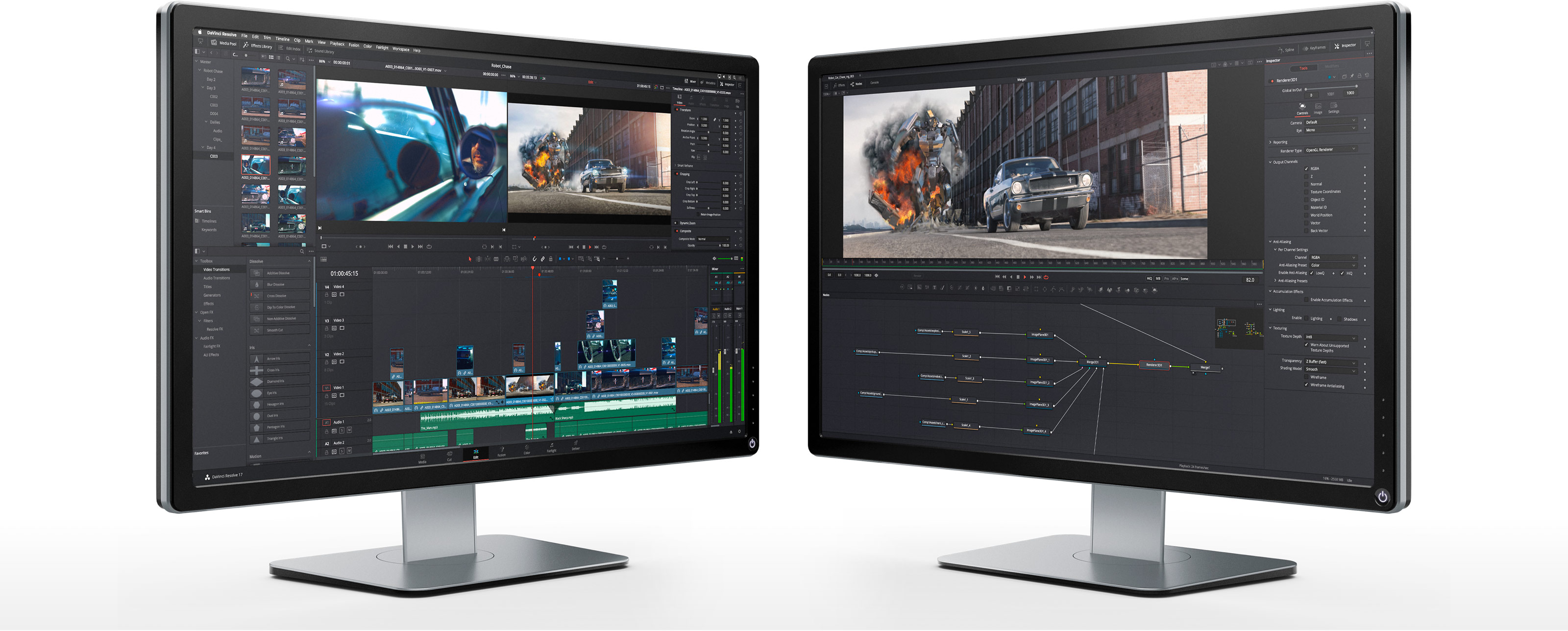
DP: When you’re developing both editions, is there an ideal use case in your mind for when users should use each version?
Simon Hall: If you’re doing things like shot clean-ups, you’re doing some matte painting, you’re doing some tracking, my recommended workflow is to use fusion in resolve.
I always tend to steer people towards fusion studio when you’re doing sort of heavy VFX work – You’ve got a couple of hundred nodes, you’ve got 3d models, you’ve got particle generators. As soon as you start to do something that becomes quite complex, you’re going to get performance enhancements in fusion studio. The one thing that fusion studio can do that resolve can’t, is to use network rendering.
DP: Both Resolve and Fusion include very useful ML tools like the Magic Mask. What’s next on your roadmap for neural-network features? Any change to see an integration with tools like ComfyUI? What is Blackmagic Design’s long-term vision for applying machine learning across the industry?
I could talk about what we’re thinking, but the truth is-we don’t really know. There’s no set roadmap. That’s just kind of how things work at Blackmagic. We don’t always know what’s coming. Our approach to AI is focused on speeding up workflows-not replacing the person in the chair. That’s the goal behind all the AI we’ve built so far. Also at the moment all of our AI processing happens locally-on your system.
We don’t send your files anywhere to train the AI.
There is one exception, and that’s the scene extension feature. It’s not in the public beta yet, partly because it uses Blackmagic Cloud. Since the system needs to understand the image, it does have to send it up to the cloud for processing. We’re still figuring out how that will work, especially in terms of using it with a cloud account, which may involve some cost. Our AI is meant to help-not take over. So when it comes to the kind of AI that generates full scenes or content, like the comfy UI stuff, I could be wrong, but I don’t see us going in that direction.
DP: The community loves that Blackmagic hasn’t adopted a subscription model—but new features still cost money to develop. Are there any plans to introduce an upgrade-pricing scheme in future releases?
Simon Hall: Potentially in the future, we might charge for upgrades. A lot of this software development takes time, money, and people-we’ve got a growing team of developers. But I don’t think this is going to turn into a subscription. Grant himself really doesn’t like the idea of locking people out of their own work; he thinks it’s unfair. Long-term, yeah, we want to make things sustainable, but nothing’s been decided yet.
It kind of became a hot topic at NAB because Grant mentioned it in his video. What surprised us was how many people actually supported it-people who really want Resolve and Fusion to keep developing and improving. And if that means maybe paying, say, a $50 update once a year, or per version, a lot of folks were like, “Yeah, you know what? I’d be fine with that.” Especially considering we’ve never really charged for updates before.
DP: You surely know the Fusion Forum WSL/Steak underwater. Do you incorporate feedback from the user community into your ongoing development?
Simon Hall: Yes, absolutely. And yeah, great name-“We Suck Less.” The Fusion community there is full of really smart people writing macros, scripts, all sorts of things. A lot of our product specialists are on that forum. I don’t know if you know Steve Roberts-he was one of the original guys behind Eyeon. When we acquired Fusion from Eyeon, Steve came over with it, since it was basically his baby. He’s still a member of the forum and still checks in. We all do, really. I’ve even picked up scripts from there.

There’s one I use all the time-it animates to the beat of music by analysing the audio. I use it constantly, though I’ve forgotten what it’s called. So yeah, we’re definitely across that forum. And when people post feedback or feature requests there, the developers do take a look-just like we do across other forums-to see what the community is talking about and what they’re asking for.
DP: Is there one feature you’d most like to add or change for yourself?
Simon Hall: Yeah, one thing I’d really like to see in Fusion 20 is a bit more “smart assistance” when building node trees-especially in 3D scenes. Sometimes I’ll go to connect something, like a camera, and it just doesn’t work. Then I realize I’ve missed a node-maybe I forgot to add a 3D plane or something in between.
What I’d love is if Fusion could recognize that kind of situation. Like, if I try to connect two nodes, and it doesn’t work, the system could say, “You’re probably trying to do this,” and automatically drop in the missing node-like a 3D merge or a plane-so the connection makes sense.
Basically, a bit of smart logic that fills in the gaps when I miss something. That would really help, especially when working quickly. So yeah, that would be my feature request-something like a smart assistant that helps you build the flow correctly when it sees what you’re trying to do.
DP: Do you have a favourite movie (or specific shot) that was created using Fusion?
Simon Hall: Oh, there are quite a few-especially if we’re talking old-school Fusion. One of my favourite shots was in the film Swordfish. It’s about hacking, with a young Hugh Jackman and John Travolta. The opening shot, where someone’s left a claymore mine and the camera moves through the explosion in what looks like a frozen moment-that whole sequence was done in Fusion. That was back in the Eyeon Fusion days, and I always thought it was a fascinating use of the tool.
In more recent films, there are a few standouts. The Martian used Fusion heavily, and Top Gun: Maverick-which has been one of my favourite films in the last few years-used it for a lot of shot cleanups. The grading on that was done in Resolve. There’s also a TV show called Bosch on Amazon Prime. It’s been one of my favourite series for a while. Fusion was used extensively on that as well-for scene extensions, keying, and shot clean-up. So yeah, those are some of the highlights for me.
DP: Thanks for your time, Simon 🙂
