



Mocha Pro just got another update – and version 2025.5 puts AI in your timeline whether you like it or not. First on the list: Face Detection, now built into Mocha’s tracking toolkit. This new feature auto-detects and tracks multiple faces across a shot. It’s geared for tasks like privacy masking, facial blurs, or selective color correction – and it saves time by creating a single spline keyframe per face.
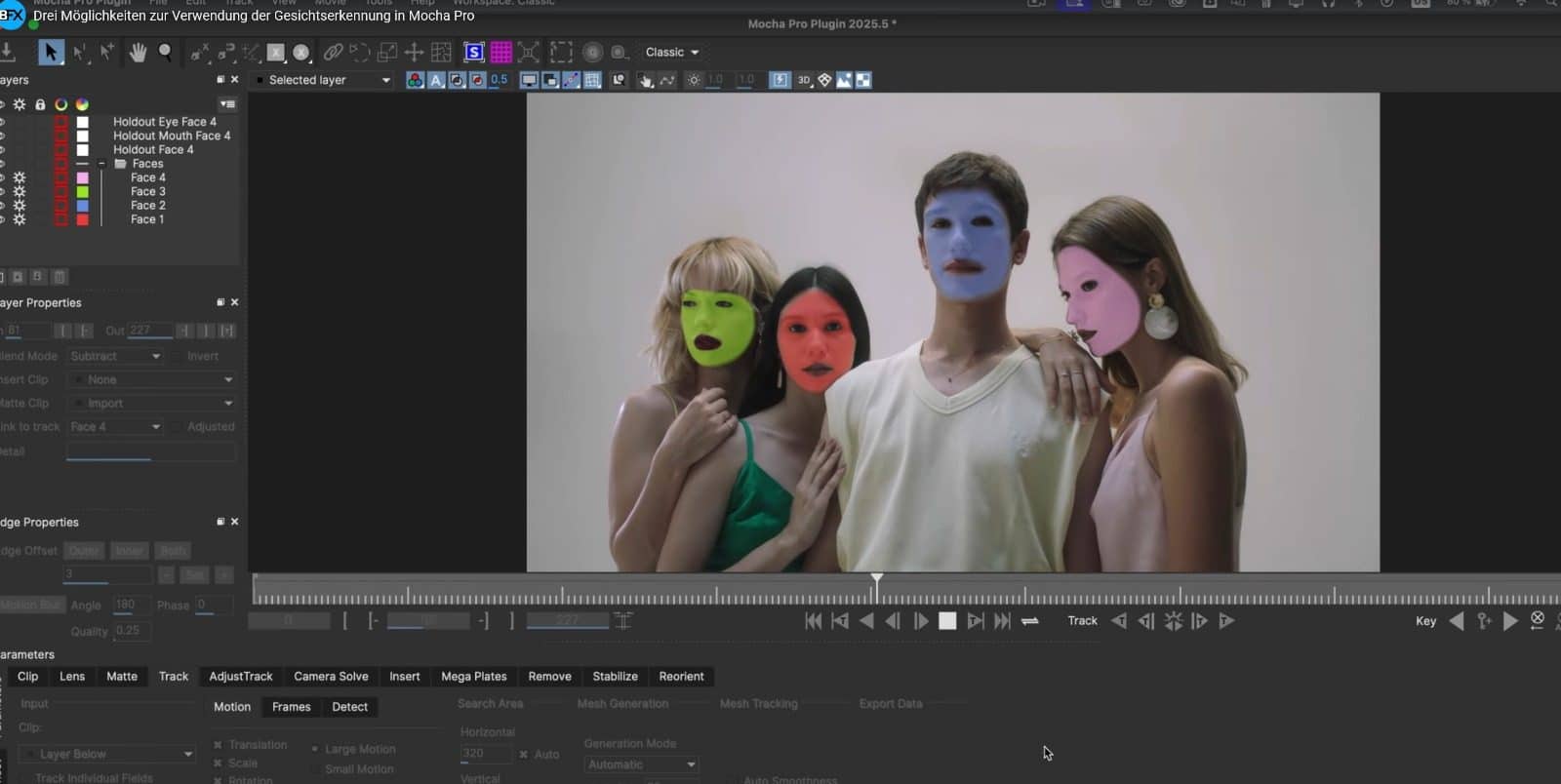
Each face layer now comes with in/out points, making face management less of a pain. You can still refine the result, but most of the heavy lifting is now automatic – good news if you’ve ever spent a weekend rotoscoping a blink.
Learn more about Face Detection in the official video here (13:32).
Matte Work That Doesn’t Feel Like Work
The Matte Assist ML toolset gets a quality-of-life pass: You can now refine mattes on individual frames directly, fixing holes or bad data fast. Mattes are convertible into editable splines and back, giving you flexible cleanup options without switching tools. The workflow runs faster overall and supports interlaced output in After Effects. One button renders both forward and backward in time, which eliminates the UI hunt and helps if you like your buttons big and your matte work minimal.
Check out the Matte Assist ML improvements here (12:08).
When The Camera Doesn’t Move
You’d think a static camera would make things easier, but it usually confuses solvers. Not anymore. The 3D Camera Solve in Mocha 2025.5 adds a “Locked Shot” option to handle moving objects in otherwise static footage. You can now snap imported models to these moving objects and get better focal length estimates in AE 3D Camera exports. If you’ve ever struggled to pin a 3D element to a nodding dog, this one’s for you.
See the updated Camera Solve in action here (6:32).
Export Everything, All At Once
The export panel gets less irritating with a batch of improvements. Mocha now supports presets for exports – so if you’re always exporting the same way, you can save your config and use it again. Even better: You can batch multiple exports in one go, including single-layer outputs. That means less clicking, more coffee. You can even tweak the presets externally via JSON. The release also adds improved support for SNI and Fusion MultiPoly exports.
Dive into the updated export dialog here (2:38).
Price? That Depends
Mocha Pro is available in several licensing models, depending on your preferred host and commitment level. For Adobe users, an annual subscription for the plugin costs $295 per year, including ongoing updates and support. If you’d rather skip the renewal cycle, a perpetual license for the Adobe plugin is available for a one-time payment of $675.
For other platforms, Mocha Pro is also offered as plugins for Avid or OFX hosts (like Resolve and Nuke), with similar pricing tiers. The annual subscription for these hosts also sits at $295, while perpetual licenses range from $675 to $995, depending on the host.
Studios looking for flexibility can opt for the multi-host plugin, which supports Adobe, Avid, and OFX in one license. This multi-host option is priced at $1,195 for a perpetual license, or $395 annually. For full project pipelines or teams needing more comprehensive coverage, this might be the more practical choice—especially when your shots bounce between hosts like they’re auditioning.
Pricing includes support and updates for subscription users, while perpetual users receive updates only within the current major version.
Fact Check Reminder:
As always, before you feed any new version to your studio’s pipeline, run it through real-world tests. Face Detection, new solves, and batch exports all sound useful – but what sounds useful and what’s production-stable are often two very different things.
