



Beeble’s SwitchLight 2.0 marks the company’s push to put AI-powered relighting into the hands of actual postproduction artists—and not just demo video influencers. The new release introduces physically based rendering (PBR) relighting, portrait and universal HDRI extraction, AI-based deflicker, a neural detail enhancer, and local processing for the security-conscious (or just the deeply skeptical). All these features target one goal: letting post artists relight filmed footage with actual, production-grade material and lighting data, without needing a full 3D scan or reshoot.
From Green Screen to Full PBR Passes—What’s New in 2.0?
SwitchLight 2.0 can generate a complete suite of PBR passes from video footage—including normals, depth, albedo, roughness, specular, and ambient occlusion. These can be exported as layered EXRs or video, suitable for use in Blender, Unreal Engine, or compositing apps like Nuke and After Effects. The updated system also brings improved halo handling, temporal stability, and smart anti-ghosting—so even when the footage is a bit rough, Beeplle claims to keep edges tight and details intact.
HDRI Extraction for Real-World Lighting
A major new feature is dual HDRI extraction. “Portrait HDRI” mode analyzes the lighting on a subject’s face, then generates an HDRI map of the environment—useful for relighting close-ups or matching CG light to live-action. “Universal HDRI” uses Beeble’s DiffusionLight technology to estimate lighting for entire scenes, not just heads. Both methods aim to shortcut the process of shooting reference balls or fiddling with 360-degree cameras (switchlight-studio.beeble.ai).
Neural Enhancers and Deflicker—But No Magic
Beeble incorporates AI-based deflicker to tame temporal noise, and a neural enhancer that tries to restore details like subsurface scattering and self-occlusion lost to compression or lighting limitations. That sounds like a marketing claim, but the neural enhancer’s job is to create passes that don’t look like synthetic plastic when relit. In practice, expect results to vary based on source quality. Still, these tools are designed to reduce the time artists spend cleaning up messy mattes and reconstructing details by hand.

The Workflow: From Upload to Export
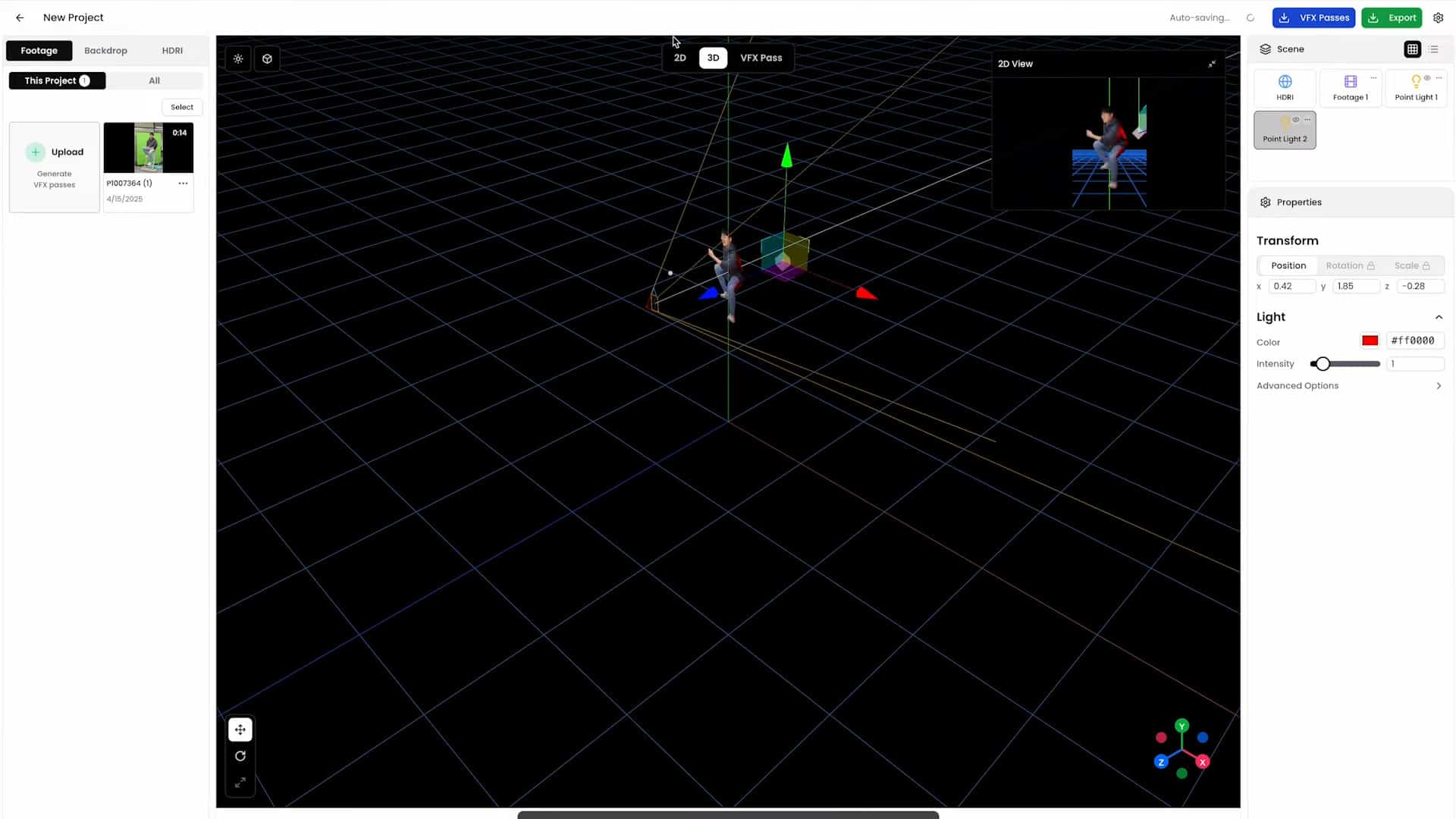
The workflow starts in the Beeble Studio web app or desktop version: upload video (green screen or not), and the AI gets to work—extracting backgrounds, creating PBR passes, and providing a real-time interface for relighting. Within the Studio, users can swap HDRIs (from the built-in library or custom sources), add point lights, and preview the results with instant feedback.
Need a background? Text prompts can generate new AI backdrops on the fly, with the usual caveats of GenAi. When finished, export your full composite or individual passes in 4K+ for Blender, Unreal, Nuke, or straight to edit. A dedicated loader plugin lets Blender and Unreal Engine users import PBR assets with a click, skipping the usual roundtrip of manual pass matching.
Deployment: Web, Desktop, CLI—And Air-Gapped
Beeble offers both web and desktop versions. Local processing is the default; no uploads to the cloud unless you want them. Air-gapped studios get RLM licensing and command-line (CLI) batch processing on Windows or Linux—making it possible to integrate into automated pipelines or run batch jobs on render farms without an internet connection (switchlight-studio.beeble.ai).
Who Should Use SwitchLight 2.0?
SwitchLight is not for Instagram filter enthusiasts. Its core audience: VFX compositors, lighting artists, colorists, look-development supervisors, indie filmmakers, and virtual production teams who need to relight live-action or green-screen plates with credible, production-ready PBR data. It’s also a fit for small shops and individuals who want the flexibility of PBR relighting without a massive pipeline investment or multi-camera setup. In practical terms, anyone who wants to blend real and CG elements (or relight plates to match different CG environments) without access to a full 3D scan should consider trying it.
Caveats: No AI Is Infallible
AI’s strengths—speed and automation—don’t make SwitchLight immune to artifacts, lighting mismatches, or temporal hiccups. The more you push the relighting or try to extract passes from low-quality or compressed sources, the more likely you are to see oddities. Beeble CEO Hoon Kim specifically urges professionals to validate AI-generated passes and composites in their own postproduction pipelines before trusting the results for final delivery (vp-land.com). That’s not just sensible—it’s necessary for any artist who wants to keep their QC department onside.
Reminder:
Innovative relighting and AI pass generation tools like SwitchLight 2.0 are best tested thoroughly in your own pipeline before any real-world delivery. No exceptions.
