



UModeler Inc. has released UModeler X Personal, a subscription license for its all-in-one 3D creation plugin embedded in Unity. The tool is aimed at indie developers, 3D artists and metaverse creators working on platforms such as VRChat or ZEPETO. UModeler X Personal enables users to perform modeling, rigging, painting, curve mesh creation and 3D text generation directly within Unity’s Editor, eliminating the need to switch between external DCC tools.
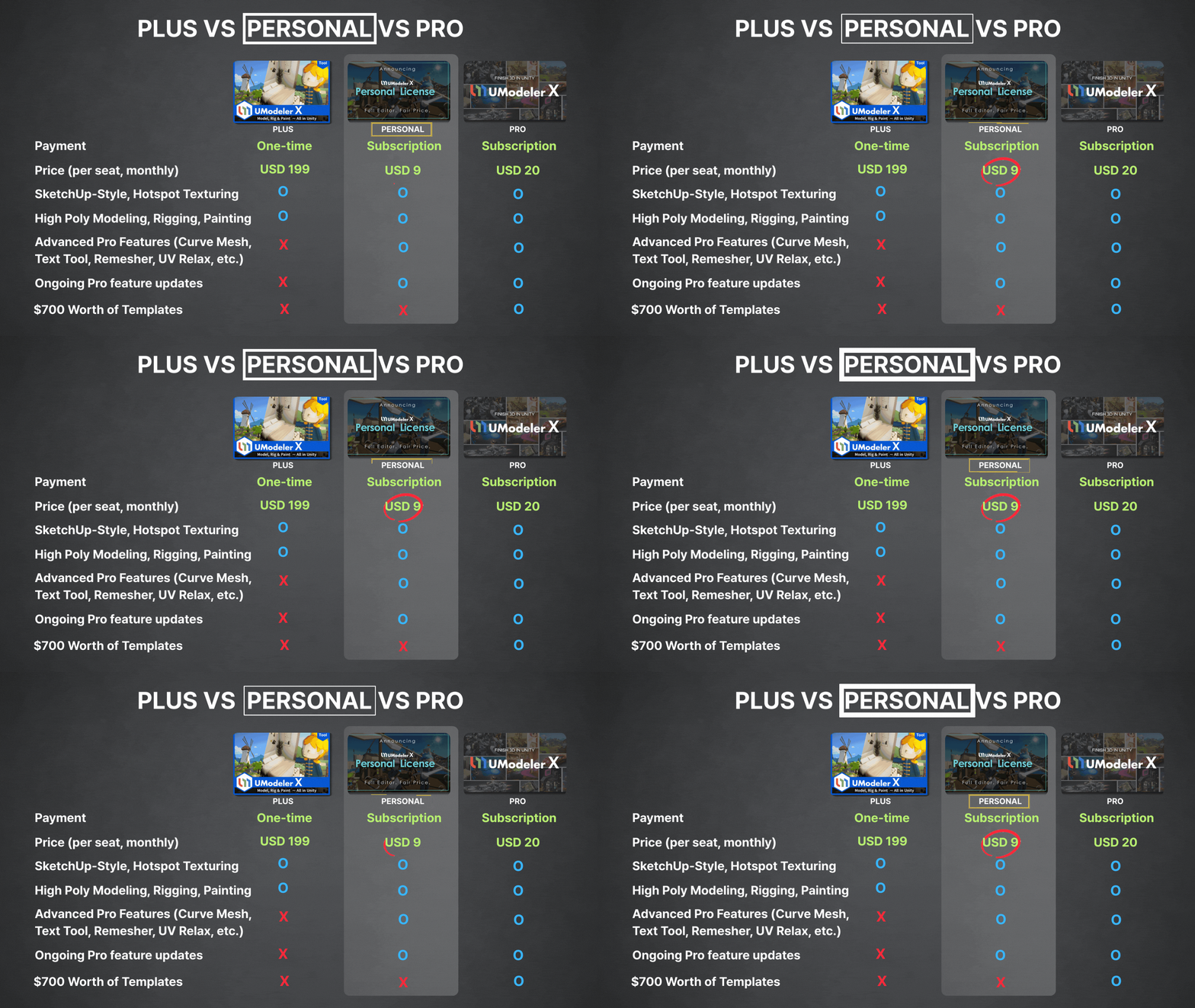
Pricing and Launch Details
UModeler X Personal launched officially on 5 August 2025. The subscription costs USD 9 per month. A 45-day free trial is available, with no credit card required. Pricing information is available on the official site.
Permanent Fallback License (PFL)
Every subscription includes a Permanent Fallback License (PFL). This means that after maintaining a subscription, users retain permanent access to the version available at the point of subscription expiry. According to UModeler, this ensures continuity of use even if a subscription is not renewed.

Features Inside Unity
UModeler X Personal integrates a full set of 3D asset creation features into the Unity Editor. The scope is designed for in-engine prototyping, rapid iteration, and lightweight production workflows:
- Modeling: Users can create and edit polygonal geometry directly in Unity. The toolset covers primitive creation, extrusion, beveling, subdivision, boolean operations and curve-driven mesh generation. Compared to external tools such as Blender or Maya, the modeling functions are simplified but sufficient for level blockouts, modular asset construction and fast iteration.
- Rigging: UModeler X provides a basic bone system for assigning skeletal structures to meshes. This allows quick preparation of assets for animation inside Unity. It is not positioned as a replacement for full rigging pipelines in Maya or 3ds Max, but is useful for lightweight character rigs, VR avatars, or interactive props.
- Painting: Users can apply vertex colours and texture painting directly on meshes inside the Editor. This eliminates the need to export to Substance Painter or Photoshop for quick colour passes. However, the painting functions are not as advanced as external texture authoring suites.
- Curve Mesh: The curve mesh tool allows procedural geometry generation from splines, suitable for roads, cables, pipes or decorative trim. It is comparable to simple curve-based workflows in Blender or Houdini, but remains focused on rapid environment asset generation in Unity.
- 3D Text: Text primitives can be created, extruded and adjusted in Unity. This is intended for titles, signage and UI elements inside immersive environments. It does not replace external typography or design tools but streamlines simple 3D text creation in-engine.
These functions remove the need for repeated export/import cycles between Unity and third-party software, though they remain focused on simplified, production-adjacent workflows rather than full-scale DCC replacement. Not independently verified at press time.
Limitations for Professional Pipelines
While UModeler X Personal reduces friction for Unity-based prototyping, it is not a substitute for specialised DCC packages in a professional pipeline:
- Modeling: No support for advanced sculpting, retopology, or high-resolution mesh workflows. Blender, Maya or ZBrush remain necessary for complex asset creation.
- Rigging: No advanced rig logic, skin weighting refinement, or control rig systems. For animation-heavy projects, external rigging remains essential.
- Painting: Texture workflows lack PBR material layering, smart masks, or procedural texturing. Substance Painter, Mari, or Photoshop continue to be required for production texturing.
- Curve Mesh: Limited compared to procedural generation in Houdini. It is suitable for fast environment dressing but not complex parametric design.
- 3D Text: Restricted to simple forms; no kerning, ligature handling, or type design tools. Graphic design software remains the standard for production typography.
These limitations mean that UModeler X Personal is best used for iteration, prototyping, and Unity-native workflows, rather than as a full replacement for DCC software in VFX or large-scale game development.
Upgrade Offers for Existing Users
UModeler confirmed special upgrade options:
- UModeler X Plus owners receive one year of UModeler X Personal for free, plus a PFL.
- Original UModeler owners get 30% off their first subscription year. If they maintain the subscription for one year, they also receive a PFL at no extra cost.
Final Notes
For production environments, artists should test UModeler X Personal within their pipeline before committing. While the tool promises a simplified Unity workflow, stability and compatibility with existing assets must be confirmed in practice.
Sources
UModeler X – Pricing Page
UModeler Blog – Personal License 2025
UModeler Documentation – UModeler X FAQ
