



At IBC 2025 in Amsterdam, Jason Druss of Adobe’s Premiere Pro team turned the booth into a live editing stage. His demo of Premiere Pro 25.5 showed off what happens when Adobe swallows a plug-in maker whole. Spoiler: the result is faster cuts, fewer render bars, and one button literally called Surprise Me.
Film Impact now plays natively
Druss opened a typical social-media timeline (fine, but flat) and replaced a cut with a VHS Damage transition. Instantly the edit pulsed with digital static, running in real time. No caching, no excuses. The magic: Film Impact’s entire library of transitions, effects, and motion tools now ships with Premiere Pro 25.5. Editors no longer need to install or license Film Impact separately. Everything lives in the Effects panel or via the new Film Impact Dashboard, which previews transitions before you drop them onto the timeline.
The “Surprise Me” aera
Each effect is deeply editable in the Effect Controls panel, position, hue, angle, or motion curves, but Druss’s crowd-pleaser was a big randomise button labelled Surprise Me. Click once, get a new version. Click again, get another. The audience watched him roll through styles until he hit a violet-tinted lens flare that fit perfectly. With 90 base effects and thousands of tweakable parameters, Druss quipped that you could “spend your career without repeating a single transition.” Editors can save any custom setup as a preset and share it with colleagues, useful when you finally hit something great by accident.
Real-time motion and look development
Druss then ditched footage altogether and animated two static PNGs using only Film Impact transitions. The result looked closer to an After Effects comp than a quick Premiere mock-up. He cloned and animated elements with Clone FX, layered bokeh blur and chromatic aberration, and key-framed the strength of the blur. He then toggled on Mosaic, instantly turning the piece into a dancing 8-bit animation, all running live on a 16-inch MacBook Pro, without rendering once. Other look-driven effects – light leaks, volumetric rays, halation, vignettes, channel shifts, now sit a click away from the main timeline. For many quick jobs, After Effects can stay closed.
But is this also working fine on my Lenovo ThinPad P16 ? We all have seen the “Realtime” Demos, and were impressed, only to learn later that there was a huge machine in the back. So, for really testing it in realtime, my trusty workhorse is:
Testing for real!
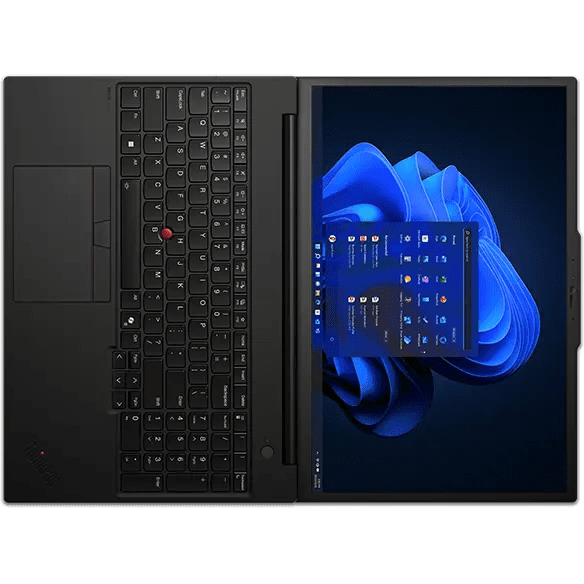
Lenovo ThinkPad P16
12th Gen Intel i7-12850HX Alder Lake
NVIDIA RTX A3000 12 GB Laptop GPU
Intel(R) UHD Graphics
64 GB DDR5
1 x 2 TB / 1 x 4 TB NVME
And I tried hard to put too many effects on my timeline – way more then look good or resaonable, just to see when the timeline would stutter. You can see the result in the intro of my tutorial. Did it work ? You will find out when you watch the realtime vMix screenrecording below.
Tl;DR: All the New Features
| Feature | Description / Benefits |
|---|---|
| 90+ new real-time effects, transitions & animations | Dramatic boost in motion capability — new dissolves, glitches, chromatic aberration effects, glows, vignettes, etc. All of these are GPU-accelerated and customizable. |
| New animation tools | You can animate text, video, graphics using drag-and-drop transitions (less need to round-trip to After Effects). |
| Live waveform editing | Audio waveforms now update in real time as you adjust volume, add keyframes, or perform ripple/roll edits — making audio edits more visual. |
| Multi-Transitions editing | You can apply, edit, and manage transitions across multiple audio/video clips simultaneously, improving consistency and speed. |
| Snappier timeline playback / responsiveness | Under-the-hood improvements to make dragging, skimming, and general timeline interactivity more fluid. |
| Hardware acceleration enhancements | • 10-bit 4:2:2 H.264/HEVC acceleration on NVIDIA Blackwell GPUs (Adobe Hilfezentrum) • Hardware acceleration for Canon Cinema RAW Light (Adobe Hilfezentrum) • Support for decoding ARRIRAW HDE (High Density Encoding) |
| New preferences for graphics / font defaults | You can set default fonts for text, subtitles, and captions; import wide-aspect CEA-708 captions properly; and control how graphics preferences behave. (Adobe Hilfezentrum) |
| Advanced Search / Media Intelligence filtering | The Search panel supports metadata-based filters to refine results. |
| Label colors in sequence tabs | You can show and change sequence tab colors directly in the Timeline panel to help visually organize your project. |
| Improved color & metadata handling | Better automatic data range application for DNxHR / DNxHD and PNG files (preserving super whites, sub blacks), improved color management workflows, and precise HDR/SDR export control. |
| Generative Extend (using AI) | Add frames (at the beginning or end of clips) via generative AI to smooth transitions, extend reactions, or mash up ambient room tone. |
| Translation of captions / multilingual captions | Automatically translate captions into many languages (over 27) to support global reach. |
| Import MKV (H.264/AAC) support | Premiere Pro improved its MKV import performance and compatibility. |
| Export with Content Credentials | You can attach content credentials (metadata about creation / provenance) to your exported videos. |
| Rounded corners for timeline clips | A more comfortable, modern visual design for clips in the timeline view. |
| Object Masking (only in beta) | This allows isolating specific areas of footage for applying effects or selective adjustments. Because it is in beta, it may have limitations, be unstable, or change in future releases. |
Smoother playback, quicker feedback
Premiere Pro 25.5 also gets more responsive. Druss pressed spacebar, playback started almost instantly. Adobe claims latency below 0.1 seconds between command and action. Audio waveforms stay visible while dragging clips, and users can adjust multiple fades or keyframes simultaneously. Format handling is tidier too: acceleration for H.264/HEVC on new NVIDIA GPUs, improved support for Canon Cinema RAW Light and ARRIRAW HDE, and better import of 16-bit PNG files. It’s not glamorous, but it keeps editors editing instead of watching progress bars.
Premiere on iPhone: serious, not cute
Druss also teased Premiere on iPhone, calling it “craft-grade mobile editing.” The mobile version includes multi-track timelines, waveform display, and access to Adobe Stock assets. Generative AI via Firefly lets users create elements or sound effects on-device. Editors can start a project on the phone, then send it straight to desktop Premiere for finishing, no re-conforming required. For Druss, it’s less about replacing laptops and more about keeping creative momentum on the move.
One editor, one ecosystem
Druss’s booth demo summed up Adobe’s current direction: keep editors inside one app for everything, cutting, motion design, grading, and even sound. By baking Film Impact directly into Premiere Pro 25.5, Adobe removes a plug-in layer while giving back real-time speed and playful control. Still, production teams should test before updating. Adobe hasn’t confirmed whether every legacy Film Impact effect made the cut, and older projects might behave unpredictably. Premiere Pro 25.5 is available now via Creative Cloud. Try the new effects, hit Surprise Me, and see whether the randomness improves your edit or just your mood.
