



At Digital Production, we usually ignore CAD files. They belong in another world, the world of engineering departments and factory floors and solid budgets. Yet, “not our topic” does not mean “not our problem”. When a client sends you a STEP or DWG file and expects a quick visual check, a dependable viewer becomes essential.
For that reason, we have long kept ABViewer from CADSoftTools in our toolset. The utility has been around for years, and we keep Version 11 on our machine, always (Even bought a license for that, way back when). It is not a Houdini or 3ds Max replacement, but when you just need to measure or inspect engineering geometry, ABViewer does the job.
A plugin for Irfan View, our image viewer choice, adds a quick preview of what is inside those foreign file types. Also helpfull, if you do some research for looks or future models to be able to look inside DWG Files, Plans, Stepfiles and so on. Definitely one for the toolbox, and with 190€ for a lifetime license, not a huge investment.
What’s New in ABViewer 16
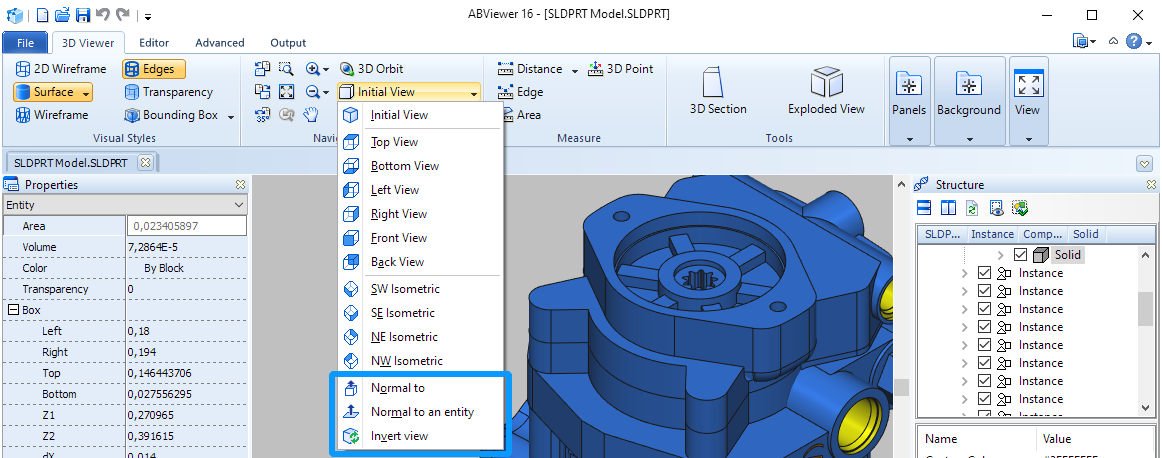
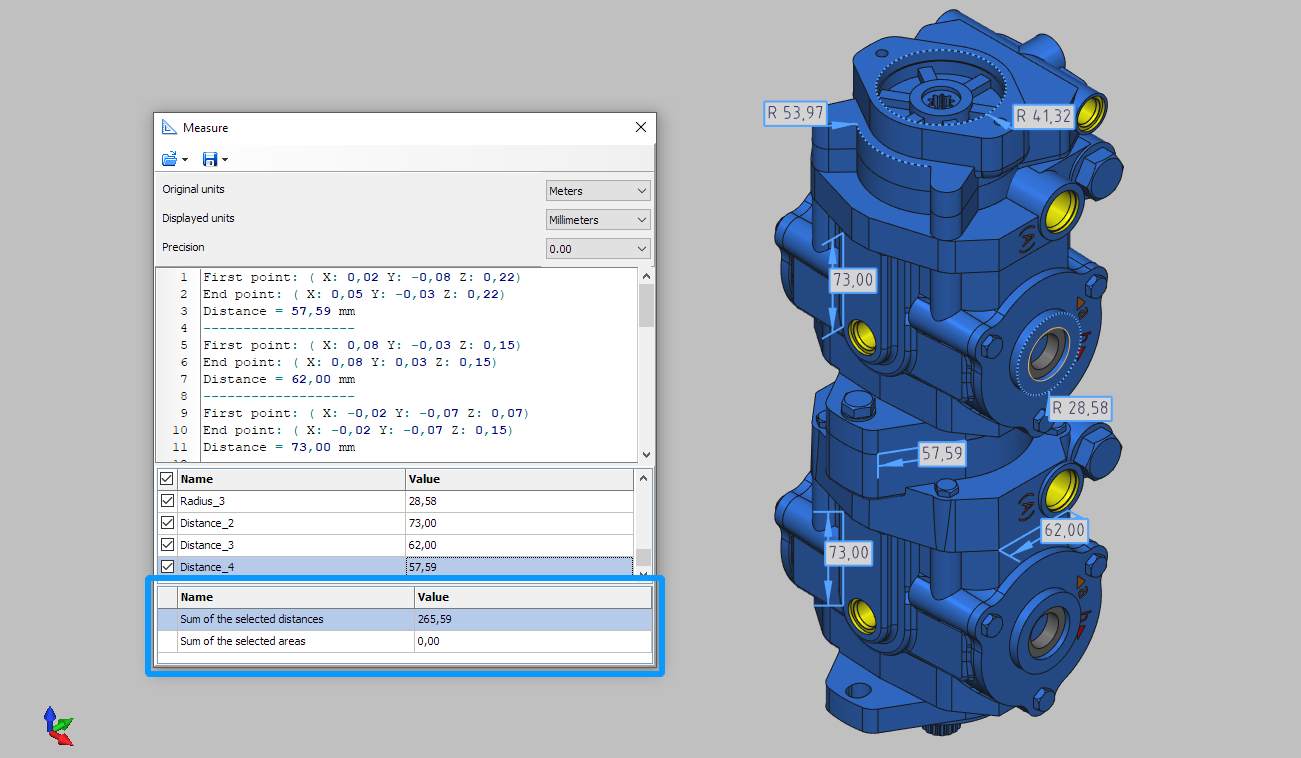
The latest release focuses on refinement. In version 16, CADSoftTools has improved the import of STEP, SLDPRT, X_T, X_B, and ACIS formats, along with cleaner export to STEP and ACIS. New view tools such as Normal to, Normal to an entity, and Invert view simplify orientation control during 3D inspection. The Bounding Box tool has been upgraded with an Oriented Minimum Bounding Box option, and a total measurement calculation for 3D models has been added.
2D workflows benefit from improved import of DWG, DXF, DWF, HPGL, and SVG, and improved export to DWG, DXF, SVG, and PDF. Exports now include DWG and DXF versions 2010, 2013, and 2018. Measurement tools in 2D view mode have also been upgraded. PDF-to-DWG conversion quality has been improved, and new settings add transparency control for fills, editable-drawing output, and the option to automatically open converted files. The G-code generation tool now includes Create Pocket for machining operations, plus settings for coordinate rounding and incremental positioning (G91).

The editor gains new drawing tools: Offset for parallel geometry, Polygon for inscribed and circumscribed shapes, and Coordinate Points for placing and connecting points by coordinate. There is now a geometric-centre snap for closed polylines, a new viewport insertion method, and grid configuration options. Additional tweaks include an adjustable display-border width, improved viewport navigation, higher stability under Wine, and general bug fixes and performance enhancements.
Supported Formats
According to the official documentation, ABViewer supports an extensive range of CAD, 3D, and image formats. It reads all versions of AutoCAD DWG and DXF (both ASCII and binary), as well as DWT templates and DWF drawings. The software also supports many 3D model formats including SAT and SAB (ACIS), STEP, IGES, STL, OBJ, 3DS, SLDPRT and SLDASM (SolidWorks parts and assemblies), Parasolid (X_T and X_B), IFC, and BREP. Vector and raster image support covers WMF, EMF, SVG, EPS, PS, CGM, and common bitmap formats such as JPEG, PNG, TIFF, and BMP.
Less common legacy and 3D-mesh formats are also supported. ABViewer can open RAW, DDS, EXR, SGI, and PSD files, and even game-oriented 3D assets like MD2, MD3, BSP, SMD, PLY, and VRML. This makes it unusually versatile for a CAD viewer, handling both engineering data and general graphics assets.
Exported Formats
ABViewer can export files to a wide set of vector, raster, and 3D formats. Vector export options include PDF, DWG, DXF, SWF, CGM, DXT, SVG, and PLT (HPGL/HPGL2). For 3D, it supports export to STL, STEP, OBJ, NMF, LMTS, SAT, and SAB. Raster export options include BMP, JPEG, PNG, GIF, TIFF, and WMF/EMF. The software can also output G-code (NC format) directly from 2D CAD drawings, which is relevant for CNC machining workflows.
Verdict
ABViewer 16 remains what it has always been: an unpretentious, technically useful tool for viewing and measuring engineering data. No production artist will model in it, but everyone in post or VFX who occasionally receives mechanical geometry should probably keep it installed. Version 16 strengthens its role as the “just open it and measure” viewer. As always, test any new version before relying on it in production.
