



Table of Contents Show
For those who don’t know the tool: Assimilate is best known for Scratch, its colour grading and finishing system used in professional post pipelines for more than twenty years. Building on that experience, the company developed Live FX, a software-only real-time media server for virtual production. Live FX sits alongside Live Looks for live grading and Live Assist for multicam VTR and Play Pro Studio as the only professional Video Player you’ll ever need. Together, these tools cover on-set backup & offload, colour, capture, playback, and now LED stage control, completing a loop from wall to camera to grade.
Why Live FX Was Created
When virtual production started creeping into film workflows, nobody had actually built a media server for film sets. Crews borrowed tools from the live-event world or bent game engines like Unreal into shape. It worked, technically. It also meant a lot of compromises, hacks, and explaining to cinematographers why things behaved like stage tech.
Live FX was explicitly built to stop that nonsense. It is a software-only system designed for film production, not for programmers or touring engineers. Live compositing, projection mapping, and image-based lighting all live in one interface that makes sense to people who think in shots and lighting setups. There are no artificial limits on video outputs or DMX universes. It stays lean, runs fast, uses hardware efficiently, and scales cleanly from a single machine to multi-node setups. Playback, lighting, and metadata all reside in the same environment rather than being duct-taped together.

Take a driving plate shoot for a car commercial. Live FX can drive 360-degree plates across a curved LED volume, control real lighting fixtures based on what is happening in the image, and stay locked to camera tracking and lens metadata. As the virtual sun in the plate moves or shifts colour, the physical lights on set follow along in real time. The result is a much closer-to-final image before anyone even opens a compositing tool.
The best part is that Live FX does not demand a rack of servers or exotic hardware. With small or midsize LED volumes, it runs comfortably on a normal workstation. Think MacBook, think gaming PC. That makes LED workflows accessible to smaller studios without turning the hardware budget into a horror story.
Completing the Assimilate Ecosystem
Live FX also neatly finishes what Assimilate has been building for the past two decades. The company already knows a thing or two about media pipelines, and while Scratch covers real-time colour work and solid format playback. Live Looks brings grading onto the set. Live Assist handles multicam VTR duties. All familiar territory.
With Live FX in the mix, the ecosystem finally extends into projection mapping, camera tracking integration, and lighting control. In other words, the bits you need for LED volumes and still very much need for classic green screen stages. Crucially, Live FX keeps metadata intact. Lens data, focus, exposure, tracking information, scene, take, timecode – all of it can be captured on set and passed straight down the line into postproduction. No extra logging, no manual copy-paste rituals, and far fewer opportunities to lose something important between shoot and post.

Why It Is Different from Unreal
Live FX is fundamentally different from running an instance of Unreal Engine. Unreal is a full game engine that requires significant system resources, whereas Live FX is designed as a creative tool for cinematographers, DITs, DPs and VFX artists. It emphasises rapid real-time operation with a user interface tailored to film workflows rather than code.
Live FX supports workflows such as 360° plates and 2.5D compositing with ease. It can also import 3D environments like Notch Blocks or USD scenes. Notch Blocks are prebuilt, real-time graphics or effects authored in the Notch motion graphics tool and used here to add dynamic or procedural visual elements directly to LED walls without taxing the system as heavily as a full engine build. (If you have a look around the Notch site, you’ll spot Live FX in many of their demonstrations)
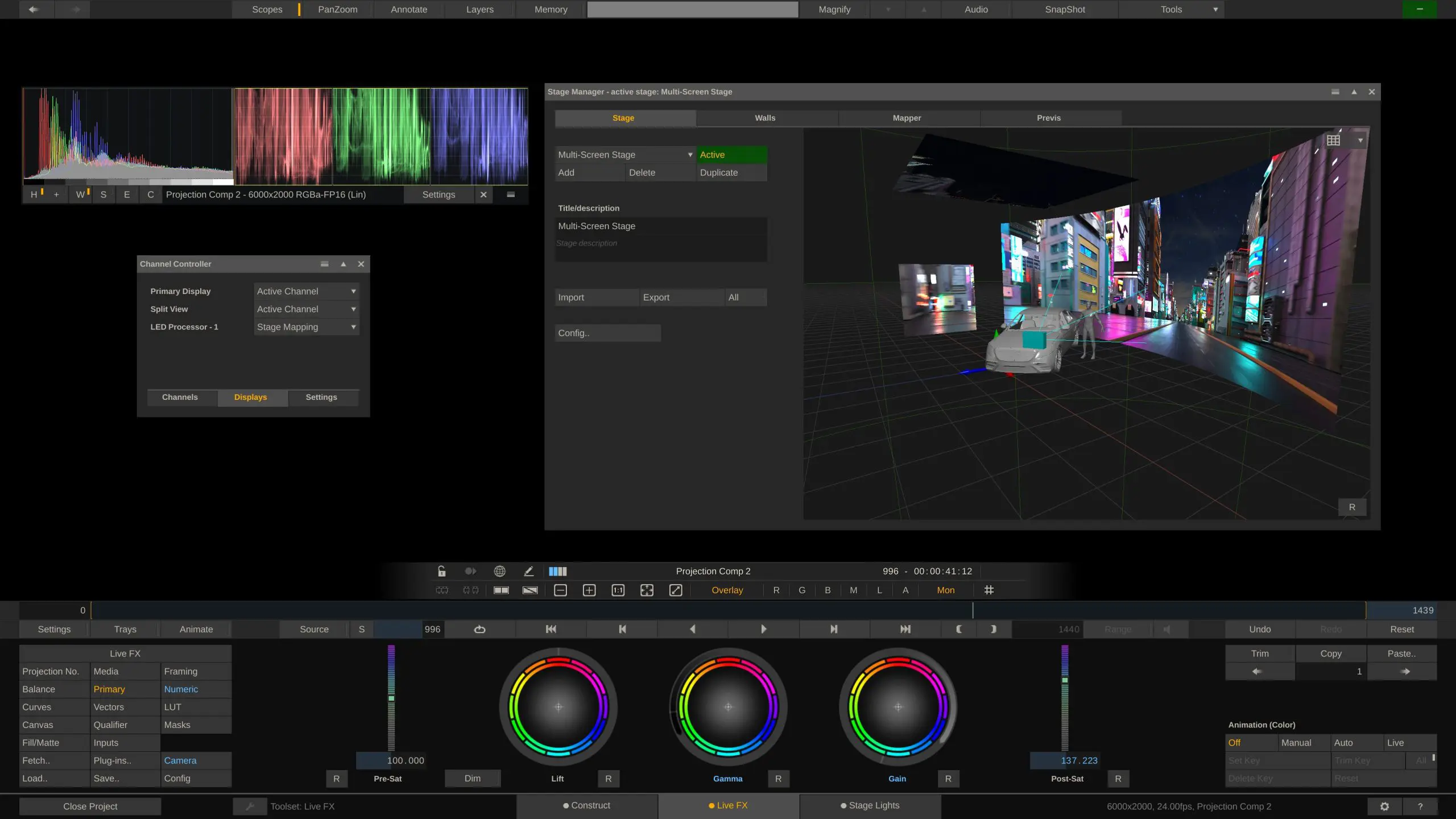
At its core, Live FX is one machine that can drive LED walls, control lights, composite live plates, and manage colour, all in a single, unified software environment.
The Software Side
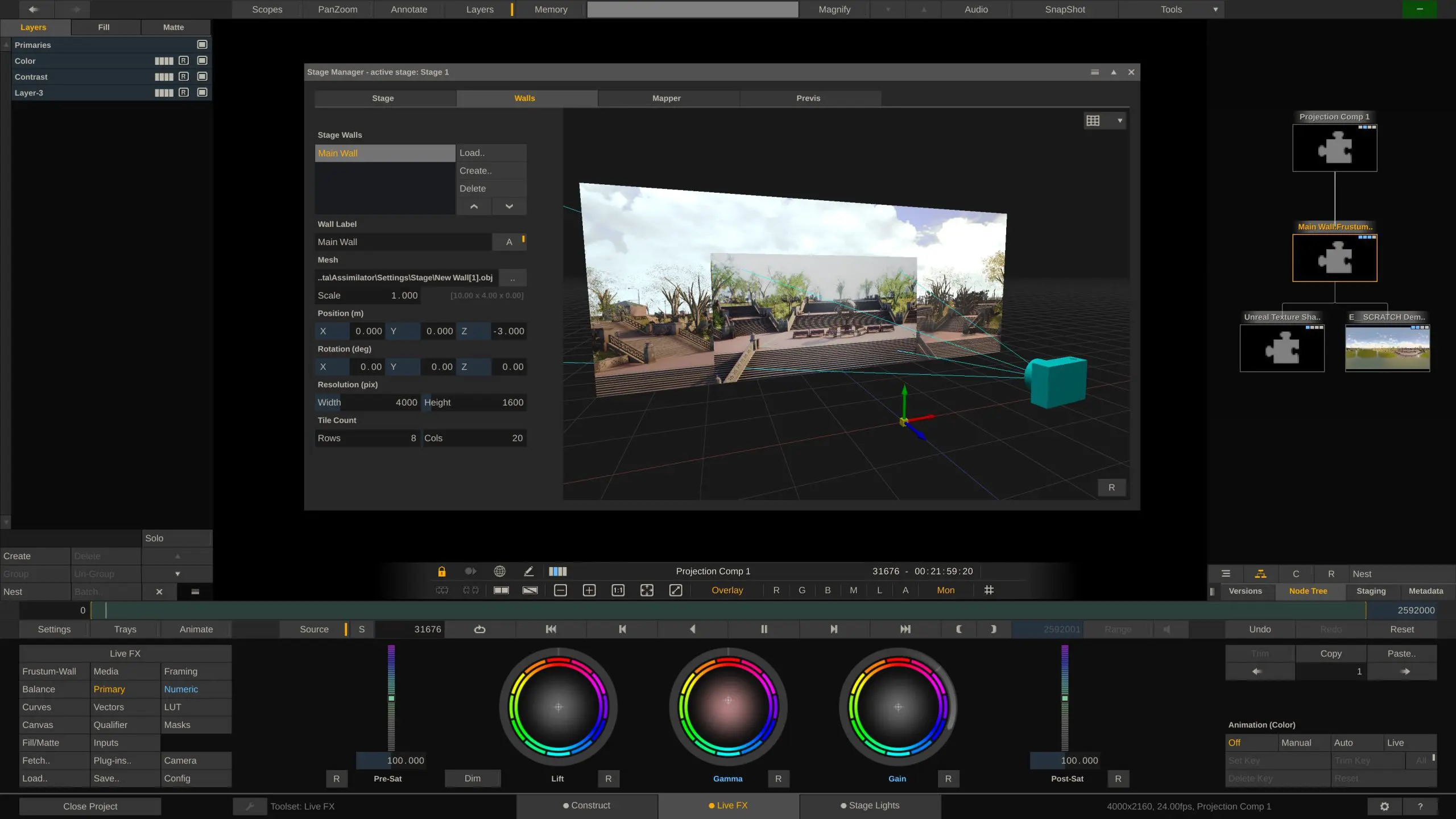
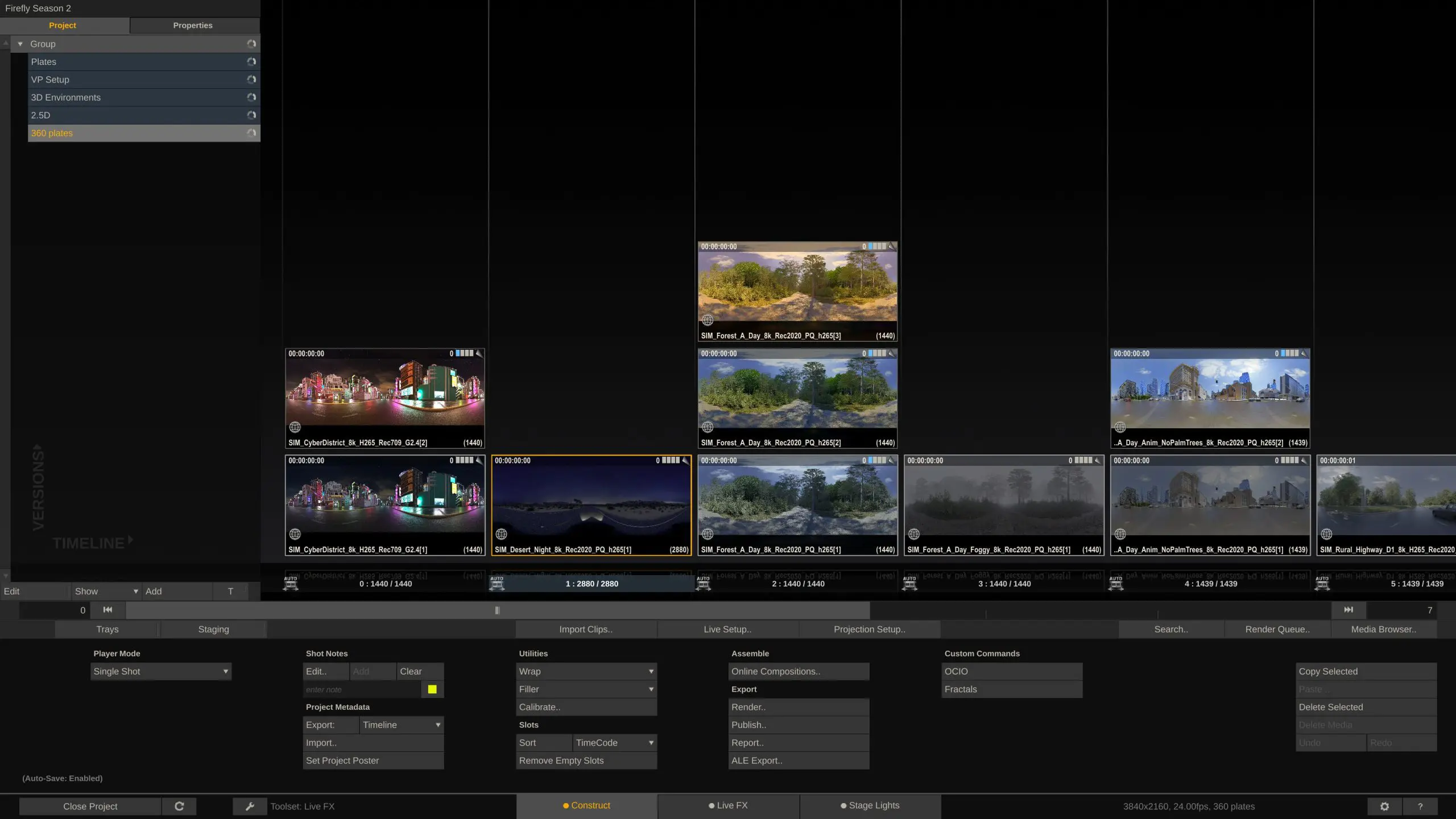
The Live FX interface is built on immediate visual feedback. It is a GPU-powered environment that can load, layer, grade, and project footage onto LED walls, green screens, or 360° domes. It supports the projection of 2D, 2.5D, 180° and 360° content beyond 16K resolution in a variety of modes, including frustum, planar, spherical, dome or cylindrical output.
For 3D content, Live FX can import USD scenes and Notch Blocks. It also supports Netflix OpenVPCal, an open-source LED wall calibration tool developed for in-camera visual effects workflows. OpenVPCal creates colour space corrections tailored to the camera and LED pipeline to improve image accuracy across walls.
Live FX does not limit scene size or plate resolution; the hardware instead determines those constraints. Modern GPUs commonly support textures up to 32K by 32K, and Live FX can theoretically handle playback up to 65K by 65K at over 1,000 frames per second. However, real-world limits are set by machine capability.
Compositing
Real-time compositing includes built-in qualifiers:Live FX ships with RGB, Chroma, Luma, HSV and Vector keyers that can be combined in any way thinkable. It supports OFX plug-ins and Matchbox Shaders, the latter being small GPU-based shading programs developed initially for Autodesk Flame, adapted here for custom, real-time visual effects.
Inline colour grading tools include wheels, curves, masks, and LUT management, enabling DITs and Creative Artists to see accurate grades on set. Camera and metadata integration allows Live FX to read detailed information, such as lens, focus, and exposure, from SDI feeds from manufacturers including ARRI, Sony, Canon, and Panasonic. It supports all major camera trakcing systems, such as Mo-Sys, Zeiss, Vicon, OptiTrack and others, but also generic protocols like FreeD, Open Track IO or Open Sound Control protocols.
Playback in Live FX supports nearly any frame rate or aspect ratio the GPU can manage. It can record raw feeds and metadata while outputting a live composite and automatically rebuild the final online version after the shoot. Storage requirements vary by format; high-resolution codecs such as NotchLC or OpenEXR sequences demand high-speed, high-capacity storage, while lighter formats accommodate portable SSDs. Live FX can also capture and output via NDI for streaming to platforms such as YouTube through tools like OBS.
Live FX does not natively run interactive simulations or complex particle systems, but it integrates with engines such as Unreal, Blender or Unity. In these hybrid workflows, Live FX passes timecode and tracking data to the engine and receives the rendered output back, making it suitable as a composer in mixed real-time pipelines.

Scaling the Stage
A single Live FX Studio system can control up to seven LED processors from two GPUs, or up to eight LED processors through two 8K-capable SDI cards – provided no other hardware bottleneck limits the playback. For larger volumes, a multi-node configuration becomes necessary. In such setups, multiple Live FX systems split the rendering and control responsibilities across the volume, with each system driving part of the wall.
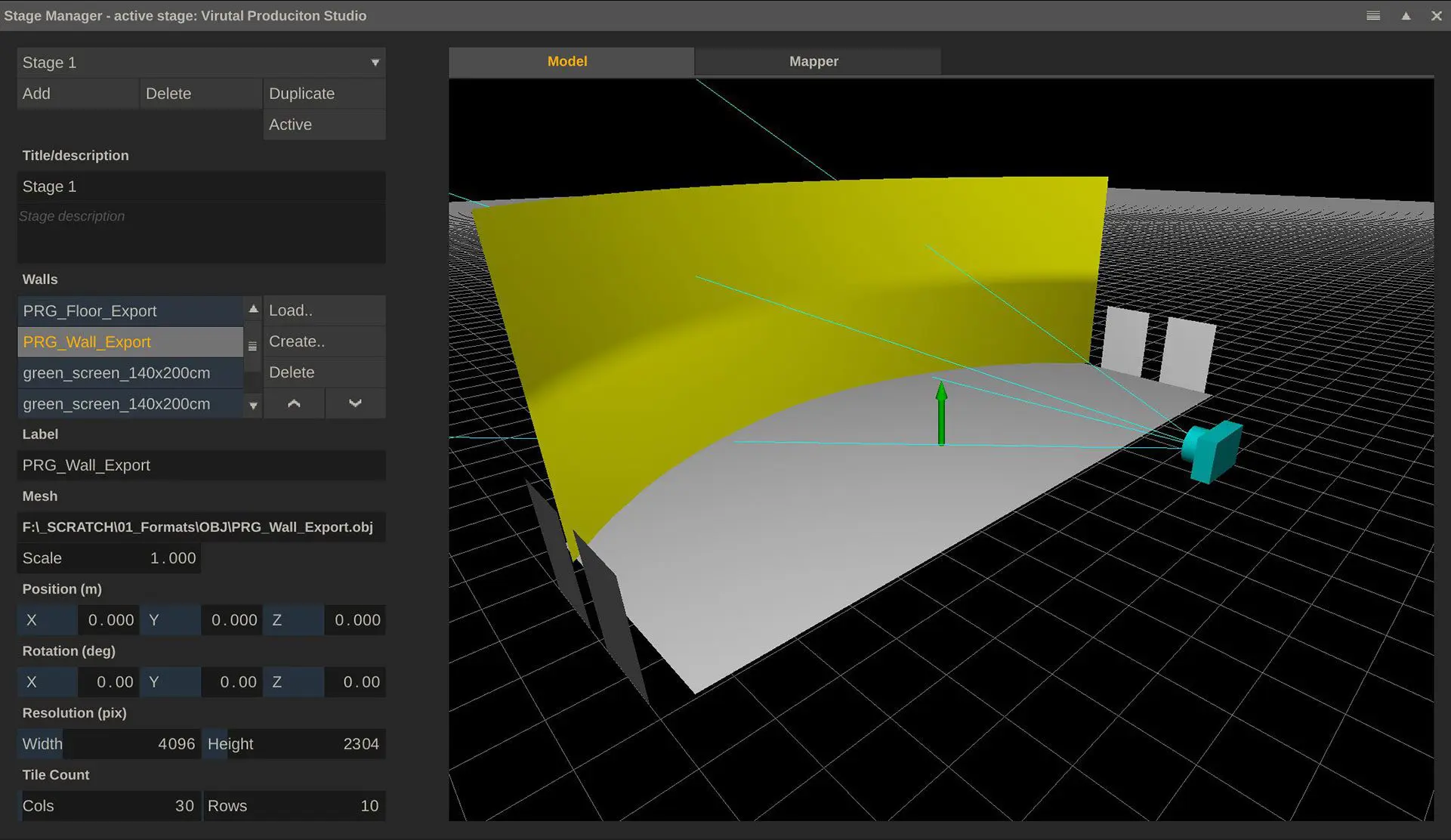
Multi-node workflows also help clarify roles on set. Typically the guy taking care of the lights, is a different guy from the one taking care of the LED volume and you don’t want the two to fight over who gets to use mouse and keyboard. So setting up a separate client Live FX system to take care of lighting might be a good choice.
Hardware and Platform Requirements
One of Live FX’s core strengths is that it does not require datacentre level hardware. A modern workstation or laptop with a contemporary GPU is sufficient for smaller and medium setups. For larger stages, a Windows workstation with a high-end Nvidia Quadro card is advisable. You can run Live FX on really any machine, as long as the operating system is Windows or macOS. You can even reuse existing mediaserver hardware. The main question is, whether that hardware is up to the task its supposed to fulfill – the software does not impose any limitations.

CPU requirements are modest; any processor from the last five years that handles video rendering comfortably will work. Minimum RAM is 8GB, recommendations start at 32 GB with 64 GB or more for heavier workloads. If Unreal runs on the same machine, memory usage scales with that workload. Supported operating systems are Windows 10 or later and macOS 10.15 or later. Optional SDI I/O can be added via cards from AJA, Blackmagic Design or Bluefish444.
Existing media server hardware can often be repurposed for Live FX if it meets these requirements. The software itself does not impose restrictions; performance depends on hardware suitability. Even a compact Mac Mini can handle basic LED playback for smaller LED stages .
Connectivity: Walls and Lights
Live FX interfaces directly with LED processors, such as those from Brompton and Megapixel VR, to manage genlock, timecode, and perspective correction. It outputs Art-Net, sACN or USB DMX to lighting fixtures and is the only tool right now that supports video-based fixtures like Kino Flo Mimiks, wihch do not use DMX. (A short glossary of those formats at the bottom)

In image-based lighting mode, each fixture can respond to what is playing on the screen – or content that is supposed to appear off the screen in front, above, or next to the talent on stage (think 360° content, where only a portion of the entire 360 degrees is actually shown on the LED wall and the other content can be used for image-based lighting to simulate the environment!). If the plate shows an intense directional light from the left, the physical lights respond accordingly, making stage illumination react to LED content in real time.
Live FX integrates with lighting consoles, enabling gaffers to control physical fixtures or their virtual equivalents. Because Live FX handles pixel mapping internally, lighting desks only need to control up to 51 DMX channels per fixture, regardless of how many channels the physical fixture uses. This helps reduce network complexity and preserve universes on the lighting console.
A webinterface?
A built-in web interface allows remote control of fixtures from a tablet or phone, which is convenient for on-set adjustments. Using real stage lighting to complement LED walls provides brightness and full-spectrum illumination that LED panels alone often cannot deliver. Many LED walls remain based on RGB emitters that exhibit spectral gaps, particularly problematic for accurate skin tones. Stage lights with full-spectrum sources help close those gaps, producing more realistic imagery. Although newer LED tiles that incorporate warm and cool white emitters improve colour response, adoption in studios remains limited, due to cost.
Setup and Onboarding
It is claimed that a Live FX setup can be completed before your coffee gets cold. Installation, licensing and launch are straightforward. Connect the LED processors and lighting interfaces, load the background plates or environments, import LUTs or colour profiles such as ACES, Rec.2020 or HDR10, and begin playback. Lighting synchronises automatically.
Learning resources include the Assimilate YouTube channel,
demo scenes for green screen and LED wall workflows from sim-plates.com,
the Live FX User Guide,
and the Assimilate Discord server.
To learn Live FX, Assimilate offers dedicated training, which should be booked for at least 2 days. Alternatively, their free Assimilate Academy Masterclass might come to a town near you. But even without training, Live FX can be learnt fast and efficiently via the YouTube channel. Tutorials and dedicated playlist for almost any subject exist and allow new users to get up & running really quickly. While it is preferred that users get acquainted with the software beforehand, the reality is that Live FX is often deployed a day before the shoot, but even in those scenarios, new users can get a usable image onto the wall within minutes after installing the software.

But does it work?
Although a very young tool, Live FX has been used on major Netflix shows and feature films. Unfortunately, a lot of the details cannot yet be disclosed, but here is a very select list of the latest case studies:
- LiveFX on “Secrets we Keep” https://digitalmedianet.com/behind-the-scenes-of-the-netflix-hit-secrets-we-keep-a-virtual-production-deep-dive/
- Live FX for “Biffy Clyro” https://digitalmedianet.com/interview-with-russ-shaw-daniel-walker-on-the-making-of-biffy-clyros-goodbye-video/
- Live FX on “Ballad for a Small Player”: https://digitalmedianet.com/behind-the-scenes-visual-effects-for-ballad-of-a-small-player/
What’s new in the latest release and what’s next?
Just before Christmas, Assimilate released Live FX 9.9, which introduced true multi-node workflows, along with multi-GPU-output options, an updated Stage Manager, new Unreal nDisplay workflow, and various smaller updates to the IBL toolset, projection modes and format support. But Assimilate is already working on the next batch of features: REST API and native ST2110 support are coming up later this year.
Compatibility, Technical Specs and Pricing
Live FX supports Windows 10 or newer and macOS 10.15 or newer. It scales from laptops to full LED control rigs. Typical configurations can hold multiple 4K feeds or a single 16K background plate. Supported file types include EXR, ProRes, NotchLC, HAP, RAW, H.264, H.265, LUTs (.cube and .3dl), CDL, Notch Blocks and USD. External I/O includes SDI, NDI, Spout, Syphon, OSC, DMX, Art-Net and sACN.
Camera metadata and colour data flow directly through the Assimilate ecosystem. Metadata including user annotations, scene and take information and all camera tracking and SDI-metadata can be recorded and passed along to postproduction. Integration with Unreal, Blender and Unity workflows can happen via GPU texture sharing or NDI/SDI. Licensing is available in multiple options: monthly ($695), 3-month ($1,595), annual ($4,995) and permanent ($7,495, including one year of support and updates). Annual support for permanent licences can be renewed at any time. And before everything, get the free trial / learning edition here.
Why It Matters
Live FX functions as the set’s nervous system, coordinating LED walls, lighting, compositing and colour with post-grade precision and real-time responsiveness. It brings film production language and workflows onto the stage, reducing guesswork and providing artistic control at the source. After twenty years of Scratch being called the Swiss army knife of postproduction, Live FX may take that title for virtual production.
As always, professionals should test thoroughly before deploying on live shoots, and you can do this easily with the free personal learning edition here. Register and drop us a line that Digital Production sent you. Assimilate will set you up :).
Appendix: Protocols, Extensions, Standards and Definitions
FreeD A tracking data protocol developed for camera tracking systems to transmit pose, lens and other metadata in real time.
Open Track IO An open and free metadata protocol designed by the SMPTE RiS-OSVP group for virtual production tracking interoperability. ris-pub.smpte.org
Open Sound Control (OSC) A network protocol for communication among computers and multimedia devices, widely used in creative and show control environments. Wikipedia
Art-Net An Ethernet protocol specification for transporting DMX universes over UDP/IP, used for lighting control in entertainment networks. Beckhoff Automation
sACN (Streaming Architecture for Control Networks) – A protocol (ANSI E1.31) for sending DMX data over UDP/IP networks, designed for multicasting lighting control. Beckhoff Automation
OpenVPCal An open-source calibration tool for LED wall and camera pipelines developed by Netflix, used to generate colour space corrections. GitHub
Notch Blocks Prebuilt, real-time content building blocks created in the Notch motion graphics tool for procedural visuals. Notch Blocks
Matchbox Shaders Small, GPU-based shader programs originally developed for real-time effects in Autodesk Flame, used here for Live FX real-time effects.
USD (Universal Scene Description) A file format and interchange framework for 3D scene descriptions, widely adopted for complex pipeline interoperability. But as Digital Production readers you should know about all this. Why are you reading this? Get the LiveFX-Trial!
RTMP (Real Time Messaging Protocol) A protocol for streaming audio, video and data over the internet.
P.S.: Yes, the headline is a wink at one of the funniest moments in Mel Brooks’ High Anxiety. We’ll just leave this here.

