



Table of Contents Show
For those who don’t know the tool: Druckli Tools is a node asset library for Cinema 4D by Dominik Ruckli. It installs via the Asset Browser as a zip database and adds procedural modelling, selection, distribution and generator assets aimed at node-based workflows.
Version two, asset browser first
Dominik Ruckli has released version two of Druckli Tools, a node asset collection for Cinema 4D. Vversion two includes all tools from version one plus additional assets, and requires Cinema 4D 2026.1 or later. On earlier versions not all tools will work. Installation is handled directly through the Asset Browser by connecting the downloaded zip file as a database. The zip does not need to be unpacked. Two variants are available. The full version contains example scenes and additional assets. A light version omits the heavier example scenes to reduce disk usage. The toolset is distributed via Gumroad . Pricing is “Name a Fair Price” .
Minor updates, practical fixes
Several assets from version one have been updated. All selection visualisers no longer rely on a default selection string that stopped working in Cinema 4D 2025.1, Users must now explicitly define or search for selections. The Ray Connector asset has been clarified. Its input was previously labelled as a points object, which led users to assume it required geometry. It actually operates on a matrix object.
Surface Stippling has been adjusted for large scenes. The previous version reportedly produced incorrect results on very large meshes. The updated asset is described as working correctly on larger scenes. A new stippling distribution variant has also been introduced for MoGraph workflows.
Plane Split rebuilt
The most significant change is a complete rebuild of the Plane Split asset, now referred to as version three inside the library. In the previous implementation, UVs, normals, weight maps and selections were not reliably transferred after cutting geometry. The new version is described as transferring UVs and normals correctly and offering optional transfer of vertex maps and selections.
Users can define the cutting axis and whether to generate top, bottom or both outputs. Selection transfer can be toggled for performance reasons when working with large meshes. The asset can also store new selections created at the cutting edge, including point, edge and polygon selections. Users can define custom names for border, top and bottom selections generated during the cut.
Normal handling is addressed explicitly. Proper shading after cutting requires correct normals. The author demonstrates generating a normal tag before cutting, either manually or procedurally, to avoid shading artefacts caused by Phong interpolation. This is a practical reminder that procedural cutting still depends on valid surface normals.
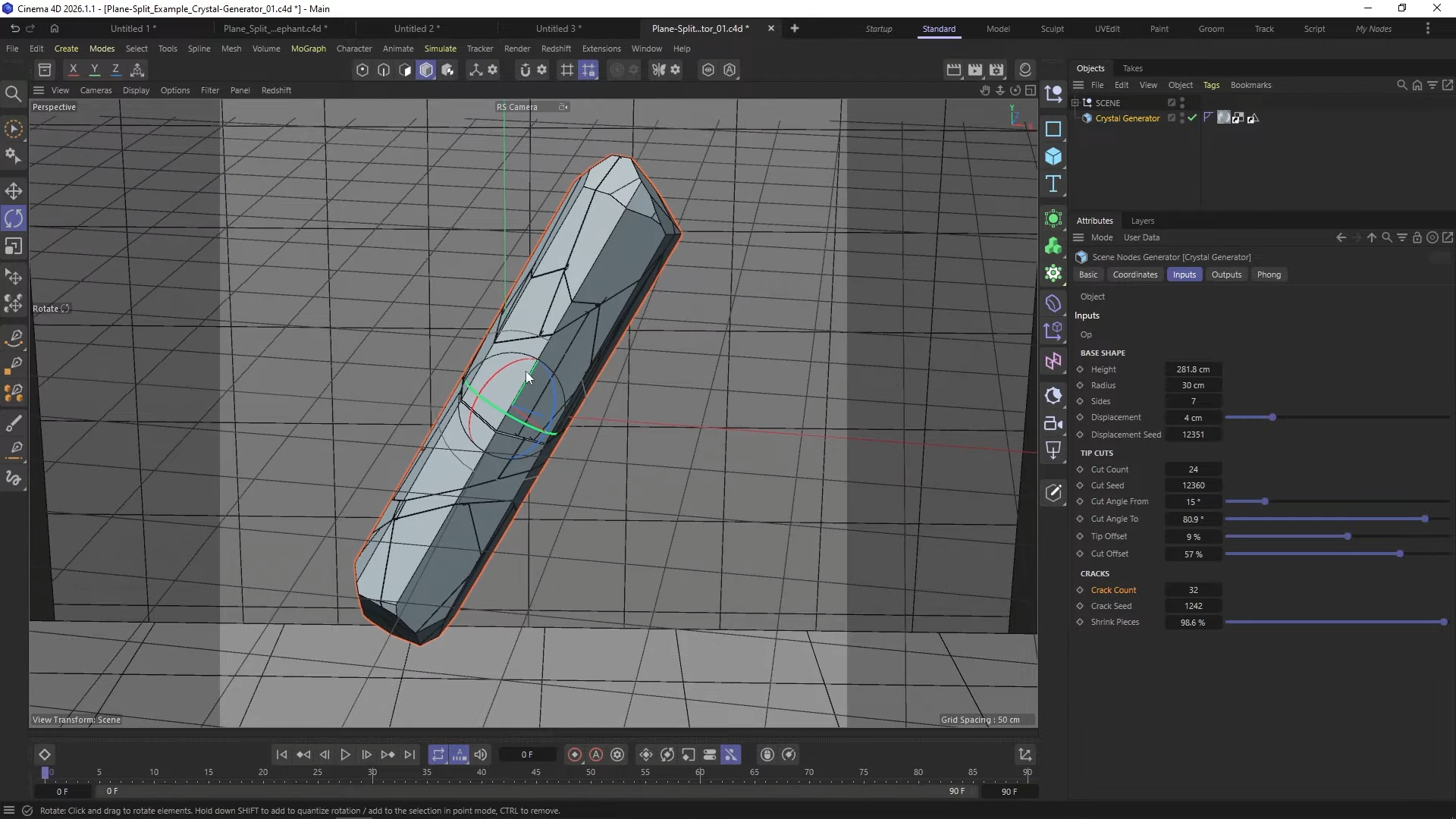
An included example scene demonstrates a procedural crystal generator built with Plane Split and the Close Polygon Holes asset. The setup uses repeated plane cuts, parameterised height, radius, side count, displacement seed and crack count to generate fractured crystal forms. The example is procedural and adjustable but relies entirely on the provided node assets.
Selection and visualisation tools
Outline Selection provides an alternative to Cinema 4D’s built in Border Selection node. According to the author, the default node can be slow on dense meshes. The custom implementation is presented as faster, although no benchmarks are supplied.
Select by Camera View creates selections based on a camera’s field of view. It supports viewport camera reading or object link input in node setups. Parameters include XY border offset, near and far clipping planes, optional exclusion of occluded geometry and surface offset tolerance for polygon selection. An example scene shows scattering trees only within the active camera frustum.
Vertex Map Visualiser displays per point vertex map values as numeric text in the viewport. Standard vertex maps are colour based and can exceed a normalised zero to one range depending on node operations. The visualiser reveals exact float values with adjustable precision and optional camera alignment. The author notes that camera aligned text can reduce performance on high density meshes.
Normal Visualiser exposes vertex normals in node-based workflows. Cinema 4D’s viewport normal display does not function inside node meshes. The asset requires a normal tag to read data. If only Phong smoothing is present, users must convert it to a normal tag.
Axis Preview visualises transformation matrices as axes, primarily for distribution and scattering setups. It displays X and Z orientation vectors per matrix, aiding debugging of alignment in node-based MoGraph workflows. These utilities target technical directors and look development artists who need numeric and vector-level feedback inside node graphs.
Modifiers and node utilities
Close Polygon Holes procedurally fills open boundaries on meshes. It can operate automatically on all holes or use an edge selection. When used in combination with Plane Split, it can cap newly created openings. If a normal tag exists, the asset can either respect it or generate flat shading normals.
Spline Smooth restores interpolation on resampled splines. In Cinema 4D, resampling removes interpolation type influence. The asset reintroduces interpolation modes such as Bezier or B-spline on resampled splines inside procedural setups.
3D Noise extends Cinema 4D’s Sample Noise by outputting a three-dimensional vector instead of a single float. Standard Sample Noise returns a one-dimensional value, requiring three nodes for XYZ displacement. 3D Noise outputs a vector directly, simplifying vector displacement workflows. Parameters include offset, noise type, octaves, seed, scale, amplitude, speed and remapping range. This reduces node count in displacement setups.
Get and Set Polygon Color convert between point-based and polygon-based vertex colour representations. The toolset allows per polygon colour assignment using arrays, iteration and conditional logic inside nodes. Example scenes demonstrate threshold-based colouring and polygon index comparisons.
These assets are procedural building blocks rather than UI tools. They are intended for users already comfortable inside the Scene Nodes system.
Generators and distributions
The Stitching asset generates procedural stitches along a guide spline on a surface mesh. It operates in real world scale. Parameters control stitch length, gap, randomness, zigzag or parallel patterns, thread count, lift, tilt, bendiness and global seed.
A grow animation system supports progressive stitching with different animation modes, including floating and machine style stitching. Users can define subdivision for performance versus smoothness trade offs and adjust fade spread and randomness.
Multi Loft functions similarly to Cinema 4D’s Loft object but operates on spline segments within a single connected spline rather than separate spline objects. It supports open or closed configurations, segment interpolation and optional caps. An additional optimise asset can weld resulting points.
Split Spline Mask extends the standard Spline Mask by producing open splines rather than always closed results. It includes axis selection, inversion and optional end point welding.
Two new distribution types are included. Surface Stippling Distribution adapts the existing stippling generator to MoGraph distribution. The author states that distribution density no longer depends on object scale, addressing behaviour in the earlier asset. Parameters include iteration count, neighbour count, search distance, strength, solver mode and optional vertex map driven charge for clustering and repulsion. Example scenes include toothbrush bristles, scale placement and large point distributions.
Paint Stroke Distribution builds on a previously published tutorial setup. It distributes strokes over a surface using flow splines derived from gradient intersection assets and vertex maps. Parameters are reorganised compared to the tutorial but functionality is described as equivalent. Example scenes demonstrate painterly portrait effects and more complex scenes with lighting and shadow driven maps.
The documentation is delivered primarily through tutorial videos by Dominik. As always, new tools and innovations should be tested before use in production to confirm stability, compatibility and performance under real project conditions.
