



Houdini is no longer a tool that is primarily used for simulations; it is increasingly being used for animations, crowds and other VFX tasks. Thanks to the Houdini Engine, the exchange with other software packages now also runs smoothly.
In addition to new modelling, animation and rendering tools, Houdini 15 includes onion skinning, new shader building tools, crowd ragdolls and the Houdini Engine 2.0.
Modelling
With the new Tweak Edit workflow, Edge Sliding, Soft Selection Highlighting and new tools such as PolyBridge and PolyExpand 2D, modelling artists can now work more intuitively in Houdini’s viewport. The handling of high-res models has also been improved: thanks to the new Retopology tool, it is now easier to create low-res geometry by allowing the artist to record it onto the high-res geometry.
 Rendering

Rendering with Mantra has also been revised with improved checkpointing and render view feedback. In terms of shading, a new shader library has been added, as well as a reorganised Shader FX 2.0 menu, layered materials and a cartoon shader. Disney’s physically-based Principled Shader is implemented in Houdini 15 and two libraries with royalty-free PBR textures are available for free on the SideFX website, which can be used with the shader building tools in Houdini 15.
For those who prefer to render with Renderman, support for the Pixar tool version 20 and RIS has also been fully integrated into Houdini 15. In the current DP issue 07 : 2015 we have a detailed article by Pixar artist Markus Kranzler on version 20 of Renderman and its functions.
Animation
Houdini 15 can do onion skinning, has a pose library panel and an improved character picker panel, and dope sheet optimisations have also been added. This means that 3D characters can now be better posed and keyframed with Houdini. In addition, ready-made character rigs are available in Houdini, which can be used to test the new animation tools.
Crowds
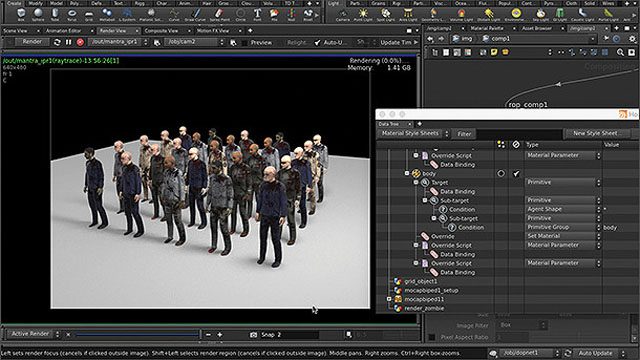
The Houdini crowd tools have been expanded in version 15 with ragdoll dynamics and functions such as limb detachment and optimised crowd behaviour. It is now easier to set up material and geometry variations and clear targets can be set. The new Agent Cam tool can also be used to record a point-of-view shot.
Effects
Houdini 15 is designed to create larger, even more dynamic effects: New adaptive Position Based Dynamics (PBD) and Viscous Fluids tools such as Lava, Melt Object and emitting Steam have been added. Fluid and PBD simulations can now be distributed to different nodes on the render farm, making extremely large sims easier to manage and a FLIP fluid sim with billions of particles easier to realise than before.
Houdini for games
Game artists in particular who create procedural assets for use in engines such as Unity or Unreal should benefit from the modelling optimisations in Houdini 15: The PolyExpand2D tool makes straight skeleton calculation easier and it is ideal for generating roads. Texture baking and viewport support for UDMI textures, world-space normal maps, UV mesh boundaries and overlapping UV areas should also support the work of game artists.
Houdini Engine 2.0
Thanks to Houdini Engine 2.0, Houdini Digital Assets can now be opened in the viewport of Maya, Cinema 4D, UE4 and Unity. Independent developer Hideki Suzuk has also developed a plug-in for 3ds Max, and the code is already available on Github. A compiled plug-in should also be available soon.
If you are looking for a few tutorial videos showing the new Houdini 15 tools in action, Side Effects Software has put together something here. For technical directors there are a few masterclasses here.
The complete, comprehensive feature list can be found here.
And here, of course, is the download for Houdini 15. If you are not yet a user: Houdini costs around 2000 US dollars and is compatible with Windows, Mac OS X and Linux 64-bit.
All further information can be found on the Side Effects Software website.
