



Until the final version is released, we are concentrating here on improvements of functions that were already available in version 18 but were not yet particularly mature. One of these is the transcription from audio to text.
In our article on 18.5 and 18.6 of DaVinci Resolve (DR for short) in DP 23:06, we already dealt in detail with the then new speech recognition. Unfortunately, we had to admit that there were still considerable comprehension problems. As the competition, such as Adobe with Premiere Pro, is not sleeping in this area either, this time we want to find out whether anything has changed.
In any case, a new feature is the optional recognition of the person speaking, to whom you can subsequently assign a name. Initially, we left the setting in the programme on “Auto” in the hope that the AI would find out the language itself. Unfortunately, this was a disappointment, because in a feature film with clearly understandable German dialogue, the program only stated that a foreign language was present and reported the type of music and a few noises. Incidentally, this was done in English, even though we had switched the interface from DR to German. You would expect the AI to orientate itself to the language setting of the operating system, or at least that of the GUI.

Only after selecting the language to be recognised in the project settings did we get a more usable result. However, after closer inspection, we again found the hallucinated, multiple repetitions of a sentence that was basically recognised correctly. These also appeared elsewhere in the film without dialogue, often before the actually existing sentence. There were also occasional omissions, as in version 18, with even slightly longer sections of dialogue occasionally being ignored. During a passage of jazz music with a small cast, without any dialogue at all, we got completely nonsensical text mixed with Cyrillic letters (or should that be Greek?).
Subtitles
As we have had relatively good results in the past with the “Create Subtitles from Audio” function in the timeline menu, this was our next test. To our surprise, this is obviously not the same AI, as the language is recognised correctly here even when set to “Auto” and the results tend to be better than with transcription. Where there were misinterpretations, these were not identical to those from the transcription.
To ensure that it was not just the language, we repeated the test with a French film. The results were largely comparable in terms of error rate and type of error, and the differences in language identification between transcription and subtitles were also the same. What was astonishing, however: If the film was in French but the language for subtitles was set to German, the AI can translate subtitles reasonably well. Where the text was recognised correctly, punctuation and spelling were also surprisingly good, e.g. subordinate clauses or questions were rendered correctly.
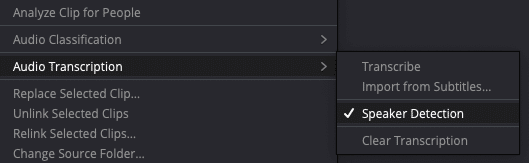
As well as being accessed via the icon at the top, the transcription can be accessed by right-clicking on clips or a timeline in the Media Pool. It is irritating that after closing the text window, selecting “Transcribe” in the menu opens the window again, as if the analysis had to be repeated. A new feature here is that text can be imported from subtitles or exported with speaker information as a file in .srtx format. Logically, the errors are identical to those in the transcription window.
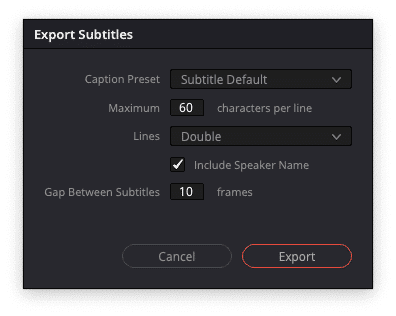
Identify speakers
The menu also contains the new “Speaker recognition” function. After correct language selection, the AI needed less than 5 minutes for a feature film of just under one and a half hours on a MacBook M1 Pro with pure text recognition, with this additional function it was a good 7 minutes. Unfortunately, the results were not outstanding in this respect either. Even male and female voices were not always correctly separated in short dialogues. In longer text passages, there was still confusion between speakers of the same gender, even between young and older voices.

In addition, the AI generated far more speakers in the list than were actually involved, especially for short dialogue passages of the same person. On the other hand, the text of a completely new person is often assigned to a person who has already appeared before. The AI had difficulties recognising the same person, especially when changing the tone of voice to express different emotions, as well as when whispering and shouting with room reverberation, even if the text content was recognised correctly. Overall, the new function is still not very useful under these conditions.
In all tests, we noticed that speech recognition seemed to run much faster at the beginning, with up to 28 times real time being reported. After a short time, the display dropped to considerably lower values, in some cases less than ten times. We therefore also tested the possibility that a short clip could be analysed better than a longer one – unfortunately to no avail, there were no differences.

Filtering with AI
We had deliberately presented the AI with fully mixed feature films as an endurance test, because even in earlier versions, a commentary in clearly spoken English without any music or environmental noises was recognised almost perfectly. A trial with conventional normalisation only brought us various “Muffled Speaking” messages in the subtitle function, but DR now offers two neural filters for speech called “Voice Isolation” and “Dialogue Leveler”. When set to 100%, the first can actually remove most of the music and background from speech, but should generally be reduced somewhat as it can distort the sound.

The Dialogue Leveler is primarily suitable for improving the intelligibility of speakers when the volume varies greatly. We also tested it for transcription, although the AI often recognised e.g. whispered speech surprisingly well. On the first attempt, the speech recognition seemed to fail completely after activating both filters, but this is probably due to the beta and could not be reproduced. The second time, everything ran smoothly and it only took a little longer than the pure transcription.
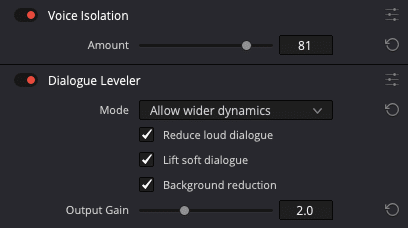
Loud music or noises come through in the Voice Isolator as incomprehensible snippets of speech, which are occasionally interpreted as such by the AI. Otherwise, these experiments hardly brought any improvements for the transcription, obviously the AI already does this quite well internally. The errors were only sometimes different, but not significantly less frequent. So you can save yourself the additional computing time in this respect. Regardless of this, both filters can be very useful, especially for documentary film under difficult conditions. They work quite fast even on modest hardware.
Comment
Blackmagic is obviously running its mouth with the following marketing statement: “Due to recent advances in AI and expert system technologies, it’s become possible to get remarkably accurate and perfectly timed subtitles of spoken text using DaVinci Resolve’s Create Subtitles from Audio function.” We were unable to verify this, at least for German and French. Even the position in time is not always accurate, and you still need to check the AI results carefully.
As the errors with identical source material are largely the same as those in version 18, we do not expect any outstanding improvements in the final version either. In addition, DaVinci Resolve only recognises a dozen or so languages, while Whisper understands around 100. However, you would have to install this yourself, as it is open source. The new speaker recognition is also not very useful as long as it is too often unable to correctly identify people in fast dialogues. One wonders whether BM could not improve this by correlating it with the visual person recognition that has been available for some time.
