



Autodesk has unveiled Maya 2026, featuring the integration of Golaem and a series of incremental enhancements across various tools. While these updates may refine certain workflows, users should evaluate their impact relative to the current subscription pricing.
Golaem Integration: Crowd Simulation Now Standard
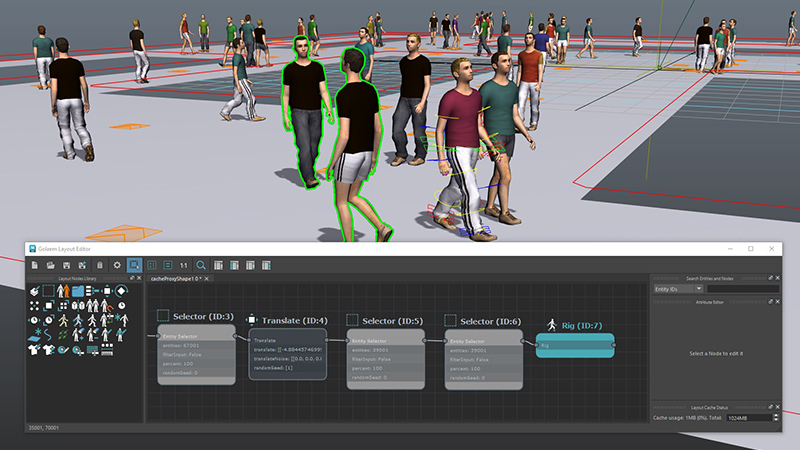
Maya 2026 incorporates Golaem as a built-in feature, making it part of the standard toolset within the Media & Entertainment Collection. Golaem simplifies crowd simulation, offering artists the ability to generate large-scale, realistic crowds with AI-driven behaviors. Previously a standalone solution, its integration into Maya streamlines workflows for VFX and animation artists handling populated scenes. However, for users not involved in large-scale crowd animation, this addition might not justify an upgrade.
Notable Additions in Maya 2026
- Golaem Integration: Now included within the Media & Entertainment Collection, Golaem simplifies the creation of realistic crowds and animated characters, streamlining the process of populating complex scenes. (help.autodesk.com)
- Flow Retopology: This tool facilitates working with complex geometry by offloading processing to the cloud, enhancing efficiency in retopology tasks. (help.autodesk.com)
- Boolean Node Update: The addition of a Volume mode allows for the conversion of source objects to volumes before performing operations, then back to polygons, aiding in the rapid blocking out of organic models. (help.autodesk.com)
- STL Import/Export Enhancements: Users can now set scale units during STL file import or export, improving the 3D printing preparation process. (help.autodesk.com)
- ML Deformer Improvements: Enhancements include a new Apply Mesh Compare display option for visualizing differences between source and target meshes, customizable training processes, faster load times, and reduced disk space usage. (help.autodesk.com)
- LookdevX 1.7.0: Introduces improved publishing workflows, support for relative paths, and a generative textures API, facilitating integration with third-party generative AI services. (help.autodesk.com)
- Bifrost 2.13.0.0: Offers advancements in liquid simulation capabilities, enabling the creation of more realistic and detailed fluid dynamics. (help.autodesk.com)
- Arnold for Maya 5.5.0: Features improved, more realistic shadows for glass objects, enhanced Global Light Sampling on glossy materials, and optimized Cryptomatte and GPU support. (help.autodesk.com)
Subscription Pricing
Maya 2026 follows Autodesk’s subscription-based model, with pricing remaining consistent with previous releases. Users can expect the following rates:
- Maya Subscription: $235/month, $1,875/year, or $5,625 for a three-year term. (Autodesk)
- Maya Creative: $50/month or $375/year, offering a more limited feature set for those who don’t require the full capabilities of Maya. (Autodesk)
While these enhancements contribute to refining Maya’s toolset, they represent incremental improvements rather than groundbreaking changes. Users should consider the relevance of these features to their specific workflows and assess whether they justify the current subscription costs.
Note: As with any software update, it’s advisable to thoroughly test new features before integrating them into critical production pipelines.
