



RailClone 7 brings new spline tools, RailClone systems, and many workflow improvements. This latest release is all about making complex spline-based modeling tasks easier and more intuitive. With a new set of library systems, powerful new path operators, and many usability improvements, RailClone 7 continues to set the standard as the ultimate modeling tool for 3ds Max. Whether you’re working on architectural visualizations, urban planning, commercial interiors, or infrastructure projects, RailClone 7 has the features to save time and improve your creativity.
Introducing RailClone Systems
A new release wouldn’t be complete without new presets, and RailClone 7 doesn’t disappoint. Introducing RailClone Systems, our new initiative that aims to offer much more extensive customization, allowing you to generate a huge number of variations from a single setup and without opening the graph editor. This update introduces 6 new categories, including:
- Windows: A versatile collection of window systems to populate architectural scenes effortlessly.
- Office Ceilings: Fully customizable suspended ceiling systems designed for quick commercial interior setups.
- Curtain Walls: Modern curtain wall systems for speedy building designs.
- MEP: A variety of mechanical, electrical, and plumbing systems including cable trays, HVAC, piping, and more.
- Boardwalks: Several wooden boardwalk and bridge systems for designing nature trails, parks, and gardens.

New Features
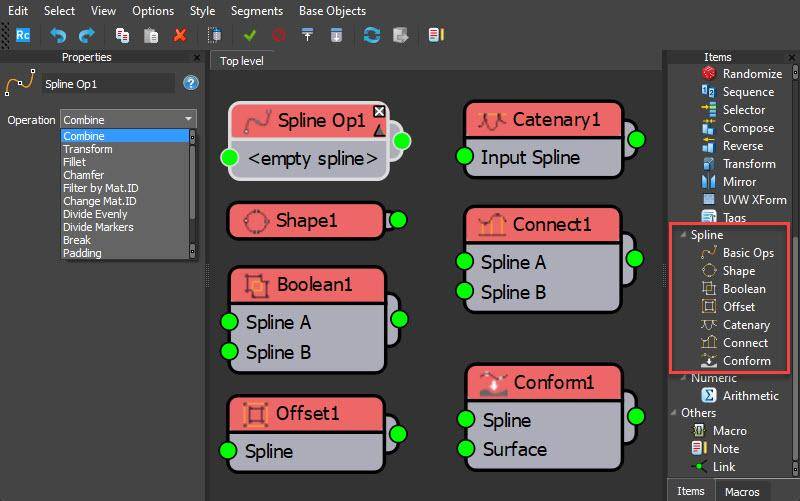
RailClone 7 introduces spline nodes to add many new possibilities for procedural modeling in 3ds Max. A brand-new category of nodes called Spline Operators has been added with 19 new options divided across 7 nodes, offering a new level of control over paths in RailClone directly from the graph editor.

Pricing and Availability
RailClone 7.0 is available for 3ds Max 2022 and newer. New licenses start at $250, including one year’s maintenance. There is also a free, feature-limited Lite edition of the plugin. For more information, visit the official RailClone page: iToo Software Please note that any innovation should be thoroughly tested before being used in current projects. Things can go off the rails quickly in 3ds Max!
