



Table of Contents Show
When your shot breakdowns live in spreadsheets and your supervisors spend more time data wrangling than supervising, something’s broken. Jindrich Cervenka, lead developer at PFX, decided to fix it. The result? The Crossbow VFX pipeline tool: a project management and review tool aimed at automating the grind, integrating with platforms like Ftrack, and keeping productions in context, whether you’re running dailies or fighting through last-minute chaos. We asked Jindrich what Crossbow actually shoots, how it’s built, and whether it really makes life better for VFX and animation teams.

In this interview, we speak with Jindrich Cervenka, a seasoned VFX Supervisor at PFX. His recent work on Locked—a claustrophobic thriller set entirely inside a car—offered a unique set of challenges, which you can read about here. But in that interview, he mentioned “Crossbow”, the bidding and pipeline tool at PFX. And even though it is, so far and maybe always will be, internal, PFX lets us take a peak at it!
DP: What’s the story behind Crossbow and what exactly does it shoot?
Jindrich Cervenka: What exactly does it shoot? That’s the question. Let’s just say there are quite a few arrows, but what matters most is that they hit the target. The initial idea came from bidding and project planning before anything goes into production. Back then, supervisors would collect or enter shot information into spreadsheets and look up shots in the editing timeline. It was a manual, tedious process where they spent more time hunting data than actually supervising. When the edit changed, comparing everything manually became a nightmare. So the first goal was to make that process simpler, more pleasant. That first “arrow” was the project breakdown.

The second idea was about eliminating duplicated tasks across different departments and making their handoff smoother. For example, you do a shot breakdown based on an edit, probably splitting it into the shots you’ll be working on. You place markers to clarify things with the director or producers. At the same time, you start preparing an online workspace where you’ll view the shots in context and update them continuously. That means you’re effectively cutting the film twice. Online has to be frame-accurate, while the breakdown can afford a frame or two of imprecision. Different types of work, different precision and so, why even pass shots around?
Meanwhile, someone prepares artist tasks based on the breakdown by importing it into a project management system (in our case, Ftrack) or worse, recreates it manually. In online, you’re constantly checking whether the shots are trimmed properly, whether the versions are correct. Then during dailies, you’re jumping around trying to find who made which comment. It can be quite frustrating, time-consuming and error-prone with many people involved and several departments.
So Crossbow shoots arrows into systems like online, Ftrack and others and it can also receive data back from them. The goal was never to replace existing platforms, but to simplify communication, speed up workflows, improve precision, and make handoffs easier. Within the app, you’re constantly building the project and shooting arrows where needed. No need to worry about workflows or multiple logins. Fewer meetings, more clarity. You just simply shoot arrows.

DP: What kind of productions are you building this tool for?
Jindrich Cervenka: It can be used for any audiovisual work, animated projects, films, music videos, etc. It keeps you in context and helps you quickly orient yourself. The benefits really shine on bigger projects, say, 100+ shots with varying complexity.
Our primary users are supervisors, team leads and coordinators. But when I think about it, it would also make life easier for independent freelancers. The app is designed primarily for internal use, but we are discussing a version that could be released publicly.
DP: Four years of development – that’s either a well-funded software odyssey or a very committed side hustle. What’s the tech stack under the hood?
Jindrich Cervenka: Let’s say someone wanted to make their life easier. The app runs standalone on any machine with an SSD and a mid-range GPU. Everything created in the app is stored within the project and can be fired off as an arrow to third-party systems. It doesn’t rely on any other software to work.
Surprisingly, the core isn’t Python, it’s built with Electron and NodeJS. For I/O, it uses custom C++ plugins wrapping existing libraries like OpenImageIO and FFmpeg. Thanks to Electron, it’s highly modular and the UI is very responsive with virtually unlimited flexibility. It runs smoothly. Whether a new feature gets added depends on how well it fits into the ecosystem we work in. But users can also write their own custom scripts if they’re up for it.
DP: How do you actually enter a bid into Crossbow?
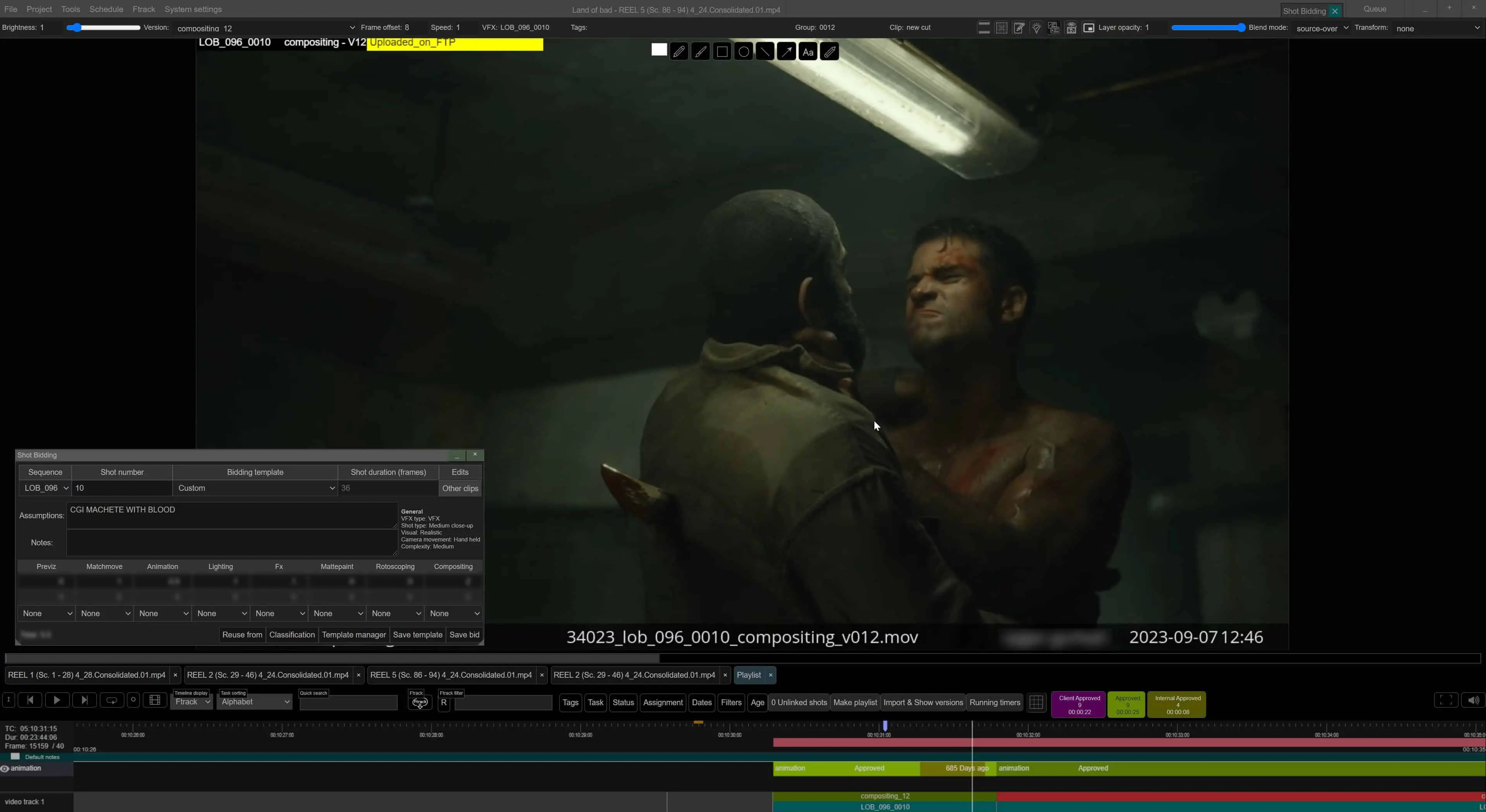
Jindrich Cervenka: First, I want to separate two concepts: Ballpark and Bidding. For us, these are two different terms. A ballpark estimate is based on the script and happens far in advance. Actual bidding only begins once we receive video material. Until then, everything is just an approximation and that doesn’t go into Crossbow.
The starting point is having a rough cut. Ideally, we receive EDL, XML, or OTIO files from the client – those can be imported directly. Then you start marking shots, creating assets, adding tags, writing or drawing notes, and uploading references.
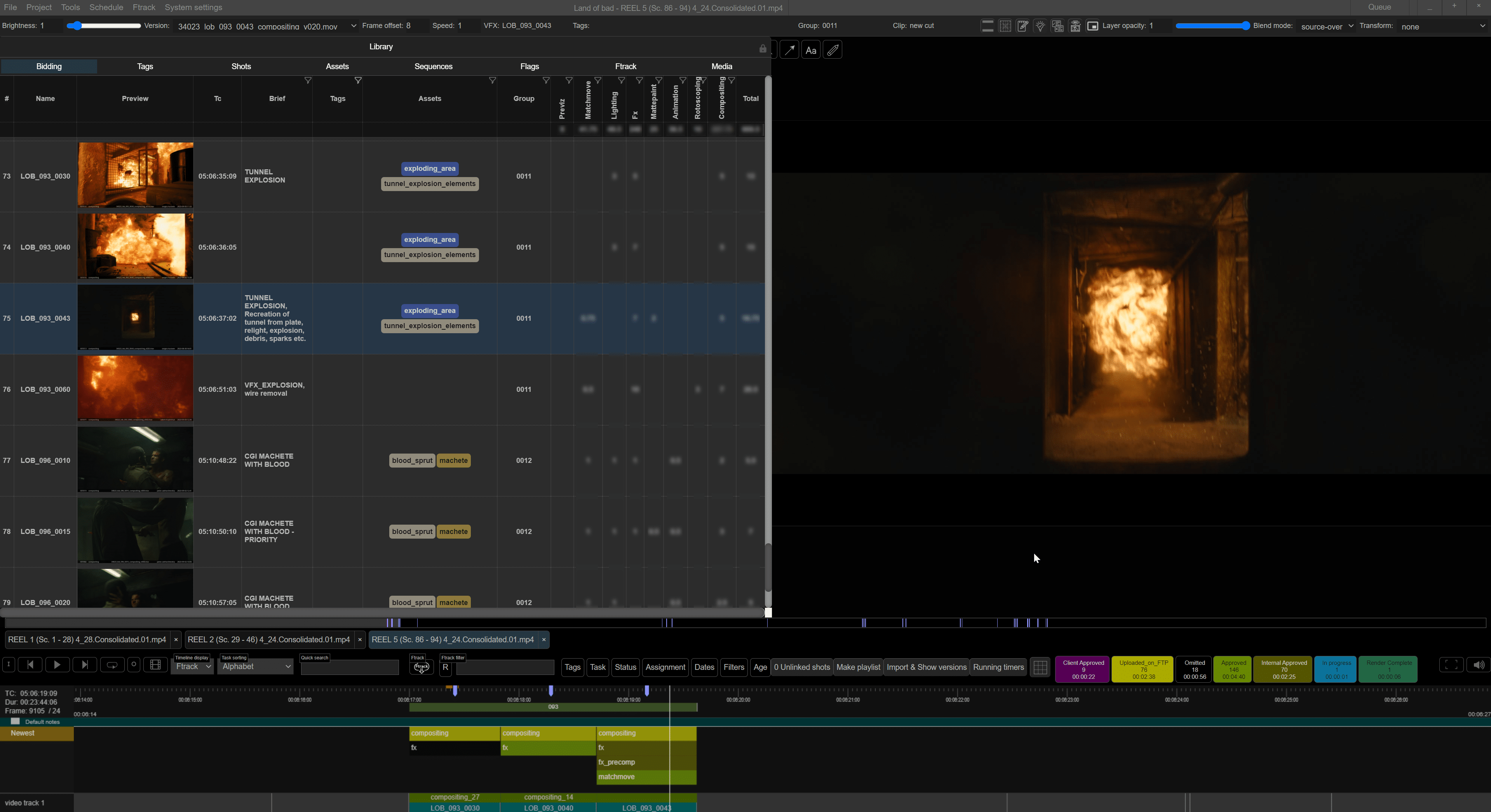
There are tools for cut detection, and even AI to detect shot names if they’re burned into the video. That AI can be used during edit updates to help match finished bids with new video inputs even when clip names don’t match. You can tag shots or link them to assets and bid based on their context. Then you can do local adjustments. You can bid either in absolute mandays or per second. You can also create shot playlists and batch-edit them dynamically.

DP: What factors are considered when calculating the bid?
Jindrich Cervenka: The app doesn’t know how packed our studio schedule is. It just produces a breakdown. That breakdown gets reviewed by the Head of Studio. Booking is handled by other tools. And those people don’t need visuals, just an Excel sheet with numbers.
DP: Does Crossbow understand the production context of a show?
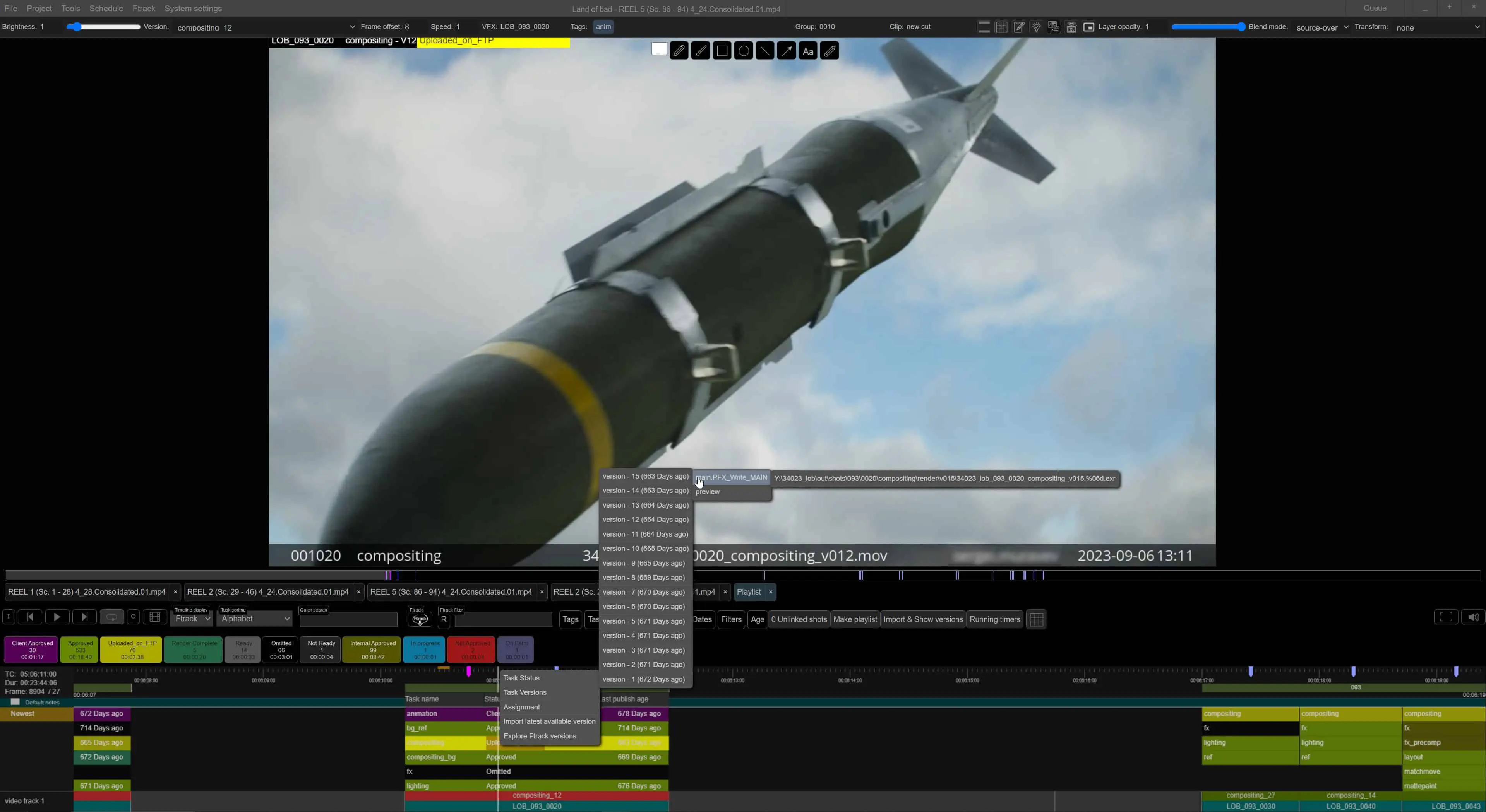
Jindrich Cervenka: You can change statuses and attributes of every task in the app. It can also connect to multiple systems at once. So if we’re working with two vendors, and we’ve agreed to share access to their ShotGrid or Ftrack, the integration can happen simultaneously. We can see their tasks and attributes in context with ours including comments.
For example, on a recent animated film, we had linked Ftrack instances: each studio worked on a different part of the film or exchanged animation that we rendered. Thanks to this, we could watch the entire film in the latest version from both companies without ever exchanging actual files. This was especially important for animators to stay in sync in terms of continuity and style. And it’s all on-demand. You just click “Update,” and it happens.
DP: How flexible is the final number?
Jindrich Cervenka: Great question! But no, the app doesn’t care about the client, only the project. It gives you the output and statistics. What you do with that is up to you.
DP: Will others ever get to try Crossbow?
Jindrich Cervenka: That’s currently under internal discussion. I can’t share any details yet.
DP: Walk us through a typical day in Crossbow – who logs in first and who gets to ignore it the longest?
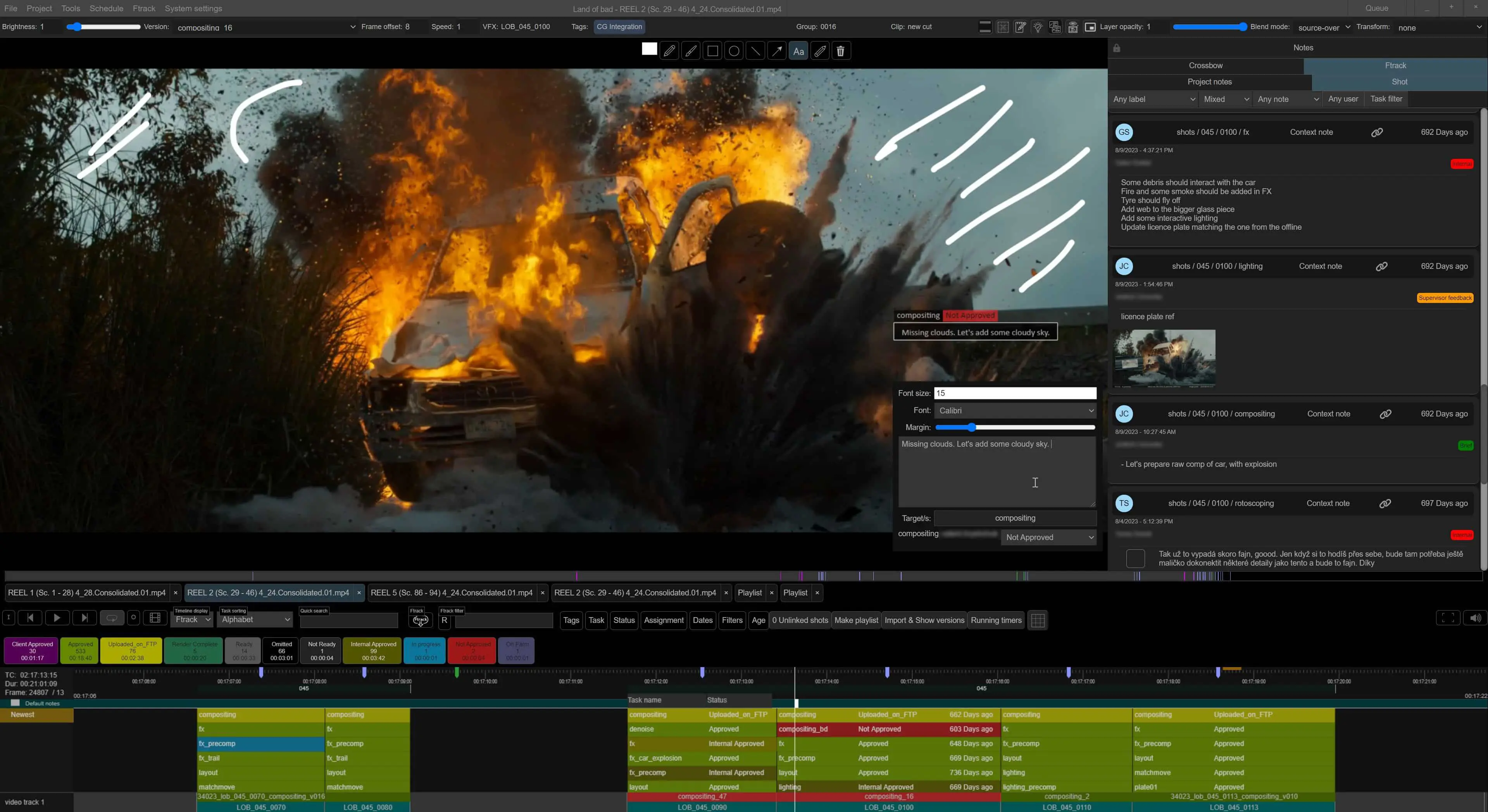
Jindrich Cervenka: Usually, the first ones to log in are lead artists and supervisors. Crossbow often stays open all day, sometimes for several days, unless an app update forces a restart. Each user sets up their own filter, just like in Ftrack, and focuses only on what matters to them: assigned artists, specific tasks, statuses, deadlines, etc.
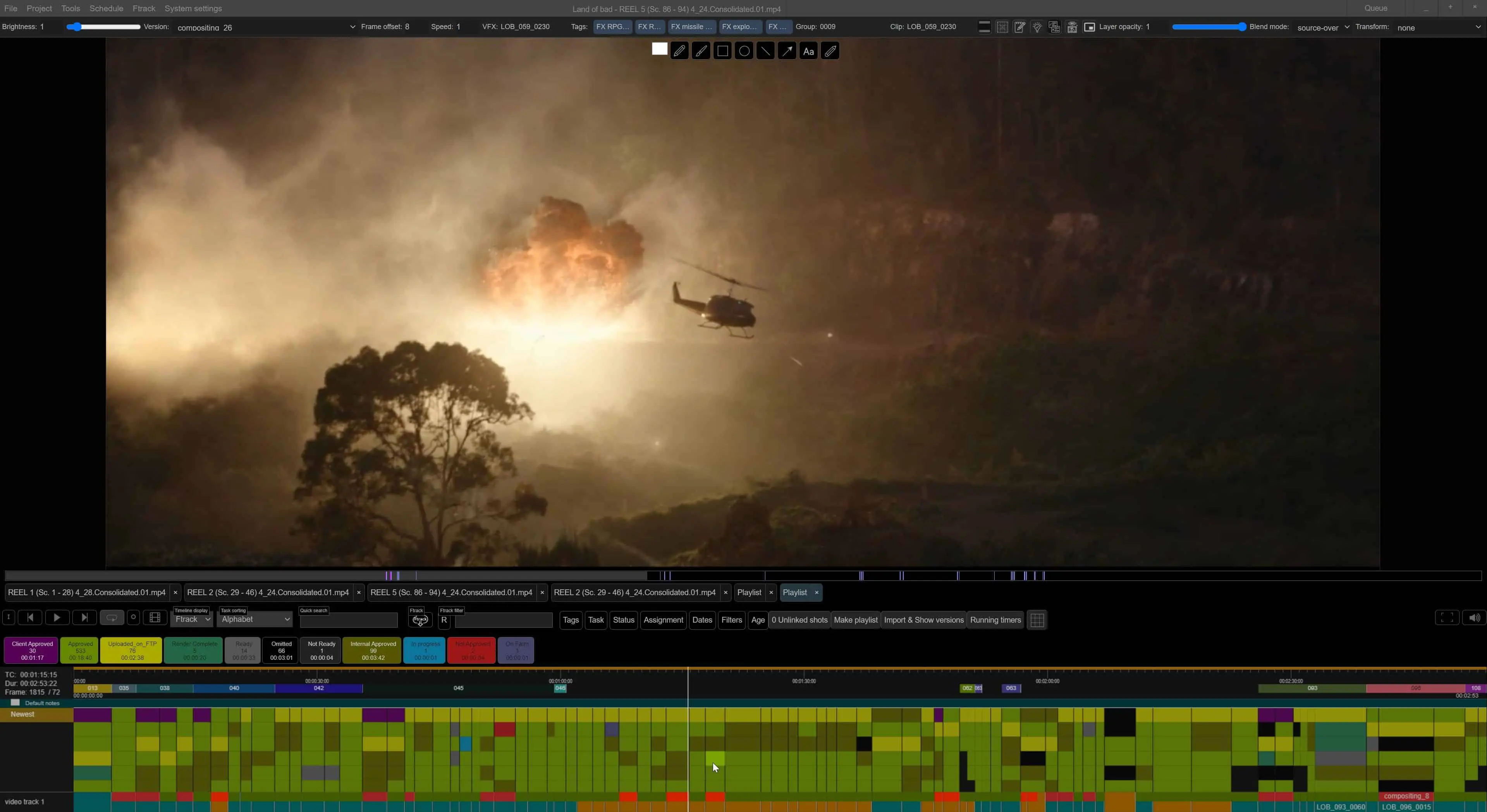
During active production, Crossbow primarily serves as a review tool. Supervisors can browse shots directly in the timeline, without switching between tools. For example, they can open 10 shots in a grid, play them back simultaneously, and comment either individually or in bulk. We often use it during client calls, set up a board of shots, add notes, and quickly navigate between different parts of the film.
You can time comments directly in the video and export them as clear reference frames or previews, which the client can receive almost immediately. Everything is designed for smooth, real-time information flow.
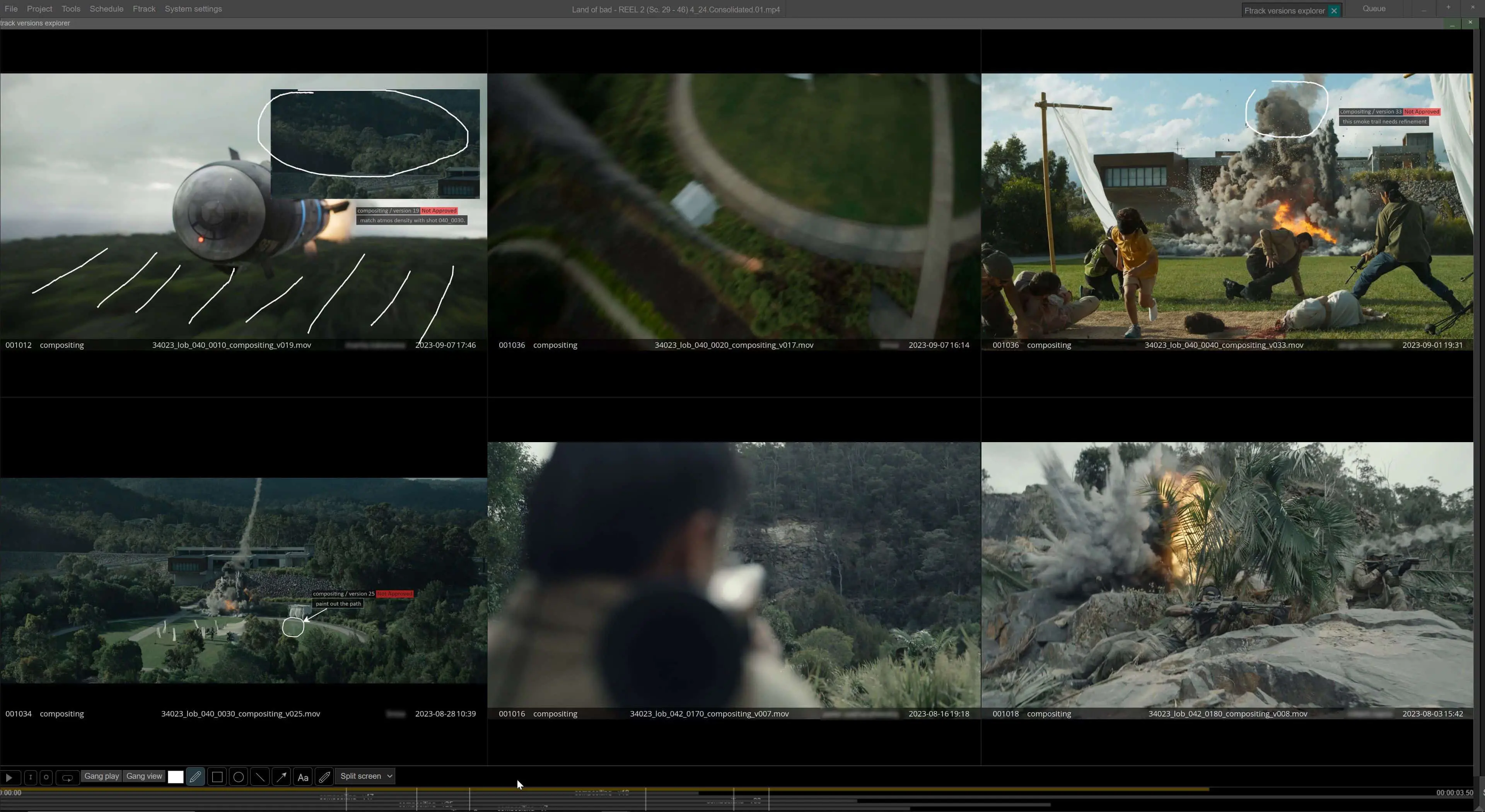
For artists, Crossbow is mainly a feedback source, they see all notes under their assigned tasks directly in Ftrack. The same goes for production: any comments or changes created in Crossbow are automatically synced to Ftrack. So the production team doesn’t even need to open Crossbow unless they want to.
But if they do, they’ll find tools that go far beyond task lists, project status reports, visualizations, aggregated stats, planning tools. Crossbow combines data, visuals and production context in one environment. It’s less about day-to-day operations and more about making production decisions and having live discussions with full visual context.
Just three years ago, before Crossbow was ready, we often spent hours on calls with directors just to clarify intentions across the film. Today, that process is much quicker and clearer because we can jump straight into scenes and shots, without long prep. Everything can be published to Ftrack right away.
It’s an incredibly flexible tool that significantly speeds up communication, decision-making, and project orientation.

DP: Real-time two-way bridge with Ftrack – so does that mean no more copy-pasting of shot status into emails?
Jindrich Cervenka: Exactly. Crossbow has real-time, two-way integration with Ftrack. Any change in shot status, version or task update is synced instantly, no manual copy-pasting needed.
The only exception is notes: you can have private notes inside the app, while choosing when and what to publish to artists. This way, you can refine or expand them before pushing them live. Those are published manually when the user decides.
Aside from that, everything related to tasks is synchronized – comments, statuses, asset versions, preview media, and metadata. Crossbow intentionally doesn’t handle higher-level production features, like multi-project overviews, that’s Ftrack’s job. Crossbow is focused on detailed work inside a single project.
Within a project, users can open any version of any shot or asset. In the timeline, they choose what they want displayed, the default is the latest version with an attached EXR or video preview, but all earlier versions are accessible. So work history and feedback are always easy to track.
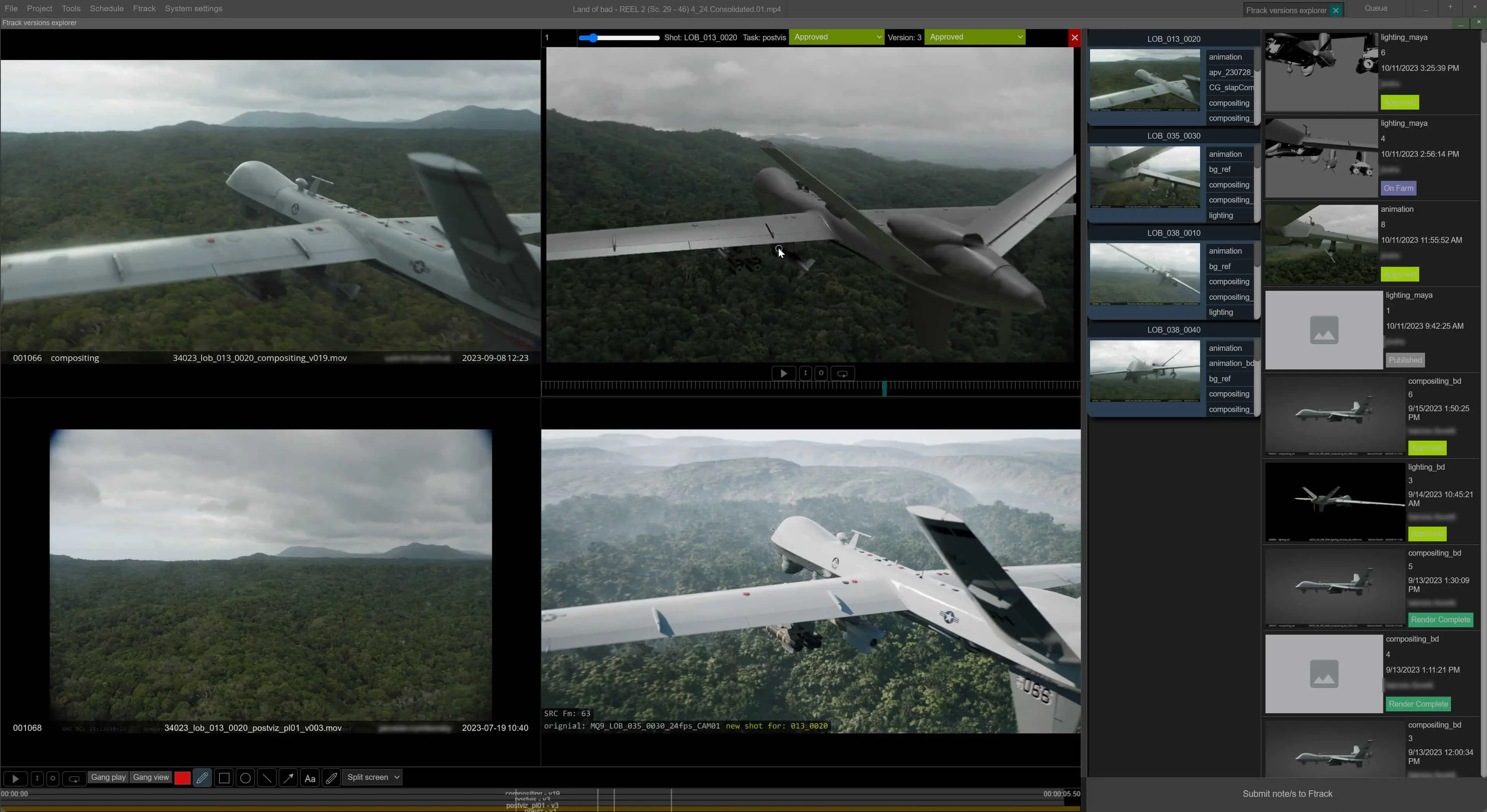
At PFX, we version every publish, even ones not meant for review, like standalone animation caches. What gets used for previews or client deliveries is then defined by the pipeline. Crossbow isn’t a pipeline tool, it’s a visual and organizational layer on top of what the pipeline prepares.
DP: You mentioned that during dailies, people keep sending in shots until the very last minute, sometimes mid-session. That sounds… chaotic. Crossbow handles this without caching?
Jindrich Cervenka: Production can definitely get chaotic especially near deadlines. But if you know how to handle it, that chaos becomes controlled momentum.
We used to work in Resolve or Hiero, where shots had to be prepped in advance, pulled into the timeline, aligned, transformed, cached, version-checked. For larger dailies with 40–60 shots, that could mean 2–3 hours of prep the night before or even right before the session. And even then, we often screened the wrong version, or missed shots due to time pressure. I’d frequently leave dailies frustrated by what we’d just watched.
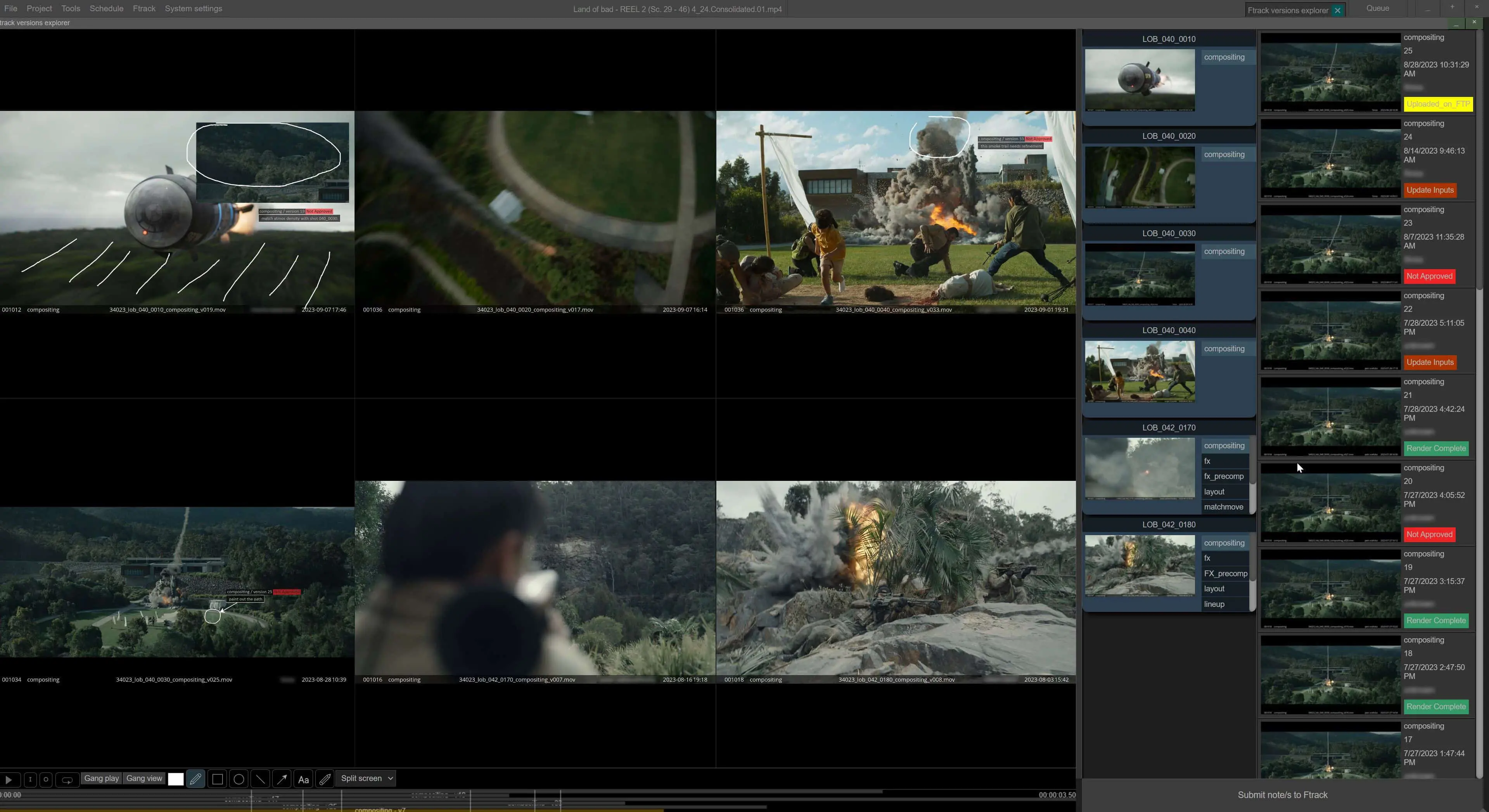
Crossbow completely automates that process. You can update the full timeline or just a selection with a single click, and the app will automatically insert the latest outputs from the relevant tasks. For example, if you’re only interested in animation, slap comps or comps, you set your filter and run the “insert latest versions” command. Crossbow finds the latest publishes for those categories and adds them to playback. In the background, it analyzes and optimizes the data. The whole process takes just a few seconds.
Technically, there’s no magic involved. Crossbow is built on reliable open-source components and merges them into a robust, responsive UI. The app’s philosophy is simple: speed and continuity without timeline limits. EXR playback is available, but we typically use high-quality H.264 previews, usually 4K at 40 Mbps. From experience, that’s good enough for 90% of production needs. The remaining 10% where pixel-perfect quality matters is handled by the QC team with differential keying.
So creative reviews run smoothly and without delay. And when quality matters, you can switch to EXR, zoom into pixel level, and adjust exposure, gamma, and more. Thanks to this, dailies are no longer “events” that require huge prep, they’ve become more dynamic and constructive.
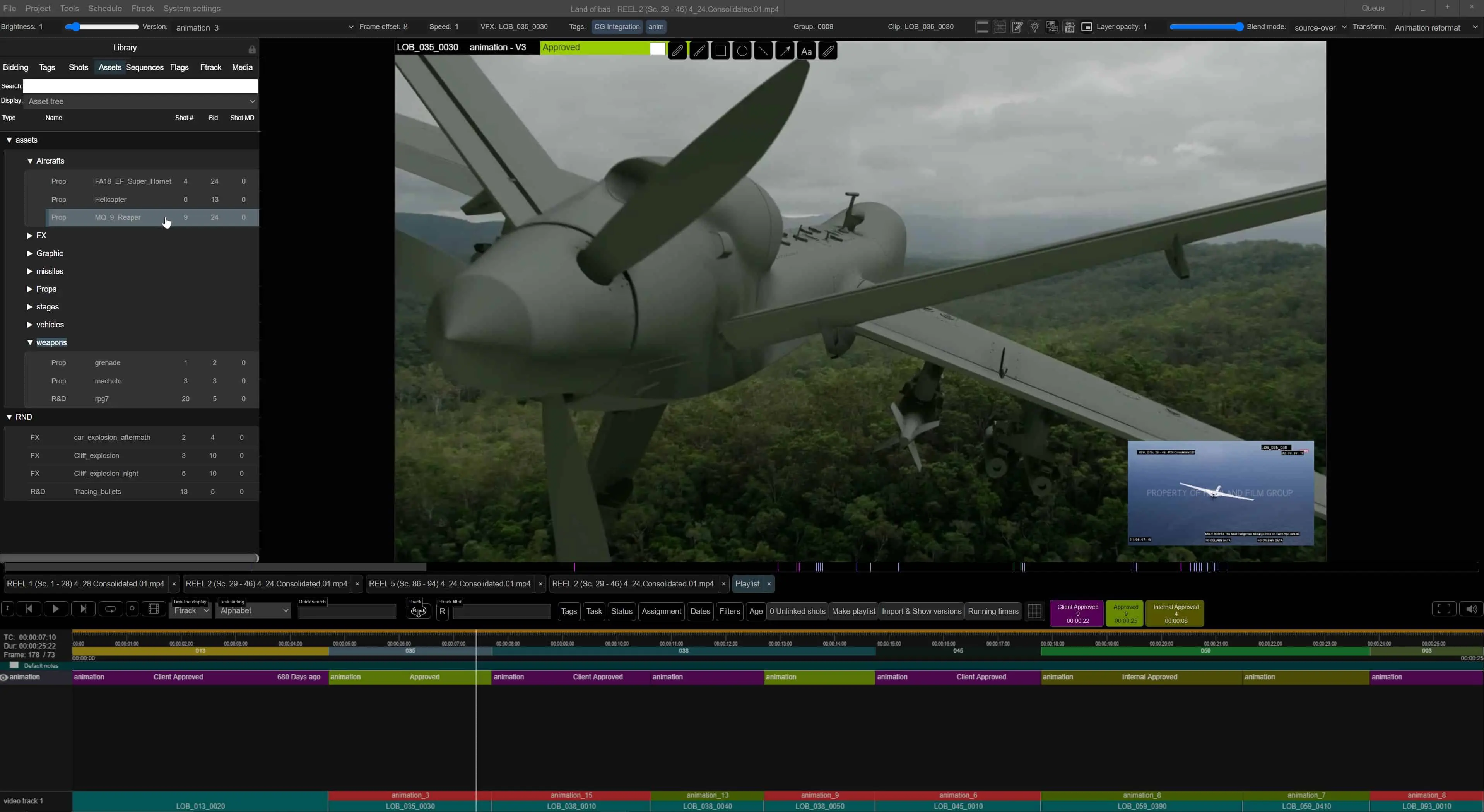
DP: And what happens when you’re off the network – say on a train, in a client meeting or, worst case, in a hotel lobby with 1.5 Byte/s upload?
Jindrich Cervenka: Yes, Crossbow can work offline. When you’re on a decent connection, you simply run a timeline update, and the media is cached locally. You can then play it back without needing to connect to the studio infrastructure. That said, when you’re offline, you don’t have access to all versions of every task, only the ones that are already part of the timeline. And if you’re downloading previews from Ftrack, the image quality will naturally be lower. But you can still work with the full edit, make comments, and once you’re back online, you just publish your notes. It’s designed to let you stay productive even when disconnected.
DP: Let’s talk about crunch: Locked was running on tight deadlines, and yet you managed to coordinate with new departments and even a new director. Does Crossbow really help with that, or does it just make the panic more visible?
Jindrich Cervenka: Prioritization is a living process in every project, we reevaluate it every day based on the current situation and schedule. Personally, I don’t know the detailed status of what every single person is working on, that’s the coordinators’ job. And when production is running in parallel across multiple offices, the overall picture gets even more complicated.
Crossbow helps a lot in this regard, it immediately shows whether the artists on a sequence are creatively aligned, and lets you make a quick call to clarify what’s working and what isn’t. It speeds up brainstorming and decision-making, which is absolutely critical during high-pressure phases.
Example: imagine you’ve got 15 days left until the hard deadline, and 110 shots are still at 0%. You need to involve 10 compositors from two locations at once, and they’re working on similar shots within the same sequence. In that scenario, you either have a system that helps you prioritize quickly, catch issues and dependencies, or you spend the final 8 days in extreme stress, hoping things will work out, while still reviewing 80 shots and only then starting to finalize them. In that case, Crossbow wasn’t a panic amplifier, it was a stabilizer.
DP: After years of iteration do you still open Crossbow and go: “Why is that button there?”
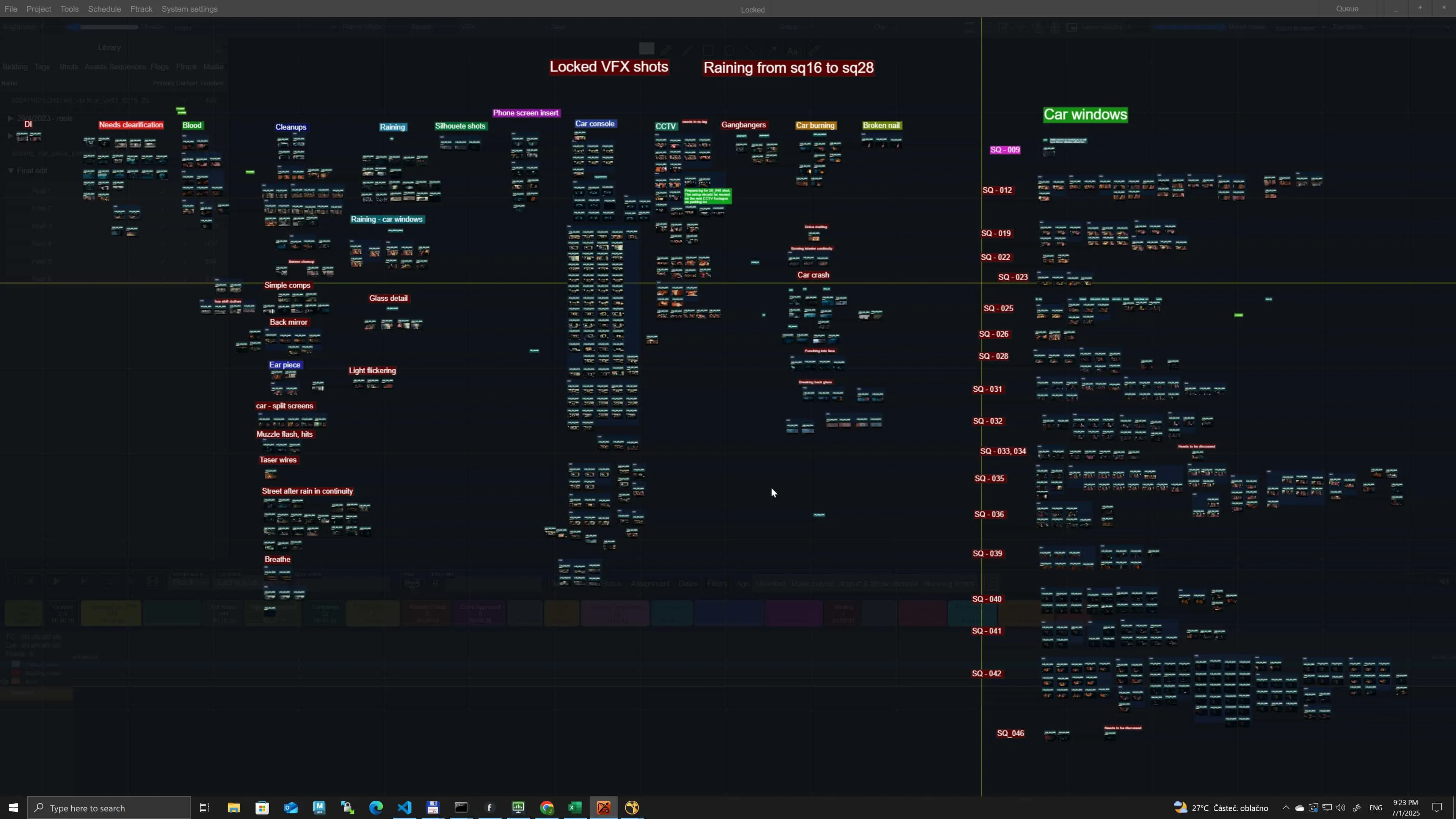
Jindrich Cervenka: Absolutely. Even after four years, there are still a few buttons like that. And sometimes sneaky UI bugs show up, especially on displays with less than 2.5K resolution. I never really focused on visual styling or design. What mattered more to me was navigation and accessibility. The goal was for everything important to be no more than three clicks away. I was inspired by the simplicity of old-school Flame, no unnecessary layers, no visual clutter. I stuck to minimalism: tools shouldn’t get in the way, but they should always be within reach.
The hardest part? Teaching people how to use it. Although the app seems simple, it offers a lot of depth.
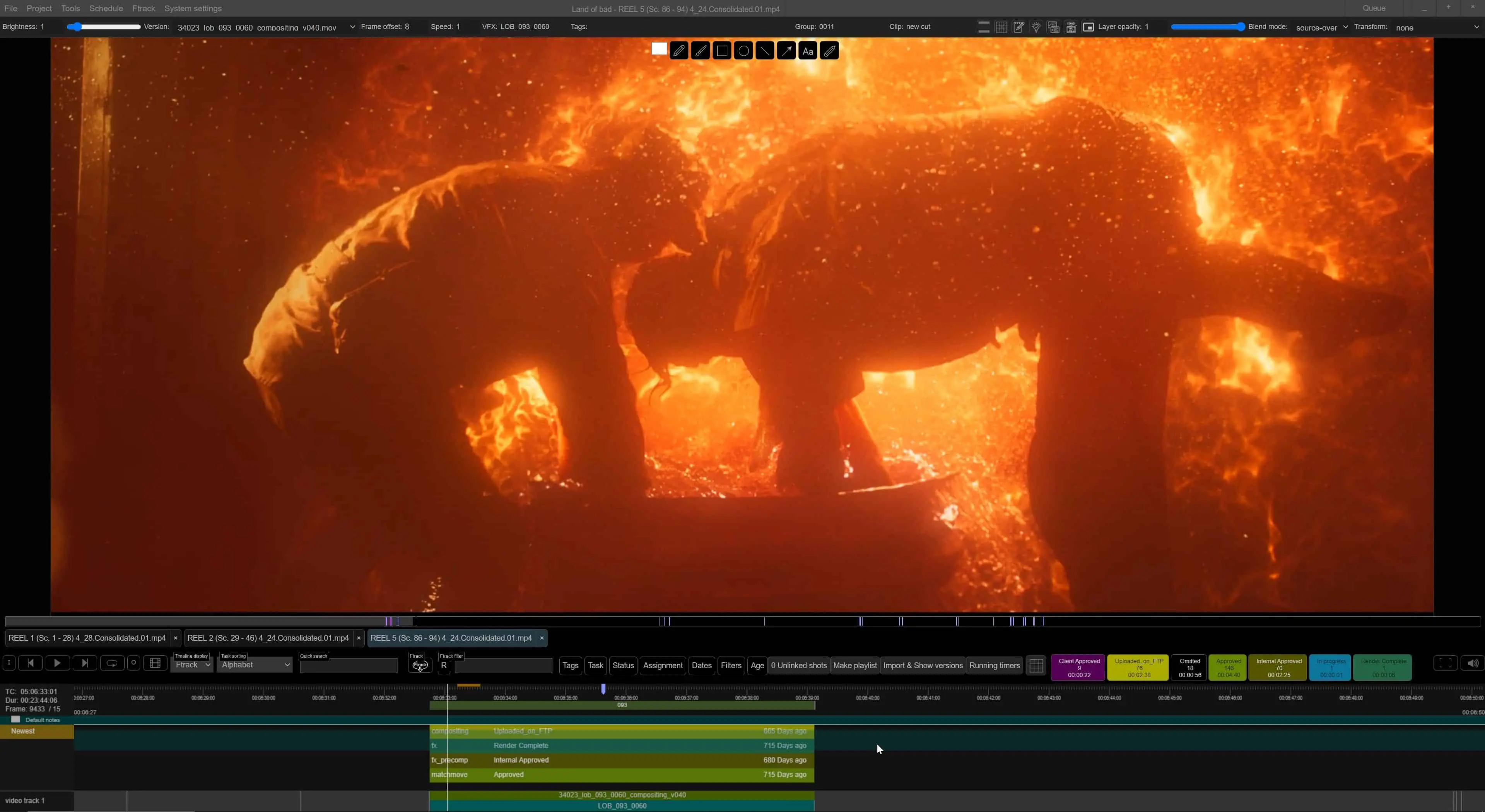
DP: Every project pushes the app forward. So what did “Locked” change about Crossbow and what’s coming in Crossbow 2.0?
Jindrich Cervenka: Locked showed us the need for a proper shot board, a space where notes can be pinned visually. The more diverse a project gets, the more you outgrow timelines, groups, lists, and tags. You want to lay things out in a visually meaningful way.
That project also led us to add retime functionality. I’m resisting turning this into a full-blown editing tool, but it’s slowly leaning that way. And of course, more AI-based functions are creeping in. So yes, we’re starting to see the outline of version 2.0 take shape.
DP: And finally: What’s the feature in Crossbow you personally use the most, the one you’d refuse to work without?
Jindrich Cervenka: It’s mostly about the speed you work with in the app. No lagging, absolute minimum waiting.
