



![A group of people in various poses, with a focus on a woman in white attire, overlayed with the text 'SWITCHX' and the tagline 'SWITCH [ANYTHING]. KEEP WHAT MATTERS.' The scene is set against a beach background at dusk.](https://i0.wp.com/digitalproduction.com/wp-content/uploads/2026/02/beeble-switchx-hero.png?resize=110%2C110&quality=72&ssl=1 "a group of people in various poses with a focus on a woman in white attire overlayed with the text switchx and the tagline switch anything keep what matters the scene is set against a beach background at dusk digital production")

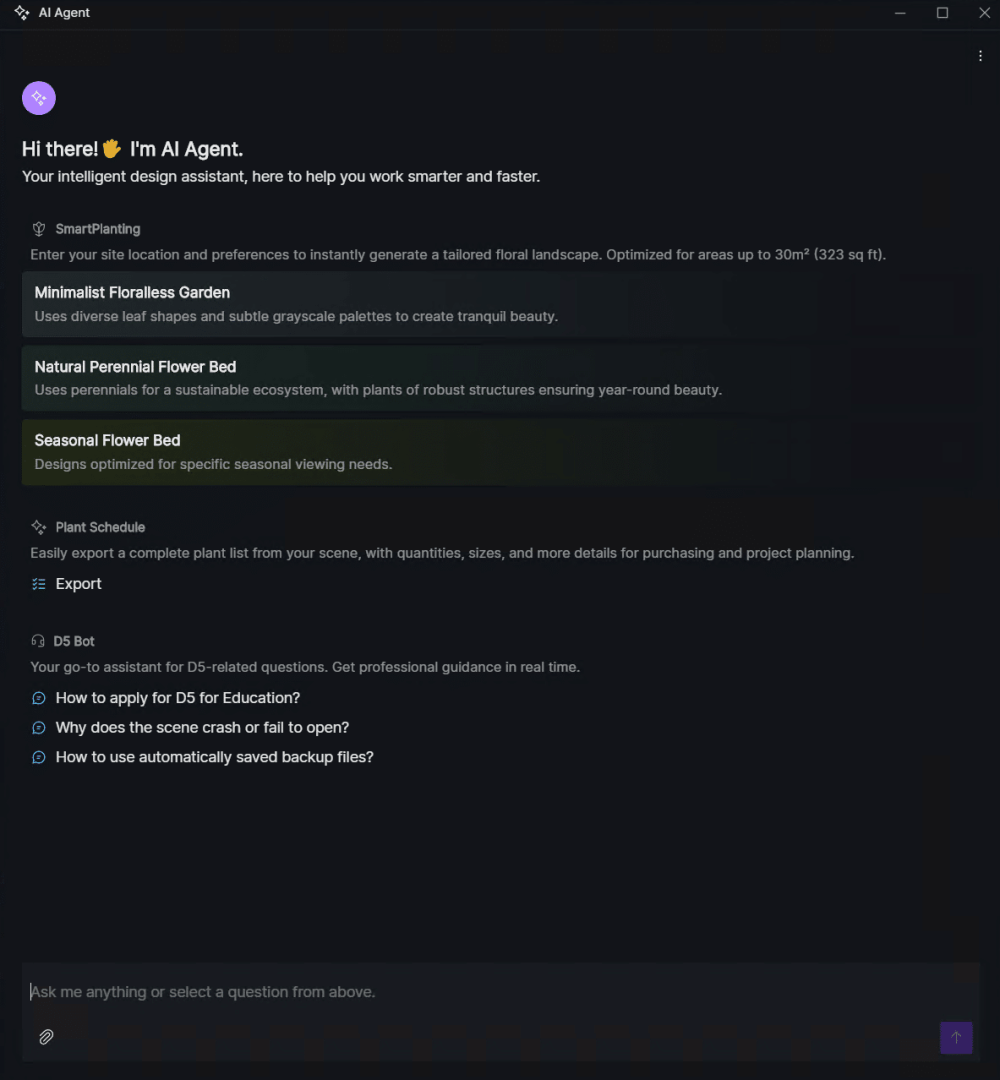
Dimension 5’s D5 Render 2.11 isn’t shy about showing off its new AI toys. The AI Agent system sits at the top of the interface, offering three components: SmartPlanting, which creates region-appropriate, botany-driven planting layouts; a Plant Schedule tool exporting lists of species, quantities, and price estimates for procurement; and D5 Bot, a support chatbot ready to field software-related queries in text form. No, it won’t do your client calls for you.
PBR Materials, Now With “Snap”
If your library is missing a perfect bark or a trendy stone, the new AI PBR Material Snap tool will extract PBR textures (diffuse, roughness, normal, etc.) from a reference image at up to 6K resolution, and then suggest visually similar materials already in D5’s own asset library. AI-driven Atmosphere Match and Post-AI Image Enhancer both receive new AI models, with added controls for style, reference image matching, enhancement strength, and—because it’s 2025—“Smart Retouch” inpainting.
Path Tracing for All
Real-time Path Tracing is now the default GI method, dropping its “alpha” label. The legacy GI engine is still around for compatibility, but path tracing now delivers improved accuracy in diffuse bounces, glass, caustics, and reflections—without a hit to performance, according to Dimension 5. AMD Radeon users finally get frame generation via FSR, catching up with NVIDIA’s DLSS crowd.
Cameras, Lights, and Parallel Projections
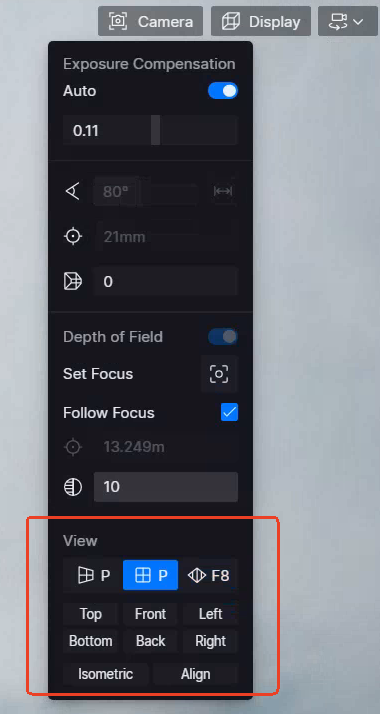
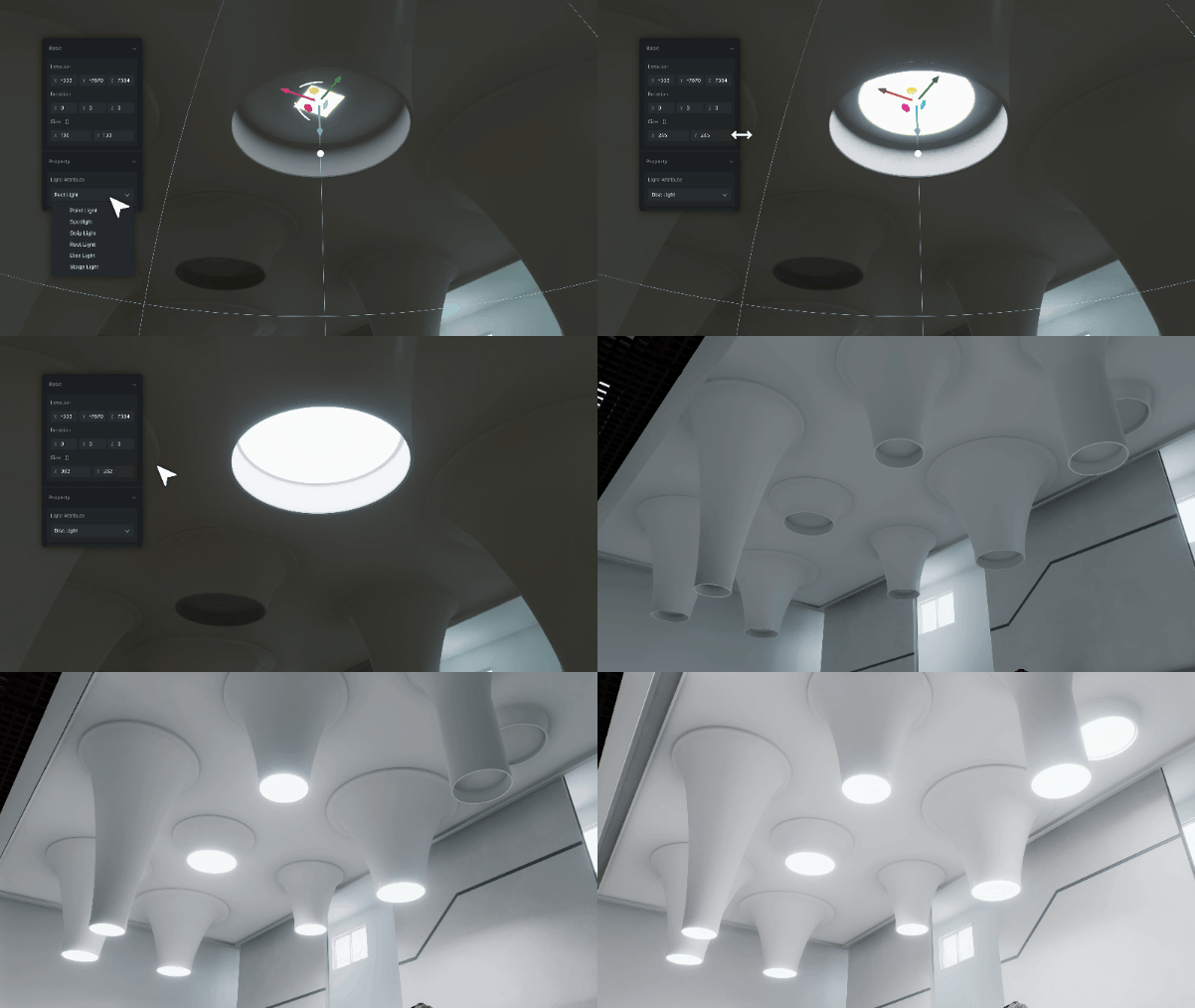
The camera toolset picks up a parallel projection mode, a must for elevations, sections, plans, and those axonometric views clients suddenly want at 5 p.m. There’s also a one-click “Align Views” tool for snapping a camera orthogonally to any selected face, and an Orbit Center icon for view manipulation. New lighting features include a Disc Light, improved directionality for Rect and Strip lights, support for IES profiles on point and area lights, and exposure compensation for anyone still fighting auto-exposure in 2025.
Layout Tools and Format Smorgasbord
The new Advanced Brush lets users paint, erase, and adjust vegetation in a scene. If you need to populate a street or scatter benches with architectural precision, the Custom Path tool distributes assets along user-defined curves. D5 Render 2.11 expands its list of supported formats: OBJ, DAE, 3DS, DXF, STL, GLTF, MMD, and performance-optimized Alembic imports. Scene List grouping, per-camera target selection for video, and improved view persistence round out the workflow updates.

For Teams: Cesium, XR Tour, and 8K Output
Teams-level subscribers gain some geospatial firepower: Cesium integration imports real-world terrain and context for site-accurate visualizations, while the XR Tour system enables browser-based 3D walkthroughs generated with Gaussian Splatting from smartphone photos and videos. Teams subscribers can now also output videos in 6K and 8K, if there’s a wall big enough to watch them on.
Bugs Squashed and Plug-ins Synced
Among the patch notes: round-cornered materials work again on NVIDIA’s 50-series, lost views are restored after scene deletion, and scatter-generation is more reliable. LiveSync plug-ins are updated for SketchUp, 3ds Max, Archicad, Blender 4.3–4.5, Cinema 4D 2025, and Revit 2026.
Pricing and Hardware
The Community edition is still free. Pro unlocks AI tools, the full asset library, and image sequence output for $38/month or $360/year. Teams (collaboration features, Cesium, XR Tour, and higher-resolution video) runs $75/month or $708/year. Windows 10 or later is required, along with a GPU at least as powerful as an NVIDIA GTX 1060, RTX, AMD Radeon RX 6400 XT, or Intel Arc A3. Supported DCCs include 3ds Max, Blender, Cinema 4D, Revit, Rhino, SketchUp, ArchiCAD, and Vectorworks.
Production Reality Check
As with all major releases, production artists are reminded to test new features in non-critical environments before rolling them out to live projects. Surprises belong in renders, not deadlines.
