



Miauu, known for pragmatic MaxScript tools that fix small but persistent annoyances in 3ds Max, has released LayerColorizer, a utility that does exactly what its name promises: it lets users colour-code layers directly in 3ds Max’s Layer Explorer and Scene Explorer. The script gives artists the ability to assign both background and text colours to any layer entry. The result: a touch of visual sanity in what is, for many Max users, an unending sea of identical grey layer names.
The tool works with Autodesk 3ds Max and 3ds Max Design 2020 through 2025, covering the current production range. It’s a lightweight MaxScript install, so no plug-in licensing or external dependencies are required.
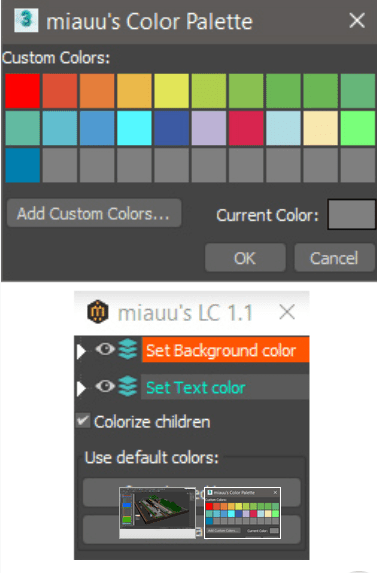
Colouring outside the layers
LayerColorizer does not alter the underlying scene data; it simply overlays user-defined colours on layer entries. Artists can also propagate the chosen colour to all child objects, meaning every object in that layer inherits the same hue in the explorer view. A small but well-thought-out colour palette system allows saving and reusing favourite tints — practical if you want all cameras in teal, lights in orange, and everything else in “some shade of despair.”
For large productions, where scenes may contain hundreds of nested layers, this visual differentiation can make a tangible difference. It’s easier to see which layer holds geometry, which contains proxies, and which was created by the intern who doesn’t name anything.
Small feature, big relief
Miauu’s scripts have long been favourites among 3ds Max users who prefer practical tools over grand promises. LayerColorizer continues that tradition — modest in ambition, effective in function. There’s no talk of AI, procedural intelligence, or synergy. Just colour, finally.
It is unclear whether the script interacts with Max’s built-in layer filters or other third-party layer managers, but the tool’s self-contained nature should keep conflicts minimal. As always, users should test the script in a production scene before adopting it in a live pipeline.
Conclusion
If you’ve ever squinted at 3ds Max’s default Layer Explorer, trying to remember which “Layer0042” holds your hero asset, Miauu’s LayerColorizer might save you both time and irritation. It won’t revolutionise workflows, but it will make them slightly less grey — which, in Max land, counts as progress.
