



When a group of architectural illustrators set out to test Chaos Vantage, they planned a few small real-time experiments. Instead, they built Unbox, a fully animated short film where an architectural cube folds open like a mechanical puzzle. From “a few little minis,” it grew bigger – there are worse outcomes for a stress test.

Coming from the Alpine south, Peter Stulz trained as an architect in Stuttgart before detouring through the US and London, where he completed his “Master of Architecture”. In 2006, he co-founded xoio in Berlin’s creative Kreuzberg district together with Bettina Ludwig. Nestled in a former industrial courtyard, xoio has been crafting photorealistic 3D visualisations for global clients since 2006. Stulz and Ludwig prioritise artistic quality and sustainability, keeping the team deliberately compact to preserve collaboration and a healthy work rhythm. A long-standing contributor to Berlin’s creative community, xoio regularly takes part in industry meetups and maintains a close working relationship with the Chaos development team. From one of these events emerged a new kind of experiment…
Facebook | Instagram | Youtube | Behance
DP: What was the initial spark for testing Chaos Vantage and why risk it on a narrative short instead of a comfy archviz sizzle?
Peter Stulz: Honestly, at first we intended to do a few little minis in Vantage… and then the second test spinned out of control and grew bigger each day. But no regrets, we embraced the prospect to develop a narrative architectural piece ourselves.
You see, we are architects and not an animation studio. So this was a massive learning journey for us: sequencing shots in an attractive manner, telling a story, how to reveal information and how to retain it… Vantage was fantastic, because it allowed us to be quite experimental here, make mistakes and learn while working on it.
DP: Give us the pipeline in one breath: DCC(s), renderers, interchange (Alembic/FBX/USD), and the editorial path from storyboard/animatic to picture lock.
Peter Stulz: Natively we use 3ds Max in our studio, still the main tool for architecture. Our studio mostly renders in Corona Render, but I feel very home in Vray. For asset creation I use Blender which then sent to Max via FBX. The animation was rendered in Vray CPU – 5 months was tight enough and I know Vray as an engine that delivers without funky surprises.
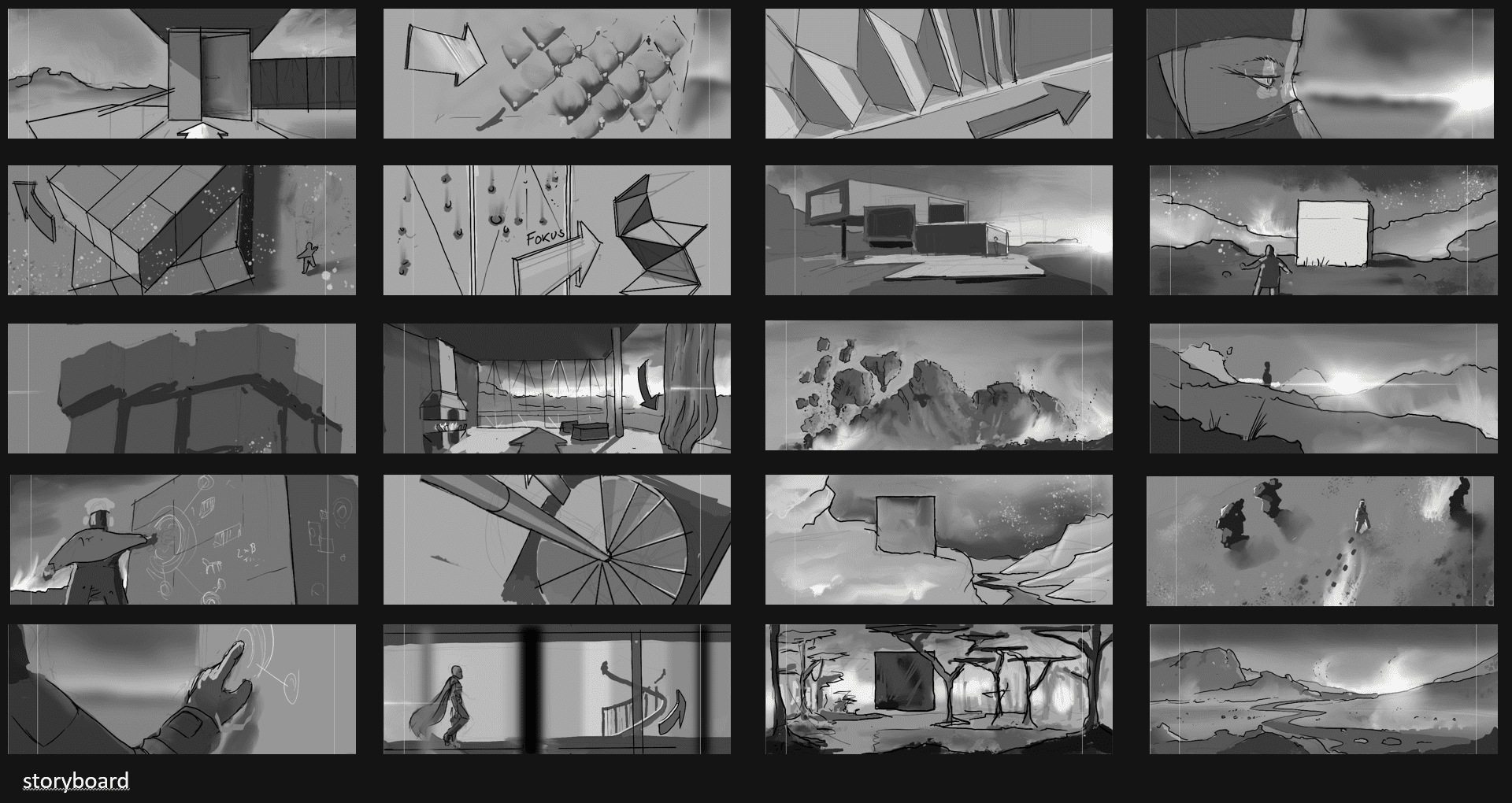
For the creative part, I drew initial sketches and the storyboard in Procreate. We were lucky to have my friend and cinematographer Olaf Aue (LinkedIn) on board, who was kind enough to share some of his Know-How. The storyboard was straight away sequenced in Resolve with some stand-in SFX and music, just to get a feeling for timing. The stills were then replaced with Vantage Previz shots; the iteration frequency could be kept fastpaced due to Vantage, that was a tremendous relief. Finally for that project we also familiarized ourselves just enough with character creator and Iclone to pull off a somewhat decent protagonist – which then is mostly kept out of focus anyhow :).
Depth of field and lighting are crucial in linear storytelling formats. Vantage allows for having these available during the early layout phase, enabling us to evaluate the flow and precise timing of edits early on, resulting in fewer iterations and more streamlined communication, features that Olaf, as a cinematographer, found lacking in the animation feature films he previously worked on.
DP: Hardware reality check: what exactly were the two workstations (CPU/GPU/VRAM/RAM/storage), and how did that cap scene size, proxies, and iteration speed?
Peter Stulz: There are two parts to this, the GPU and CPU specs: For working with Vantage, I had a 4060TI with 16GB. It was mainly the ground displacement in Vantage that was the key factor for VRAM necessity. Otherwise Vantage is smart when scaling to smaller GPUs. You don’t need massive GPUs to get started with Vantage.
For the final CPU rendering – we have several AMD 9950x in our studio with 64GB Ram, totally unspectacular workstations. In fact rendering moved between machines, whatever was available, the bottleneck was that we had just two render licenses available. Another thing, that I really appreciate about Vray CPU – it stays pretty consistent even if you throw in an older architecture.

DP: How did you keep the master scene nimble?
Peter Stulz: 3ds Max can become a real chore, when scenes get too heavy. I wholeheartedly hate unresponsive scenes – anything that breaks the creative flow has to be solved. Technically, there are several approaches: obviously using Proxies for heavy assets is a must; staying parametric if possible also keeps my scenes small; my modifier stacks can get quite impressive and I avoid baking them.
I xref wherever it makes sense, especially if parts of your scene are used in different settings. If I find the time, I localise heavy textures and reduce them – tedious but worth the effort later. Ideally the Master Scene only contains the camera, the lights and a few key assets. All the heavy load is loaded from external files. These scenes mostly are only a few MB in itself – helping with autobackups.
DP: Camera language before pixels: how did boards/animatic evolve once you could “walk the set” in Vantage?
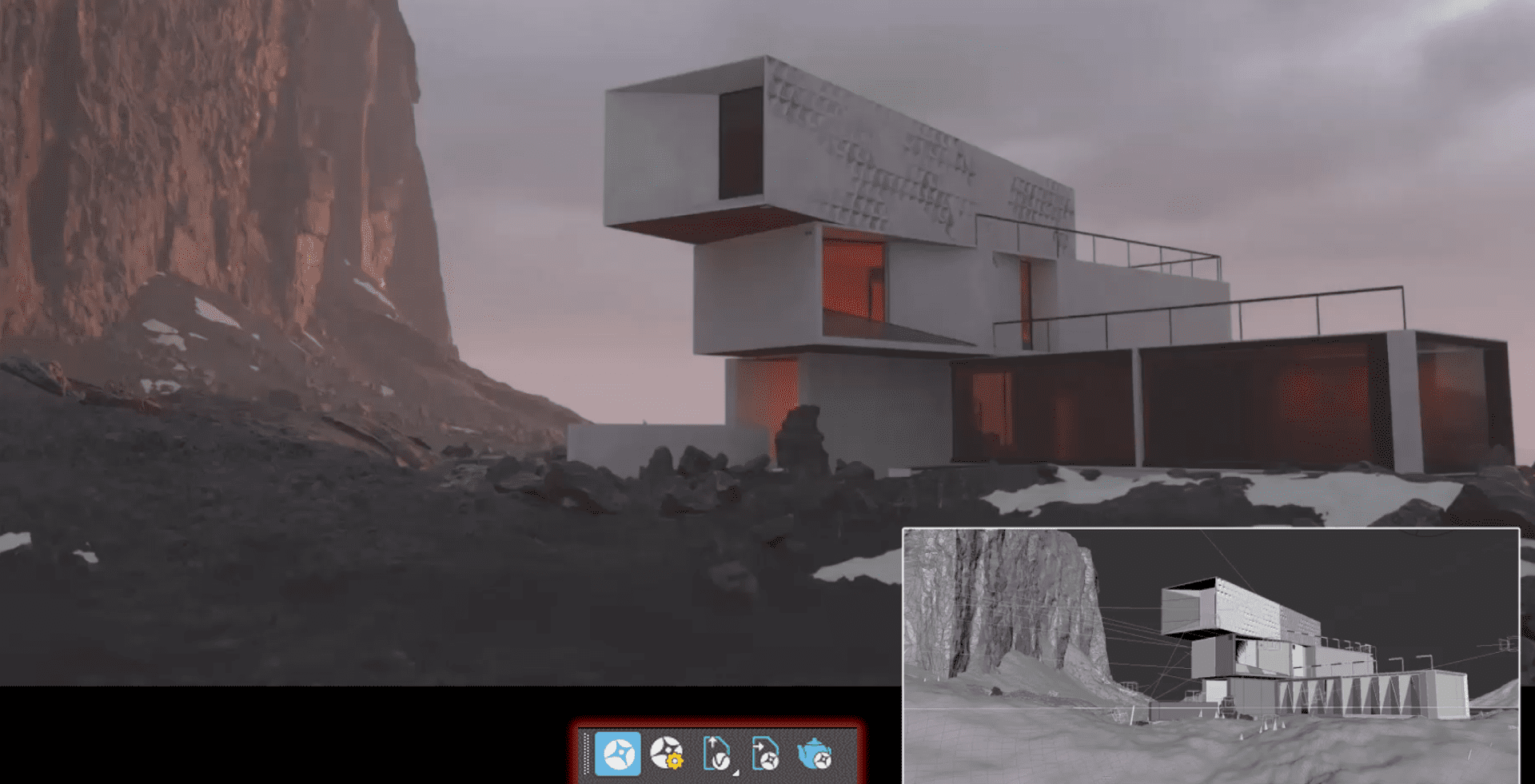
Peter Stulz: It was important to develop a storyboard outside of 3D first to avoid thinking as a 3d designer. The environment was conceived like a sandbox, so we could freely explore the set with different lenses and angles. The superfast iterations we could do with Vantage really helped to test alternatives. That felt very powerful. Obviously some storyboard shots were then adapted or omitted. Vantage was great to secure we are on the right path.
DP: Lighting in Vantage: What translated 1:1 to finals, and where did parity crack?
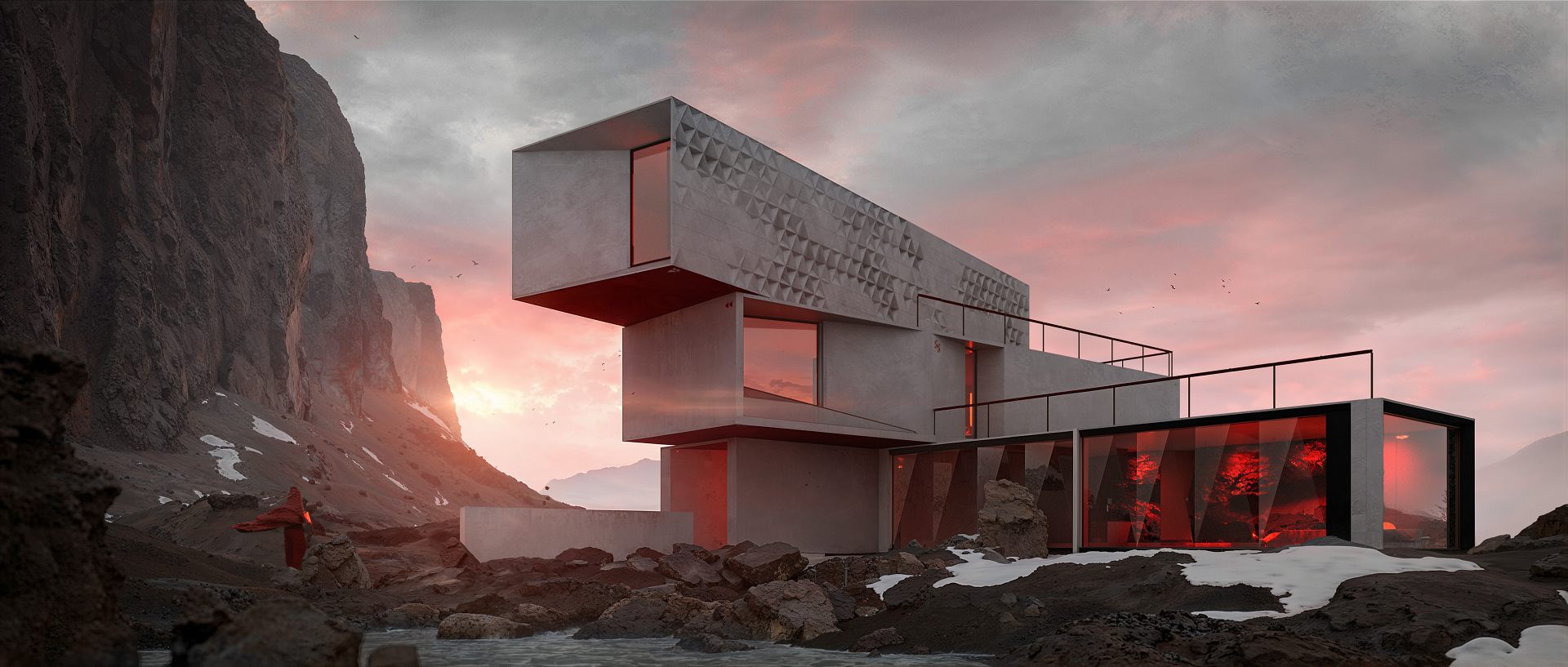
Peter Stulz: At first it is scarily impressive how close Vantage can feel to the final look. We did a few final shots directly in Vantage and realised afterwards we could have done more in Vantage to prove the point. The extra turntable animation is done 100% in Vantage, but we really had to go deep in the settings to get rid of some flickering.
You have to understand, Vantage works like this: It downscales automatically to achieve close-to realtime speed and then gradually refines the look. But that logic causes limitations: For example GI depth in tricky setups might cause visible flickering. If you want to get rid of unwanted artefacts like these, you have to go deeper into the settings; and then you get these Vray 2010 vibes again :). Apart from that the denoiser might create some artefacts, textures are getting blurry, VDBs were not possible etc.
DP: Materials & lookdev: which shader features were non-negotiable, and what did you simplify for real-time parity?
Peter Stulz: Since we decided to use Vray CPU for finals, we just accepted that some stuff for Previz looked different – we knew it would be ok in the finals. But to answer the question we used Vantage for a another client project and it became clear again: If you want to produce in Vantage you can not set stuff up in Vray and hope for the best. In that case we had a semitranslucent ocean setting and that looked quite diffferent in Vantage and had to be especially adapted.
DP: The moving house: How was it rigged , and what broke first under real-time playback?
Peter Stulz: The architectural cube is in fact one scene with 2000 frames of animation. No cheap tricks – nothing appears magically out of thin air – it’s all in there. Only the initial cube with the rough surface is a different prop because it had a tricky blending shader which was animated ( animating materials in 3ds Max is a disaster …).
The rig for the unfolding was very basic and was built out of a lot of nested helpers. That was the most simple way to avoid the “locked axis” problem. What is this? Well, rigging a rubics cube is in fact not so straightforward as it seems: after a few twists the individual parts start to move quite unexpectedly – try it yourself, it’s actually pretty hard. The nested helpers solved this, now it was a matter of adjusting the right timing; how fast is the right speed for a massive 12m cube? You want to correspond a certain weight without boring the viewer. At the end we sprinkled some subtle secondary movements on top.
DP: Performance metrics: What were typical FPS for look-dev in Vantage and per-shot render times? Both for Vantage previews and V-Ray finals?
Peter Stulz: We could render out playblasts in Vantage (+/- 200 frames) over a toilet break in 1.5k resolution at 1:2.39. For finals in Vray I attempt to stay around 10 minutes / frame. If you want to use Vantage for final quality in FullHD, you crank up the settings to 1 minute / frame. If there was any noise left, the Resolve temporal denoiser is the last polish.
DP: The famous 95%: where did Vantage land “close enough” to V-Ray and what are the missing 5%?
Peter Stulz: Every “resolution” in Vantage is more coarse. I am not only talking textures, but sampling, atmospherics, global illumination. Obviously the denoiser also tends to smear everything. Everything is just lower definition than in Vray / Corona. That’s why oldschool rendering is still very valid to achieve that crispy level of detail.


DP: Editorial rhythm: how often did you re-cut while “shooting in engine,” and what told you a shot was edit-locked before triggering finals?
Peter Stulz: In our case that answer is quite simple: the presentation date was coming up, so we had a very strict timeframe when shots had to be done. Only thing we updated in the last days, we extended a few shots by 30 frames, because they felt rushed in the beta cut. That little change improved the rythm quite substantially.
DP: Pitfalls & fixes: three things that wasted time before you found the trick and what was the trick?
Peter Stulz: Vantage is built in a way that it actually could be used as a standalone loading in VrayScenes. Since I had my friend Olaf Aue as a cinematographer on board we tried to use it in that way. Theoretically that works, but with a lot of drawbacks and very limited editing and getting the changes from Vantage back into 3dsMax is hard.
We omitted that concept and resorted to live link only with 3ds Max. But actually that standalone option is not so bad – Chaos could really focus there more.
DP: If you rebuilt “Unboxed” today at 100% Vantage, what would the delivery plan look like? QC, shot classes that stay real-time, and the shortlist that still goes offline?
Peter Stulz: I know, that there are more shots that could be realised in Vantage directly. But if you plan this, it is smart to set up the whole project more focused on Vantage directly. Switching to Vray, if needed, is easy, the other way can be frustrating.
DP: What did “Unboxed” change in how you scope, price, and pitch real-time narrative work to clients?
Peter Stulz: We can offer fast animation works more easily which don’t need very high quality or are visually suitable for Vantage (clay shots).
DP: Wishlist to Chaos: What are the top parity/features that would let you ship more shots straight out of Vantage next time?
Peter Stulz: I would like easier quality settings if you intend to use Vantage as final renderer. We had to do a lot of tweaking for specific scenes or even change the 3d scene to avoid artefacts. Additionally Vantage ships with specific assets like a water surface or animated plants. These are great, but in LiveLink they are hard to be used, because there is not way to insert them in your Root Scene.
DP: For Vantage newcomers: What is your “first-day” checklist?
Peter Stulz: Familiarize yourself with the basic UI and do some stress tests to find the limits. Additionally I would look for a study project that comes close to a client environment. There is no point in having all the bells and whistles, if in a real production case you are missing the crucial components.
DP: One more hypothetic: with one extra week or one extra GPU, which single area would you invest in—and why?
Peter Stulz: Funny alternatives. As described above a half-decent GPU is good for previz which was the main usage in “Unbox”. Having a week extra is always great – so I would opt for that!
DP: Where exactly did you keep the “cube layer” for the whole piece: did we start life on the Blender Default Cube, and how much of that origin survived?
Peter Stulz: It sure was great that we could hire the mighty default cube as a support role. It didn’t even mind too much to be shipped into another 3d-suite – what a humble character and it really outshined itself in our short. 3d-artists should show more appreciation to have it per default all free!
DP: The cube’s side text: What does it say, and why?
Peter Stulz: The cube text gives instructions how to mix the perfect Daiquiri as it is served on Kepler 5 but it is quite explicit so I can’t go into depths here. But if you look for easter eggs, we have hidden various personal items in the architecture. Talking about audio my friend Olaf had a lot of fun browsing through his SFX library and pull out quite unusual sounds for the cubes inner mechanics.

