



Rotate Object is now available in the Photoshop beta. The feature is designed to quickly transform a 2D object on a pixel layer into a rotatable 3D image, so the object can be rotated from different viewpoints to help match perspective and depth. The beta build called out alongside the feature is Version 27.5.0 20260311.m.3453.
How the workflow behaves
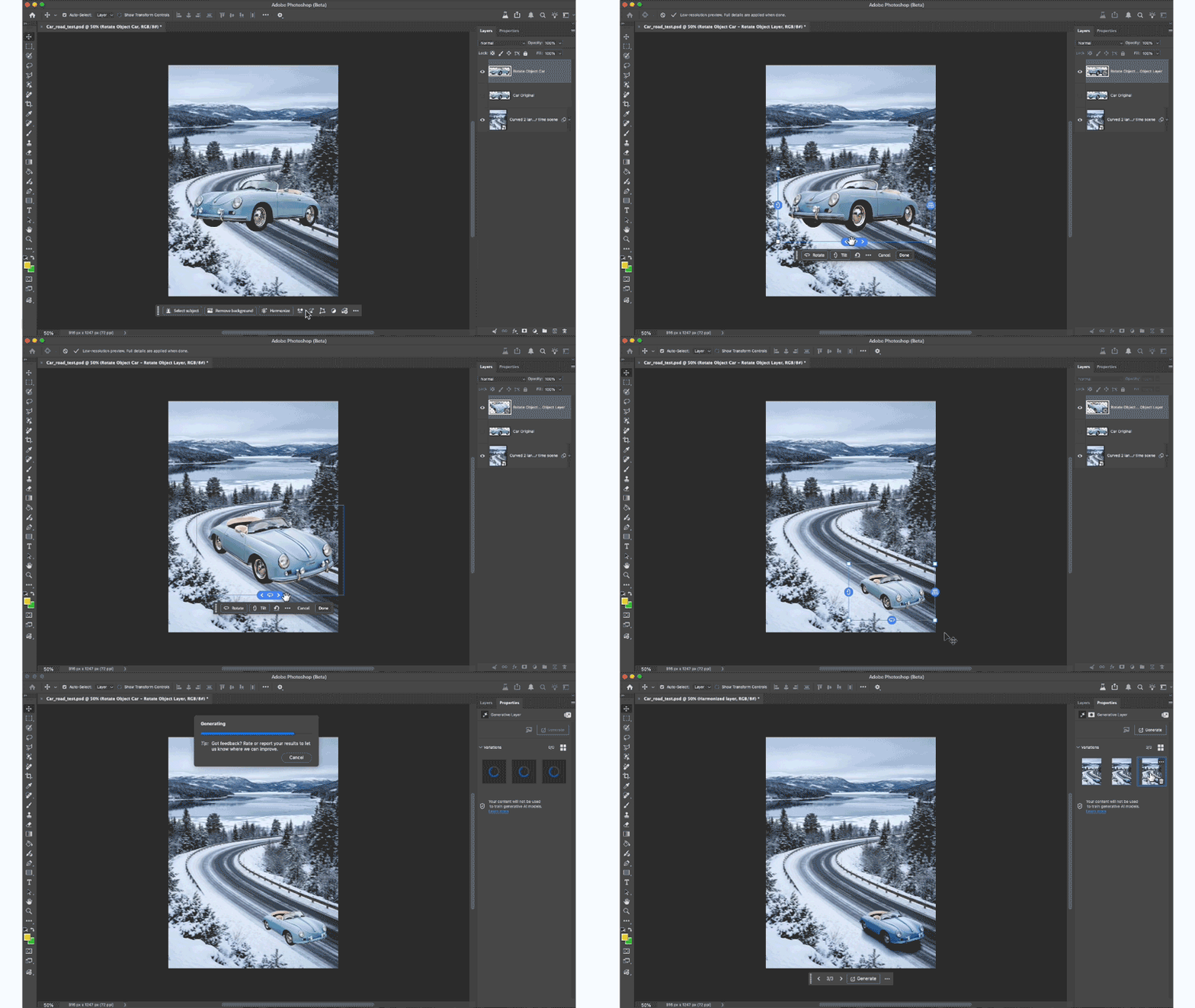
Rotate Object starts with a familiar setup: open or place an image, then select a pixel layer that contains the object you want to rotate. Duplicating the layer gets recommended because the selected layer converts into a Rotate Object layer.
From there, the entry points described are Free Transform with Cmd+T or the Edit menu path: Edit> Rotate Object. The feature can also be triggered from the context bar via a Rotate object button. After the conversion step completes, the rotated result initially appears as a low-resolution preview. Once rotation is finished and you select Done, the result gets upscaled with added details.
Rotation controls and where they live
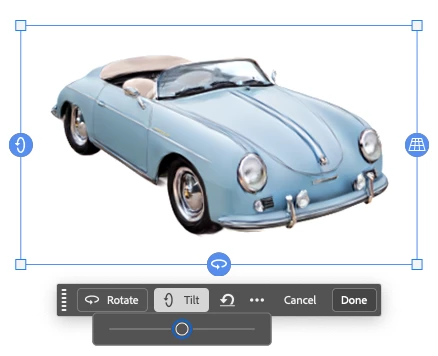
Rotate Object exposes multiple control routes while you are in rotation mode. The described options include sliders in the Contextual Task Bar, on-canvas blue controls you can drag, right-click drag for unconstrained on-canvas rotation, and numeric entry via the Properties panel. Once you accept a rotation, the feature also supports an Edit rotation step for changing the rotation and then accepting again.
Credits and usage costs
Rotate Object uses Generative Credits in the beta. The stated cost is 20 Generative Credits for the feature, with the first three tries not deducting credits. The announcement also notes that 20 credits are deducted only on the first rotation.
Blending the rotated result back into the comp
A suggested next step after rotating is using Harmonize to blend the rotated object with the background. The feature callout positions Rotate Object within a larger composite workflow: rotate for perspective first, then blend for cohesion. In practical terms, that means Rotate Object aims to reduce the number of times you have to rebuild a cutout just because the angle feels wrong, while still staying in a layer-based 2D pipeline.
Beta reality check
Rotate Object is explicitly presented as a beta feature, and the feedback loop is built into the beta app experience via the beaker icon and Beta feedback area. The flow described for feedback includes selecting whether Rotate Object feels ready for a non-beta release and optionally leaving comments.
Notes for production teams
Rotate Object has a clear promise: keep your existing 2D asset workflow, but let a single layer behave like it can spin, tilt, or dolly for a better perspective match. That makes it easy to see why it fits into daily comp cleanup, especially when an element needs a subtle angle correction without a full rebuild.
Still, treat it like any new beta capability. Test it on representative assets, validate the upscaling step against your delivery requirements, and watch how credit costs behave across iterations, because hte billable reality shows up fast when a workflow becomes habit.
// Rotate Object beta announcement and workflow steps
https://community.adobe.com/announcements-698/rotate-object-is-now-available-in-beta-1553466
