

For those who don’t know the tool: RealityScan is a desktop photogrammetry tool from Epic Games, paired with RealityScan Mobile. It outputs meshes, point clouds and textures for DCC handoff and Unreal Engine.
AMD gets a turn
RealityScan 2.2 arrived on 24 June 2026 with full AMD GPU support. Reconstruction stages that already used NVIDIA GeForce and Quadro acceleration now also use Radeon and Radeon PRO acceleration. This matters for scan teams with hardware that was previously sitting outside the fast lane. A workstation with a supported Radeon card no longer needs to behave like a very expensive display adapter when a reconstruction starts.
Mixed rigs, fewer sulks
Version 2.2 can use supported AMD and NVIDIA GPUs in the same machine at the same time. The workload gets split across every supported GPU in parallel. That is the sort of change that makes Frankenstein workstations look less like bad procurement and more like resourcefulness with cable management. Or so we told each other all the time. While filling every single available PCI slot. The current implementation is available on Windows. Linux support is listed for later.
The card list
The newly supported hardware spans modern desktop and workstation silicon. The RDNA 3 gfx1100 group covers Radeon RX 7900 XTX, Radeon RX 7900 XT, Radeon PRO W7900 and Radeon PRO W7800. The RDNA 3 gfx1101 group covers Radeon RX 7800 XT, Radeon RX 7700 XT and Radeon PRO W7700. The RDNA 3 gfx1102 group covers Radeon RX 7600 XT, Radeon RX 7600 and Radeon RX 7650 GRE.
RDNA 3.5 gfx1151 adds Ryzen AI Max series Strix Halo APUs. RDNA 4 gfx1200 adds Radeon RX 9060 XT and Radeon RX 9060. RDNA 4 gfx1201 adds Radeon RX 9070 XT, Radeon RX 9070, Radeon RX 9070 GRE and Radeon AI PRO R9700.
That makes this teh GPU access update first, and a shiny button update second. Which, for anyone waiting on dense photogrammetry jobs, is not a complaint.
360 cameras get a path
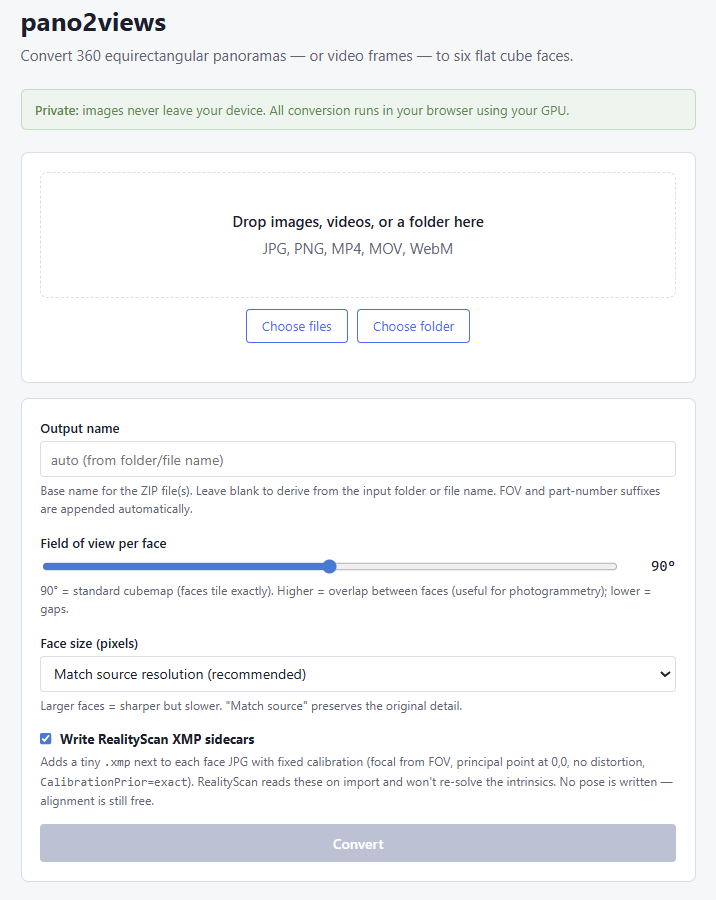
The update also brings a tutorial for a 360 camera workflow. It converts equirectangular photos into cube-face views and carries the calibration metadata RealityScan needs, namely focal length and undistorted image data. With that information, the app can skip lens correction during alignment.
The stated goal is faster capture of whole spaces, using 360 hardware teams may already own. That is useful for location capture, heritage spaces, VFX reference work and the ritual of hoping nobody walks through shot twelve. The workflow uses an experimental conversion tool, so it belongs in tests before it belongs in a day-one client schedule.
The boring fixes
The maintenance side of 2.2 is good production dentistry: unglamorous, specific, and best appreciated when it stops hurting. The editor fixes cover two COLMAP import errors, including one tied to scanner data and one tied to a trailing space in the input.
The editor also gets a crash fix for a specific sequence involving Marginal Triangle Selection and Set Reconstruction Region. Render Image now applies the camera selection chosen in its dialog when exporting renders.
Texture and CLI janitor work
Texturing gets a fix for visible patterning artifacts in displacement maps when reprojecting texture between two planes. That is narrow, but narrow is lovely when the bug lives in your shot.
The CLI fixes are similarly practical. The addImageWithCalibration command now applies the proposed calibration metadata when importing an image already present in the project. The importLaserScanFolder command no longer misplaces lsp files. Automation people may now lower one eyebrow.
Handoff without magic dust
The tool still works as a capture and reconstruction tool, not a magic ingest button for every 3D app. Its export path covers model, point-cloud, camera, texture and scene data, including OBJ, FBX, GLB, Alembic and USD. Import support includes OBJ, PLY, FBX, DXF and DAE.
For realtime work, the useful bit is the round trip. A scan can leave for cleanup, UV work, and simplification, then return for texture baking or texture reprojection. An rsinfo file stores coordinate and export-parameter data so the returned model can align with the original component. Skip it, and the model may return shifted, rotated or scaled. The computer, as ever, is petty but precise.
Export settings also cover vertex normals, vertex colors, material data for FBX, texture export, embedded textures where supported, texture alpha and single-texture export. Camera export can include positions, orientations and focal lengths for supported formats. This is the part where pipeline people nod quietly, because boring metadata is often the difference between a clean handoff and an afternoon of swearing at scale.
Download and pricing
Existing users can download 2.2 from the Epic Games Launcher or, for subscribers, the Developer Portal. New users can check licensing options and request a free 30-day trial.
RealityScan is free for students, educators, hobbyists and companies earning under 1 million USD in annual gross revenue. For individuals and businesses above that threshold, seats cost 1250 USD per seat per year. The paid seat includes all tool capabilities, documentation and learning materials, community forums and updates for one year. Custom terms are mentioned for purchases of more than 25 seats.
https://www.realityscan.com/news/realityscan-2-2-is-here-with-full-amd-gpu-support-download-today
