



This article by Anna Huber originally appeared in DP 02 : 2014.
In this still, a lively metal panther catches the viewer’s eye. With its emerald green eyes and filigree decorations, the animal looks like a piece of jewellery. The animago submission for the still category 2O13 was created by 3D artist Anna Huber.
The image was originally created for a 3D contest on PSD-Tutorials on the subject of “Steampunk”. My idea was to transform a real living creature into a machine. The mechanical creature was to have the characteristic features of the animal and the typical steampunk elements. I decided on a panther – an elegant creature, light-footed and fluid in its movements. And filigree in a certain way. A steampunk panther should not be made of heavy metal parts, which would make it appear heavy and clumsy. Instead, thin plates were important, which defined the body in ornate ornaments and also gave the viewer a view into or through the body. The ornaments and decorations were not chosen at random, but reflect the panther’s area of distribution and thus the cultural patterns of the population in Africa. I used Cinema 4D as the software and V-Ray as the renderer. Photoshop was used for post-production.
Light / Rendering / Camera
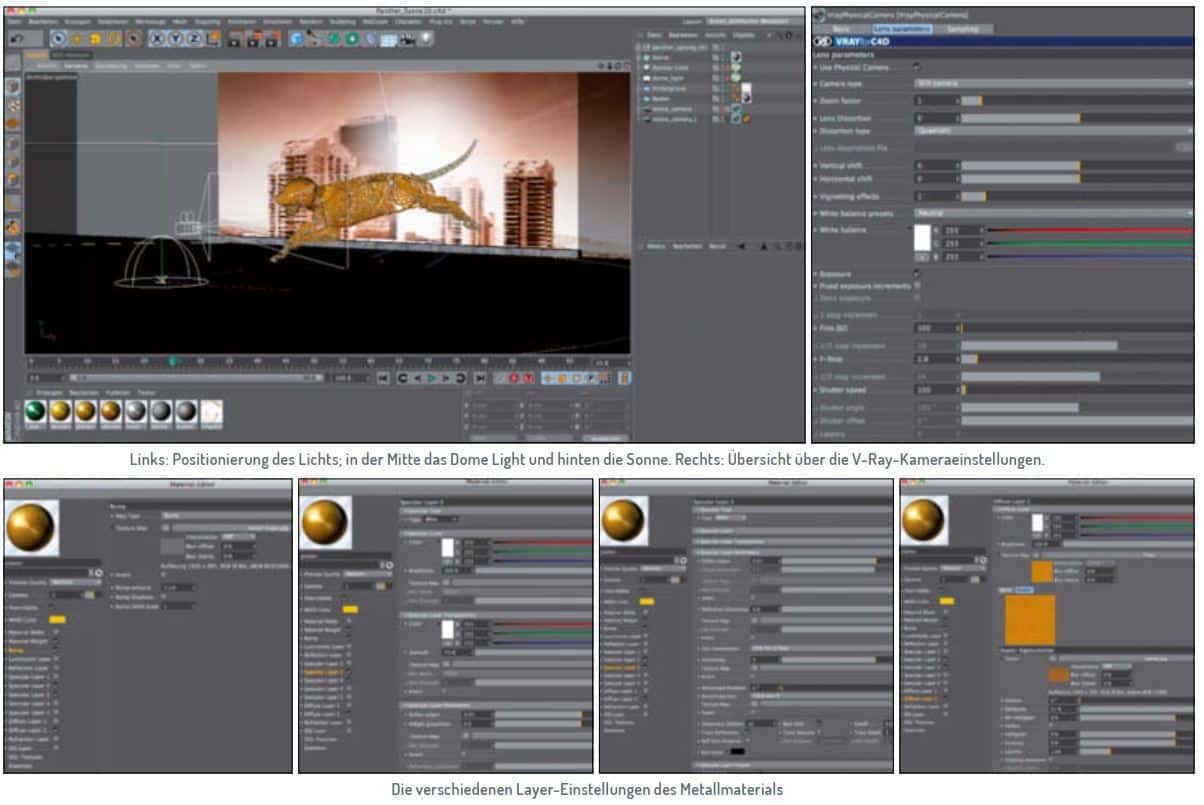
The first step was to set the global illumination in the V-Ray render settings. I created the basic lighting using an HDRI light. The nice thing about HDRIs is that they create a general and – depending on the setting – realistic basic brightness with a certain colour mood. This gives you an initial overview of the lighting mood. In the next step, I loaded the HDRI motif into the V-Ray Area Light and changed the Area-Type to “Dome”. “Enable Shadows” and “Invisible” were activated. To ensure that the lighting conditions of the background texture and the scene match later on, the area light was aligned so that the “sun” of the HDRI comes from the same direction as the “light” on the background texture later on.Finally, I added another light source directly behind the panther to intensify the overexposed sun of the background image by casting a shadow on the panther. The camera was fitted with a 50 mm lens, the aperture was set to 2.8 and 1/100 second was selected as the exposure time. A beauty pass and the corresponding multipass layers were rendered.
Materials
All materials were created in V-Ray. The metal material was generated first. To do this, a photo of a metal plate, which had previously been colour-adjusted in Photoshop, was loaded into Diffuse Layer 1. To adjust the final details of the colour directly in Cinema 4D, I also loaded a filter shader into diffuse layer 1. In this, the saturation was set to 51 per cent and the gamma value to 1.4. In the Bump Channel, the same photo of the metal plate was loaded only in black and white and Bump Amount was set to 1 cm. Specular Layer 2 was responsible for the highlights. In addition to the general settings, I entered -0.5 for Anisotropy. Specular Layer 3 was used for the specular reflection. I also activated Fresnel and set its IOR to 2.43. The Reflection Glossiness was set to 0.8 and the Glossiness Subdivs were increased to 12 to avoid too much grain. I realised the concrete and stone material with the help of suitable textures and it has a similar structure to the metal materials.
Modelling
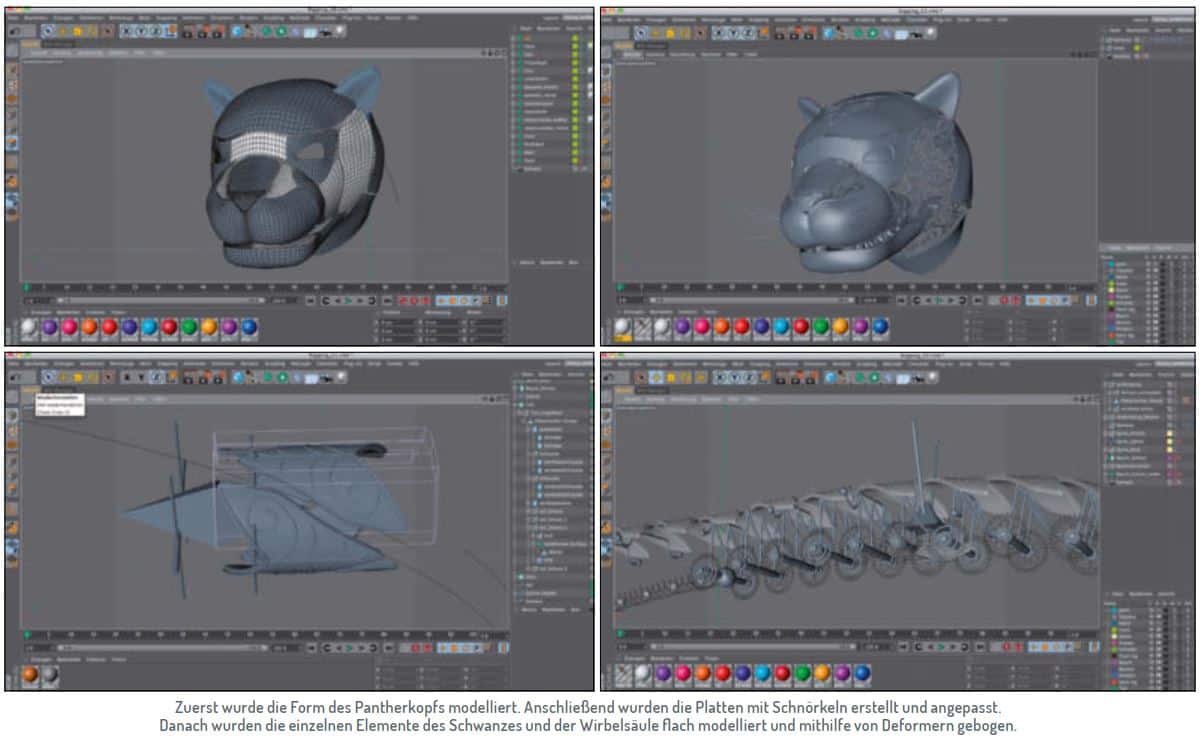
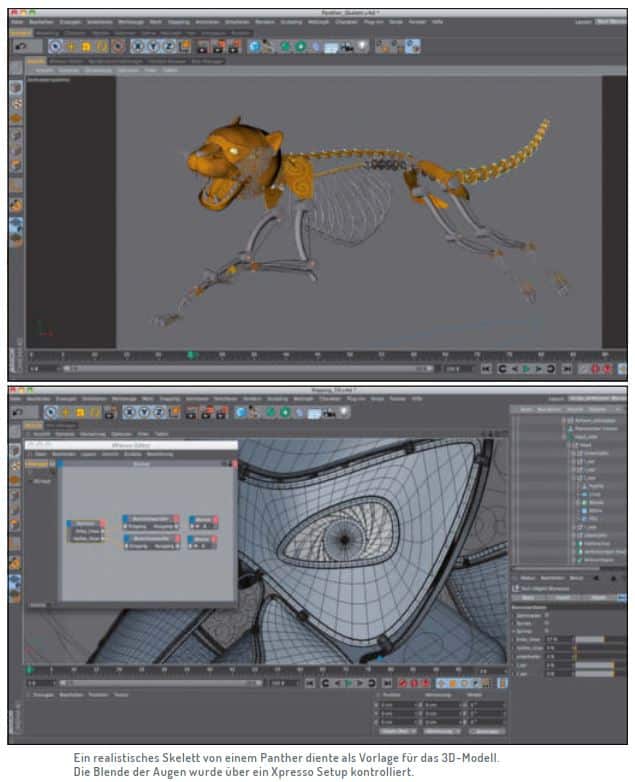
First of all, I roughly outlined the panther so that I could later adapt the shapes of the individual plates to the skeleton better. The skeleton should be visible through the plates and decorations and was modelled true to life. I replaced the bones with bent iron rods and the joints with cogwheels, cadre joints and metal joints. The plates were then modelled and adapted piece by piece. For the plates with the spirals, I mainly used Bezier and helix splines, which were subordinated to sweep nurbs together with a rectangle spline. First, the plates with the decorations had to be modelled flat and then brought into the correct shape using deformers. The pure metal plates were modelled poly by poly. The “Edge selection to spline” tool was used to create a spline for the border. This was then subordinated to a sweep nurbs together with a rectangle spline. Finally, I had to connect the panels both to the skeleton and to each other.
Rigging
The rigging was built in parallel with the modelling to ensure that the individual parts interlocked perfectly. Due to the mobility of the outer shell and the skeleton, I had to make sure that the axes of the joints were congruent with the axes of the modelled joints or that they overlapped. This ensured that the movement of the plates was synchronised with the joints and that the axes of the joints always rotated around their centre point. IK chains were used for the legs. There were additional controllers with an Xpresso setup for the claws. The face was also realised using an Xpresso setup. For this, I created user data in a null object and connected it in an Xpresso tag with the angle of the jaw, the ears and the visor using a range converter. Finally, all modelled parts were subordinated to the corresponding joints. In order to keep the whole thing a little clearer and to be able to quickly show and hide individual areas of the panther, layers were assigned to all objects.
Problems
The main problem with the panther was that everything had to fit together well, but the panels could not collide with each other during posing and animation. The solution was to build the rig in parallel with the modelling and to test it again and again right from the start. The scene was very polygon-heavy and slowed down my work in the editor. For this reason, I worked a lot with the layer manager and set the detail level of the editor to “low”, especially when texturing and posing. This made it possible to easily show and hide or render individual parts of the panther.
References
Visual and textual references about appearance, movement and behaviour are essential for a realistic representation of the object. In addition to various panther reference images for a correct skeleton and muscle structure, I was inspired by steampunk elements, armour, metal decorations and ornaments.
Post-production
I used Photoshop for the post-production. To achieve a stronger metallic effect, I enhanced the highlight and the reflection using the corresponding multipass layers. The background texture was colour-matched to the panther, creating a warm, unnatural mood.
