


![A group of people in various poses, with a focus on a woman in white attire, overlayed with the text 'SWITCHX' and the tagline 'SWITCH [ANYTHING]. KEEP WHAT MATTERS.' The scene is set against a beach background at dusk.](https://i0.wp.com/digitalproduction.com/wp-content/uploads/2026/02/beeble-switchx-hero.png?resize=110%2C110&quality=72&ssl=1 "a group of people in various poses with a focus on a woman in white attire overlayed with the text switchx and the tagline switch anything keep what matters the scene is set against a beach background at dusk digital production")


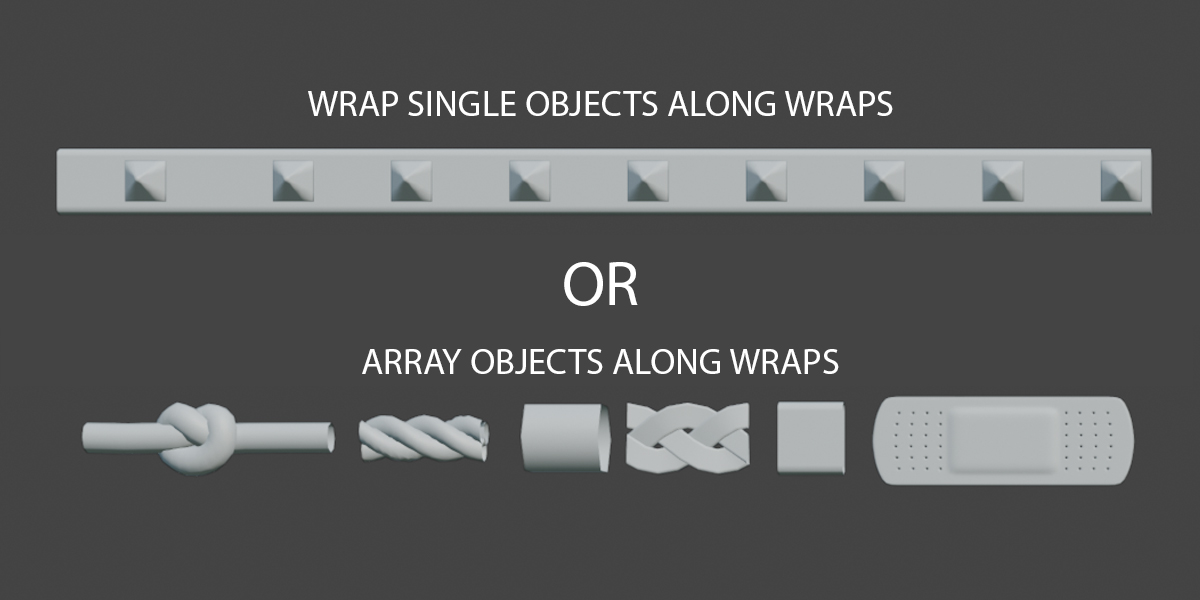
Wrap Gen is a procedural wrapping tool for Blender, created by Hodgson3D. It allows users to wrap custom geometry around objects using guide curves and geometry nodes. The tool supports both poly and bezier curves as guides, enabling users to define the path of the wrap. Users can choose to array objects along the wrap or wrap single objects along the curve. An internal shrinkwrap/convex hull system ensures that the wrap conforms to the contours of the target mesh, behaving like a tight rope or strap over concave and convex areas.
Key Features
- Custom Geometry Wrapping: Assign your own geometry to be wrapped around the target mesh.
- Wrap Count Control: Set the desired number of wraps. For individual control, set the wrap count to “1” and duplicate the guide curve in edit mode.
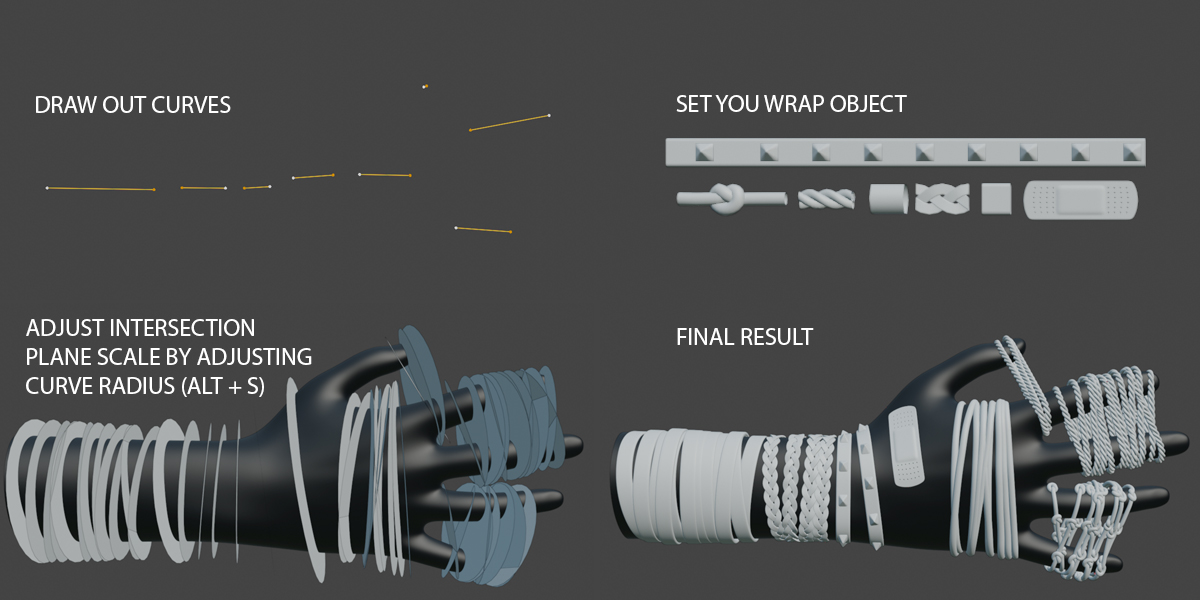
- Curve Radius Adjustment: Dial in where the wraps interact with the target mesh by adjusting the curve radius.
- Target Mesh or Collection: Choose to wrap around a single mesh or a collection of objects.
- Array Option: Decide whether to array the wrap mesh along the curve or wrap a single object.
- Randomization Settings: Add randomness to offset, rotation, and spin with exposed seed parameters for quick iterations.
- Scatter Meshes: Scatter objects along the wraps to add knots or imperfections, enhancing the organic look.
- Self-Collision Detection: Enable self-collision to generate more realistic layering of wraps.
- Convex Hull Normals: Convert the target mesh to a convex hull to sample normals from, aiding in wrap alignment.
- Alignment to Normals: Align wraps to the normals of the target mesh for non-uniform objects like straps.
- Merge Threshold: Adjust the merge threshold to control the merging of vertices after deformation.
- Default Wrap Settings: Use default settings for profile radius, resolution, and curve resolution when no custom wrap mesh is assigned.
Usage Steps
- Draw out a guide curve (poly or bezier).
- Set the desired number of wraps.
- Adjust the curve radius to define interaction with the target
- Assign your target mesh or collection and the wrap mesh.
- Customize settings for randomness, alignment, and more.
Compatibility and Availability
Wrap Gen is compatible with Blender versions 4.1 through 4.4. It is available for purchase at Superhive Market for $10.99, currently discounted to $8.24.
Final Thoughts
Wrap Gen offers a procedural approach to wrapping geometry in Blender, streamlining the process and providing extensive customization options. As with any new tool, it’s advisable to test its integration within your specific pipeline before full-scale implementation.
