



For those who don’t know the tool: RapidPipeline is a 3D asset optimisation suite that now integrates into the Unreal Editor to let artists import and prepare CAD and 3D models for real-time use, extending its existing ecosystem alongside Blender, Maya and 3ds Max plugins.
What It Is
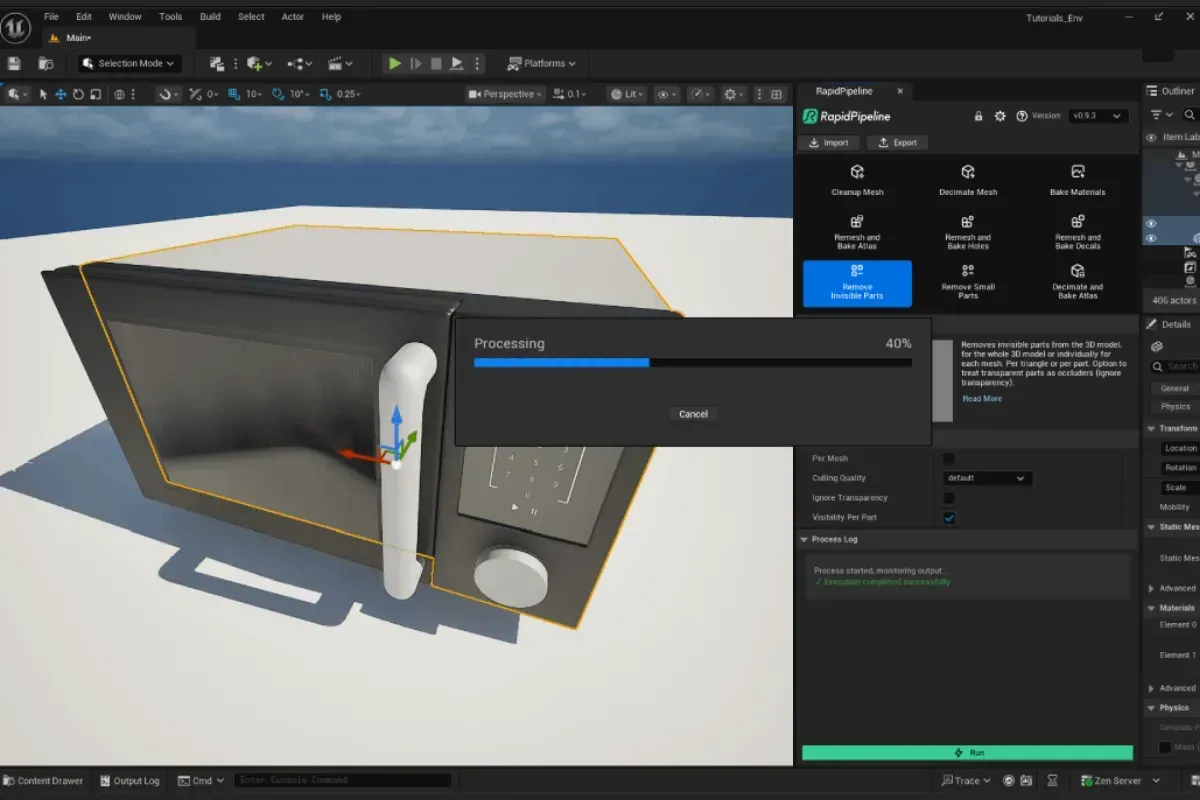
RapidPipeline for Unreal Engine is a plugin that embeds the company’s 3D Processor inside Unreal’s Editor. It lets artists import over 20 CAD and 3D file formats and perform cleanup, simplification and optimisation tasks on those models without leaving the engine. Activities such as decimation, remeshing, hole baking, invisible geometry removal, texture atlas generation and more are available directly through the plugin’s UI.
Real-time workflows often struggle with heavy industrial CAD data, which is built for engineering and not designed for real-time visualization or VR. Traditional pipelines export data out of the engine, optimise using separate tools, and reimport. RapidPipeline’s plugin consolidates these steps inside Unreal Editor and processes everything 100 per cent locally on the user’s machine. This avoids external cloud transfers and simplifies iteration.
How It Works
Once installed, a RapidPipeline menu appears in the Unreal Editor. Users can:
- Import CAD/3D formats natively — Directly import files from CATIA, Solidworks, Rhino, PTC Creo and others.
- Run optimisation actions — One-click operations handle cleanup, simplification and remeshing tasks with adjustable parameters.
RapidPipeline’s approach is complementary to Unreal Engine’s Datasmith: while Datasmith focuses on transport and compatibility of source packages, RapidPipeline focuses on preparing and optimising geometry for real-time use.

RapidPipeline also offers a free education plan for students and faculty, letting eligible users access its full suite of tools, including the Unreal Engine plugin, so long as they’re working on academic and non-commercial projects.
Limitations and Notes
Official docs note that the Unreal integration uses glTF as an intermediate format and currently supports only static meshes; advanced material setups and skeletal meshes may not be fully handled yet. Installation requires extracting the plugin ZIP into the Unreal Engine Plugins folder and setting a valid RapidPipeline account token. Test the plugin with your own assets and performance needs before adopting it in a production pipeline.Sources
// RapidPipeline product overview and plugin details
https://rapidpipeline.com/en/unreal-engine/
// Official Unreal integration docs
https://docs.rapidpipeline.com/docs/componentDocs/integrations/unreal-plugin-setup
