



For those who don’t know the tool: DJV is an open source image sequence viewer and playback tool for VFX and animation. It runs on Linux, macOS and Windows, supports OCIO colour management, and is typically used for dailies, shot review and quick sequence inspection without licence infrastructure.
DJV 3 has been evolving through incremental releases, culminating for now in version 3.3.3. We missed the earlier 3.x updates, so let’s summarise.
Version 3.3.3 is the latest tagged release. It adds one feature and resolves two bugs. The new feature enables the Escape key to close the secondary window. The fixes address a flipped export issue and incorrect tool tooltips. No further technical detail is provided in the release notes regarding the root cause of the export flip or the tooltip behaviour. Not independently verified at press time. Prebuilt binaries are provided for Linux x86_64, macOS arm64 and Windows amd64. Assets include tar.gz, dmg, exe and zip packages. SHA256 checksums are published for the binaries. To understand the significance of 3.3.3, it is necessary to look at the broader 3.x changes.
Sequence awareness and file handling
One of the more practical changes in the 3.3 branch arrived in version 3.3.0. The built in file browser can now display image sequences as a single item with an associated frame range. Instead of listing every frame as an individual file, the browser aggregates them into a sequence entry.
This change affects directory navigation and review workflows directly. For facilities handling large EXR sequences, reducing file list clutter improves browsing speed and visual clarity. The release notes describe this as a display change in the built in file browser. No additional details are given about sequence detection rules or supported naming conventions beyond the example provided for command line input.
The command line in 3.3.0 now accepts file sequences written in hash notation, such as render.#.exr. This aligns with established VFX naming patterns and allows users to load sequences from the terminal using shorthand notation.
Keyboard shortcuts expanded
Keyboard customisation received significant attention in 3.3.0 and 3.3.2. Version 3.3.0 introduced primary and secondary keyboard shortcuts. It also added a search box to the keyboard shortcut settings. The Tab key can now be assigned to shortcuts, including combinations such as Ctrl+Tab and Ctrl+Shit+Tab for changing the current file. The spelling in the official notes reads Ctrl+Shit+Tab.
A fix in 3.3.2 addressed the keyboard shortcuts search box. Another fix in 3.3.0 resolved keyboard shortcut behaviour in the secondary window. In 3.3.2, the version number was added to the window title, and a command line flag was introduced to print the version. A dialog for displaying system information was also added. These additions are small but relevant for deployment and support scenarios. Being able to query the version from the command line simplifies scripting and diagnostic workflows.
Mouse behaviour and interaction changes
Version 3.3.0 updated mouse configuration in several ways. Extra 1 and Extra 2 buttons were added to the mouse settings. A frame shuttle scale was introduced in the same settings panel. The default mouse mapping was changed so that the left mouse button performs frame shuttle and the middle mouse button pans. This represents a behavioural change for existing users migrating from earlier versions. A separate fix in 3.3.0 corrected swapped middle and right mouse buttons in the settings.
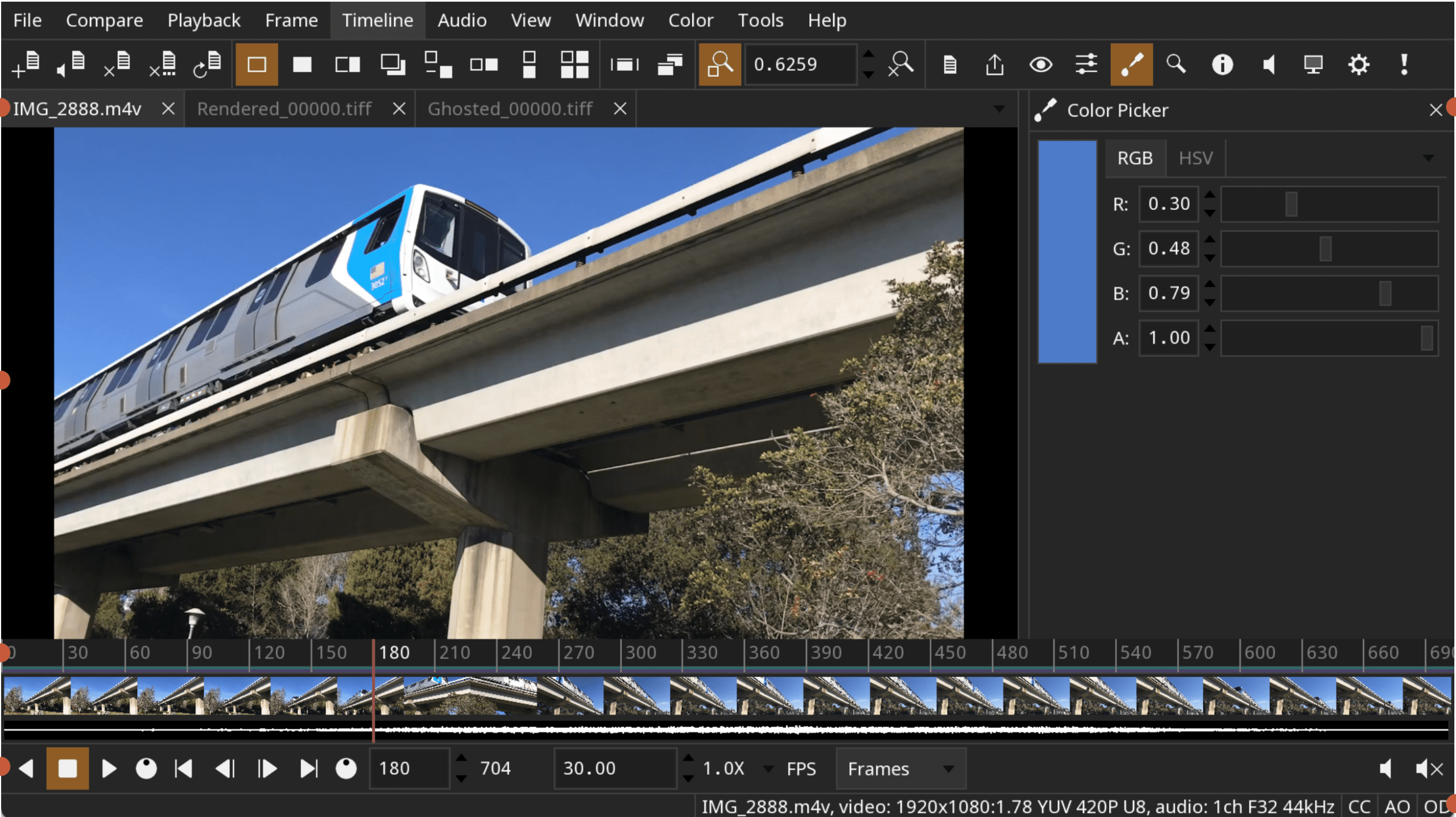
In 3.3.2, pixel and mouse binding labels were added to the colour picker and magnifier tools. The release notes state that both tools now update when picking with the mouse. This suggests synchronised feedback between cursor interaction and tool UI. Version 3.3.3 then added Escape key support for closing the secondary window. Together, these changes reflect ongoing adjustments to interaction ergonomics rather than new feature domains.
Colour management and UI indicators
DJV 3 integrates OCIO for colour management. In 3.3.0, the colour tool was updated to display the OCIO configuration name. At the same time, the path for the OCIO and LUT file names was hidden within the tool.
Status bar indicators were added in 3.3.0 to display whether colour controls, the audio sync offset or the output device are enabled. In 3.3.2, additional status bar indicators were introduced to display when mirroring is enabled.
In 3.3.0, compare overlay and difference modes were fixed to prevent image flipping. In 3.3.3, a flipped export issue was also fixed. The two issues are described separately in their respective release notes, with no explicit statement linking them.
The cumulative effect is a reduction in unexpected image inversion behaviour in both interactive comparison and export contexts, based on the wording of the fixes. The specific code paths affected are not described. Not independently verified at press time.
Playback behaviour
Version 3.3.0 modified playback speed behaviour. The release notes state that playback speed can be increased and decreased by pressing forward or reverse multiple times. This implies incremental speed changes tied to repeated transport input. A magnify tool was added in 3.3.0, along with grid labels. The magnify tool was later enhanced in 3.3.2 with pixel and mouse binding labels and updated mouse interaction behaviour.
Platform specific fixes and build updates
The 3.3.x series includes multiple platform and build fixes.
Version 3.3.0 fixed compilation on Rocky 8 and addressed excessive CPU usage caused by the clipboard on Gnome. It also fixed the mouse settings to only show the Command key on macOS.
Version 3.3.1 was dedicated to macOS package fixes. No further detail is provided in the release notes.
Version 3.3.2 fixed an issue with the window title bar appearing off screen.
The 3.3.0 release notes list a library update to SDL2 release 2.32.10. No additional third party dependency changes are described in the provided notes.
Version 3.3.3 assets include Linux, macOS and Windows builds, with SHA256 hashes published for verification.
What has not changed
Based on the official notes provided, the 3.3 branch does not introduce new file format support, new codec integrations, or changes to core rendering architecture. There is no mention of GPU acceleration updates, threading model changes or cache redesigns in the referenced releases.
There is also no pricing information, as DJV is distributed as free open source software via GitHub.
Any assumptions about performance improvements, stability gains beyond listed fixes, or pipeline scale suitability would be speculative and are not supported by the cited documentation. Not independently verified at press time.
Version 3 so far
Taken together, DJV 3 up to 3.3.3 reflects iterative refinement. Sequence aware browsing, expanded shortcut handling, improved mouse customisation, clearer OCIO labelling, and a series of bug fixes define the branch.
For studios using DJV as a lightweight review tool, the changes are operational. They reduce friction in file browsing, clarify status indicators, and address specific bugs such as flipped compare modes and flipped export.
As always, new tools and updates should be tested in controlled conditions before deployment in production environments.
