



Animatrix Studio has introduced Animatrix Polisher, a new Maya add-on designed to let animators sculpt and keyframe meshes directly. The tool bypasses traditional rigging fixes and converts edits into keyframed blendshapes. At 20 USD, it is positioned as an affordable corrective tool for everyday animation problems: mesh penetrations, ugly blendshape outputs, or simply the need for stylised effects like smear frames.
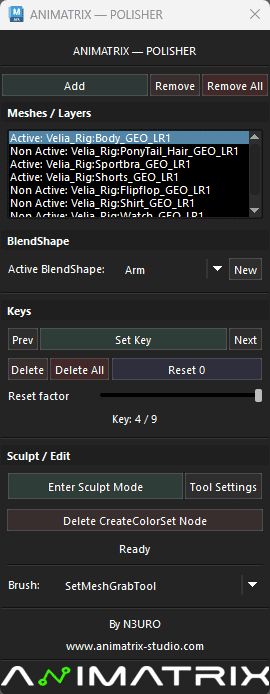
Core functions
Animatrix Polisher provides an in-viewport Sculpt Mode. Artists select a mesh, create a new blendshape node, and sculpt at any frame. When exiting Sculpt Mode, the shape is stored automatically as a keyframe.
The workflow is non-destructive. Nothing is baked into the base mesh, and sculpted corrections remain editable. Animators can also adjust tangents on the blendshape node, giving control over timing and spacing. Slow-ins, slow-outs, and motion spacing tweaks can be applied directly in the same tool.
Beyond the rig
According to the developers, Polisher allows animators to “go beyond the rig”. This covers common cases where rigs do not offer a needed corrective shape or when deformation systems produce artefacts. Instead of requesting new rig features, animators can simply sculpt fixes into place.
This approach extends to blendshape work. Results from automated blendshape generation often need refinement; Polisher makes such corrections possible without setting up separate shape targets.
Organised by body parts
A practical addition is support for multiple blendshapes per frame. Artists can create different shape layers—for example, “Arm”, “Leg”, “Body”, “Head”—and manage them independently. This helps keep track of sculpted corrections in complex scenes.
Use cases listed by the developer
The official product page identifies several typical use cases:
- Adding mesh details not supported by the rig
- Fixing mesh penetration during motion
- Polishing poor blendshape deformations
- Creating stylised smear frames
- Fine-tuning timing using tangent adjustments
All of these functions are integrated into a single sculpt–keyframe workflow inside Maya.
Compatibility and limitations
Polisher is available only on Windows and supports Maya versions 2023 through 2026. The developer is listed as N3ÜRØ, part of Animatrix Studio.
One known issue is a quirk in Maya’s own Sculpt Tool. If activated outside Polisher’s Sculpt Mode, Maya may generate a createColorSet node on the mesh. Polisher provides a button to delete this node safely.
Pricing
The tool is sold for 20 USD via AnimProps.
Why it matters
While Polisher does not replace a proper rig or deformation system, it addresses a common pain point: the gap between what rigs provide and what animators need in production. Quick fixes for penetrations, shape clean-ups, or experimental smear frames can be executed directly in the animation pass, saving time and pipeline back-and-forth.
