



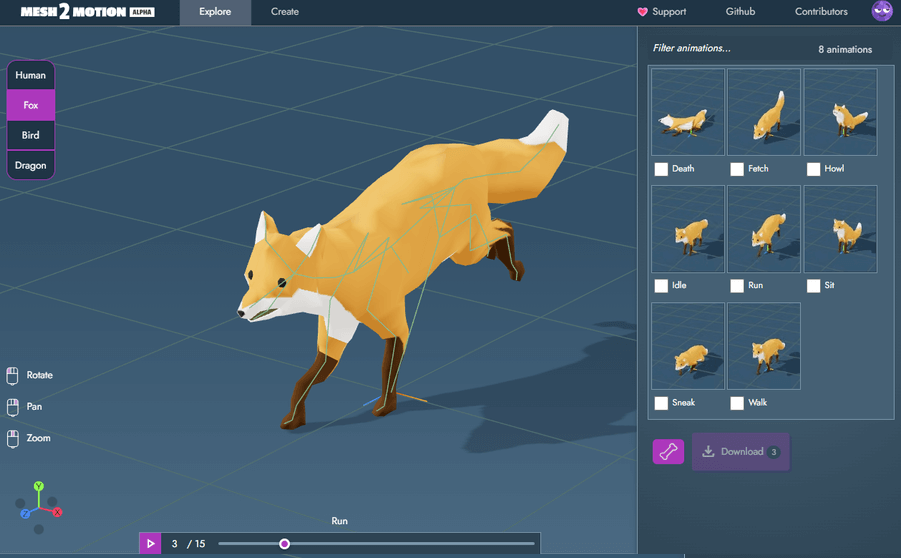
The open-source web app Mesh2Motion, developed by Scott Petrovic, has released Update 6, introducing the new Explore Library and overhauled skeleton rigs. The Explore page now serves as the default landing screen, allowing users to preview and switch between skeletons and animations instantly, no manual rig configuration required. This change simplifies testing and makes the application far more accessible for newcomers and professionals looking to evaluate rig behaviour before importing their own 3D models.
The Explore Library displays all available animation clips for humans, quadrupeds, birds, and dragons. Artists can preview motion directly in the browser, bypassing the previous requirement to manually attach rigs to meshes. Those who want to use their own assets can still switch to the Create page to import 3D models and connect them to existing rigs.
Smarter Skeletons and Rebuilt Rigs

Update 6 overhauls all control rigs. Petrovic rebuilt every skeleton using a more advanced Blender 2.5 rig structure, separating driver bones (for animation control) from deformation bones (for mesh shaping). This separation improves IK (inverse kinematics) behaviour, constraint setups, and general deformation quality. The result is greater flexibility when posing or animating directly within Mesh2Motion’s browser interface.
Additional bones were added to enhance deformation, including stomach bones for dragons and quadrupeds and wing bones for birds. Expressive mouth rigs were also added for birds, dragons, and quadrupeds, expanding facial animation possibilities. Petrovic credits tutorial resources such as Rich Stubbs’ YouTube channel for helping refine the rigging process.
Interface Tweaks and Animation Additions
A series of smaller quality-of-life updates accompany the rig rebuild. These include floor transparency for visual clarity in animations that move below the ground plane, and a transform-space toggle that switches between world and local rotation. The human skeleton gains a wider A-pose slider range for improved T-pose correction.
The animation library itself now includes new fox and quadruped motions created using the revised rigs, alongside a reworked human animation labelled “tired”. A small typographic fix corrects the spelling of “Quaternius” in the contribution guide—an example of Petrovic’s attention to detail.

Current Feature Set
Mesh2Motion provides a web-based animation workflow built entirely in the browser. Users can preview skeletons, manipulate rigs, and test deformations without any installation or plugin dependencies. It supports common 3D file formats, real-time playback, and pose editing.
Control rigs are based on Blender source files, enabling familiar IK controls and constraint behaviours found in desktop DCC tools. Artists can quickly toggle transform modes, refine poses, and view deformations across human, animal, and fantasy skeletons. As of Update 6, the app includes a growing library of pre-rigged skeletons and animations, offering a streamlined environment for rig testing and educational use.
Ongoing Development
Petrovic notes that future work may involve expanding the animation library or producing tutorial walkthroughs for contributors. Mesh2Motion remains a solo open-source project and is freely accessible online. Users are encouraged to test deformations and playback performance before integrating it into production workflows.
