



For those who don’t know the tool: Material Maker builds procedural textures and painted looks with node graphs, runs on Godot Engine, and exports materials for engines while you keep your DCC doing DCC things.
1.6 focuses on speed, sanity, and shipping
Material Maker 1.6 lands as a practical release: faster interaction on heavy graphs, new nodes aimed at controlled variation workflows, and a longer list of fixes that smooth daily use. The update keeps the core loop intact. You build textures and materials in a node graph, preview the result, and push assets downstream.
The release moves the app to Godot Engine 4.5.1. That base change pairs with performance work across graph rendering and several parameter editors. Graph rendering now optimizes zoomed-out views, and editor changes target responsiveness in places artists touch all day.
Controlled Variations aims for repeatable variety
1.6 introduces Controlled Variations and related nodes. The release frames this as a system for generating variants of a material look with more control than pure randomness.

Variant workflows matter when you need a family of surfaces that stay consistent across a set, a biome, or a prop library. In day-to-day terms, controlled variation can reduce duplicated graphs and the temptation to fork a graph into ten nearly identical versions you never want to touch again.

Aperture nodes cut the spaghetti
1.6 adds Aperture nodes to keep graphs readable. In and Out nodes connect through a shared identifier that appears as a label on the node. You edit the identifier by double-clicking the label or using keyboard shortcuts, and you can change label color with a key command while the node stays selected.
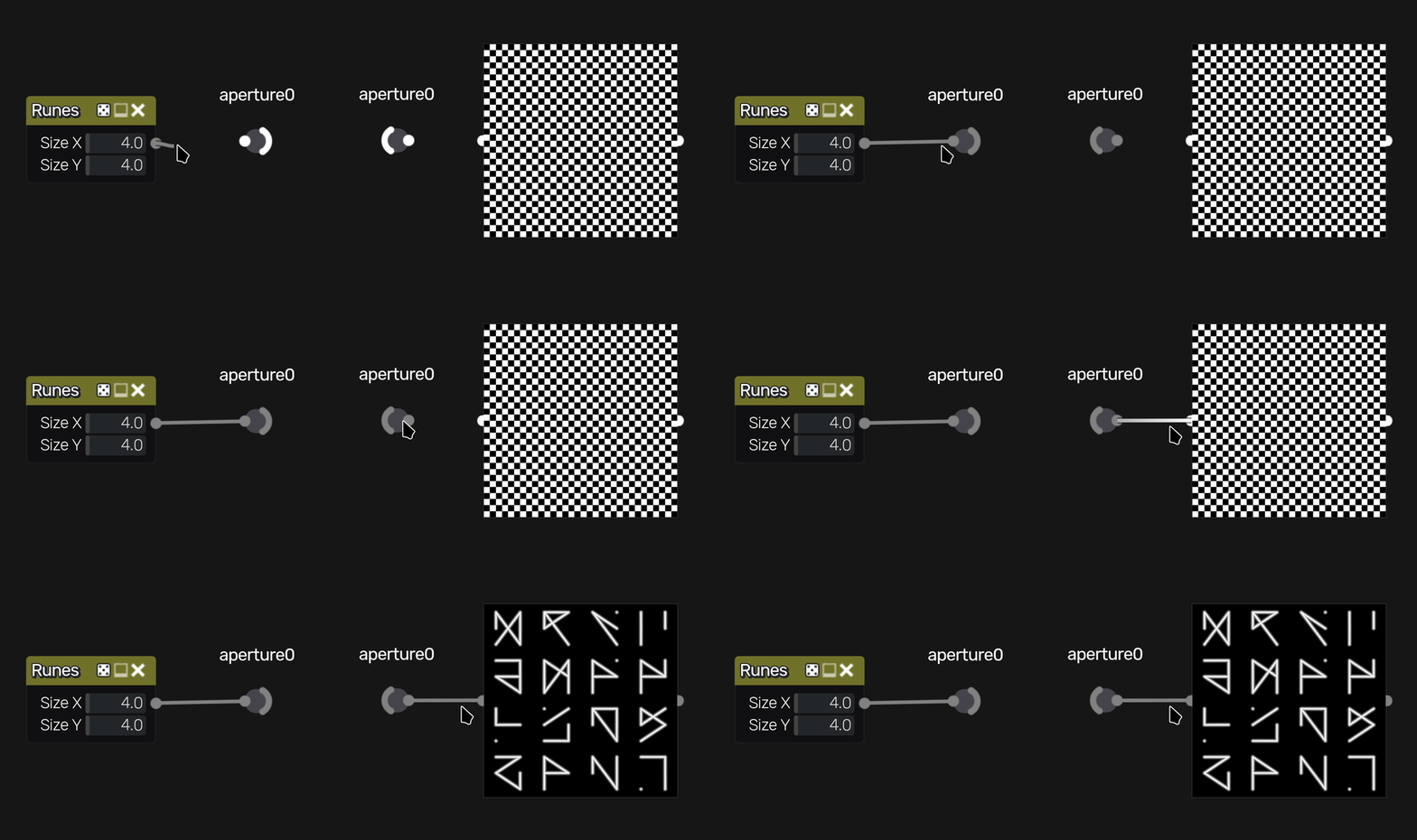
That feature targets the real enemy of node workflows: scaling up. A small graph stays understandable through wires. A production graph turns into a plate of noodles. Aperture nodes let you route signals cleanly without dragging cables across half the canvas.
Portal nodes and a growing node toolbox
1.6 adds portal nodes, plus a variadic Color Pick node. It also updates multiple existing nodes and editors. The changelog mentions changes around text handling, warp inputs, pixel tools, gradient options, and improved curve and polygon parameter editors. Comment nodes and remote links also receive attention, alongside drag-and-drop improvements for remote and iOS parameters.

glTF export takes a first step
1.6 adds a basic exporter for static PBR materials in the glTF format. The feature targets straightforward export rather than full dynamic graph translation. That still helps in real pipelines, where “get me the baked result in a common format” solves more problems than a perfect one-click pipeline dream. Several export-related fixes also land, including fixes tied to Godot 4 export behavior, missing ORM textures, and improvements to the Dynamic PBR preview and Godot 4 export paths.

Availability, licensing, and Steam plans
Material Maker distributes builds for Windows, macOS, and Linux via itch.io with name-your-own-price, including free. Source code lives on GitHub under the MIT License.
A Steam listing shows a planned release date of July 2026 and lists system requirements. Windows requires Windows 10, an x86_64 CPU with SSE4.2, and graphics support for Vulkan 1.2 or DirectX 12. macOS lists macOS 10.13 with Metal support. Linux lists Vulkan 1.2 support.
https://rodzilla.itch.io/material-maker/devlog/1491329/material-maker-16
https://github.com/RodZill4/material-maker
https://www.materialmaker.org/
https://store.steampowered.com/app/4110830/Material_Maker/
