



For those who don’t know the tool: ARRI LUKA is a very new Unreal Engine plug-in for lighting, camera previs, LED wall prep and post handoff. It sits beside the company’s lighting, camera, lens and metadata tools.
Previs, now with lights
LUKA is a plug-in for Unreal Engine that brings lighting and camera setup into a real-time virtual environment. It targets film students, gaffers and DPs who want to test lighting and camera setups before the physical set starts charging rent.
The tool works as a planning sandbox for lighting, camera, exposure, lenses and staging. The interface claims to be simple to use, scalable and designed for users with little or no previous Unreal Engine experience. The catalog includes luminaires, lighting accessories, cameras, recording formats and lenses. The plug-in also accepts custom and third-party hardware input, so users can move beyond the built-in set of virtual kit when a job demands it.

The download entry lists the LUKA Plug-In and Manual for Win64, macOS and Linux downloads are not listed.
Fixtures with fewer fairy tales
Virtual Fixtures use detailed specifications from real lighting fixtures to model color, intensity and light distribution. The system aims to reproduce the look, reach and tuneability of actual fixtures. Common accessories can attach to fixtures or sit around them, including diffusion, bounce and flags.
The shadow model covers hard-edged shadows from open-faced lamps, softer shadows through accessories and shadows cast by multiple sources. That is the sort of detail that turns a previs scene from “nice mood board” into ligthing homework.

The plug-in integrates with ArtNet and sACN for lighting networks and control panels, for practical production planning, not just viewport decoration with a photogenic UI.
Supported fixture models beyond the described catalogue are not listed in public detail. The same goes for the exact depth of third-party hardware support. Custom and third-party input exists, but a complete compatibility list is missing so far.
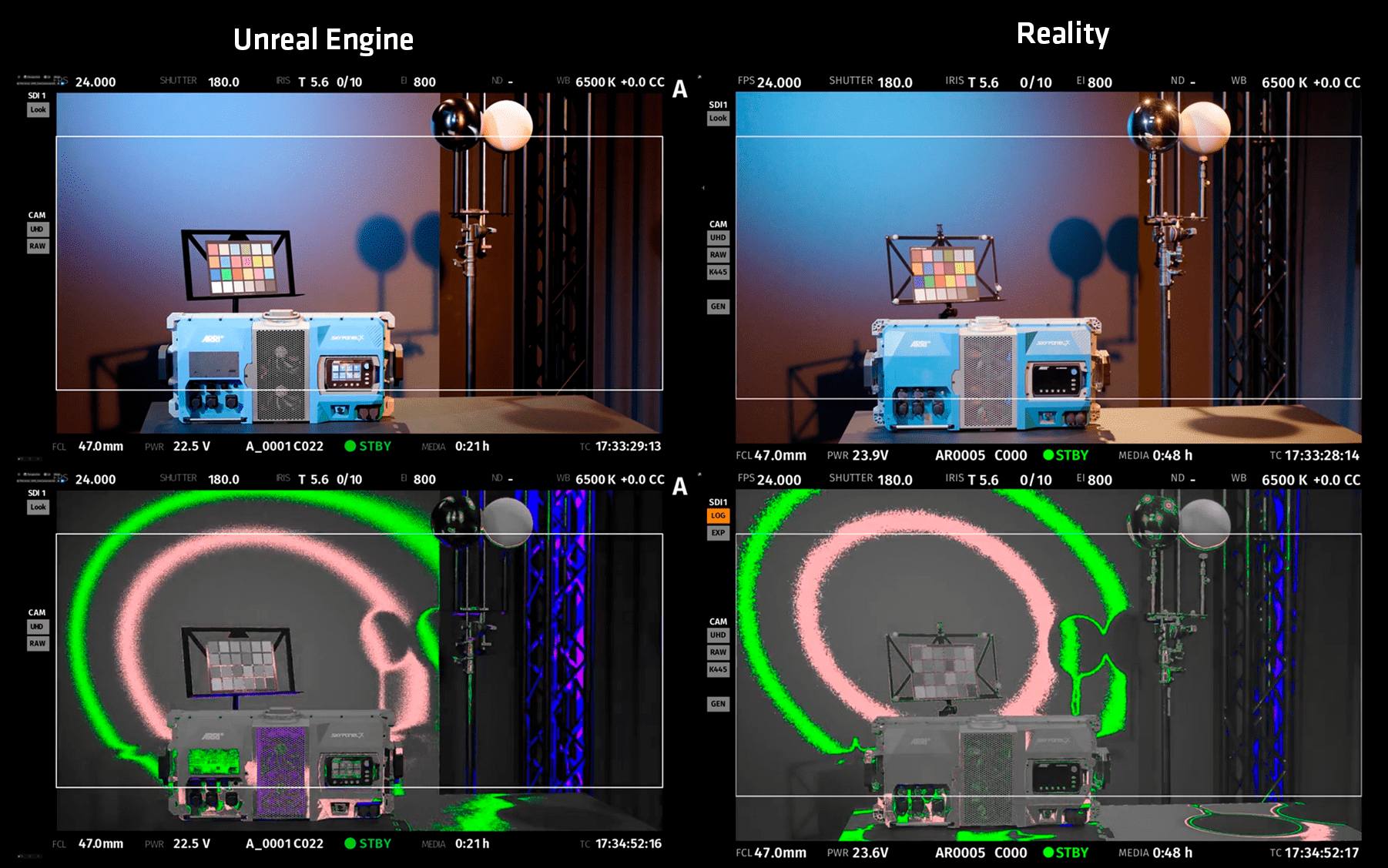
Camera brains in the viewport
Virtual Cam emulates different camera models and camera settings inside Unreal Engine. It extends the engine’s camera actor into a production-style virtual camera and includes lens properties such as focal length, focus setting and T-stop.
Lighting previs without camera behaviour often lies with a straight face – a lamp can look useful until the lens choice, stop and exposure show up. LUKA puts those choices into the same scene, which is much closer to how DPs and gaffers actually argue, only with less walking.


Virtual cameras and lights also connect to color rendition and exposure levels inside the previs. The aim is dependable previsualization for logistics and creative planning. This does not replace taste, experience or the person who knows where the shadow should fall. It gives those people a shared digital room before the real one gets booked.

For virtual camera work, the interesting bit is the combination of lens settings, camera models, light response and real-time feedback. A camera sandbox gets more useful when it can annoy both the camera and lighting departments at the same time.
Lumen does the fast talking
Real-time rendering in LUKA uses a Lumen-based workflow. Lumen is Unreal Engine’s dynamic global illumination and reflections system. In this workflow, users see changes to light, shadow and reflections while moving lights and cameras on a virtual set.

Users can build a 3D space from scratch or choose and adapt environments available in Unreal Engine. The official product page also mentions scanning performer faces with consumer hardware to practise lighting realistic virtual avatars. That sounds very 2026, but it is simple: test faces and light together before someone has to stand still for an hour.
For the Unreal Engine plug-in crowd, LUKA is not about gameplay logic, foliage tools or shader archaeology. It is aimed at film lighting, camera testing and production communication. The pixels are there to answer blocking and exposure questions before the crew eats the schedule.

LED walls get a rehearsal room
For in-camera visual effects and LED walls, LUKA can twin a virtual camera with a physical camera via LiveLink. Camera and lens settings sync in real time for live output.
The same workflow integrates with Colour Management for Virtual Production for LED wall calibration. That tool allows precise calibration of LED walls in ICVFX environments, uses an LED Calibration plug-in for Unreal Engine, and supports Unreal Engine Version 5. The LED Calibration software communicates with compatible cameras via CAP and generates a calibration file for a chosen LED panel and camera combination.

Color Management for Virtual Production is available as an annual subscription license. It also has a free 30-day trial route. That pricing belongs to the color management tool, not LUKA.
Live Link Metadata remains a separate Unreal Engine plug-in. It streams camera metadata into Unreal Engine via the Universal Motor Controller UMC-4 or natively via the ALEXA 35. It transmits real-time lens metadata and camera metadata, including camera state. The current listed version is 1.04 for Windows, with support from Unreal Engine 4.27.2 to Unreal Engine 5.7.2.
For Live Link workflows, that ecosystem matters. The plug-ins do different jobs, but they point in the same direction: camera data, lens data, lighting choices and stage output should travel through the Unreal pipeline with fewer mysteries.

Post gets a clearer parcel
LUKA also targets data transfer to postproduction. For shoots with virtual elements, it can provide control of virtual lighting fixtures and streamline data handover to post.
The postproduction angle is practical. CG element integration can move faster when the virtual lighting setup is easier to reconstruct. The useful part is the record of intent. Light positions, fixture choices, camera settings, lens values and scene layout can help post teams understand what production planned. That does not solve every matchmove, lighting or comp problem, but it can turn handover into something closer to a package.
The tool also supports preproduction tasks such as digital recces, accurate previsualizations, fixture type planning, fixture quantity planning, visual set planning and rehearsal of complex sequences. For previs, that is the sweet spot: make the uncertain parts visible early enough that departments can still change them.
Trial, pricing and caveats
A trial license route is available for LUKA. Commercial pricing is not specified. The available public download entry lists the Win64 plug-in and manual, but does not list a paid license price.
