



Available systems with artificial intelligence (AI) play to their strengths in different ways when creating images and videos. AI artists therefore use different solutions depending on the workflow. With “Flora Fauna AI”, you get a solution that combines popular AI systems and lets them interact with each other via a node network. No installation is necessary as the software runs completely in a compatible browser. Images and videos can be loaded into the workspace via the import function.
Nodes for text, images and videos are available for use. Notes can be inserted and linked in the workspace with a click of the mouse. Navigation in the network is simple and has many similarities to CG packages. Notes can also be inserted in boxes to describe the workflow. Work in groups is provided for and existing projects can be shared.
Nodes in Flora Fauna AI
Text nodes are a way to improve your own prompts, but also to analyse images. This can be style or colour schemes. This information can be incorporated into the process when generating and modifying motifs. This enables style transfers or the colouring of images or videos, for example. The user can choose from various AI modes for the text nodes:
- Claude 3 Sonnet
- GPT o4 mini
- Google Gemini 2.0 Flash
To create still images, simply type a prompt into the input field of the image node and start the calculation. Text or other images can also be used as input during this process. Two images with people can be combined to create completely new scenarios. The style option makes it easy to automatically change the result. This creates a great deal of flexibility when working.

The nodes can be quickly duplicated for different variants and the parameters or the AI engine for the calculation can be changed. “Flora Fauna AI” automatically generates variations of an image on request. When calculating the images, the system has support for various AI engines, including
- Flux Dev and Flux Pro 1.1
- Ideaogram 2.0
- Luma Photon
- Recraft V3 Stable Diffusion 3.5
If an existing image is linked to an image node, the context changes. The existing information can optionally be displayed with Google Gemini 2.0 Flash, Flux Canny, Flux Depth and Flux Redux. There is also an option to remove the background. In practice, the user can quickly change the perspective or view with “Gemini 2.0 Flash”, for example. Useful if you need different frames for video production later on.
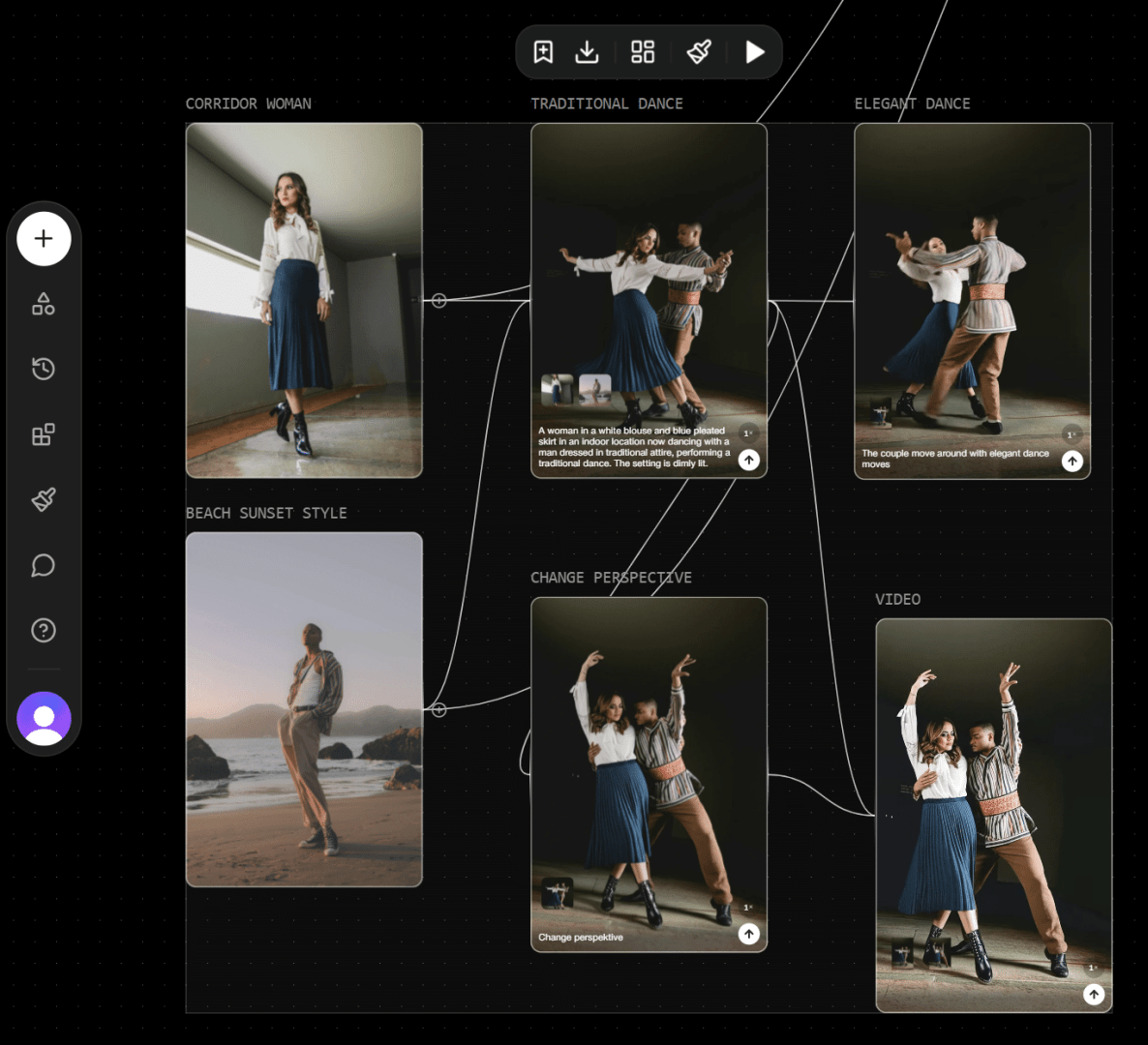
The production of videos is part of the programme’s range of functions. This can be a simple prompt or you can combine images or descriptions via the node network. Depending on the instructions, the selected AI generates the clips. For the calculation, the user can choose between
- Hailou Minimax
- Kling 2.0 / Kling Pro 1.6 / Kling 1.5
- Luma Ray 2 / Luma Ray 2 Flash
- Pika
- Runway Gen-3 Alpha
- Tencent Hunyan
- Lightricks LTXV
- Google Veo2
- WAN 2.1
Create your own styles
Since the end of March 2025, the available styles for creating images can be expanded with your own entries. To do this, the user uploads a series of 20 to 30 images to “Flora Fauna AI”. Their content determines the new style. Training is started with one click and the style appears in the list after a short time. It is important here not to violate copyrights. The controversy surrounding the “Studio Ghibli” style in images and videos when “OpenAI ChatGPT 4o” was released shows how polarised this topic is.
Conclusion
With “Flora Fauna AI” you get a useful AI workspace for a wide range of tasks. The system can help with the development of designs, storyboards or concepts for games. The node network makes the work flexible and is a great help for the presentation of designs. Thanks to the broad support of various AI systems, there is no need to switch between different offers. The styling allows the generation of completely individualised images and videos. Many tasks can be realised directly in a project. “Flora Fauna AI” also eliminates the need to manage different subscriptions because the service manages the various AI systems under one roof.
Featured image: © Flora Fauna AI
