



Table of Contents Show
For those who don’t know the tool, SynthEyes from Boris FX is a standalone 3D camera-tracking and matchmove application used in VFX pipelines. It exports to major DCC and compositing tools and sits upstream of layout, animation, and comp, quietly solving cameras so others can focus on lighting.
Boris FX has announced SynthEyes 2026 with a faster, more responsive camera solve release aimed at reducing iteration cycles and workflow interruptions in feature film and high end streaming projects. The update introduces a Mocha Point Tracker, Live Preview for geometric hierarchy solving, user interface revisions and expanded USD support. According to the company, the release is shaped by user feedback and focuses on daily production tasks rather than broad architectural changes.
Faster supervised tracking
As shots become more complex, trackers require more manual attention. Rapid camera moves, whip pans and motion blur increase the likelihood of drift or failure. But a classical point tracker operates by defining a small target area and a larger search area. On each frame, the tracker searches for the target area’s pixel pattern within the search region by scanning left, right, up, and down. This works reliably when the camera is locked off or moves in a controlled manner on a dolly, gimbal or tripod.
The limitation is that a standard RGB point tracker does not inherently account for rotation or scale changes in the pattern over time. These are affine transformations: translation, rotation, scaling, and shear. If the tracked feature rotates or changes size significantly, the tracker may drift or lose the pattern entirely.
SynthEyes provides options such as updating the reference frame at defined intervals. However, between those reference updates, the tracker still searches primarily by translation, allowing drift to accumulate. In shots with strong rotation or scale change, this can result in unstable supervised tracks and broken solves.
For these scenarios, SynthEyes 2026 introduces the Mocha Point Tracker. The feature leverages Mocha’s planar tracking technology under the hood directly into the supervised tracking workflow. The goal is to combine the robustness of planar tracking with the point data required for camera solving.
Planar brain, point output
Planar trackers are designed to compensate for rotation, scale and other affine transformations across a defined surface patch. Instead of following a single pixel pattern, they analyse the motion of a planar region.
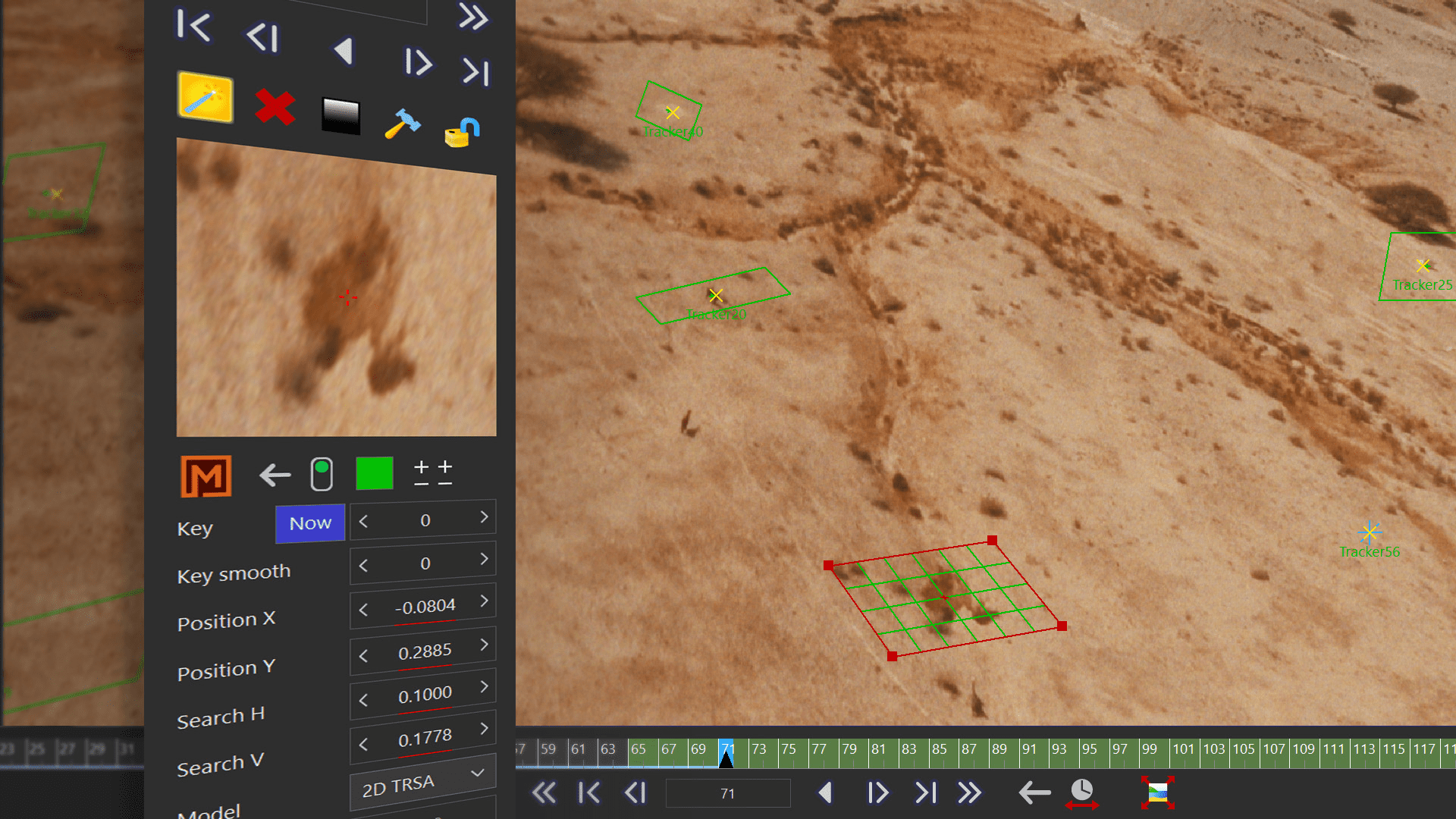
The Mocha Point Tracker tracks a small planar patch and returns the coordinates of the centre of that patch as point tracking data. In practical terms, artists still obtain a single 2D point suitable for solving, but that point is derived from a planar solve rather than an RGB comparison.
In the user interface, switching a tracker from the traditional RGB mode to Mocha Point Tracker updates the tracker controls without launching Mocha. The planar patch can be reshaped freely. Corners can be adjusted individually, and the centre point can be offset by holding Shift while dragging.
The planar patch does not need to remain a strict rectangle. Artists can enlarge it to capture more contrast detail, for example, around the edges of an architectural feature. During tracking, the patch visibly rotates and scales with the image content, while the returned centre point remains tightly locked.
This behaviour addresses a core limitation of classical point trackers: Because the planar patch models translation, rotation, scale and affine deformation, it remains stable under perspective and motion changes that would cause a standard tracker to drift.
Parameters for unruly shots
The Mocha Point Tracker includes adjustable parameters for more demanding material. By default, each tracker automatically determines how much of the initial pattern must be visible in subsequent frames before continuing. This percentage threshold can be manually adjusted.
Users can also select different motion models. The default model is 2D TRSA, which stands for Translation, Rotation, Scale, and Affine. Alternative models constrain the tracked motion to fewer parameters. For heavy perspective change, a 3D Perspective model is available.
All models ultimately return single-point data, but they use different internal motion assumptions to generate that data. In addition, advanced controls allow users to increase the expected per-frame rotation and scale change. By default, SynthEyes expects up to one degree of rotation and half a per cent scale change per frame. These limits can be raised for more aggressive camera movement. These advanced controls are typically unnecessary, as the planar tracking approach is quite forgiving at default values, but who knows what happened on set? Sometimes it is best not to ask.
Mixing tracker types
SynthEyes continues to support mixing different tracker types within a single supervised tracking setup. The Mocha Point Tracker is particularly useful for bridging gaps where feature trackers fail. In such cases, adding larger planar patches can help maintain continuity across problematic frames, enabling a continuous solve where feature tracking alone breaks down.
This highlights a workflow caveat: When combining two Mocha Point Trackers into a single tracker, SynthEyes first converts them into classical point trackers before merging. This avoids merging two planar patches directly, which would be unstable. After conversion, the resulting track retains point data but no longer allows modification of the original planar patch.
Boris FX positions the Mocha Point Tracker as a complementary tool rather than a replacement. Traditional RGB trackers remain better suited for manual frame by frame adjustments, where artists may need to babysit a track through occlusions. The supervised tracking system is designed to allow mixing and matching tracker types as needed.
In short, when the camera behaves politely, classical point tracking remains efficient. When it does not, the Mocha Point Tracker offers a planar fallback inside the same workflow, without requiring artists to leave SynthEyes. If neither works, demand reshoots.
Real time GeoH feedback
SynthEyes 2026 introduces Live Preview for geometric hierarchy, referred to as “GeoH”. Live Preview is a toggleable checkbox located above the axis lock controls in the GeoH interface. When enabled, the GeoH setup dynamically adjusts while users manipulate trackers and selected parameters.
With Live Preview active, artists can adjust trackers, focal length and distortion parameters and see the hierarchy update instantly in the current frame. The primary use case described by Boris FX is tracker adjustment. Instead of replaying the shot after every modification, the result is visible immediately.
In addition, the feature operates hierarchically. Users could typically enable Live Preview on the object level where downstream elements should animate in real time. For example, activating it on a shoulder joint would allow the arm chain beneath it to update in real time. In practice, it can also be enabled on the topmost root object if required.
In current builds, enabling Live Preview highlights the affected hierarchy in yellow, providing visual feedback about which nodes are active. This is particularly useful in larger hierarchies where dependencies can become difficult to track.
But why?
The system updates without requiring repeated play-stop-check cycles. Users can move trackers, adjust seed positions, tweak pivots, unlock or rebalance axes and modify lens or offset parameters while seeing the result immediately. You can think of GeoH in SynthEyes as a lightweight rigging system inside the tracking environment. Objects are created at mesh pivots and parented hierarchically. Animation channels must be explicitly unlocked before they can be driven by trackers or mesh deformation. Locked parameters remain static.
A typical workflow involves creating a GeoH object from a mesh, branching joints from parent nodes, adjusting pivots in Edit Pivots mode and painting vertex weights to define influence regions. Trackers can then be parented under specific GeoH objects, with seed points projected onto the mesh to drive animation.
With Live Preview enabled on a GeoH object, moving a tracker updates the mesh deformation or joint rotation immediately in the viewport. The effect is comparable to interactive rig manipulation in DCC applications, with the mesh responding as trackers are repositioned.
Before finalising animation for export, users should disable Live Preview on all relevant nodes and then play through the shot so that the animation is fully realised. This step ensures the resulting keyframes are baked from the tracked motion. Or, don’t do that, and we’ll see what happens :) Jokes aside, the feature should cut iteration time by at least one order of magnitude.
SynthEyes Special: The Interface refresh begins
The 2026 release marks the beginning of a “multi-phase user interface modernisation”. The current update focuses on the left panel and room navigation – one thing after the other. Boris states that improved labelling, more consistent layout and interaction behaviour, and a clearer visual structure are intended to enhance discoverability and daily usability. At the same time, existing workflows and muscle memory are said to be preserved.
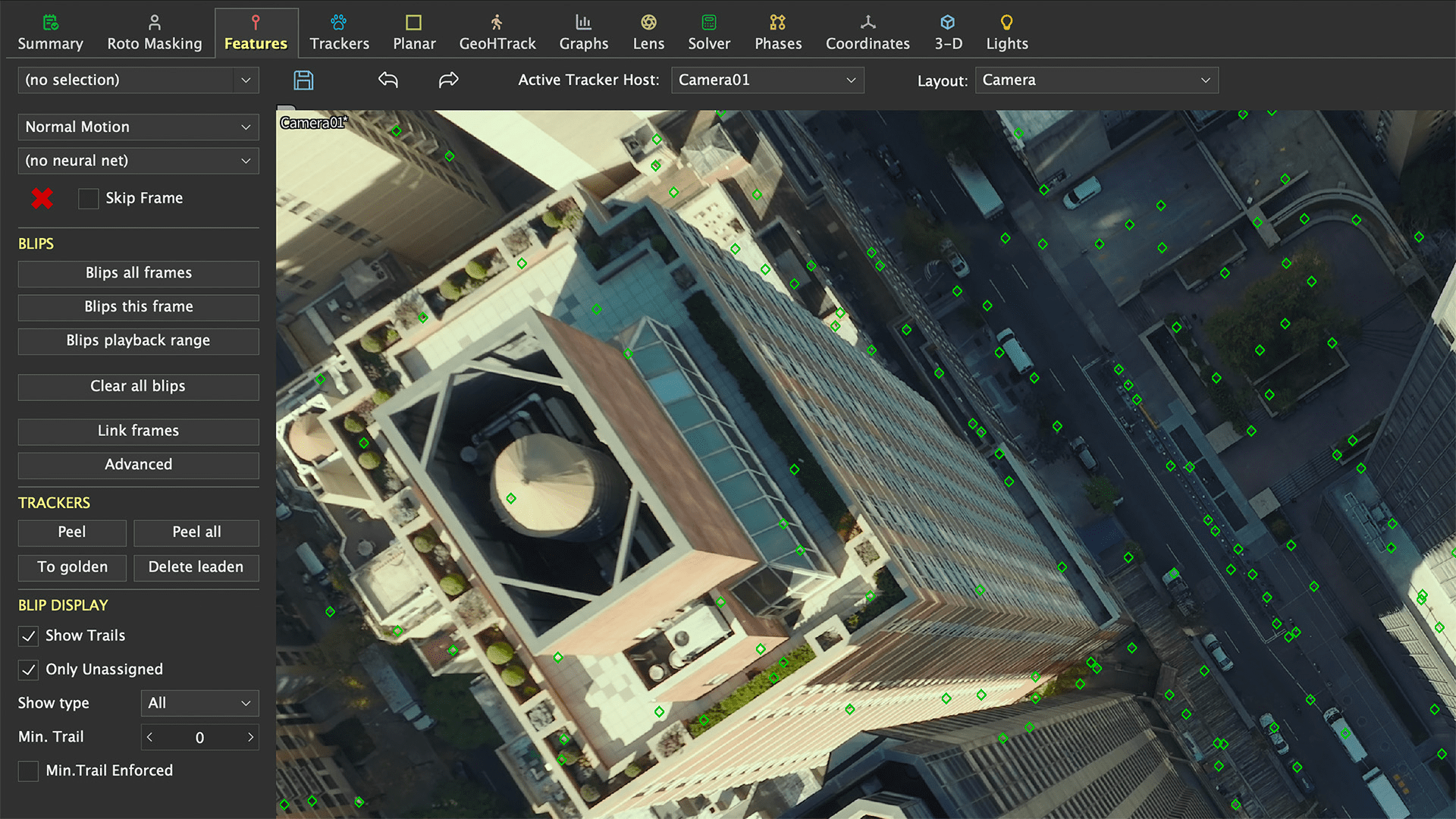
The changes are positioned as incremental rather than disruptive. Advanced users are expected to retain familiar workflows, while first-time users may find the application more approachable. Because, as good as Syntheyes is, the Interface was always a bit … particular.
USD moves upstream
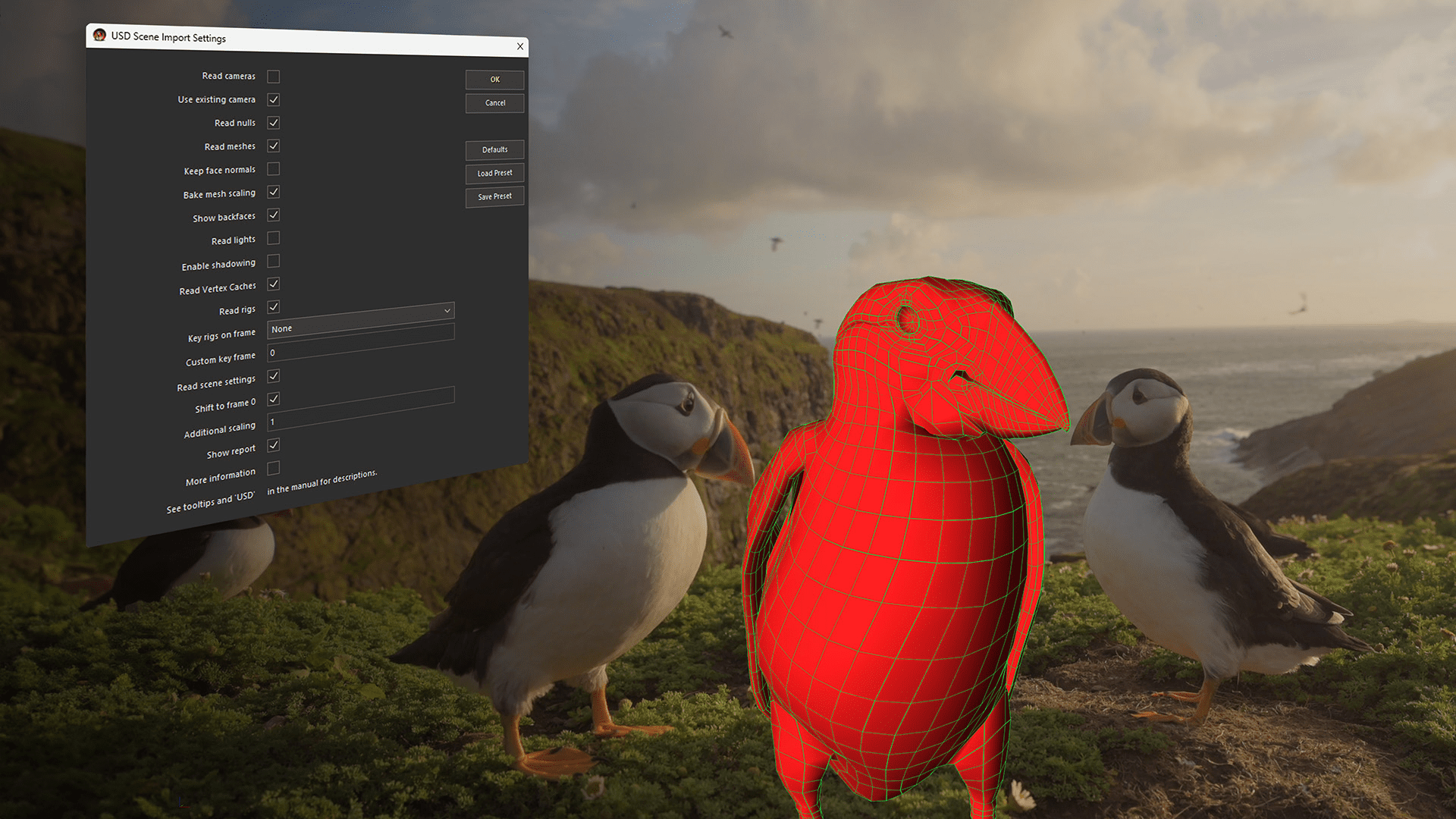
And another thing: SynthEyes 2026 expands USD support, allowing USD assets and scenes in the application. Users can import individual meshes or full USD scenes while preserving hierarchy, cameras, lights, animation and metadata, including parent-child relationships and transforms. USDZ assets import with embedded textures intact.
Whole scene transforms and STMaps
A new Whole Scene Transform mode allows scale, rotation or translation to be applied to the entire scene, including cameras, objects, trackers and meshes, while preserving relative motion and solve integrity.
This mode is intended for late-stage adjustments, including multi-camera projects. The company states that relative motion and solve integrity remain intact, though no technical detail is provided on the underlying implementation.
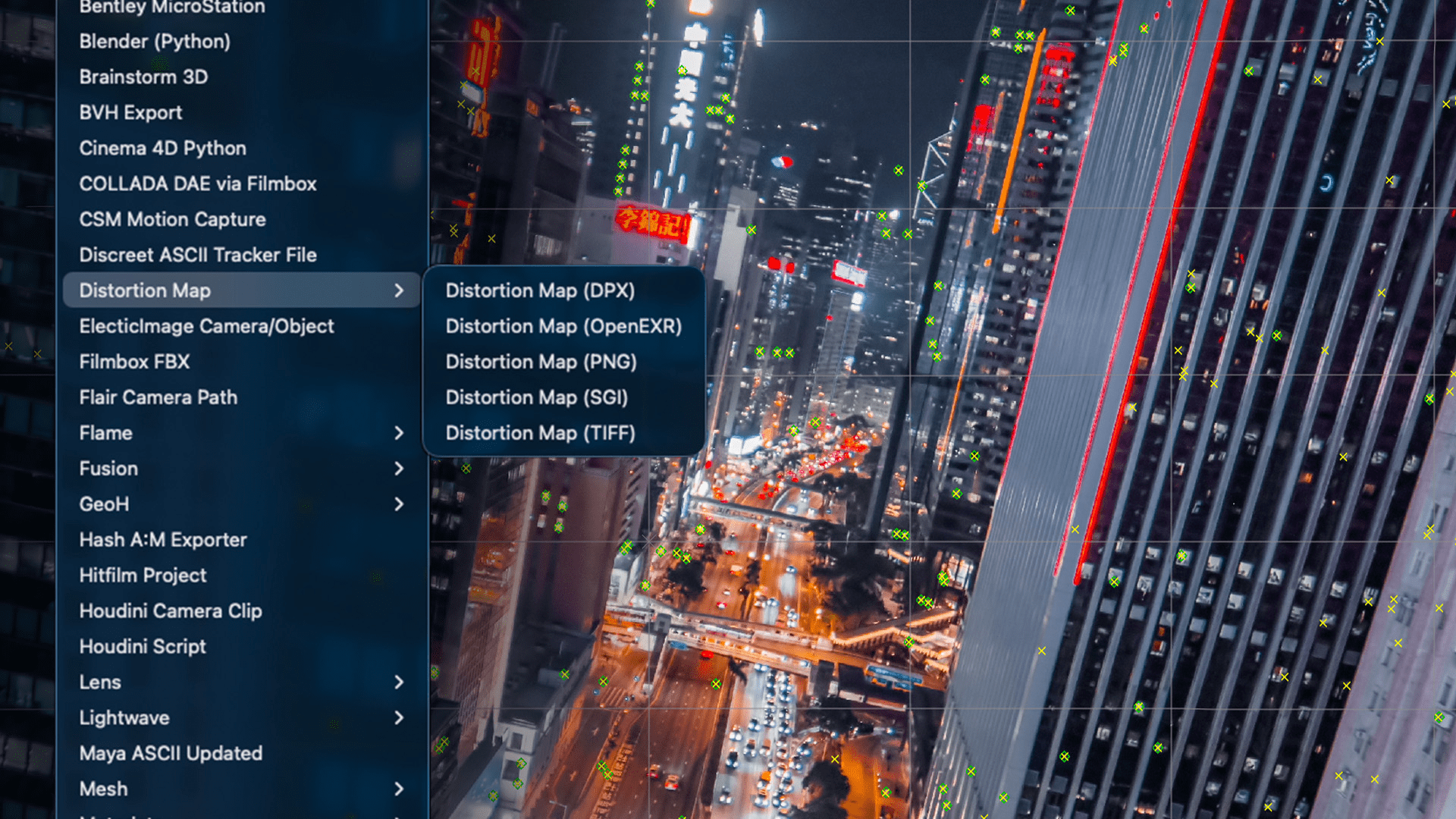
Distortion map export, commonly referred to as STMap export, is now integrated directly into the standard Export menu and the Multi Export system. This enables distortion data to be generated alongside other outputs in a single export pass rather than as a separate step. STMaps are commonly used in compositing to apply or remove lens distortion via UV maps. Integrating STMap export into the main export pipeline reduces the number of discrete export operations required.
Pricing and availability
SynthEyes remains a standalone application. Subscription, perpetual, upgrade and support renewal options are available. Pricing starts at 325 USD per year or 62 USD per month. Customers with an active SynthEyes or Boris FX Suite subscription, or with an upgrade and support plan, receive the 2026 release as a complimentary update.
Further details are available via the SynthEyes product page on the Boris FX website.
As with any update that affects solving, hierarchy behaviour or export fidelity, new tools and innovations should be tested before use in production.
// SynthEyes 2026 What’s New
// https://borisfx.com/products/syntheyes/whats-new/
