



ShotNotes adds a dedicated notes-and-tasks panel to Adobe Premiere. It targets the everyday problem that never makes it into a spec sheet: remembering what to fix, what to check, and what to deliver while the timeline keeps changing.
The core idea is sequence-based notes: You add an entry, and it belongs to the sequence you are working on. Notes can be colour-coded, and the panel can filter what you see by colour, so you can separate client feedback from internal reminders or mark items by priority.
A note can include an optional timecode pulled from the current playhead position. When an entry includes timecode, ShotNotes automatically places a marker on the timeline so the entry stays linked to that frame. The panel treats timecode as more than a label: it turns timecode into a navigation control.
Clickable timecode that behaves like a jump button
ShotNotes can insert clickable timecode into a note so you can jump straight to the referenced point in the timeline. The note becomes a shortcut, not just a comment.
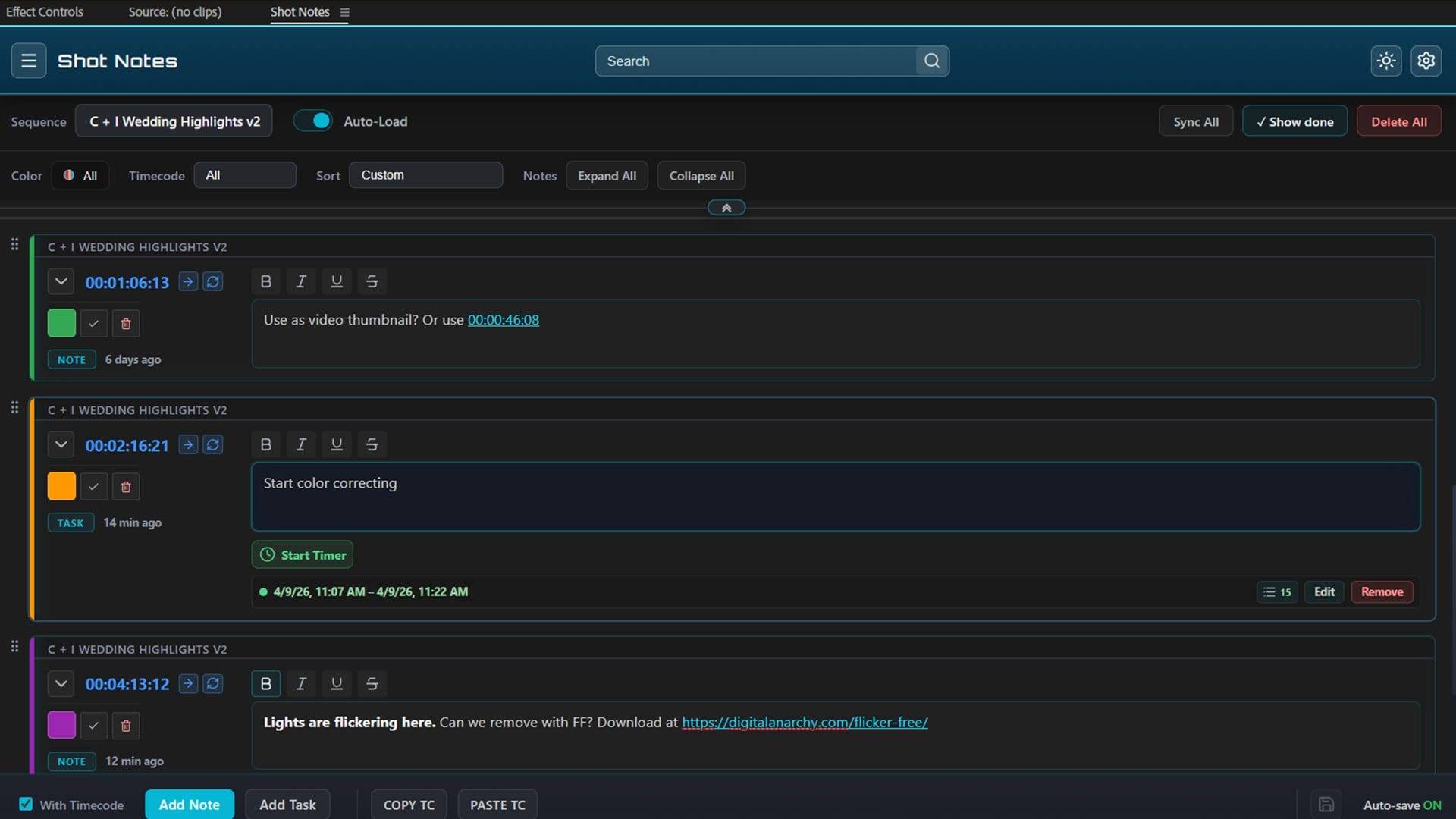
The panel supports copying timecode from one sequence and pasting it into a note for another sequence. That makes it possible to reference a moment in a different sequence and still navigate there quickly from the note.
Notes can also reference other sequences directly. The result is a lightweight way to connect the dots across a project: a note in one sequence can point to a specific moment in another sequence and take you there with a click.
If your usual approach is to build a marker forest, ShotNotes can still feed that workflow by creating markers for each note so the timeline can carry the breadcrumbs the panel shows, without forcing you to rely on markers alone as the only place your thinking lives.

Links and reference material that stay one click away
Notes support hyperlinks. If you type a URL into a note, ShotNotes turns it into a clickable link and opens it in a web browser. That is handy for reference docs, client frames, internal shot tracking pages, relevant memes, or just the one weird spec sheet everyone forgets until export day. The point is not that links are rare, but that links usually end up in a separate app, which becomes another place to lose context.

Search and filters for the whole project brain
ShotNotes can search notes across the entire project. When you need to find that one line about audio cleanup, the one producer note that actually made sense, a missing lower third, or the exact frame that needs stabilization, the panel can locate it without you hunting sequence by sequence.
The interface also includes filtering, including options to filter based on whether entries have timecode. Combined with sequence-based organisation, this lets you narrow the panel down to the entry you need right now. Notes and tasks can expand and collapse in the panel, so you can keep long entries around without turning the panel into a wall of text.
Marker sync, because timelines move
ShotNotes links entries to timeline markers when you include timecode. When edits move markers later in the project, ShotNotes provides Sync and Sync All buttons to sync entries to the marker’s new position, because a note is only useful if it still points at the right moment after the cut changes. (*looks emberassed at the heap of PostIts building a ramp below the screen*)
There is an important limitation: depending on how you edit, Premiere Pro may not move the markers. If that happens, you may need to manually update the timecode in the affected notes when frame accuracy matters.
A built in time tracker for tasks and receipts
ShotNotes includes tasks with timers. You can start and stop a timer for a task, log multiple timer entries, and then review those entries in the task log. If you forget to stop a timer, the panel includes an edit option that lets you adjust the end time so the entry reflects when you actually finished. If a timer entry is junk, you can delete it so it does not appear in exports.
The time tracker also logs certain events to provide more detail about what happened while a timer ran, including switching sequences or selecting a clip in the timeline. That makes the report more descriptive than a single number on an invoice.
This is also where reality bites a little. Premiere Pro limits what events can be captured, so the activity log does not represent every editing action. Some actions can appear as delete and add events because Premiere Pro treats certain edits that way internally.
Export and backup that fits the handoff phase
ShotNotes can export notes and other data in a variety of formats for printing out or viewing.

For backup and transfer, ShotNotes includes exporting to JSON as its native format. That JSON export can be imported on another computer, copied to another sequence, or used as a backup. For time tracking, ShotNotes can generate a report that saves timer entries for a sequence to a CSV file that can be viewed in a spreadsheet.
Exportable notes and exportable time data matter for finishing and delivery, because that is where you often need to share information outside the NLE. Like, what to bill the client for his latest “Just one more change”. ShotNotes gives you a structured way to pull that information out without rewriting it.
Licensing, trial, and getting it into the workspace
ShotNotes includes a free seven-day trial, which is fully functional. Licensing can be done with a serial number or by logging in to a Digital Anarchy Cloud account. The cloud account method is described as the easiest way to license if you want to install on a different machine without juggling serials. If you cannot license online, support provides an offline activation file option.
Compatibility notes, including one awkward bug
ShotNotes only supports Premiere Pro 2023 and newer versions. A known issue exists in Premiere Pro 2025 and 2026 that can occasionally cause the recorded timecode of newly created entries to be slightly inaccurate. The amount of offset can depend on how zoomed out the timeline is when the entry is created; zooming in typically reduces the offset. If needed, you can manually adjust the timecode for the entry.
Price, promo window, and the practical take
ShotNotes is available immediately at $129 USD, with a $99 price offered until May 15. As with any new workflow tool, test it before you rely on it for a deadline-sensitive job.
https://digitalanarchy.com/shot-notes/
Topics
 Workflow745 postsKeep the handoffs from becoming cliffhangers. Explore pipelines, collaboration and production practices that connect people, applications and assets, making room for creative work between the deliveries and revisions.
 Adobe Premiere Pro238 postsFollow the story along the timeline. Explore Premiere Pro updates, editing techniques and production workflows, from organising source material to refining the cut and handing work on to the next department.
Article details
- Published
- Author
- Bela Beier
- Reading time
- About 6 min
- Word count
- 1,094