



We stumbled across something new in the render-cloud jungle, and it’s not just another GPU-as-a-service with a fancy landing page . Praxilla is a tiny Austrian startup with big ambitions: fast, affordable, and even collaborative cloud rendering that plugs straight into Blender.
Could this be the thing that makes you rethink your local workstation’s role in your pipeline? And what exactly is “collaborative rendering,” anyway? They’ve got an introduction video that hints at their plans, but we wanted to dig deeper. So, we asked.

DP: Oh no, yet another cloud rendering solution? What makes you different?
Praxilla: Yes, it looks like render clouds are multiplying faster than donut tutorials on YouTube. But we’re not “just another.” Here’s the short version: Praxilla is a distributed render farm built by two founders who were tired of watching their machines wheeze through endless frames. Instead of selling raw GPU horsepower, we built something that’s plug-and-play with Blender. Upload directly from Blender, monitor progress in our job handler, and download frames – no extra setup, no arcane FTP servers, no “please install seven dependencies first.”

We’re small, which means we can listen. When users say “hey, this addon doesn’t work” – we patch it. When someone asks for Eevee support – we add it. The pitch: it feels like local rendering, just a lot faster.
DP: How did you come up with the idea to start this company? And what exactly is a “Praxilla”?
Praxilla: It didn’t actually start with us sitting in a café having a lightbulb moment. We’re from pretty different worlds: Tariq comes from IT security, Steffi has been dealing with clients forever (which is why she now does customer support with slightly too much passion), and our designer friend… well, she was the one suffering.
She had this animation project that kept her poor PC running all night long – fans spinning like a jet engine, the room heating up like a sauna. She’d wake up in the morning, coffee in hand, praying the render hadn’t crashed at frame 237. That was her normal. We looked at each other and thought: this is insane.
Why should artists babysit a progress bar that moves slower than Windows updates? Most GPUs out there are idle, waiting for Netflix or Minesweeper. So we said: let’s build a network that actually makes them useful. That’s how Praxilla was born.

Get in Touch: Praxilla on Facebook | Praxilla on Linkedin | Praxilla on instagram
DP: Which tools can I currently connect to your service?
Praxilla: Right now: Blender with Cycles and Eevee. Why? Because Blender is open, its community is massive, and frankly, it’s where our hearts are. The donut memes were just a bonus. But it’s not the endgame. Maya, 3ds Max (Arnold), and Cinema 4D (Redshift) are on our roadmap. We’re not trying to be a “Blender-only” club – we’re building infrastructure that works for the wider industry.

DP: On which cloud infrastructure is the rendering performed and what exactly is being processed?
Praxilla: Right now, we rely on a secure network from a trusted third-party provider. That gives us the flexibility to scale and the reliability artists need, while we prepare to expand into our own dedicated infrastructure. For users, the experience is the same: jobs get split into frames, get rendered on multiple nodes and delivered back. The standard is 12-15 nodes at once, which means an animation that would normally block your workstation for hours can be finished in minutes.
DP: How do I pay for rendering?
Praxilla: We keep it simple: you buy packages of rendering hours. Prices start at 2.50 € per GPU hour, and yes, we give generous discounts. That means it’s indie-friendly – you don’t need a studio budget to use us. And no, your files don’t hang around forever. Uploaded scenes are deleted immediately after the rendering finishes on the nodes, and the files stay in the cloud for a maximum of two weeks (unless you delete them earlier). No digital skeletons in our closets.

DP: Can I limit my jobs to run only within the EU?
Praxilla: By default, jobs can run in different regions of our provider’s network. But if required, the nodes can be limited to Europe only. Just request it! The storage, however, is always in the EU.
DP: What happens to my frames if my account runs out of funds?
Praxilla: We don’t delete progress. If you run out of hours mid-job, the render pauses. Once you top up, it picks up right where it left off. No heartbreak, no lost frames.

DP: How flexible is the hardware configuration?
Praxilla: Right now, it’s standardized. That’s what makes it stable. You don’t have to worry about which driver version or GPU mix you’re getting. Every node is tuned to behave the same way. As we expand, we’ll offer more choices, but we’d rather be consistent than throw you into a GPU lottery.
DP: Do you offer automatic scaling?
Praxilla: At the moment, the system distributes each job automatically across up to 15 nodes. Currently, jobs are processed one after the other, and a multiple-job queue will be available soon. True dynamic auto-scaling across many simultaneous jobs isn’t part of the setup yet.

DP: How do you handle GPU virtualization and allocation?
Praxilla: We don’t chop GPUs into virtual slices or make you share them with strangers. Each job gets dedicated GPUs: Not just one, but up to multiple full cards working in parallel. That way, performance is consistent and predictable, and your renders won’t slow down even if someone else is tackling a huge project at the same time.
DP: Is there redundancy or failover in case a node crashes mid-render?
Praxilla: Absolutely. If a node dies (and sometimes they do, Murphy’s Law and all), the frame is instantly reassigned to another. You won’t even notice unless you’re watching logs like a hawk.
DP: What’s your approach to driver and software versioning for render consistency?
Praxilla: We currently support Blender 4.0 to 4.5. Our job handler makes sure your file runs with the exact version you choose, so you don’t get any surprises like lighting or shading looking different between local and cloud renders.
DP: How do you ensure security during file transfer and storage?
Praxilla: Uploads and downloads are fully encrypted (TLS). Files are removed from the render nodes as soon as rendering finishes and are then stored in secure cloud storage in the EU for a maximum of two weeks, unless you delete them earlier.
DP: Do you support containerized rendering environments?
Praxilla: Yes. All rendering runs in containerized environments using Docker images. This ensures every node behaves the same. No surprises with drivers or settings. The containers are created and managed automatically, and no one has access to them, so your projects always run in a secure, controlled environment.

DP: How do you handle extremely large datasets or texture-heavy scenes?
Praxilla: We do see projects with video files and large textures. Upload can take a while depending on your internet, but once staged, the farm handles them fine. If your project file is larger than about 7 GB, just let us know so we can prepare everything on our side. We recommend optimizing where you can, but we don’t shy away from “monstrous” files.
DP: How do I submit my render job to Praxilla Cloud?
Praxilla: Technically, it’s just two steps (since Blender has to be open already, haha): choose “Render Animation with Praxilla”, confirm your settings, and hit upload. That’s it: No complicated dashboards, it feels just like rendering locally, only way faster. No magic! But jokes aside, we always recommend starting with a small frame range first, just to make sure everything looks the way you expect before sending the full animation.
DP: How is the dashboard structured?
Praxilla: We do have a separate job handler. Think of it as your render cockpit: you see all jobs, the progress, estimated times, and you can download the jobs from there. It’s clean, lightweight, and designed so you don’t feel like you need a sysadmin degree to use it.
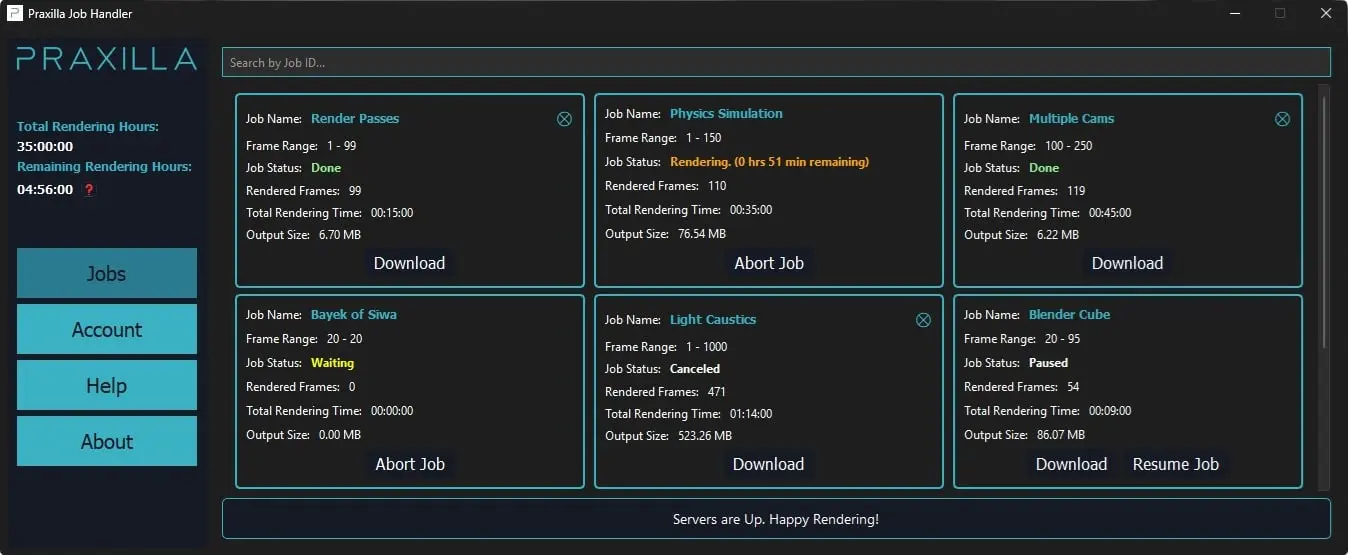
DP: How does the Praxilla job handler work?
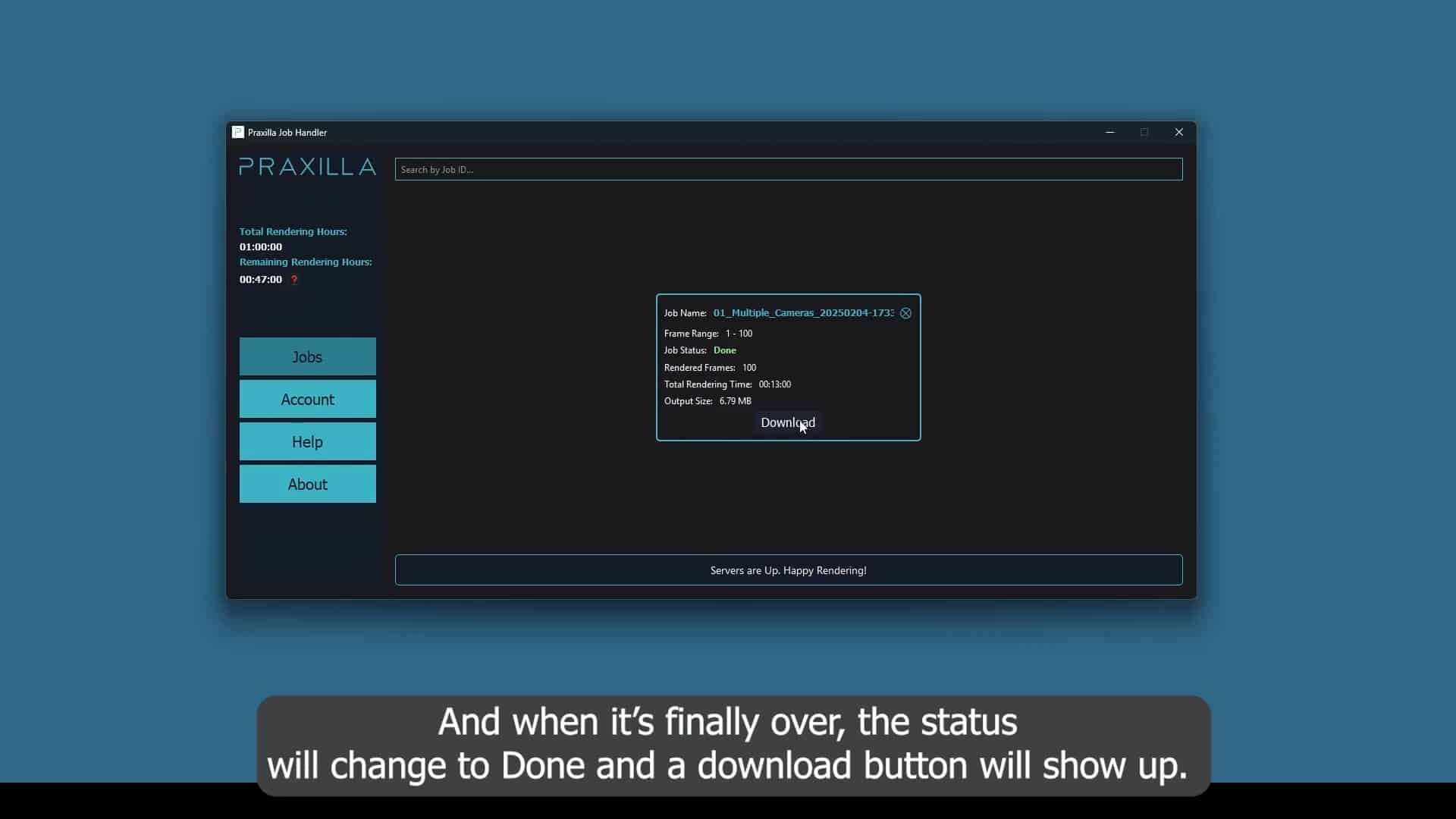
Praxilla: The job handler is our little control center outside Blender. It automatically takes care of uploads, job tracking, and lets you download. It also shows you job progress, estimated time, and updates you about the job status. Think of it as a polite assistant, so you don’t have to babysit the render.
DP: Can I change parameters mid-job?
Praxilla: Not yet. If you change HDRIs mid-job, you’ll need to restart. We’re working on smarter checkpointing, but today, it’s “cancel and relaunch.”
DP: Will I get notifications when a job completes or fails?
Praxilla: The Job Handler updates in real time, so you can always see the exact status of your job — whether it’s running, finished, or if something went wrong.

DP: Can I preview rendered frames while the job is running?
Praxilla: As soon as the first frame has finished, you can download it directly from your dashboard on our website to check if everything looks right before the rest completes. Instant gratification included.
DP: Can I send the output directly to another cloud storage service?
Praxilla: Currently, we deliver to your local machine. Cloud-to-cloud transfers (Dropbox, S3, GDrive) are planned.
DP: Is there an API for automated job submission?
Praxilla: Yes, such API is available on demand. If you need to hook Praxilla straight into your pipeline without opening the Job Handler, just let us know and we’ll set it up for you.
DP: Right now, all rendering happens on Praxilla’s own cloud hardware? Have you considered hybrid setups that mix cloud nodes with an artist’s local resources?
Praxilla: Why should your own GPU sit idle while ours do the work? Hybrid setups are on our roadmap — and they’re the stepping stone to something bigger: collaborative rendering. And we will make it happen. We’re still working on the security side of things, of course. But as mentioned earlier, Tariq comes from an IT security background. And really, who could be more ideal for this role than him?
DP: What are the main challenges when trying to integrate personal machines into a cloud render network?
Praxilla: The big challenge is security and consistency. Letting someone else’s file touch your PC without them touching your stuff is tricky — and the other way around too. Your project has to stay protected from anything on their machine. That’s why everything has to run in a secured environment, which we are already working on.

DP: How will collaborative rendering work?
Praxilla: You’ll install a small app along with a prepared USB stick. When you want to contribute, the app reboots your PC into that secure USB environment, and your machine temporarily becomes a render node whenever it’s idle. No one sees your files, no one can poke your system. Everything runs inside that isolated environment. You just contribute GPU time. And in return, you earn either cash or rendering credits. That’s the plan.
DP: How do you ensure data security between multiple collaborators?
Praxilla: Projects run in a fully encrypted environment, and the storage is encrypted as well. Even if your PC is rendering someone else’s frames, you will never see their files.
DP: Will collaborative rendering earn me credits or render hours?
Praxilla: Yes. The plan is that you can earn render time based on actual minutes your node spends rendering. You can save them, spend them later, or run your machine like a little “GPU piggy bank.”

DP: What are the next 2 – 3 features on your roadmap?
Praxilla: The next big one is the multiple-jobs queue — so you won’t have to babysit projects one by one anymore. After that, expect more addon magic. We already support a handful of favorites, but we know there are plenty more Blender artists are waiting for. And then comes a big leap: Arnold for Maya. Step by step, the render cloud keeps growing up. After that, we plan to add 3ds Max and Cinema 4D with Redshift. We’re moving step by step to make sure each integration is stable before rolling out the next.
DP: Looking into your crystal ball: What will Praxilla look like in 5 or 10 years?
Praxilla: In 5 years, we want Praxilla to be the go-to choice for fast, affordable rendering across multiple 3D tools. In 10 years? We see ourselves as the global GPU network for creative computing – not just rendering, but AI, simulations, maybe even games.
Think of it this way: Netflix streams movies. Praxilla streams computation.
And if you want to know about the pictures in this article: One of the Praxilla Users allowed us to show of the results rendered with Praxilla! Nick is a freelance 3D Generalist based in the US, specializing in product visualization and motion design. He also shares 3D tips and full product design tutorials for Blender on his YouTube channel . Feel free to check his other works on his website www.nickel3d.com or on his Instagram page.
For freelance bookings, Nick can be reached at his email contact@nickel3d.com, or by DM on LinkedIn or Instagram.
