



Table of Contents Show
The Munich-based team behind Das Element has announced version 2.2 of its production-grade asset library, describing it as a strengthening of core capabilities with deeper 3D workflow support, expanded permission controls and new customisation features. The update targets environments where assets are increasingly complex and multi-file. Version 2.2 delivers a “more complete solution” for teams managing multi-file assets, offering tighter integration and automation options. The update allows studios to tailor their setup through permission-based access, Python hooks and CLI-driven automation.
Deeper 3D Pipeline Integration
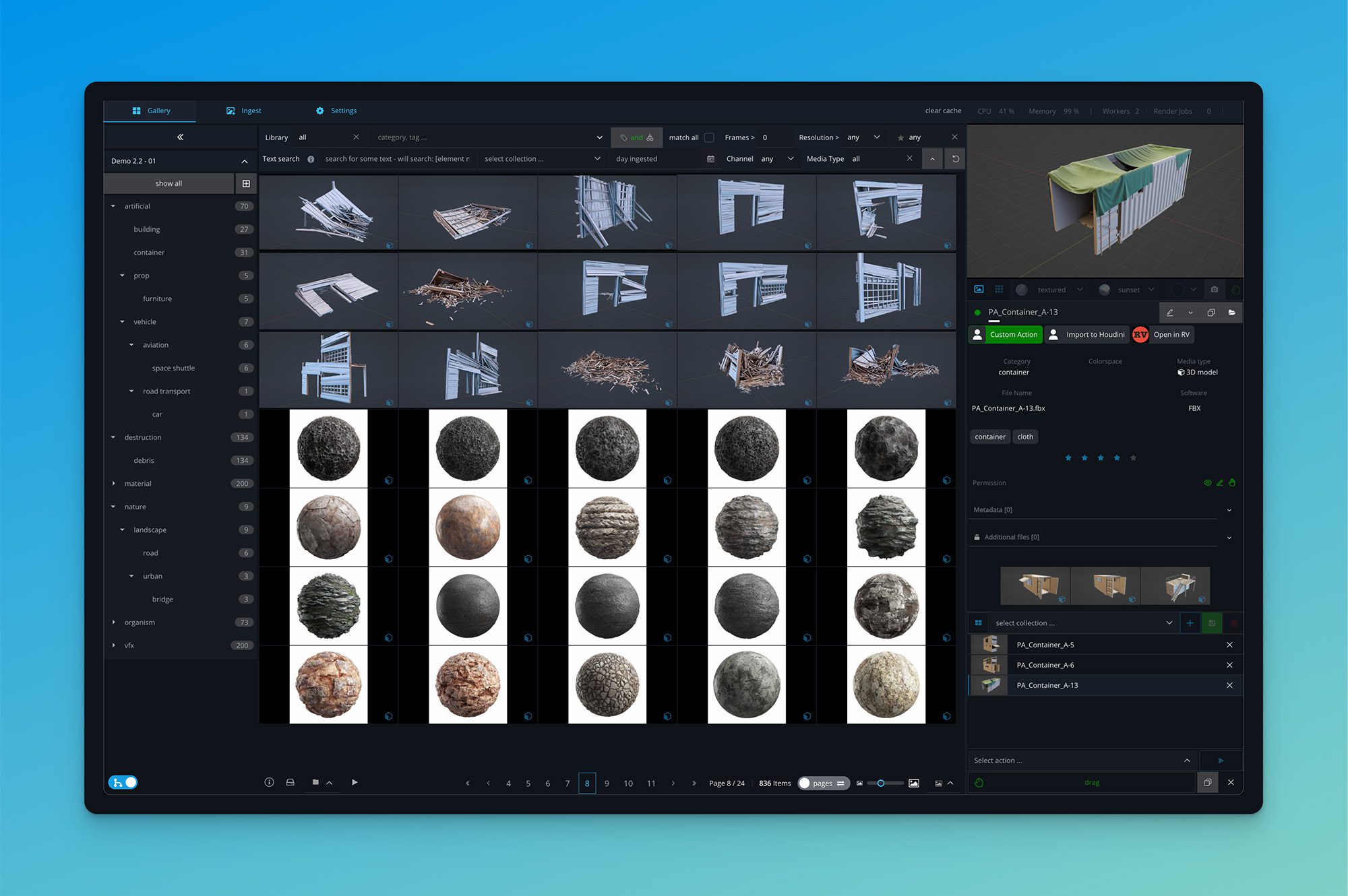
Version 2.2 puts heavy emphasis on 3D library support. Entire folder structures can now be ingested (Including “The Folder where the big USD-scene lives”), displayed and managed as native assets, simplifying the handling of complex 3D project layouts that include models, materials and textures. Depending on you project, you can get Thumbnails and Turntable Renderings for the Lighting / Rendering you need in this project, without having to manually do anything or re-render previews and assets.
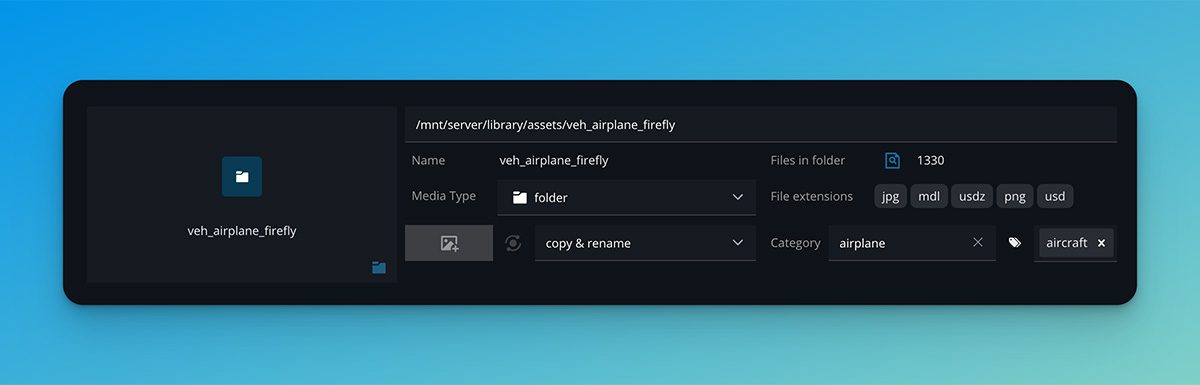
Artists can now treat full scenes, shader libraries and texture packages as unified entities, reducing the overhead of tracking separate dependencies. UDIM sequences are now recognised as a dedicated media type, while a new media type for 3D materials enhances compatibility with USD and texture-intensive workflows.
3D assets can now reach ANY level of complexity, covering large-scale environments, intricate material setups and multi-layered texture networks. No performance benchmarks or asset size limits are specified, so users should evaluate system performance within their own pipeline before wide deployment.
Stronger Control with Permissions

Element-level permission settings are one of the most notable additions. Studios can now define who can view, use or manage each asset directly within the library. Access can be controlled dynamically through Python hook files, enabling production-specific logic such as permissions by show, client or department. This flexibility means studios can maintain strict separation between sensitive projects or share common assets selectively without duplicating data.
Permissions can also be configured to limit access to certain user groups or workflows, a feature relevant for facilities handling client-restricted material or confidential IP. The documentation does not detail how permissions cascade across nested structures or whether change histories are logged, so studios should verify these aspects in production testing.
Customisation Through Action Hooks
Das Element 2.2 introduces action hooks: custom UI buttons that can execute Python scripts directly from the interface. Studios can extend the toolset by creating buttons that trigger scripted actions, such as sending assets to an external DCC tool, launching a review session, exporting a collection, or performing batch tagging. Or whatever else you need. Hooks can be applied to single assets or groups of elements, offering a way to embed custom behaviour without waiting for vendor updates.

This feature allows technical directors to align the library closely with studio-specific workflows, automating repetitive tasks directly from the interface.
Pipeline Integration via the command line
Version 2.2 expands command-line functionality to simplify automation and deployment. A new CLI can now create complete libraries, configurations and databases directly from the command line, making it easier to integrate Das Element into existing studio automation systems.
This feature supports full setup scripting for new productions, allowing facilities to initialise new project libraries, apply permissions, and define folder templates without manual GUI interaction. For pipeline engineers, this reduces setup time and aligns with automated provisioning workflows already common in render-farm and build systems. The press release does not specify supported operating systems or whether the CLI includes migration commands for existing libraries.
Simplified Licence Management
Licence handling receives a complete overhaul. The new built-in License Manager supports both individual and network setups, allowing users to activate via local licence files or through a central licence server. This streamlines activation, reduces reliance on technical support and speeds up onboarding. The system aims to make setup frictionless for both freelancers and multi-site studios. Details on concurrent-seat management and offline activation are not specified, so studios should review licence documentation before rollout.
Improved Gallery and Ingest Workflows
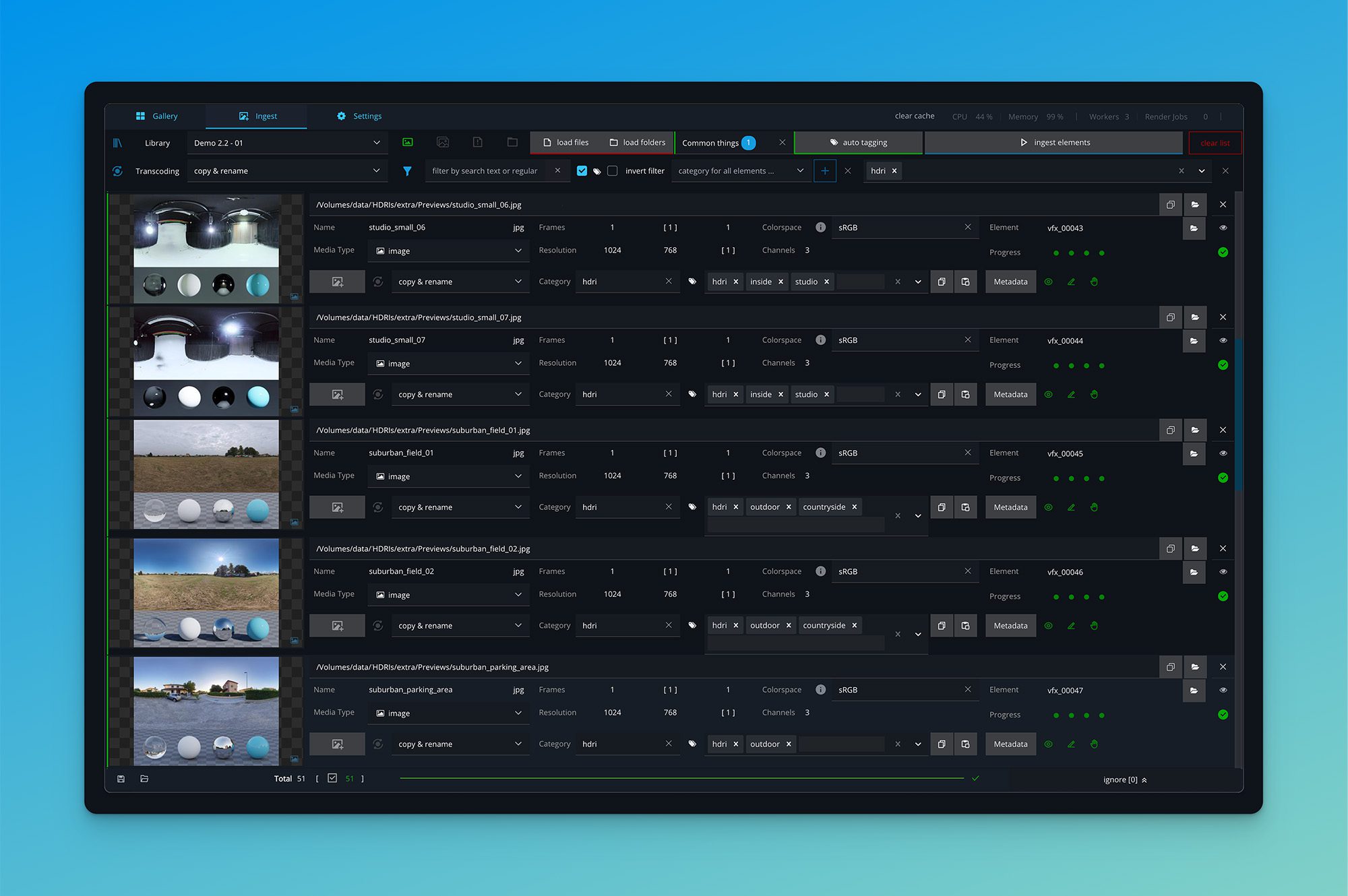
Das Element 2.2 also refines user interaction with the library. Gallery navigation is faster, supported by local image caching, clearer visual indicators and improved filter controls. Transparent regions in image previews now display against a checkerboard background, matching standard compositing conventions. During ingest, metadata can be applied dynamically as path values, ensuring imported assets follow correct naming and folder patterns automatically. Users can now assign colourspace and media type for additional files, bringing ingest metadata closer to on-set data standards. A new option lets users delete only proxies without affecting original files, providing greater safety when cleaning up preview material. Together, these refinements improve day-to-day efficiency, especially in studios that handle large libraries or multi-departmental access.
Designed for VFX and Animation Studios
Das Element was first released in 2021 and developed in Munich for professional production use. It is designed for VFX and animation studios requiring secure, offline-capable asset management. The software is used worldwide across more than 50 studios, ranging from small boutiques to large multi-facility companies. Its emphasis on stability, offline operation and flexibility makes it applicable to visual effects, commercials, games and architectural visualisation. Version 2.2 continues that direction, adding practical upgrades without altering the system’s offline-first philosophy.
Real-World Application and Outlook
Das Element 2.2 appears to mark a steady evolution rather than a radical redesign. The improvements across 3D handling, permission control, scripting, CLI and ingest workflows together form a cohesive update for studios running structured production environments. For artists, the practical benefits lie in more responsive asset browsing and simpler ingest; pipeline engineers will enjoy automation and control; supervisors thrive on better permission and access granularity; and for administrators, reduced setup complexity. The software remains modular, adaptable and focused on the real-world requirements of production facilities rather than marketing trends.
In Our Own Archive
Here at Digital Production, we rely on Das Element to run our internal archive, the Digital Production Asset Library (My long suffering drive full of various, miscellaneous and confusing stuff from a decade of tests, trials and confusion) and have done so for several years. Its offline-capable architecture, stable metadata management and flexible automation make it a practical tool for managing production data across departments. Version 2.2 strengthens that foundation. While we remain mindful of testing every new feature before adopting it in production, this release demonstrates steady and meaningful progress for this elementary toolbox!

FMX 2026 program goes live
The FMX program is live for the 30th edition, with RENO pipeline lessons, generative video craft, and European collab on Predator: Badlands.

Let’s Fix it in Pod 04 Industry Societies and Associations
In this episode, Bela and Christoph discuss means of staying connected – from informal groups and meetups to the Societies and Associations that define our industry.

Element 2.1: Asset management for VFX professionals
The latest version of Das Element 2.1 brings numerous improvements, including enhanced video controls and improved library migration.

A new element is here!
Element, our favourite 3D asset manager, is entering its second version – now with infinite scroll, duplicate detector and the long-awaited assignment of textures and maps to geometry within the manager!

Hitchhikers Guide to … asset libraries?
Let’s talk about asset management! But why do we actually want to organise our assets?

The element appears in version 1.2!
VFX Library Software from Munich gets an upgrade. Further development focuses on user-friendliness and teamwork. Founder Jonas Kluger presents the new functions.
