



For those who don’t know the tool: Adobe Substance 3D Painter is a texture painting hub that spits out textures and masks for other DCC apps.
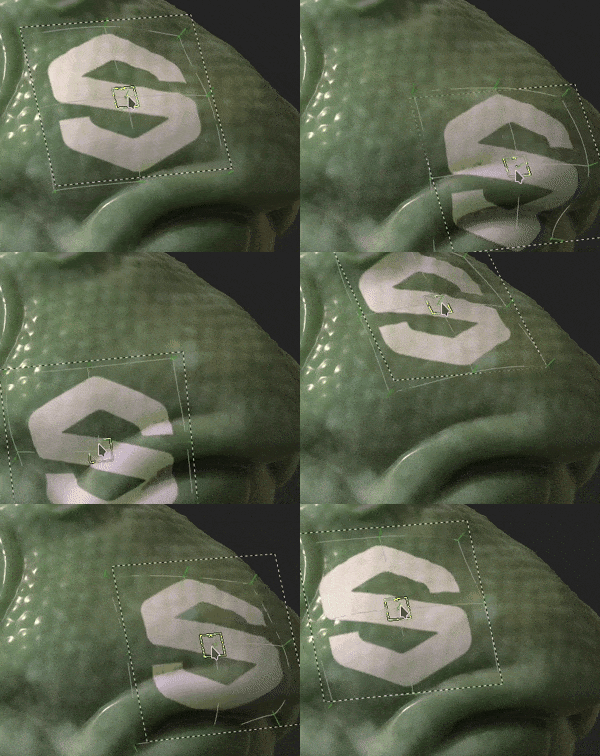
Warp to Geometry, because decals deserve better
Substance 3D Painter has a new option called Warp to Geometry aimed squarely at one of texturing’s most reliable time sinks: projecting decals onto surfaces that refuse to behave. The feature lives as a new toggle in the contextual toolbar. When enabled, decals follow the curvature and topology of the mesh they are projected onto. The stated goal is cleaner results on complex surfaces, including cases where curvature shifts sharply and projection artifacts become obvious.
The practical change is easy to describe. A decal projection that would normally fade at the edges when the surface bends hard can retain its shape instead, with the toggle stopping that edge fade in the before-and-after comparison shown for the feature. If your decal workflow involves anything more dramatic than a flat panel, the point is clear: fewer hand fixes and fewer compromises to keep projected detail readable across tricky shapes.

Viewport post effects step up the lookdev game
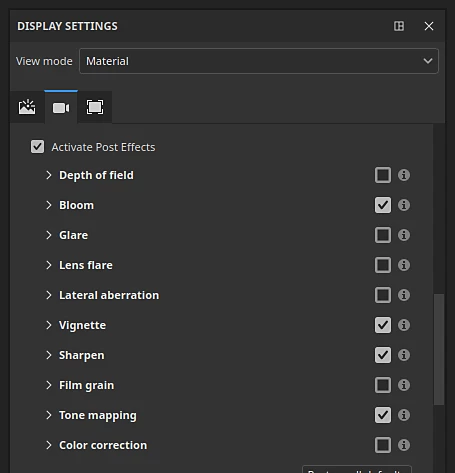
Painter now includes additional post-processing effects in its built-in renderer. The intent is to let artists preview assets in the viewport under conditions that are closer to final renders. There are now 10 post effects in total. New options include lens flares and film grain. In other words, the viewport can lean further into presentation and context, so you can judge a surface with more of the usual render seasoning already applied.
This is still a preview context, not a final render pipeline. It is a way to iterate with more of the finishing layer visible while you paint, adjust, and evaluate. As always with shiny new viewport tricks, test new tools and innovations before using them in production.
Flatten layers, export fast, keep the editability
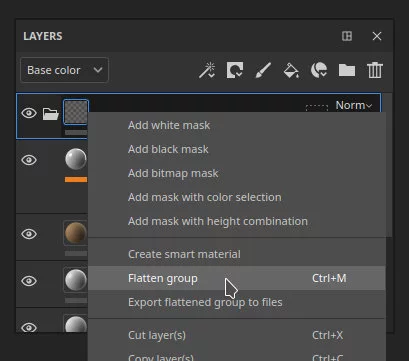
A new Flatten action has been added inside the layer stack. The workflow improvement here is about speed and convenience, especially when you want to get something out of your stack without committing to the full export pipeline. The flow described is simple. You can group layers and merge them to create a flattened copy. That flattened copy can be exported to disk. The payoff is a quicker path for getting textures or masks out of Painter so you can test them in other DCC applications, without having to go through the full export pipeline.
Crucially, flattening does not have to mean losing your ability to keep iterating. The original group can be saved as a Smart Material, making it possible to edit it in future. That is a useful balance for anyone who wants fast outputs for testing while keeping the layered logic intact for later adjustments. This is also the kind of change that quietly speeds up team communication. A flattened export is easier to pass around, and a saved Smart Material keeps the authoring side reusable for the next asset that needs the same treatment.
The end result is less friction when you need quick texutres for a test, while still keeping the layered work ready for a more considered pass later.
Project setup tweaks and a nod to USD workflows
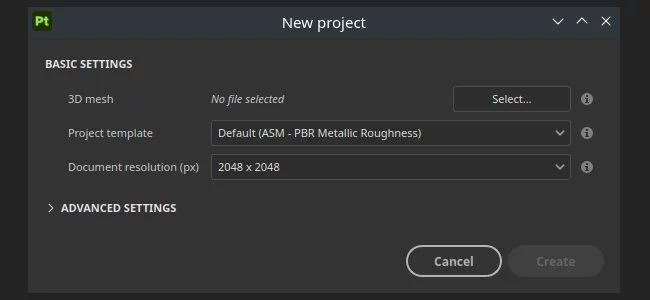
Painter 12 also updates parts of project setup and iteration. The New project dialog has been reordered to make key settings quicker to access. There is also a new checkbox for reimporting the project mesh in the Project configuration dialog. Taken together, these are small adjustments that aim to reduce the number of clicks and the time spent hunting for the setting you always use.
Beyond that, there are smaller feature updates and bugfixes, including to USD workflow. Even when changes like these do not grab headlines, they often show up as day-to-day time saved, especially on projects where geometry keeps evolving and the texturing side needs to keep pace with mesh updates.
Platforms, licensing, and the money part
Substance 3D Painter 12.0 is available for Windows 11, Red Hat Enterprise Linux versions 8.6 and 9.2 or later, Ubuntu 22.04 or later, and macOS 12.0 or later.
Perpetual licenses are available via Steam and cost $199.99.
The software is also available via Creative Cloud based 3D and AR subscriptions. Substance 3D Texturing subscriptions cost $24.99 per month or $249.99 per year. Substance 3D Collection subscriptions cost $59.99 per month or $599.99 per year. That gives teams and individuals a choice between a one time buy through Steam or subscription access through the 3D and AR plans, depending on how they prefer to budget tools and how often they expect to stay on the latest major versions.
If you are planning to fold these features into an existing pipeline, keep the usual discipline. Validate the new projection behavior on your typical asset types, check that flattened exports match what downstream expects, and confirm viewport effects do not mislead your approvals when compared to your final render targets. And yes, do a quick proejct side-by-side on something ugly, curved, and full of detail. The tools are clearly aimed at those moments.
