



For those who don’t know the tool: Arnold is the production renderer from Autodesk, integrated via MtoA, MAXtoA, HtoA, C4DtoA and KtoA into Maya, 3ds Max, Houdini, Cinema 4D and Katana, and increasingly used in USD pipelines.
Arnold 7.4.5 is now available. According to the official Autodesk documentation, this release introduces new shaders focused on non photorealistic rendering, expands point based shading workflows, improves OpenVDB volume perfromance on CPU and GPU, and adds controls to Cryptomatte and lens effects. It also includes API changes, bug fixes and updates to OSL and USD support.
All feature descriptions below are taken from the official Arnold 7.4.5 documentation. Where Autodesk provides measured performance figures, these are cited as vendor benchmarks and are Not independently verified at press time.
Line shader for NPR work
Arnold 7.4.5 introduces a new Line shader. The shader is designed to render line based effects directly in Arnold. According to Autodesk, it can generate outlines, contour lines and stylised strokes across surfaces.
The shader works procedurally and can be driven by surface attributes and shading inputs. The documentation states that it can be combined with other shaders and textures to create sketch style and illustrative looks. Autodesk positions it for non photorealistic rendering workflows and motion graphics style treatments.
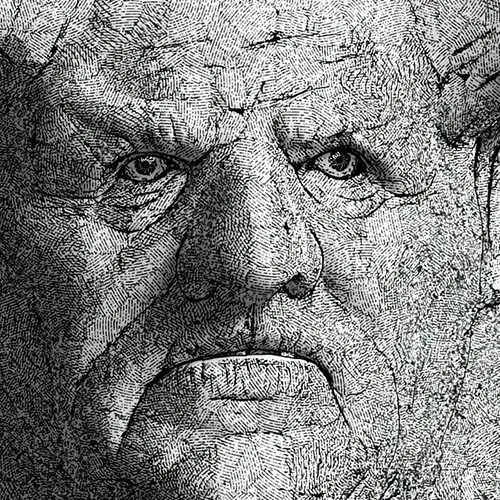
The Line shader integrates into Arnold’s standard shading network. It supports typical shader parameters for controlling line thickness, colour and other attributes. The exact parameter list and behaviour are detailed in the official shader documentation. Appearantly, this does not replaces existing toon or contour solutions. It is presented as an additional shading node within the Arnold core.
Nearest Points shader

Arnold 7.4.5 also adds a Nearest Points shader. This shader samples nearby points from geometry or point cloud data and exposes their properties to the shading network.
The shader can read point data from geometry and OpenVDB sources. It computes distances and relationships to nearby points and outputs shading data based on those calculations.
This enables effects such as network-like connections, proximity-based colour changes and graph-style visualisations.
The shader exposes controls for the number of points sampled and the search radius. It is designed to work within Arnold’s existing shading system and can be combined with other nodes. No claims are made to replace external point-processing tools. The feature is described strictly as a shading node within Arnold core.
OpenVDB volume performance
A major focus of Arnold 7.4.5 is performance improvements for volume rendering. On CPU, the volume node now supports OpenVDB grids with mipmaps. Mipmaps are pre-filtered versions of volume data at multiple resolutions. According to Autodesk, using mipmapped OpenVDB grids can significantly improve rendering speed when sampling large volumes.

Autodesk states that in internal test scenes, CPU volume rendering can be betwen approximately 1.5 times and 5 times faster when using mipmapped grids. These figures are vendor supplied benchmarks and are Not independently verified at press time. On GPU, Autodesk reports performance improvements of up to 3.5 times for certain volume rendering scenarios. The documentation attributes this to optimisations in volume sampling and shading. Always remeber that results depend on scene content and volume configuration.
Lens Effects updates
Arnold 7.4.5 updates the Lens Effects imaging node. A new Aperture Dispersion parameter has been added. This parameter controls colour dispersion in bloom effects, simulating chromatic dispersion across highlights.
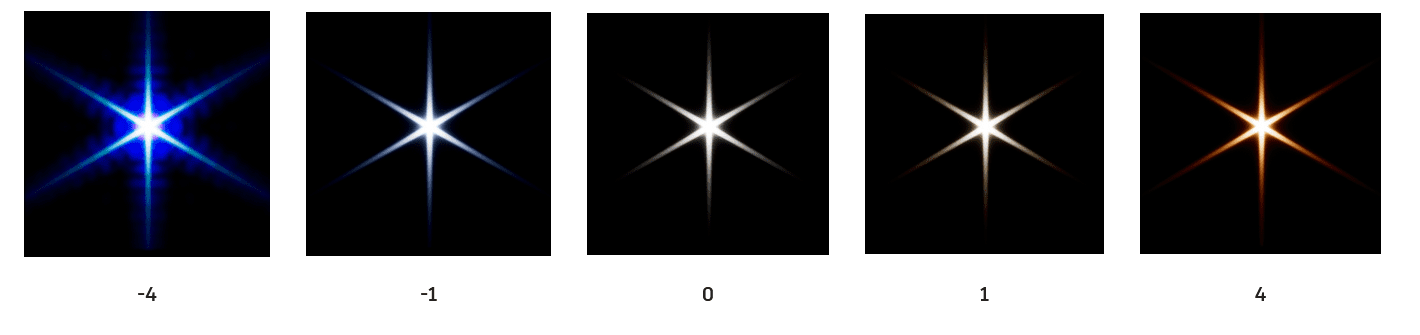
The Lens Effects node operates as a post process imaging operator within Arnold’s render pipeline. The new control extends its ability to simulate optical artefacts.
Cryptomatte controls
Cryptomatte support has been updated in Arnold 7.4.5. The documentation states that new controls have been added for handling instances in Cryptomatte outputs. These controls affect how instanced geometry is encoded into Cryptomatte IDs. Cryptomatte is commonly used for ID based compositing masks in post production. The new options allow artists to refine how instanced objects are represented in the resulting mattes.
OSL and shading updates
Arnold 7.4.5 includes updates to OSL support. OSL, or Open Shading Language, is used for writing custom shaders. The documentation lists new and updated OSL functions and improvements to compatibility. These changes aim to ensure consistency between OSL and native Arnold shader behaviour. No deprecations are prominently highlighted in the summary documentation, but API level changes are documented for developers.
USD workflow improvements
Arnold’s USD support is also updated in this release. The official documentation references improvements to USD related workflows, including enhancements to how Arnold interacts with USD scenes and Hydra delegates. USD, or Universal Scene Description, is increasingly central to pipeline interchange. Autodesk documents refinements to integration rather than new headline features.
API and developer changes
Arnold 7.4.5 includes API updates for developers integrating Arnold into custom pipelines. The release notes document changes to certain API functions and behaviours. Developers are advised to review the API changes before upgrading production builds.
Platform support
Arnold 7.4.5 is available for Windows, Linux and macOS, as stated in the official documentation. GPU rendering remains supported on compatible NVIDIA hardware under supported operating systems. The documentation does not expand hardware requirements beyond those listed in the system requirements section. Integration plugins for supported DCC applications are updated separately. Autodesk provides corresponding builds for host applications including Maya, 3ds Max, Houdini, Cinema 4D and Katana via their respective Arnold bridges.
Practical implications
For production teams, the most concrete additions are the Line shader, the Nearest Points shader and the documented OpenVDB volume speedups. NPR and motion graphics teams gain native shading tools inside Arnold rather than relying entirely on external compositing or geometry preprocessing. Pipeline engineers should review API notes and test custom plugins before deployment. As always, new tools and innovations should be tested before use in production. Arnold 7.4.5 is available now via Autodesk’s official distribution channels.
// Arnold 7.4.5 Release Notes
// https://help.autodesk.com/view/ARNOL/ENU/?guid=arnold_core_7450_html
