


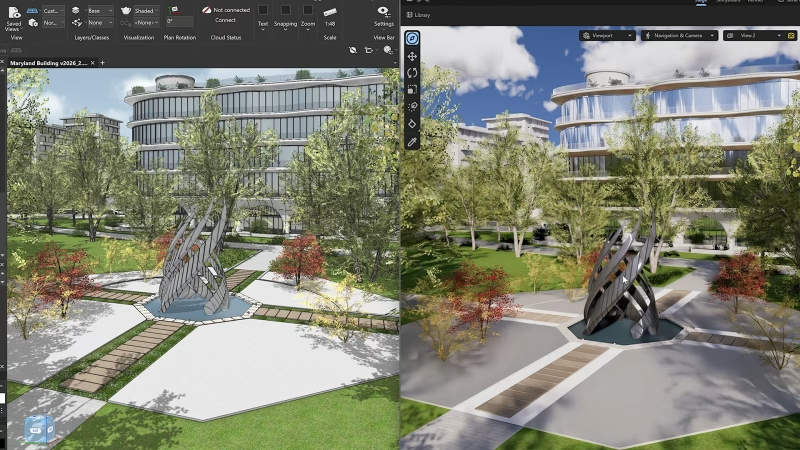
For those who don’t know the tool: Redshift is a GPU renderer built for fast lookdev and final frames. Vectorworks is a BIM (Building Information Modeling) and CAD hub where buildings get drafted and organised.
Architectural visualisation pipelines love a clean handoff, but they hate the part where you wait for it. Redshift for Archviz positions itself as a single-environment loop: preview inside your BIM tool, iterate while the model still feels editable, then render without rebuilding the whole look in a second app.
The core pitch is direct integration with Vectorworks, aimed at letting artists and designers stay in the same workspace while moving from real-time previews to final renders. The platform targets the usual ArchViz pressure points: quick iterations, look development that stays consistent from draft to final, and visuals that survive client meetings without the dreaded “we will render it later” disclaimer. Maxon describes this as an expansion of the same rendering technology used in its existing ecosystem, tuned for real-world, real-time architecture design workflows
Real-time lighting that behaves like a grown-up
In the feature set, the real-time preview leans hard into lighting, materials, and environment response. The toolset includes controls to change the time of day, sun position, and cloud cover, to show how natural light interacts with the design as you adjust conditions.

Cloud cover control is quite precise, spanning conditions from clear to fully overcast, specifically to visualize how clouds affect natural light, shadows, and the overall mood of an architectural render. That kind of environment knob matters because it ties directly to decision-making. When lighting direction and softness update instantly, material choices stop being theoretical and start becoming compositional tools.

Assets, materials, and the eternal fight against empty rooms
The content side is framed around libraries that help you get to “inhabited space” faster. A growing asset library includes materials, lights, and ready-to-use assets intended to speed up scene building while keeping physical accuracy and visual consistency.
On top of that, the feature descriptions call out drag-and-drop population of interiors and exteriors with a selection that includes furniture, vehicles, realistic plants, and people, and these assets interact naturally with surfaces.

Material coverage is physically correct, spanning concrete and metal through glass, wood, and textiles, with the promise that materials react naturally to light and environment. The workflow emphasis stays on applying, adjusting, and previewing changes in real time, so look development can happen while you are still shaping the design.

Mac and Windows parity, right from the start
Platform coverage is plain: Redshift for Archviz is available for Windows and macOS, andfeature parity across both platforms from the outset. That matters whether you bounce between machines in a studio or your clients do. It also matters if your pipeline includes artists who bring their own gear and do not want a surprise feature gap halfway through a project.
The Cinema 4D escape hatch for the fancy stuff
When a still image turns into a walkthrough, you need more than a preview window. The workflow includes the ability to send a project to Cinema 4D with a simple click, with the intent of enabling more advanced architectural visualisation work, including procedural animations and simulations.
The FAQ describes export from the Redshift for Archviz plugin to Cinema 4D, and states that geometry, materials, cameras, and basic lighting generally transfer well. Once in Cinema 4D, refining scenes, materials, and lighting with a higher level of control is as usual, and then extending the project with animation and simulation.
This is a practical bridge for teams who want the speed of in-app previs but still need a DCC stage for shot craft, camera choreography, or heavier scene management. It also keeps the promise of visual continuity: the same scene, lighting, and materials across preview and final output.
Installation and the beta-shaped reality
The tooling around installation is explicit enough to be useful. The install notes state that the current availability is for Vectorworks, with Revit and Archicad coming soon.
For the Vectorworks side, the guide references installing Vectorworks 2026 using default settings, downloading and signing into the Maxon App, installing an AEC Viewer, then activating the plugin inside the host application by customising the workspace and adding the Redshift entry from the Rendering category. Launch is a Auto Synch button inside the host environment. Use requires creating a MyMaxon account and accepting an EULA. The subscription bundle (Plans and Pricing) supports multiple instances with up to eight GPUs on a single computer.
Because this is new workflow territory, treat early adoption like you treat any new renderer, plugin, or bridge. Run a proper test scene, push the corner cases, and validate the round-trip before you bet a deadline on it. Do that before you put it into production.
What this means for working artists
The practical story is simple: real-time previews inside a BIM host, asset and material libraries geared at architectural scenes, cross-platform support on Windows and macOS, and a pipeline bridge into Cinema 4D for animation and simulation.
If you live in the overlap between design and storytelling, this kind of integration can reduce handoffs and shorten iteration loops. If you live in the overlap between client expectations and physics-based lighting, real-time environment controls can turn “maybe” into “yes” quickly.
Just remember the unglamorous part: new tools and innovations should be tested before use in production, even when the marketing copy sounds like it was written by a very confident sunbeam.
https://www.maxon.net/en/article/maxon-introduces-new-real-time-rendering-and-cinematic-previews-solution-for-architects
