



For those who don’t know the tool: OctaneRender is a GPU renderer that sits after lookdev and before finals, and it talks fluently with DCC plugins plus OpenUSD and MaterialX, when it is in a good mood.
The alpha, the scope, the fine print
OctaneRender 2027.1 Alpha 1 is out as a public development build intended for testing by experienced users, and it is explicitly not positioned as production ready. Scenes saved in this alpha are not guaranteed to stay compatible with future builds. The build is Windows only right now, the minimum required NVIDIA driver version is 572. The downloads listed for this alpha are the standalone Windows installer and a ZIP archive. Other build types are planned for subsequent releases.
Real time neural viewport, now with thunderbolt energy
The headline feature is a new real-time neural viewport mode that replaces the previous real-time mode. It is built on the neural radiance cache framework introduced in OctaneRender 2026. The alpha describes the new mode as enabling near noise-free interactive rendering at very low sample counts compared to traditional path tracing. The mode is designed to preserve the spectral path-tracing behaviour while improving interactive feedback, even under complex lighting conditions. It combines internal research with NVIDIA DLSS Ray Reconstruction.
In the UI, the alpha notes a dedicated toggle. The real-time neural viewport can be enabled or disabled using a Thunderbolt button in the viewport components bar. Quality settings for the real-time denoiser live under the imager node, with the goal of balancing performance and quality depending on the hardware. If you have ever watched a veiwport go from soup to something readable right as a director walks over, you already know why this matters. The promise here is faster clarity, not just faster pixels.
Upscaling joins the party: DLSS and FSR modes
This alpha adds support for new up-sampling modes based on NVIDIA DLSS and AMD FSR. The build also references AMD FSR 3. The implementation sits in the Upsampler section of the imager node, alongside other up-sampling methods. On the DLSS side, the referenced technology page describes DLSS Ray Reconstruction as an AI method that replaces hand-tuned denoisers with an AI network that generates higher quality pixels between sampled rays in intensive ray-traced scenes. Those statements describe DLSS generally, not a specific Octane integration result. This renderer is CUDA based, and the Windows alpha focuses on NVIDIA GPUs (Big surprise!).
AI Light 2.0: sampling that tries harder
AI Light 2.0 lands as a new light sampling method intended to resolve noise faster. AI Light is described as a hierarchical algorithm for sampling scenes with many light sources, and the update is positioned as a major revision compared to the original introduction back in OctaneRender 4.0.

For lighting heavy setups, this is the kind of change that can alter how fast you converge on creative decisions. If your daily routine includes juggling dozens of practicals, emissive set dressing, and a few too many hero gobos, any sampling improvement tends to show up right where it hurts, in the first minutes of iteration.
USD export and a more hands on USD workflow
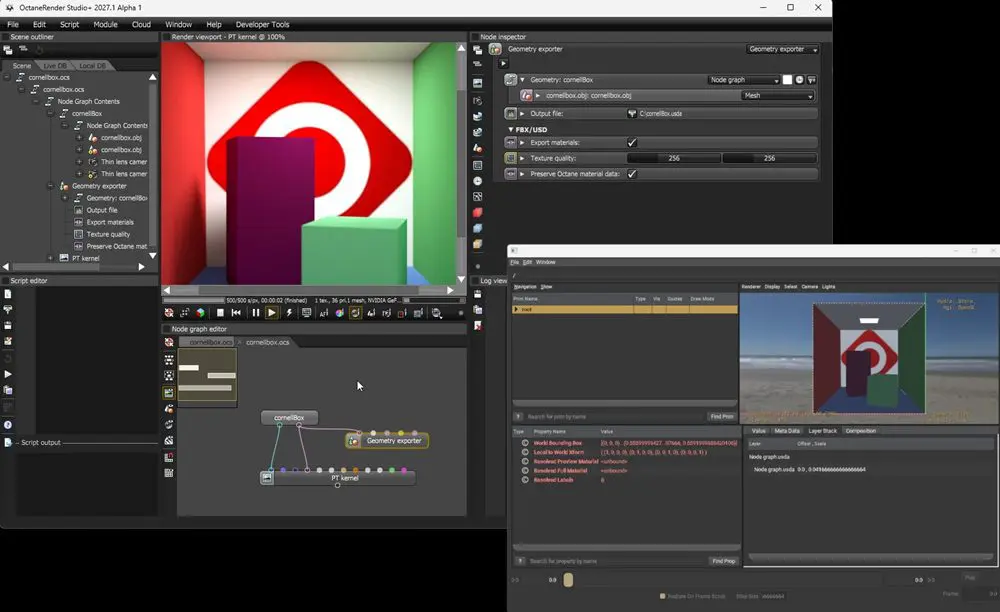
OpenUSD workflows get a concrete upgrade. Geometry export to USD is included, and the build adds the ability to export a scene in USD format. The cgchannel overview also notes that geometry export in USD can include limited support for USD Preview Surface materials.
On the editing side, the standalone edition includes a USD Stage editor that allows selecting variants and layers without saving and reopening the USD file. The alpha also adds built in support for authoring variants and muting USD layers directly within the USD geometry archive.
If your pipeline already treats USD as a transport layer between layout, lookdev, lighting, and downstream tools, these changes aim straight at friction. More export options reduce the number of awkward handoffs that turn into late night chat messages that start with “hey quick question….”
UVs and geometry: more room for messy reality
The UV ceiling changes, because production UVs are never as polite as tool demos. The maximum number of UV maps allowed per primitive increases to 10, up from 3, and UV sets can be assigned arbitrary names in DCC apps that support it.
Other geometry and attribute changes include support for named UV vertex attributes, support for using vertex attributes in bump maps, support for colour vertex attributes in vertex displacement, and a Vectron tube primitive addition.
If you have ever inherited an asset with five UV sets and a note that says do not touch UV4, you now have more breathing room. The named UV support also helps keep humans oriented when the same mesh carries multiple UV purposes across shading, decals, and baking.
Changelog nuggets for TDs who read release notes for fun
Beyond new features, the alpha lists a spread of resolved issues and smaller changes. A few examples include fixes around DDS preference crashes, Alembic instancing, several MaterialX node behaviors, and multiple OpenUSD import issues such as points not loading correctly and animated point instances importing incorrectly.
The Lua API gets deprecations in geometry exporter properties, including moving from renderSizeX and renderSizeY to textureRenderWidth and textureRenderHeight, and replacing writeOcsData with embedNativeData. A small UI level tweak removes Clock Rate and Cores fields from the GPU information panel. This is where you start thinking about tool glue. If you have scripts that poke exporter properties or automate export settings, the deprecations are your early warning sign to check for breakage.
Availability, licensing, and pricing
This alpha is available alongside the stable OctaneRender 2026 releases. The software is offered as rental only via Studio+ subscriptions. The pricing listed is €23.95 per month or €239.88 per year, and the Studio+ subscription page also lists an annual price presented as 19.99 € per month billed yearly.
Free Prime editions are also available for OctaneRender and Octane X, with the Prime editions limited to rendering on a single GPU and offering a smaller set of DCC integration plugins. The alpha download links themselves require a licensed customer login for access. That is where OTOY enters the picture in the most practical way possible.
Production reality check
This build is explicitly framed as experimental, and it is not recommended for production use. That guidance aligns with the normal alpha reality: features change, files drift, and stability work continues in later builds.
New tools and innovations should always be tested before use in production, ideally on representative scenes with your actual assets, shading conventions, and deadline pressure.
What to watch while you test
The big workflow test is whether the neural viewport mode makes iteration measurably smoother on your scenes, and whether AI Light 2.0 shifts your sampling strategy. The second test is whether USD export plus USD Stage editing reduces round-trip times in YOUR pipeline. The third is whether the DLSS and FSR upsampler options behave predictably inside your lookdev and review loop, especially when you rely on consistent framing and visual stability.
