



Table of Contents Show
InstaMAT Studio is out now – a layer-based painting and node-based authoring tool in the same general category as Substance 3D tools like Substance 3D Painter, Substance 3D Designer, and Substance 3D Sampler, with integrations into common DCCs and engines including 3ds Max, Blender, Maya, Unity, and Unreal Engine.
What changes in 2026 is the set of levers available for high-precision, iteration-friendly detailing. Curves Brushes move detail painting toward an editable, control-point workflow. Lazy Stroke helps freehand lines behave. Radial symmetry adds a new patterning tool. Masking and mesh filters expand geometry-aware selection and effects. The new toolbar and hotkeys aim to keep artists in flow instead of chasing settings panels.
And yes, your first experiment should probably be those curve-driven panel lines that always look great right up until the model changes. This time, the system is explicitly designed so the detail survives that upstream change.
Curves Brushes: strokes that stay alive
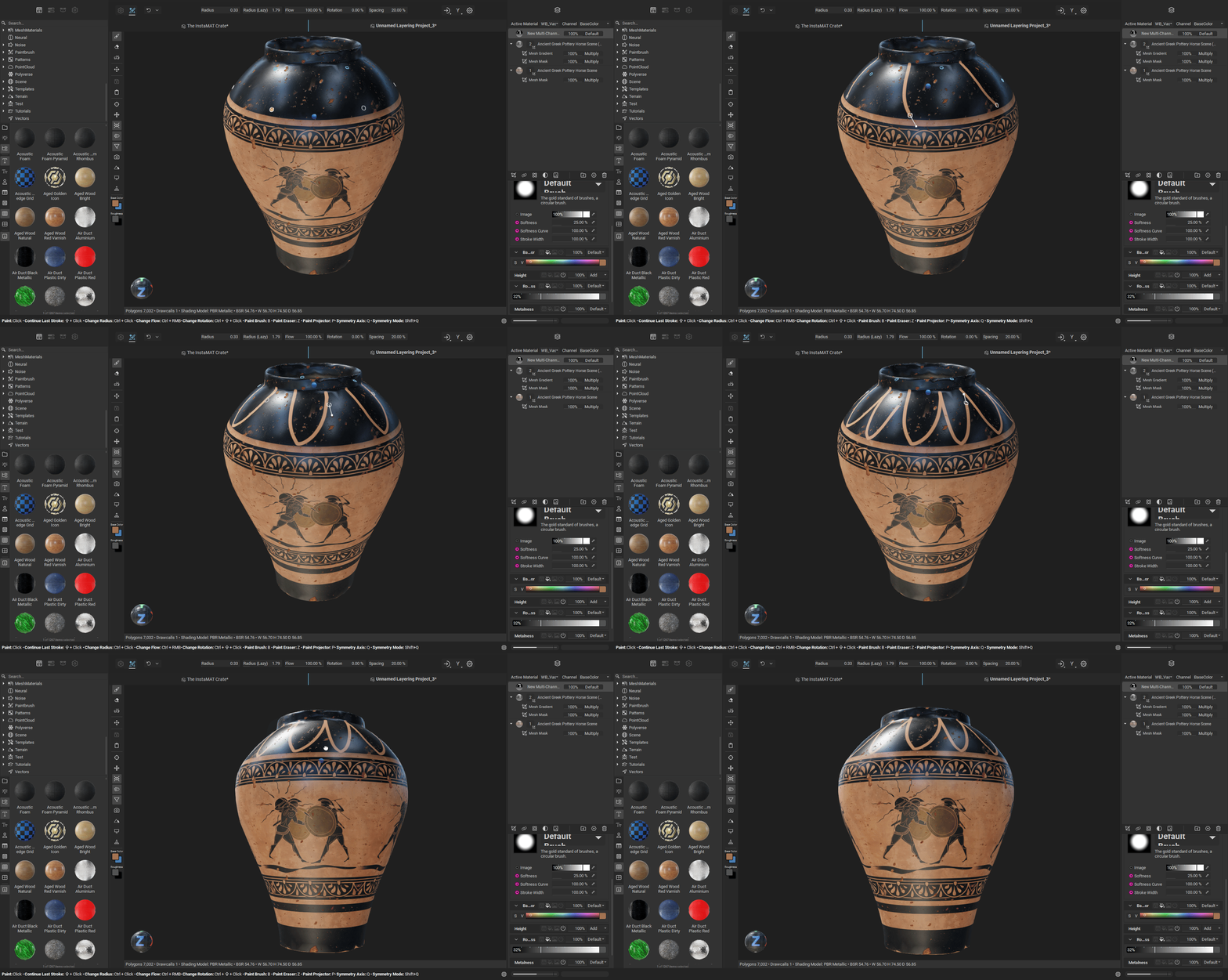
Curves Brushes let you create editable curve paths on the mesh, using control points rather than a one-and-done freehand stroke. Those curves remain editable after creation, including moving and refining control points, and transforming an entire curve as a unit by translating, rotating, or scaling the path.
A single curves layer can hold multiple curves, and their painting sequence can be reordered. Curves can also be set to erase instead of paint, and they can be closed to form continuous shapes from end point to end point.
Control points support different point types, including linear, symmetrical, smooth, and cusp, with a Joint Smooth setting to control how sharp or fluid the transitions are between segments. Each control point also supports per-point settings for radius, falloff, flow, and rotation, enabling effects such as tapering and gradual fading along the curve.
Curves can orient brush strokes along the path, so details follow the curve’s flow rather than fighting it. Curves also support dynamics for randomised size, flow, rotation, and position to add variation without manually wiggling your wrist into submission. The Curves workflow uses a GPU-accelerated 3D painting engine and does not rely on mesh UVs. The stated result is that curves remain intact even when topology or UV layout changes, which is framed as especially useful for repeating high-precision details such as panel lines, seams, stitches, and decorative elements.

Lazy stroke smoothing, now built in
Alongside Curves, InstaMAT 2026 adds Lazy Stroke, a brush-smoothing feature designed to dampen shaky-hand input and cursor jitter. When enabled, the brush follows the cursor with a delay set by a configurable radius, producing smoother lines for precision freehand painting. The feature is positioned for tasks such as smooth linework, organic patterns, and fine-detail passes where jitter becomes visible in the final maps. If you have ever zoomed in to paint one confident line and instead produced a seismograph reading, Lazy Stroke is aimed squarely at that moment. Try it, then decide if it belongs in production.
Symmetry upgrades: radial joins planar
Radial symmetry painting is new in InstaMAT 2026, enabling repeating brush instances around a central axis. The symmetry axis can be set to X, Y, or Z, the number of repeated instances is configurable, and the angle span can cover full 360 degree patterns or partial arcs. The plane origin is also customizable, allowing the symmetry center to be placed where it is needed on the asset.
Planar symmetry painting is also described as significantly improved. The symmetry plane can be offset to a custom position on any of the three world axes, plane visibility can be customised, and there is an option to mirror the brush on the opposite side of the plane. Symmetry accuracy is described as improved even when painting on meshes that are not exactly symmetrical, targeting the real-world scenario where characters and props have small asymmetries and deformations.
Masking: normals, submesh size, and raytraced AO
InstaMAT 2026 extends its mask set with new workflows aimed at isolating geometry features without hand-selecting everything. The new Mesh Normal Mask can isolate parts of a mesh based on polygon normals and an angle tolerance. The workflow is click-based: click a region, and the mask selects surfaces with similar normal directions. Multiple chosen areas can be defined within a single mask, and tolerance can be adjusted per point. The mask is described as UV independent and stable across topology or UV changes.

The Mesh Submesh Mask can mask submeshes by size and distance, targeting scenes with many similarly sized objects where manual isolation is tedious. There is also a Mesh Ambient Occlusion Mask described as using raytracing to generate occlusion-based selections for isolating crevices, corners, and recessed areas.
Mesh filters and nodes: mirror, bevel normals, drips, and smoothing
A batch of mesh-oriented effects and nodes are listed as part of the 2026 update. Mesh Laplacian smoothing arrives as an option in the Mesh Smooth node, described as producing a more unified surface while better preserving mesh volume compared to traditional smoothing methods that can shrink geometry. The described use cases include cleaning scan data, removing photogrammetry noise, and refining sculpted details while preserving silhouette.

Mesh Mirror can mirror decals, masks, and entire layers, and it can be applied to a layer group to mirror complex effect and mask combinations.
Mesh Bake Bevel Normals is a node for beveling low poly asset edges using a GPU-accelerated bevel normals baker, with procedural masking for selecting which objects or edges to bevel. The behavior is described as procedural, so bevel placement remains correct if the input mesh topology or UVs change.

Mesh Directional Blur is presented as a way to create leak and drip effects by blurring in a specific direction in 3D space, keeping directionality consistent across the mesh surface regardless of UV layout or texture resolution. It includes distortion and falloff controls.

Additional mesh features listed include Mesh Solidify for solidification to prevent rendering artifacts, Mesh Sharpen for definition and detail clarity, and a Mesh Stylized Filter for non-photorealistic texturing options.
InstaMAT UI and workflow: less hunting, more painting
InstaMAT 2026 introduces a dedicated painting toolbar intended to centralise common controls. The toolbar provides quick access to brush and curve settings, including radius, flow, rotation, Lazy Stroke radius, symmetry, and curve-specific controls. It is described as dynamic, updating based on the active layer type so only relevant options are displayed.
There is also a dedicated brush rotation hotkey, described as Cmd or Ctrl+Shift with a left-mouse drag, to rotate the brush, aiming to reduce interruptions during stroke work.
Viewport and gizmo changes include planar translation gizmos for moving a mesh, effect, or mask along two axes at once, plus custom viewport wireframe settings for width and color, and a viewport shortcut overlay that displays hotkeys while painting, using curves, and using the paint projector.
Mesh import settings add options to configure mesh up axis and coordinate system handedness for asset texturing projects.
Integrations: Blender, Unreal, 3ds Max, Maya
The release notes list updates for several integration plugins tied to the latest https://docs.instamat.io/en/Products/InstaMAT_Studio release.
InstaMAT_for_UnrealEngine lists support for Unreal Engine 5.7.3, plus fixes for crashes when creating invalid graph instances, and fixes for broken materials and mesh orientations for Scene outputs. Library previews are added for Mesh-type Graphs and Graph Instances.
Blender integration notes include support for the latest Studio release, improved performance when setting mesh as a graph input, improved performance when resetting graph instance inputs, and fixes for plugin stalls when creating faulty graph instances. Library grid UX is adjusted with fixed cell width, and search results quality is described as improved.
3ds Max integration notes list support for the latest Studio release and a fix for the plugin getting stuck when creating faulty graph instances, plus window icons changed to match the main menu.
Maya integration notes list support for the latest Studio release, improved mesh-as-input performance, fixes for plugin stalls on faulty graph instances, and a fix for incorrect exported textures when using the export dialog window.
InstaMAT Licensing and pricing: what the numbers say
InstaMAT licensing is split across tiers with revenue or funding caps stated for some options. The Pioneer license is free and fully featured with commercial-use rights, with availability limited to individuals or businesses with annual revenue or total funding less than 100,000 US dollars, and it requires attribution.
The Indie license is available for individuals or businesses under 250,000 US dollars in annual revenue or total funding, with an option at 8 US dollars per month billed annually, and a perpetual Indie price shown at 489 US dollars. For Pro, the pricing page lists a Pro subscription shown at 36 US dollars per month billed annually, and a perpetual Pro license shown at 989 US dollars.
If you are evaluating the tool for a pipeline, test it against real assets, real render targets, and real deadlines before it touches a production branch. New tooling should earn trust with results, not promises.
Finally, keep an eye on how the new mesh filters slot into your existing material graph habits. Directional blur for drips in 3D space, procedural bevel normals, and AO-based masking can remove steps that otherwise happen in separate tools. If it holds up, it reduces context switching. If it does not, at least you learned it on a duplicate branch instead of the hero asset.
Also, do not skip the boring step: validate exports, naming conventions, and texture packing against your engine ingest rules before you fall in love with a shiny new brush. The most dangerous bug is the one that looks like a style choice until delivery day.
