



For those who don’t know the tool: Animates Suite is a keyframe workflow add-on for Blender. It works around the Graph Editor, Dope Sheet, Timeline and viewport, with Animates Free and a standalone Motion Paths & Onion Skins option in the same product family.
Keyframe work without dot hunting
At the keyframe level, Select Keys adds playhead selection, nearest-key fallback, repeated grow selection, next and previous selection, Alt invert on Select All, and Loc, Rot and Scale visibility toggles in the Graph Editor. Retimer scales selected keys from a chosen origin and works in the Graph Editor, Dope Sheet and Timeline; holding Shift smooths the slider. Key Amp amplifies or damps selected values without changing timing, with Loc, Rot and Scale filters plus Start, Centre and End emphasis.
Breakdowns and arc editing
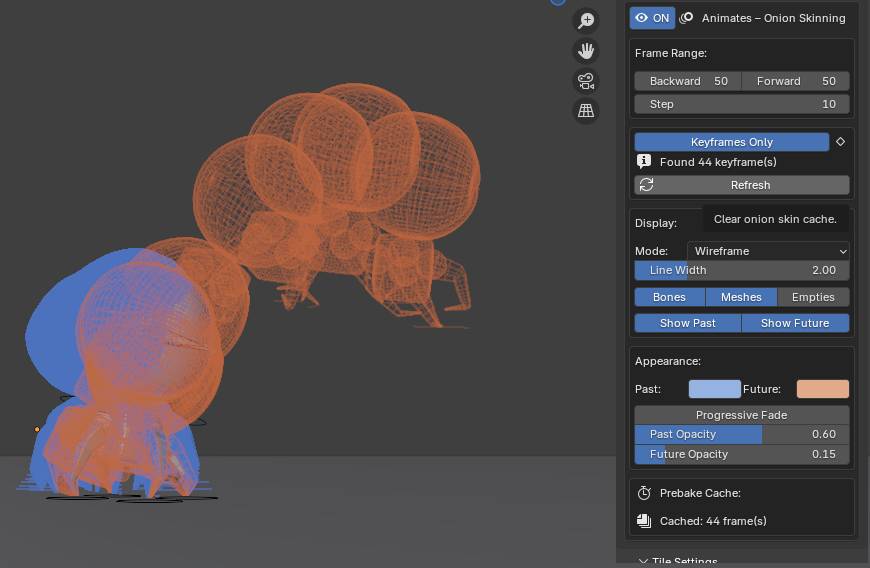
For animation blocking and polish, Breakdown/Overshoot calculates previous and next keyed values from the playhead for bones and objects, previews previous, midpoint and next values, and uses negative slider values for overshoot. Onion Skinning can show rigs or objects, up to 200 frames back and forward, with keyframe-only display, past and future toggles, progressive fade and bone line-width control. Motion Paths draws controller trails in the viewport and lets selected keys move live, freely or along vertical and horizontal constraints.

Viewport and rig-control helpers
On the rigging side, Lock to World holds a controller in world space. For a limited range, set the start frame with Key This Frame, move to the release frame, run Key All Frames, then unlock. Custom Pivot creates a temporary pivot bone, moves it to a chosen position and lets the animator key normally before releasing the pivot while maintaining curves.

Housekeeping and UI
Workflow adds blocking and spline interpolation toggling, a smoothing slider with Start, Centre and End options, and a cleaner for redundant keys. Key Colours assigns key colours in bulk and includes Graph Editor colour options. Key Colours carries a Blender 5.0 caveat, so version testing is not optional fun. Launcher Grid can use custom thumbnails or icon packs; its tile click target is the text area at the top rather than the whole tile.
Installation, compatibility and price
Installation uses the zipped add-on directly: drag it into the Blender window without unzipping, or use Edit, Preferences, Install from Disk. Sales are handled through Superhive, where the paid suite is marked as a Blender Extension Compatible add-on for Blender 4.2 to 5.0 with GPL licensing. Pricing is $65 for Single Animator/Artist, $199 for a five-seat studio license and $40 for the educational tier. Sale pricing is also displayed as $45.50, $139.30 and $28 respectively, plus $15 for the standalone Motion Paths & Onion Skins tool,.

Production caution
Test the add-on on duplicate scenes before production use, especially with locked channels, NLA, animation layers and studio rigs. Keyframe tools that write directly into curves are great until a cached rig, custom control or pipeline convention politely disagrees.
https://animates.uk/features/
https://superhivemarket.com/products/animates-suite?ref=586
Topics
 Rigging149 postsGive digital characters their strings, joints and room to perform. Explore rigs, deformation and animation controls that help a carefully built model bend, move and express a little personality.
 Blender701 postsA whole creative workshop behind one orange mark. Explore Blender news and techniques across modelling, animation, effects and rendering, with workflows for taking an idea from an empty scene to a finished image.
Article details
- Published
- Author
- Bela Beier
- Reading time
- About 3 min
- Word count
- 502