



Table of Contents Show
For those who don’t know the tool: PFTrack is The Pixel Farm’s standalone application for camera tracking, object tracking and scene reconstruction. It derives camera and lens information from footage so CG elements can be placed into photographed scenes. Its node graph connects tracking, solving and geometry operations; Solo is the edition for an individual artist, available for Windows, Apple Silicon macOS and RHEL-compatible Linux.
One artist, several departments
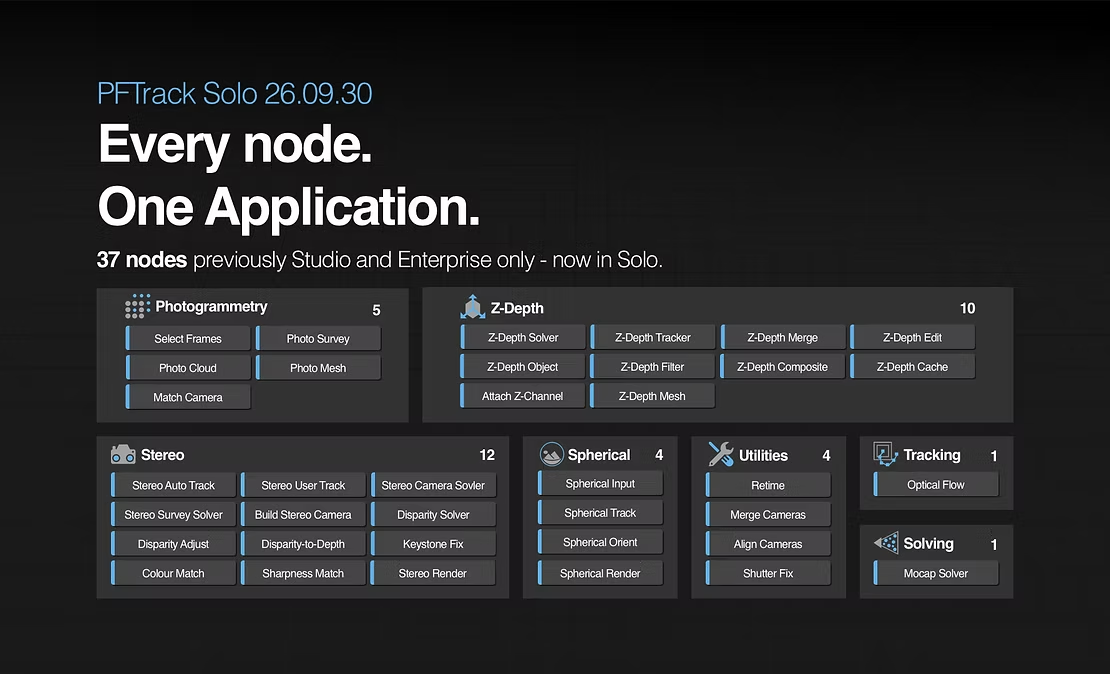
The Pixel Farm has opened every PFTrack node to Solo users in build 26.09.30. The change removes edition restrictions from 37 nodes, extending the individual-artist licence into photogrammetry, stereo, spherical footage and depth processing. For the solo artist whose job description now resembles a studio directory, this is a welcome concession to reality. “Solo” describes the number of people available for the work. It says remarkably little about the number of departments they are expected to be.
The newly accessible set also includes Optical Flow, Mocap Solver, Retime, Align Cameras, Merge Cameras and Shutter Fix. These are existing PFTrack tools newly available to Solo users. A freelancer can now build a broader reconstruction or tracking graph without choosing a team edition just to reach its next node. The extra staff, regrettably, are not included.
Your photogrammetry department is also you

Photo Survey matches features across photographs, estimates camera poses and produces a sparse point cloud. Still images normally arrive through Photo Input with camera-model and focal-length EXIF data; Select Frames can instead supply images from a movie clip when its focal length is known. The artist can add manual matches and refine the solve, while matching regions restrict correspondences in repetitive structures. A building with thirty identical windows remains a small committee dedicated to confusing the solver.

Photo Cloud takes the surveyed scene into dense reconstruction. It estimates depth maps for the photographs, then merges their points into a cloud. Bounding-box and near/far-plane controls constrain the reconstruction volume; confidence filtering helps reject weak depth estimates. Additional movie cameras can contribute when correctly aligned to the survey, including through Match Camera.
That workflow still depends on capture coverage. The documentation recommends seeing each scene area in at least four nearby photographs. Missing overlap, large viewpoint changes and lighting differences can leave holes in depth maps. Photo Cloud documents multicore CPU processing and optional OpenCL acceleration on a suitable GPU; this is a node-specific processing description, not a claim that every PFTrack operation runs on the GPU.

Photo Mesh turns the dense cloud into a triangular surface and can generate colour, normal, occlusion and displacement maps. Its simplification stage creates a custom UV map for the reduced mesh, with the resulting geometry and textures passed downstream for Scene Export. Mesh resolution and smoothing still need judgement: promoting noisy depth to a very detailed mesh is an excellent way to give the cleanup department more work. You may recognise its sole employee.
Depth, with a little less guesswork
The expanded toolset includes the spherical tracking path for equirectangular footage, twelve stereo nodes and ten Z-Depth nodes. Stereo coverage extends beyond camera solving into disparity processing, keystone correction, colour and sharpness matching, and rendering.

A useful example is Attach Z-Channel. It reads depth from a secondary clip and attaches it to RGB footage, including extraction from an OpenEXR Z channel. The depth pixels must already align with the colour image. Auto Track and User Track can then associate depth with their tracked points, allowing Camera Solver to use that information for camera motion and real-world scale. The software can use those measurements; it cannot politely persuade two misaligned captures that they were looking at the same pixel.
The pipeline TD gets a smaller hat
The current edition comparison lists in-graph scripting for Solo. The Python Node can modify data flowing through the tree, including cameras and trackers, using an editor with script output and error reporting. That gives a licensed artist programmable control inside the graph, useful when the tracking artist and the person asked to automate the tedious bits share a chair.
The release notes explicitly reserve command-line processing, the external Python API and RED/ARRI RAW debayering for Studio and Enterprise. A scripted node inside an interactive project therefore does not make Solo a command-line worker for an automated pipeline. You may be doing the work of a company, but the licence has retained a fairly precise opinion about when you become one.
Unlimited rehearsal, bring your own deadline
The new Demo Mode replaces the seven-day trial and allows indefinite evaluation on your own footage. Saving, export and Python scripting remain disabled. It can establish whether the interactive tools suit a shot, but cannot validate an exported handoff or a scripted workflow. Switching between demo and licensed use restarts the application after confirmation. Treat it as an audition: plenty of time to meet the tools, no reason to promise the client a finished shot from the rehearsal.
https://www.pftrack.com/post/pftrack-solo-26-09-30-the-complete-pftrack-toolset-for-one-artist
Solo uses online account licensing and does not support virtual machines; the Solo EULA requires an internet connection for the vendor’s services. Test representative plates, depth inputs and downstream exports on the intended hardware under an active licence before deploying the build in production.
Availability:
PFTrack Solo is available for download for Windows, macOS on Apple Silicon and RHEL-compatible Linux. The current pricing page displays £35 for seven days, £165 for 30 days and £899 for outright ownership, with applicable local taxes added where required. Purchases are initiated inside the application. Confirm the territory-specific total at checkout.
Each week earns 10 tokens and each 30-day term earns 50; 300 tokens trigger a permanent licence. That is six monthly terms, thirty weekly terms or a mixture. Terms do not renew automatically, and one must expire before the next can be bought. Direct permanent purchase is available only with no tokens and no active term. Tokens expire after 18 months without another term purchase. Your accounts department should diarise that. Conveniently, it already has your email address.
| Product | PFTrack Solo |
| Developer | The Pixel Farm |
| Release covered | 26.09.30 |
| Application | Standalone camera tracking, matchmoving and scene reconstruction |
| Platforms | Windows; macOS on Apple Silicon; RHEL-compatible Linux |
| Node access | Full node set; 37 previously restricted nodes added to Solo |
| Licence | Single user, one computer at a time; permanent purchase or fixed terms earning ownership tokens |
| Displayed prices | £35 / 7 days; £165 / 30 days; £899 outright; applicable local taxes may be added |
| Demo Mode | No time limit; saving, export and scripting disabled |
| Documentation | PFTrack documentation |
Topics
 Compositing495 postsBring the pieces together and hide the seams. Explore keying, tracking, integration and node-based workflows that help live action, digital elements and effects convincingly share the same frame.
 Workflow747 postsKeep the handoffs from becoming cliffhangers. Explore pipelines, collaboration and production practices that connect people, applications and assets, making room for creative work between the deliveries and revisions.
Article details
- Published
- Author
- Bela Beier
- Reading time
- About 5 min
- Word count
- 999